
PEAKMETER MS6252A
PEAKMETER MS6252A Digital Anemometer User Manual
Model: MS6252A
1. Introduction
The PEAKMETER MS6252A is a portable, professional digital anemometer designed for accurate measurement of wind speed and air volume. Featuring a large LCD with backlight, multi-unit switching, and functions such as data hold, maximum/minimum readings, and auto power off, this instrument is suitable for both handheld and fixed measurements. It is an essential tool for environmental monitoring, HVAC system analysis, and outdoor activities.
2. Safety Information
- Always read and understand this manual before operating the device.
- Do not attempt to repair or modify the device. Refer all servicing to qualified personnel.
- Keep the device away from water and high humidity environments.
- Avoid exposing the device to extreme temperatures or direct sunlight for prolonged periods.
- Ensure proper battery installation and disposal according to local regulations.
- Do not block the impeller during operation.
3. Product Overview
3.1. Components and Controls
The MS6252A Digital Anemometer features a robust design with an integrated impeller, a clear LCD display, and intuitive control buttons.
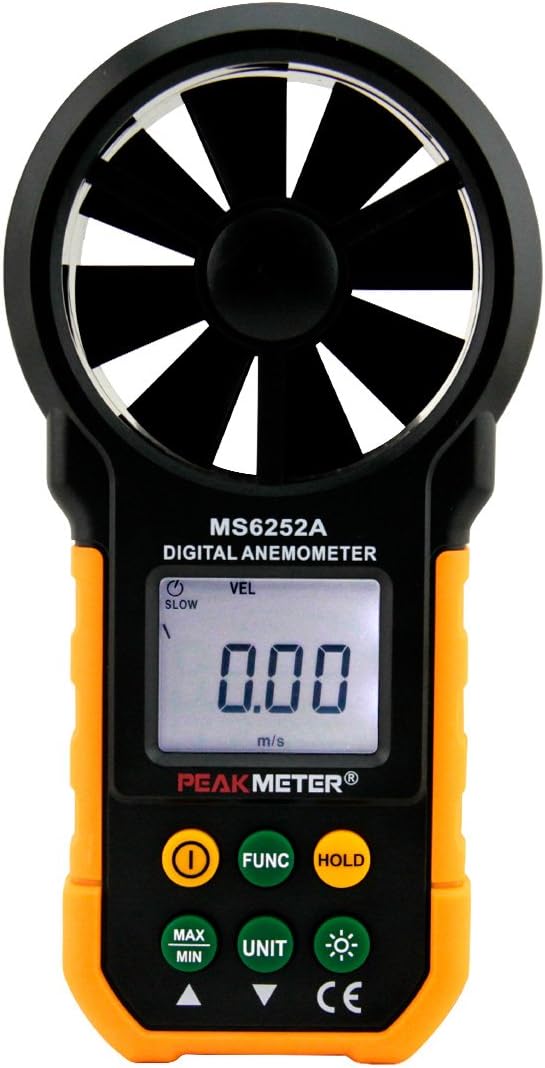
Figure 3.1: Front view of the MS6252A Digital Anemometer, showing the impeller, LCD display, and control buttons.
- Impeller: Rotates to measure wind speed.
- LCD Display: Shows measurement readings, units, and status indicators.
- Power Button (ⓘ): Turns the device ON/OFF.
- FUNC Button: Cycles through different measurement modes (e.g., CFM, CMM, CMS).
- HOLD Button: Freezes the current reading on the display.
- MAX/MIN Button: Toggles between maximum and minimum recorded values.
- UNIT Button: Changes the unit of wind speed measurement (m/s, ft/m, km/h, mile/h, Knots).
- Backlight Button (☀): Activates or deactivates the display backlight.
- Battery Compartment: Located at the back for battery installation.

Figure 3.2: Back view of the MS6252A Digital Anemometer, showing the battery compartment and product label.
4. Setup
4.1. Battery Installation
The MS6252A requires one 9V 6F22 battery (not included). Follow these steps to install the battery:
- Locate the battery compartment cover on the back of the device.
- Slide the cover downwards to open the compartment.
- Connect a 9V 6F22 battery to the battery connector, ensuring correct polarity.
- Place the battery into the compartment.
- Slide the battery compartment cover back into place until it clicks securely.
The device is now ready for use. A low battery indicator will appear on the display when the battery needs replacement.
5. Operating Instructions
5.1. Powering On/Off
- To turn on the device, press the ⓘ (Power) button.
- To turn off the device, press and hold the ⓘ (Power) button for approximately 2 seconds.
- The device features an auto power-off function to conserve battery life. It will automatically shut down after a period of inactivity.
5.2. Wind Speed Measurement
Once powered on, the device will immediately begin measuring wind speed. Hold the anemometer so that the impeller faces directly into the airflow.

Figure 5.1: Proper handling of the MS6252A Digital Anemometer for wind speed measurement.
- Changing Units: Press the UNIT button to cycle through available wind speed units: m/s (meters per second), ft/m (feet per minute), km/h (kilometers per hour), mile/h (miles per hour), and Knots (nautical miles per hour).
- Data Hold: Press the HOLD button to freeze the current reading on the display. Press it again to release the hold function.
- MAX/MIN Measurement: Press the MAX/MIN button to view the maximum or minimum wind speed recorded since the device was powered on or the function was reset. Press repeatedly to cycle between MAX, MIN, and current reading.
5.3. Air Volume Measurement (CFM/CMM/CMS)
To measure air volume, you must first set the flow area. This feature is crucial for HVAC applications.
- Setting Flow Area: The device allows setting the flow area (e.g., duct size) to calculate air volume. Refer to the on-screen prompts or specific instructions in the full manual for detailed steps on inputting the area.
- Selecting Volume Unit: Press the FUNC button to cycle through air volume units: CFM (Cubic Feet per Minute), CMM (Cubic Meters per Minute), and CMS (Cubic Meters per Second).
- Once the flow area is set and the desired unit is selected, the display will show the calculated air volume based on the measured wind speed.
5.4. Backlight Function
Press the ☀ (Backlight) button to turn the display backlight on or off. This is useful for operating in low-light conditions.
6. Maintenance
6.1. Cleaning
- Wipe the device with a soft, dry cloth. Do not use abrasive cleaners or solvents.
- Ensure the impeller is free from dust and debris for accurate readings. Use a soft brush or compressed air if necessary, being careful not to damage the blades.
6.2. Battery Replacement
Replace the 9V battery when the low battery indicator appears on the display. Follow the battery installation steps outlined in Section 4.1.
6.3. Storage
When not in use for extended periods, remove the battery to prevent leakage. Store the device in a cool, dry place, away from direct sunlight and extreme temperatures. The included black meter bag can be used for protection.
7. Troubleshooting
| Problem | Possible Cause | Solution |
|---|---|---|
| Device does not power on. | Battery is dead or incorrectly installed. | Check battery polarity and replace with a new 9V battery if necessary. |
| Inaccurate readings. | Impeller is obstructed or dirty; device not held correctly. | Clean the impeller. Ensure the impeller faces directly into the airflow. |
| Display is dim or flickering. | Low battery. | Replace the 9V battery. |
| Auto power-off too soon. | Normal operation to conserve battery. | Press the power button to turn it back on. This feature cannot be disabled. |
8. Specifications
| Parameter | Value |
|---|---|
| Model No. | MS6252A |
| Wind Speed Range (m/s) | 0.80~30.0 ±(2.0% reading + 50) |
| Wind Speed Range (ft/m) | 79~5900 ±(2.0% reading + 50) |
| Wind Speed Range (km/h) | 1.4~108.0 ±(2.0% reading + 50) |
| Wind Speed Range (mile/h) | 0.9~67.0 ±(2.0% reading + 50) |
| Wind Speed Range (Knots) | 0.8~58.0 ±(2.0% reading + 50) |
| Air Volume (CFM) | 0 to 9990 (Area: 0 to 9.999ft²) |
| Air Volume (CMM) | 0 to 99990 (Area: 0 to 9.999ft²) |
| Air Volume (CMS) | 0 to 9999 (Area: 0 to 9.999m²) |
| Flow Area Setting | Yes |
| MAX/MIN Function | Yes |
| Display Backlight | Yes |
| Auto Power Off | Yes |
| Low Battery Indication | Yes |
| Power Supply | 9V 6F22 battery (not included) |
| Product Size | 168mm x 85mm x 40mm (6.61in x 3.34in x 1.57in) |
| Item Net Weight | 190g (0.42lb) |
| Material | Plastic |
| Color | Orange With Black |
9. Package Contents
The following items are included in your package:
- 1x PEAKMETER MS6252A Digital Anemometer
- 1x English User Manual
- 1x Black Meter Bag

Figure 9.1: Contents of the MS6252A package, including the anemometer, user manual, and carrying bag.
10. Warranty and Support
For warranty information, technical support, or service inquiries, please refer to the contact details provided on the product packaging or visit the official PEAKMETER website. Keep your purchase receipt as proof of purchase for warranty claims.
Manufacturer: PEAKMETER
Related documentsMS6252A


Ask a question about this manual
Ask about setup, troubleshooting, compatibility, parts, safety, or missing instructions. Manuals+ will review the question and use this page’s manual context to help answer it.