
1. Introduction
The Mobility Lab ML303307 is a wired telescopic selfie stick designed to help you capture photos and videos from a distance. Its compact and portable design makes it ideal for travel and everyday use. This selfie stick connects to your smartphone via a standard 3.5mm audio jack, eliminating the need for batteries or Bluetooth pairing.

Image 1.1: The Mobility Lab ML303307 selfie stick, featuring a blue ribbed handle, a telescopic shaft, a smartphone holder, and an integrated 3.5mm audio jack cable.
2. Setup
Follow these steps to prepare your Mobility Lab ML303307 selfie stick for use:
- Unpack the Selfie Stick: Remove the selfie stick from its packaging. Ensure all components, including the main stick and the smartphone holder, are present.
- Attach Your Smartphone:
- Gently pull apart the spring-loaded clamps of the smartphone holder.
- Carefully insert your smartphone into the holder, ensuring it is securely gripped by the clamps. The holder is designed to accommodate most smartphone sizes.
- Connect the Audio Cable: Locate the 3.5mm audio jack cable attached to the selfie stick's handle. Plug this cable firmly into your smartphone's 3.5mm audio port.

Image 2.1: The product packaging illustrates the simple three-step process for using the selfie stick: connect the cable, position for a photo, and press the shutter button.
3. Operating Instructions
Once your smartphone is securely attached and connected, you can begin using your selfie stick:
- Extend the Telescopic Arm: Hold the handle firmly and gently pull the smartphone holder upwards to extend the telescopic arm to your desired length. Do not over-extend beyond the marked limits.
- Position Your Shot: Adjust the angle of your smartphone holder to frame your photo or video. The holder typically allows for tilting to achieve the best perspective.
- Take a Photo/Start Recording: With your smartphone's camera app open, press the shutter button located on the handle of the selfie stick. This will trigger your phone's camera to take a photo or start/stop video recording.

Image 3.1: The Mobility Lab ML303307 selfie stick shown fully extended with a smartphone securely mounted in the holder, ready for use.
4. Care and Maintenance
To ensure the longevity and proper functioning of your selfie stick, follow these care guidelines:
- Cleaning: Wipe the selfie stick with a soft, dry cloth. Avoid using harsh chemicals or abrasive cleaners.
- Storage: When not in use, retract the telescopic arm completely and store the selfie stick in a cool, dry place away from direct sunlight.
- Avoid Water Exposure: This product is not waterproof. Do not expose it to rain, splashes, or immerse it in water.
- Handle with Care: Avoid dropping the selfie stick or subjecting it to strong impacts, as this may damage the internal wiring or mechanical components.
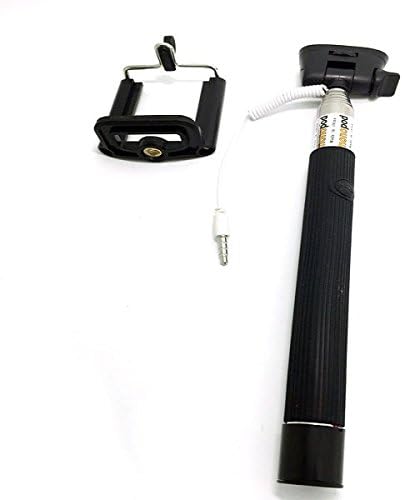
Image 4.1: The Mobility Lab ML303307 selfie stick in its compact, folded configuration, demonstrating its portability for storage and transport.
5. Troubleshooting
If you encounter issues with your Mobility Lab ML303307 selfie stick, refer to the following common problems and solutions:
- Shutter Button Not Working:
- Ensure the 3.5mm audio jack is fully inserted into your smartphone's port.
- Check your smartphone's camera settings. Some phones may require specific audio jack settings for external shutter buttons.
- Verify smartphone compatibility (see below).
- Smartphone Not Fitting in Holder:
- The holder is spring-loaded; gently pull the clamps apart to insert your phone. Do not force it.
- Ensure your phone's dimensions are within the holder's capacity.
- Compatibility Issues:
- This selfie stick is compatible with Apple, most Samsung, LG, and Sony smartphones.
- It is NOT compatible with HTC and Asus smartphones.
6. Specifications
| Feature | Detail |
|---|---|
| Brand | Mobility Lab |
| Model Number | ML303307 |
| Product Dimensions | 1.7 x 23.5 x 1.7 cm (folded) |
| Product Weight | 100 g |
| Connector Type | 3.5mm Jack Cable |
| Power Source | No batteries required (powered by smartphone audio jack) |
| Color | Blue |
| Special Features | Portable |
7. Warranty and Support
For warranty information or technical support regarding your Mobility Lab ML303307 selfie stick, please refer to the documentation provided at the time of purchase or contact Mobility Lab customer service directly. Contact details can typically be found on the manufacturer's official website.
