
Waring CB15SF
Contents
Waring Commercial CB15SF Professional Food Blender
User Manual
1. Introduction
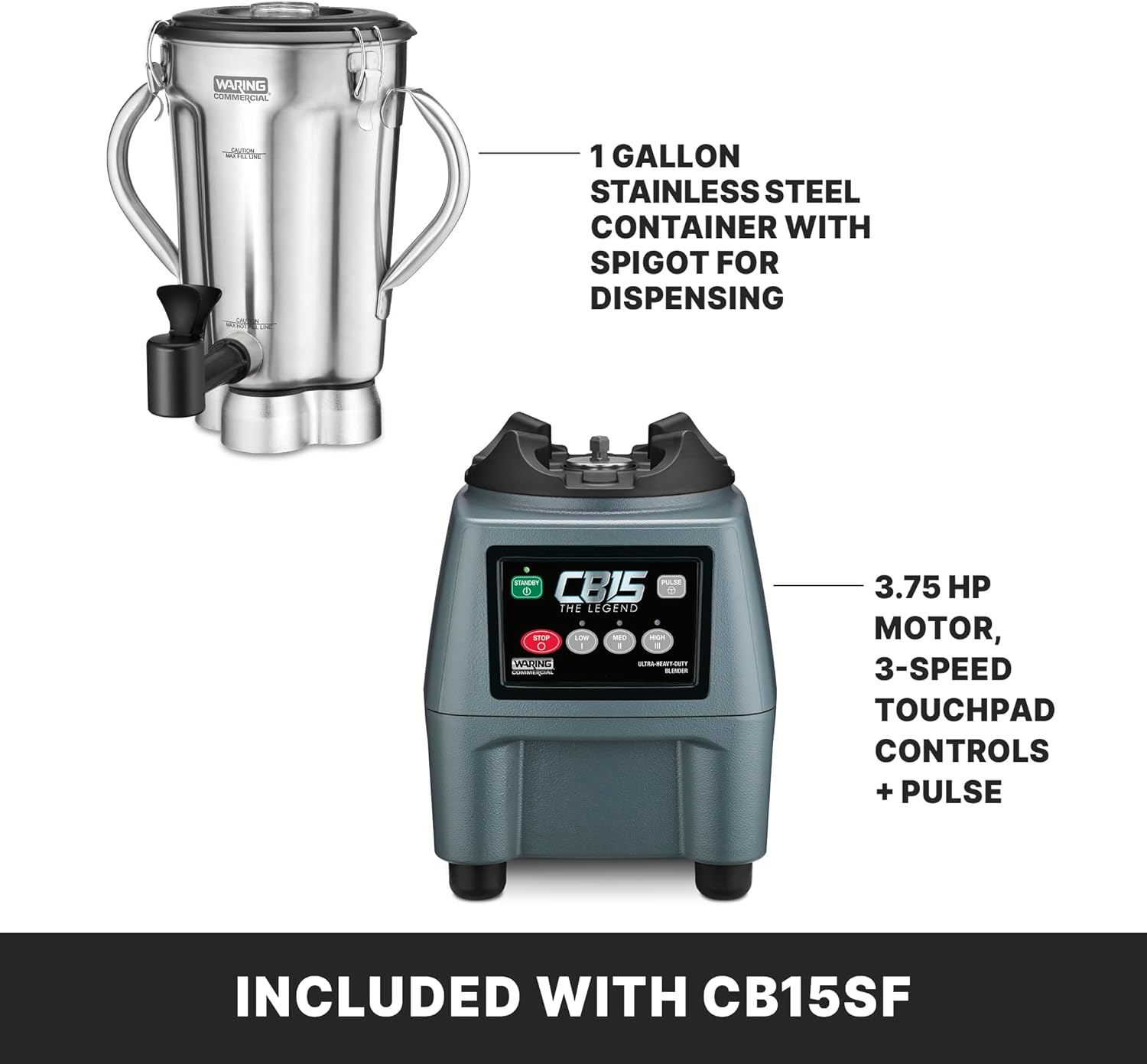
Thank you for choosing the Waring Commercial CB15SF Professional Food Blender. This heavy-duty blender is designed for commercial use, featuring a powerful 3.75 HP motor and a 1-gallon stainless steel container with a convenient spigot for dispensing. It is ideal for preparing large batches of soups, sauces, smoothies, batters, and dressings. Please read this manual thoroughly before operation to ensure safe and efficient use of your appliance.
2. Important Safety Instructions
WARNING: To reduce the risk of fire, electric shock, or injury, always follow basic safety precautions when using electrical appliances.
- Read all instructions before operating the blender.
- Do not immerse the motor base in water or other liquids.
- Always unplug from outlet when not in use, before putting on or taking off parts, and before cleaning.
- Avoid contact with moving parts.
- Do not operate any appliance with a damaged cord or plug, or after the appliance malfunctions or has been dropped or damaged in any manner.
- The use of attachments not recommended or sold by Waring Commercial may cause fire, electric shock, or injury.
- Do not use outdoors.
- Do not let cord hang over edge of table or counter, or touch hot surfaces.
- Keep hands and utensils out of container while blending to prevent the possibility of severe injury to persons or damage to the blender. A scraper may be used but must be used only when the blender is not running.
- Blades are sharp. Handle with care.
- Always operate blender with cover in place.
- Do not blend hot liquids in the sealed container without proper ventilation. Hot liquids can create pressure, causing the lid to eject and potentially causing burns.
3. Package Contents
Your Waring Commercial CB15SF Blender package includes the following components:
- Blender Motor Base (3.75 HP)
- 1-Gallon Stainless Steel Container with Spigot
- Container Lid
4. Product Overview
Familiarize yourself with the main components of your Waring Commercial CB15SF Blender:


Control Panel Features:
- ON/OFF Button: Powers the unit on or off.
- STOP Button: Immediately stops the blending cycle.
- LOW/MED/HIGH Buttons: Select desired continuous blending speed.
- PULSE Button: Provides short bursts of blending at high speed for controlled processing.
- TIMER: Digital timer for precise blending durations.
5. Setup
- Unpack: Carefully remove all components from the packaging. Retain packaging for future storage or shipping.
- Clean: Before first use, wash the stainless steel container, lid, and spigot assembly with warm, soapy water. Rinse thoroughly and dry. The container is dishwasher safe.
- Assemble: Place the stainless steel container securely onto the motor base. Ensure it is seated correctly.
- Position: Place the blender on a stable, flat, and dry surface.
- Connect Power: Plug the blender into a grounded electrical outlet.

6. Operating Instructions
- Prepare Ingredients: Cut solid ingredients into small pieces (approximately 1 inch) for optimal blending. Do not overfill the container; ensure the liquid level does not exceed the maximum fill line.
- Load Container: Place ingredients into the stainless steel container. For best results, add liquids first, then soft ingredients, followed by hard ingredients and ice.
- Secure Lid: Place the lid firmly onto the container. Ensure it is properly sealed before starting the blender.
- Power On: Press the ON/OFF button to power on the blender.
- Select Speed: Choose your desired blending speed by pressing the LOW, MED, or HIGH button. For controlled blending, use the PULSE button.
- Blend: Allow the blender to process ingredients until the desired consistency is achieved.
- Stop: Press the STOP button to halt blending, or the ON/OFF button to power off the unit.
- Dispense: Use the integrated spigot to dispense blended contents directly from the container. Ensure the spigot is closed when not dispensing.

7. Maintenance and Cleaning
Regular cleaning and maintenance will ensure the longevity and optimal performance of your blender.
Cleaning Instructions:
- Unplug: Always unplug the blender from the power outlet before cleaning.
- Container: The stainless steel container and lid are dishwasher safe. For manual cleaning, wash with warm, soapy water, rinse thoroughly, and dry. Ensure all food residue is removed, especially around the blades and spigot.
- Motor Base: Wipe the motor base with a damp cloth. Do not immerse the motor base in water or spray it with liquids.
- Spigot: Disassemble the spigot for thorough cleaning if necessary, following the instructions in the full product manual (if available). Ensure all parts are dry before reassembly.
Note: Do not use abrasive cleaners or scouring pads on any part of the blender, as this may damage the finish.
8. Troubleshooting
If you encounter issues with your blender, refer to the following common problems and solutions:
| Problem | Possible Cause | Solution |
|---|---|---|
| Blender does not turn on. | Not plugged in; power switch off; circuit breaker tripped. | Ensure unit is plugged into a working outlet. Press ON/OFF. Check circuit breaker. |
| Ingredients are not blending smoothly. | Container overfilled; ingredients too large; insufficient liquid. | Reduce ingredient quantity. Cut ingredients into smaller pieces. Add more liquid. Use PULSE function to break up large pieces. |
| Blender stops during operation. | Overload protection activated; motor overheating. | Turn off and unplug the blender. Remove some ingredients. Allow motor to cool for 10-15 minutes before restarting. |
| Leakage from spigot or container base. | Spigot not properly closed; container not seated correctly; seal damaged. | Ensure spigot is fully closed. Re-seat container firmly on base. Inspect seals for damage and replace if necessary. |
If the problem persists after attempting these solutions, please contact customer support.
9. Specifications

| Feature | Detail |
|---|---|
| Brand | Waring |
| Model Number | CB15SF |
| Motor Power | 3.75 HP |
| Container Capacity | 1 Gallon |
| Container Material | Stainless Steel |
| Blade Material | Stainless Steel |
| Speeds | 3 (Low, Medium, High) + Pulse |
| Controls | Touchpad with adjustable speed and timer |
| Voltage | 120V |
| Power Output | 1800 Watts |
| Weight | 38.6 lbs |
| Dishwasher Safe Parts | Container, Lid |
| Special Features | Integrated Spigot, Heavy-Duty Use |
| UPC | 040072029189 |
10. Warranty Information
The Waring Commercial CB15SF Professional Food Blender comes with a 3-year limited warranty. This warranty covers defects in materials and workmanship under normal use. Please refer to the official Waring Commercial website or your purchase documentation for full warranty terms and conditions, including details on what is covered and how to make a claim.
11. Customer Support
For technical assistance, service, or parts, please contact Waring Commercial customer support:
- Website: Visit the official Waring Commercial website for FAQs, product registration, and service center locations.
- Phone: Refer to your product registration card or the Waring Commercial website for contact numbers in your region.
- Email: Contact support via the email address provided on the official website.
When contacting support, please have your model number (CB15SF) and purchase date available.
Documents and downloads
Ask a question about this manual
Ask about setup, troubleshooting, compatibility, parts, safety, or missing instructions. Manuals+ will review the question and use this page’s manual context to help answer it.