1. Product Overview
The MITSUBISHI M52301SP is a specialized integrated circuit (IC) designed for digital signal processing applications. This component is part of Mitsubishi Electric's semiconductor product line, intended for industrial and research development use. It is supplied in a package of 100 units and features leaded terminals for soldering into circuit boards.
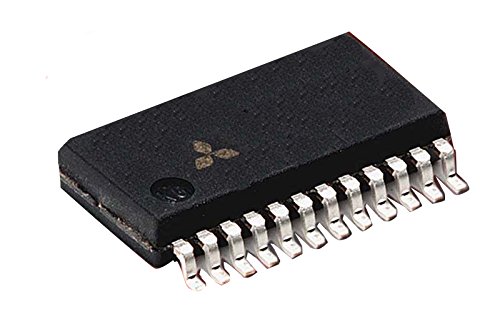
Figure 1: MITSUBISHI M52301SP Integrated Circuit. This image shows the top view of the M52301SP IC, highlighting its package type and pin configuration. The Mitsubishi logo is visible on the top surface.
This manual provides essential information regarding the specifications, setup, operation, and maintenance of the M52301SP to ensure proper integration and functionality within electronic systems.
2. Specifications
The M52301SP integrated circuit possesses the following key specifications:
- Quantity: 100 units per package.
- Lead Type: Leaded (suitable for through-hole or surface-mount soldering depending on package).
| Attribute | Value |
|---|---|
| Manufacturer | MITSUBISHI ELECTRIC |
| Part Number | M52301SP |
| Item Weight | 200 g |
| Package Dimensions | 10 x 10 x 5 cm |
| Batteries Required | No |
| ASIN | B01DXQYCTM |
| First Available Date | April 7, 2016 |
3. Setup and Installation
Proper handling and installation are crucial for the longevity and performance of the M52301SP. Follow these guidelines for setup:
- Electrostatic Discharge (ESD) Precautions: Integrated circuits are sensitive to ESD. Always handle the M52301SP in an ESD-safe environment, using grounded wrist straps and anti-static mats.
- Pin Identification: Before installation, identify the pin 1 indicator on the IC package. This is typically a dot, notch, or a specific corner marking. Refer to the M52301SP datasheet (not provided in this manual) for the complete pinout diagram and function of each pin.
- Soldering: Use appropriate soldering techniques to attach the IC to the printed circuit board (PCB). Ensure correct alignment and avoid excessive heat, which can damage the internal components. For leaded components, ensure proper solder joint formation for reliable electrical and mechanical connection.
- Power Supply: Connect the M52301SP to a stable and regulated power supply within its specified voltage range. Incorrect voltage or ripple can lead to malfunction or permanent damage.
- Component Placement: Integrate the M52301SP into your circuit design considering signal integrity, thermal management, and proximity to other components to minimize interference.
4. Operating Principles
The M52301SP functions as a digital signal processor. Its operation involves receiving digital input signals, processing them according to its internal architecture and programmed logic, and then outputting processed digital signals. Key aspects of its operation include:
- Input/Output (I/O) Signals: The IC communicates with other components via its input and output pins. Ensure that input signals conform to the specified voltage levels and timing requirements.
- Clocking: Like most digital ICs, the M52301SP requires a stable clock signal for synchronous operation. The frequency and stability of this clock are critical for correct performance.
- Power Consumption: Monitor the power consumption of the IC during operation to ensure it remains within safe limits and to prevent overheating.
- Environmental Conditions: Operate the M52301SP within its specified temperature and humidity ranges to ensure optimal performance and reliability.
For detailed operational parameters, register configurations, and programming instructions, refer to the official M52301SP datasheet provided by Mitsubishi Electric.
5. Maintenance
Integrated circuits like the M52301SP generally require minimal maintenance once properly installed. However, adherence to the following practices can help ensure long-term reliability:
- Cleanliness: Keep the surrounding area of the IC clean and free from dust, debris, and conductive particles that could cause short circuits or interfere with heat dissipation.
- Thermal Management: Ensure adequate airflow and heat dissipation around the IC, especially if it operates at higher temperatures. Overheating can significantly reduce the lifespan of the component.
- Environmental Control: Store unused M52301SP units in their original anti-static packaging in a cool, dry environment to prevent moisture absorption and ESD damage.
- Inspection: Periodically inspect the solder joints and the PCB for any signs of damage, corrosion, or cold solder joints, particularly in high-vibration or harsh environments.
6. Troubleshooting
If the M52301SP is not functioning as expected, consider the following troubleshooting steps:
- Power Supply Verification:
Check that the power supply voltage to the M52301SP is within the specified operating range and is stable. Use a multimeter to verify voltage levels at the IC's power pins.
- Connection Integrity:
Inspect all solder joints and connections to ensure they are secure and free from shorts or open circuits. Verify that all pins are correctly connected according to the datasheet.
- Clock Signal Check:
Using an oscilloscope, verify the presence and stability of the clock signal applied to the M52301SP. An unstable or missing clock signal can prevent the IC from operating.
- Input Signal Verification:
Confirm that the input signals to the IC are correct in terms of voltage levels, timing, and data format. Incorrect inputs can lead to unexpected outputs.
- Thermal Issues:
Check if the IC is overheating. Excessive temperature can cause intermittent failures or permanent damage. Ensure proper heat dissipation.
- Component Damage:
Visually inspect the IC for any physical damage, such as cracked packaging or bent/broken pins. If damage is suspected, replace the component.
If issues persist after performing these checks, consult the detailed M52301SP datasheet or contact Mitsubishi Electric technical support.
7. Warranty and Support
For specific warranty terms and conditions related to the MITSUBISHI M52301SP, please refer to the documentation provided by your supplier or contact Mitsubishi Electric directly. Warranty coverage typically pertains to manufacturing defects.
For technical support, detailed datasheets, application notes, or further inquiries, please visit the official Mitsubishi Electric website or contact their customer service department. You may also find useful information on the Mitsubishi Electric store on Amazon.co.jp.


