
Introduction
Thank you for choosing the OneConcept CTR-1 Air Cooler, Humidifier, and Fan. This device is designed to improve your indoor climate by providing cooling, humidification, and air circulation. Please read this manual carefully before operating the device to ensure safe and efficient use. Keep this manual for future reference.
Safety Instructions
- Read all instructions before using the appliance.
- Ensure the power supply voltage matches the rating label on the appliance.
- Do not operate the appliance with a damaged cord or plug.
- Keep the appliance away from heat sources, direct sunlight, and flammable materials.
- Do not immerse the appliance, cord, or plug in water or other liquids.
- Always unplug the appliance before cleaning, filling, or performing maintenance.
- This appliance is for indoor use only.
- Do not allow children to operate the appliance unsupervised.
- Place the appliance on a stable, level surface.
- Do not block the air inlets or outlets.
Package Contents
Please check that all items are present upon unpacking:
- 1 x OneConcept CTR-1 Air Cooler Unit
- 2 x Cooling Packs (Ice Packs)
- 1 x Remote Control
- 1 x Multilingual User Manual (this document)

Image: Two cooling packs included with the OneConcept CTR-1. These packs enhance the cooling performance when placed in the water tank.
Product Features
The OneConcept CTR-1 combines multiple functions to create a comfortable indoor environment:
- 3-in-1 Functionality: Air cooler, humidifier, and fan.
- Efficient Cooling: Achieved through water evaporation and optional ice packs from the 8-liter water tank.
- Air Purification: Ionization function helps to clean the air.
- Powerful Airflow: Up to 400 m³/h, suitable for small to medium-sized rooms.
- Adjustable Settings: 3 power levels (low, medium, high) and a natural mode for varied airflow.
- Timer Function: Integrated timer adjustable up to 9 hours for automatic shut-off.
- Oscillation: Fixed air direction or automatic oscillating movement of the vanes for wider coverage.
- Low Power Consumption: Economical 65 W operation.
- Portability: Lightweight (7 kg) with wheels for easy movement.

Image: The OneConcept CTR-1 offers versatile uses, functioning as an air cooler, fan, and with additional humidification and air purification capabilities.

Image: A comparison chart illustrating the differences between a fan, an air cooler, and a portable air conditioner across various performance metrics. The CTR-1, as an air cooler, offers a balance of cooling, mobility, and energy efficiency.
Setup
- Unpack: Carefully remove the air cooler and all accessories from the packaging.
- Positioning: Place the unit on a firm, level surface. Ensure there is adequate space around the unit for proper airflow.
- Fill Water Tank:
- Pull out the water tank from the bottom rear of the unit.
- Fill the tank with clean tap water up to the "MAX" line. Do not overfill.
- For enhanced cooling, place the two included cooling packs (ice packs) into the freezer until frozen. Once frozen, place them directly into the water tank.
- Carefully push the water tank back into the unit until it clicks into place.
- Connect Power: Plug the power cord into a suitable electrical outlet (220V).
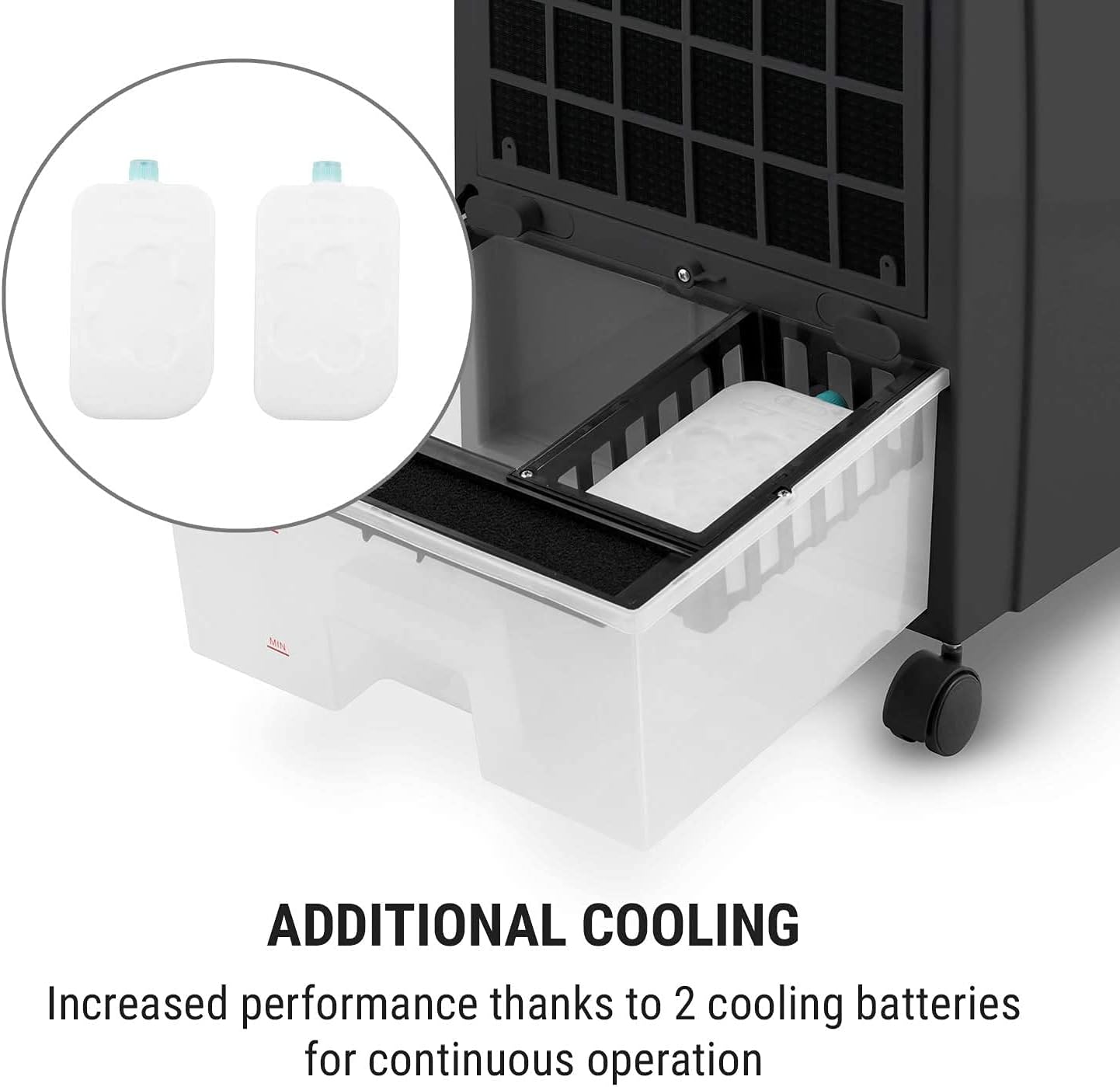
Image: The water tank of the CTR-1, demonstrating how to insert the cooling packs for increased cooling performance.
Operating Instructions
The CTR-1 can be operated using the control panel on top of the unit or the included remote control.
Control Panel and Remote Control Overview

Image: The intuitive control panel on the device and the remote control, allowing for comfortable operation of all functions.
- ON/OFF Button: Powers the unit on or off.
- SPEED Button: Adjusts fan speed (Low, Medium, High).
- MODE Button: Cycles through operating modes (Normal, Natural, Sleep).
- Normal: Constant airflow at selected speed.
- Natural: Simulates natural breeze with varying fan speeds.
- Sleep: Gradually reduces fan speed for quiet operation during sleep.
- COOL Button: Activates or deactivates the humidification/cooling function. Ensure the water tank is filled when using this mode.
- VANE Button: Controls the oscillation of the vertical vanes. Press once for automatic oscillation, press again to fix the vane position.
- ANION Button: Activates or deactivates the air ionization function for air purification.
- TIMER Button: Sets the operating time from 1 to 9 hours. The unit will automatically turn off after the set time.
- DIM Button (Remote Only): Dims the display lights.
- SAVE Button (Remote Only): (Functionality not detailed in provided data, typically for saving preferred settings or eco-mode).
Using the Cooling Function
To activate the cooling and humidification function, ensure the water tank is filled and press the COOL button. The unit will draw water from the tank and evaporate it, providing a cooling effect. For maximum cooling, use frozen cooling packs in the water tank.

Image: The CTR-1 provides individual refreshment through either a fixed blowing direction or automatic pivoting movement of its slats.

Image: Targeted refreshment from the CTR-1, providing pleasant, body-directed cooling during various activities.
Maintenance
Regular maintenance ensures optimal performance and longevity of your CTR-1 air cooler.
- Before Cleaning: Always unplug the appliance from the power outlet.
- Exterior Cleaning: Wipe the exterior surfaces with a soft, damp cloth. Do not use abrasive cleaners or solvents.
- Water Tank Cleaning:
- Regularly empty and clean the water tank to prevent mold and mildew growth.
- Pull out the water tank, rinse it with clean water, and wipe it dry.
- For thorough cleaning, use a mild detergent and rinse thoroughly.
- Filter Cleaning: The air filter (located at the back) should be cleaned periodically.
- Remove the filter panel.
- Rinse the filter under running water to remove dust and debris.
- Allow the filter to air dry completely before reinserting it.
- Storage: If storing the unit for an extended period, empty and clean the water tank and filter. Store in a cool, dry place.
Troubleshooting
| Problem | Possible Cause | Solution |
|---|---|---|
| Unit does not turn on. | No power supply. | Check if the power cord is securely plugged in and the outlet is functional. |
| No cooling effect. | Water tank is empty or COOL function is off. | Fill the water tank and ensure the COOL button is activated. Use frozen cooling packs. |
| Weak airflow. | Air filter is dirty or air inlets/outlets are blocked. | Clean the air filter. Ensure no obstructions are blocking the air vents. Increase fan speed. |
| Unpleasant odor. | Stagnant water in the tank or dirty filter. | Empty and clean the water tank thoroughly. Clean the air filter. Use fresh water. |
| Remote control not working. | Batteries are dead or incorrectly inserted. | Replace batteries with new ones, ensuring correct polarity. |
Specifications
| Model Name | CTR-1 |
| Brand | OneConcept |
| Dimensions (L x W x H) | 29.5 x 38.8 x 81.5 cm |
| Weight | 7 Kilograms |
| Material | Plastic |
| Power Consumption | 65 Watts |
| Voltage | 220 Volts |
| Water Tank Capacity | 8 Liters |
| Airflow Rate | 400 m³/h |
| Noise Level | 64 Decibels |
| Number of Speeds | 3 |
| Special Features | Timer, Portable, Humidification, Ionization |
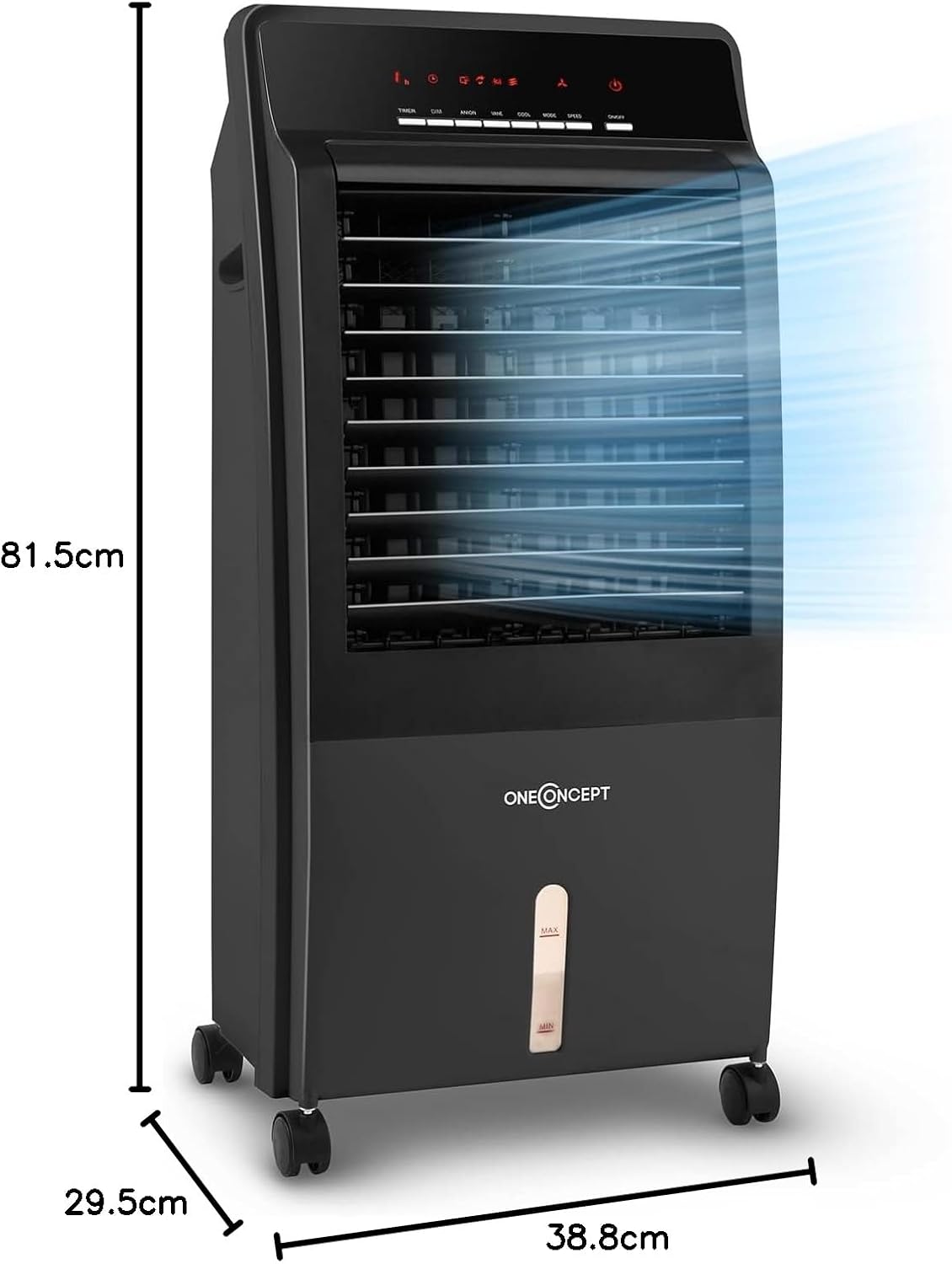
Image: Detailed dimensions of the OneConcept CTR-1 air cooler, illustrating its height, width, and depth.

Image: The CTR-1 delivers a fresh breeze with an airflow rate of 400 cubic meters per hour.
Warranty and Support
For warranty information, please refer to the documentation provided at the time of purchase or contact your retailer. For technical support or service inquiries, please contact OneConcept customer service through their official website or the contact details provided in your purchase documentation.


