
KitchenAid KSM3311XCU
KitchenAid KSM3311XCU Stand Mixer User Manual
Model: KSM3311XCU | Brand: KitchenAid
1. Safety Information
Please read all instructions carefully before using your KitchenAid Stand Mixer to ensure safe operation and to prevent injury or damage to the appliance. Keep this manual for future reference.
- Always unplug the mixer from the outlet before cleaning, assembling, or disassembling parts.
- Do not immerse the mixer base in water or other liquids.
- Keep hands, hair, and clothing, as well as spatulas and other utensils, away from moving beaters during operation to reduce the risk of injury to persons and/or damage to the mixer.
- Supervise children closely when the appliance is in use.
- Do not operate any appliance with a damaged cord or plug, or after the appliance malfunctions or has been dropped or damaged in any manner.
- Use only attachments recommended or sold by KitchenAid.
2. Product Overview
The KitchenAid KSM3311XCU Artisan Mini Stand Mixer offers mighty power in a mini footprint. It is designed to handle various mixing tasks, from making up to 5 dozen cookies in a single batch to kneading bread dough.

Image: The KitchenAid KSM3311XCU Stand Mixer in Contour Silver, showcasing its compact design and sleek finish.
Key Features:
- 25% lighter, 20% smaller footprint (compared with KitchenAid Classic Stand Mixer)
- Compatible with all attachments (Excludes bowls and beaters)
- Tilt-head design for easy access to the bowl and accessories
- Capacity to mix up to 5 dozen cookies, a loaf of bread, or a batch of guacamole
- Powerful enough for stirring, kneading, and whipping
3. Components
Your KitchenAid Stand Mixer comes with several standard components designed for various culinary tasks:
- Motor Head: Contains the motor and speed controls.
- Attachment Hub: Located at the front of the motor head, used for connecting various optional attachments.
- Tilt-Head Lock Lever: Secures the motor head in place during operation.
- Speed Control Lever: Adjusts the mixing speed from 0 (off) to 10.
- 3.5 Quart Stainless Steel Bowl: The primary mixing vessel.
- Dough Hook: Ideal for mixing and kneading yeast doughs.
- Flat Beater: For normal to heavy mixtures such as cakes, cookies, and mashed potatoes.
- Wire Whip: For incorporating air into eggs, egg whites, whipping cream, and dips.
Component Visuals:

Image: The 3.5 quart stainless steel mixing bowl, designed to securely fit onto the mixer base.

Image: The stand mixer with the dough hook attachment in the bowl, actively mixing dough.

Image: The stand mixer with an optional pasta maker attachment connected to the front hub, demonstrating accessory compatibility.
4. Setup
Before first use, ensure all packaging materials are removed and clean the bowl and attachments according to the 'Maintenance and Cleaning' section.
Initial Setup Steps:
- Place the mixer on a dry, flat, stable surface.
- Ensure the speed control lever is in the "0" (Off) position.
- Lift the motor head by pushing the tilt-head lock lever to the unlock position and tilting the head back.
- Place the mixing bowl onto the bowl clamping plate, twisting gently to secure it.
- Attach the desired beater or dough hook by sliding it onto the beater shaft and rotating until it locks into place.
- Lower the motor head by pushing the tilt-head lock lever to the lock position.
- Plug the mixer into a grounded electrical outlet.
5. Operating Instructions
The KitchenAid Stand Mixer is designed for ease of use. Follow these steps for optimal performance:
Mixing Process:
- Ensure the mixer is properly set up as described in the 'Setup' section.
- Add ingredients to the mixing bowl.
- Select the appropriate attachment for your recipe (e.g., dough hook for bread, flat beater for cookies, wire whip for cream).
- Slide the speed control lever to the desired speed setting. Start with a lower speed to prevent splashing, then gradually increase as needed.
- Allow the mixer to operate until ingredients are thoroughly combined or the desired consistency is achieved.
- When finished, slide the speed control lever back to the "0" (Off) position and unplug the mixer.
- Lift the motor head and remove the attachment and mixing bowl.
Speed Control Guide:
| Speed Setting | Recommended Use |
|---|---|
| 0 (Off) | Power off. |
| Stir | For slow stirring, combining, mashing, or starting all mixtures. |
| 2 | For slow mixing, mashing, or faster stirring. |
| 4 | For mixing semi-heavy batters, combining ingredients, or creaming. |
| 6 | For medium-fast beating, creaming, or whipping. |
| 8 | For fast beating or whipping. |
| 10 | For fast whipping of small amounts of cream or egg whites. |
6. Maintenance and Cleaning
Proper care and cleaning will extend the life of your KitchenAid Stand Mixer.
Cleaning Instructions:
- Before Cleaning: Always unplug the mixer from the electrical outlet.
- Mixing Bowl: The 3.5 quart stainless steel bowl is dishwasher safe. For hand washing, use warm, soapy water and a non-abrasive sponge. Rinse thoroughly and dry.
- Attachments (Dough Hook, Flat Beater, Wire Whip): These attachments are dishwasher safe. For hand washing, use warm, soapy water. Rinse thoroughly and dry.
- Mixer Body: Wipe the mixer body with a soft, damp cloth. Do not use abrasive cleaners or scourers. Do not immerse the mixer body in water.
- Attachment Hub: Clean the attachment hub with a small brush or damp cloth to remove any food residue.
7. Troubleshooting
If you encounter issues with your KitchenAid Stand Mixer, refer to the common problems and solutions below:
Common Issues and Solutions:
- Mixer does not turn on:
- Ensure the mixer is securely plugged into a working electrical outlet.
- Check if the speed control lever is set to a speed other than "0" (Off).
- Verify that the tilt-head lock lever is in the locked position.
- Beater hits the bottom of the bowl or is too far from it:
- The beater-to-bowl clearance may need adjustment. Refer to the full user manual for detailed instructions on adjusting the beater height.
- Mixer seems to be struggling with heavy dough:
- Ensure you are using the correct attachment (dough hook for heavy doughs).
- Do not overload the mixer beyond its recommended capacity.
- If the mixer overheats, it may automatically shut off. Unplug and let it cool down for 20-30 minutes before resuming use.
- Excessive noise during operation:
- Ensure the bowl and attachment are properly secured.
- Some noise is normal during operation, especially with heavier loads. If the noise is unusual or excessive, discontinue use and contact customer support.
For more detailed troubleshooting or issues not listed here, please refer to the official user manual or contact KitchenAid customer support.
8. Specifications
| Specification | Detail |
|---|---|
| Brand | KitchenAid |
| Model Name | KSM3311XCU |
| Color | Contour Silver |
| Capacity | 3.5 Liters (3.5 quart) |
| Item Weight | 14.3 pounds |
| Product Dimensions | 12.3 x 7.8 x 12.3 inches |
| Blade Material | Stainless Steel |
| Controls Type | Knob |
| Is Dishwasher Safe | Yes |
| UPC | 883049419527 |
| Date First Available | October 1, 2013 |
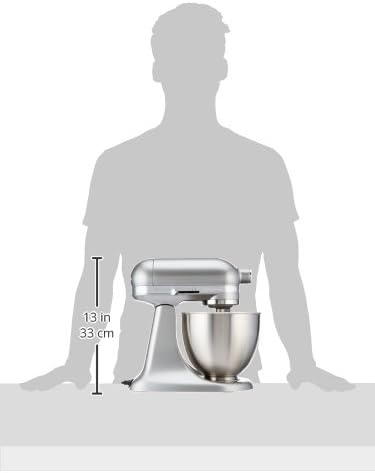
Image: Visual representation of the KitchenAid KSM3311XCU Stand Mixer's dimensions.
9. Warranty and Support
KitchenAid products are manufactured to high-quality standards and are backed by a comprehensive warranty. For specific warranty details, registration, or to contact customer support, please refer to the official documentation included with your product.
An official user manual in PDF format is available for download:
Download Official User Manual (PDF)
For additional assistance, visit the official KitchenAid website or contact their customer service line.
Related documentsKSM3311XCU


Ask a question about this manual
Ask about setup, troubleshooting, compatibility, parts, safety, or missing instructions. Manuals+ will review the question and use this page’s manual context to help answer it.