
1. Introduction
The Philips SHQ7900CL Bluetooth Sports Headphones are designed for active lifestyles, offering wireless freedom and a secure, comfortable fit. These headphones are waterproof and sweatproof, making them ideal for various indoor and outdoor sports activities. This manual provides essential information for setting up, operating, and maintaining your headphones.

Image: Philips SHQ7900CL Bluetooth Sports Headphones, showcasing the in-ear design with ear hooks and inline controls.
2. What's in the Box
Carefully unpack the box and ensure all items are present.
- Philips SHQ7900CL Bluetooth Sports Headphones
- Pouch for storage
- Quick start guide
- USB charging cable
- Detachable earhooks (1 pair)
- Rubber ear caps (3 pairs: small, medium, large)

Image: Various sizes of rubber ear caps and detachable ear hooks included with the headphones for a customized fit.
3. Setup
3.1 Charging the Headphones
Before first use, fully charge your headphones.
- Locate the USB charging port on the inline control unit.
- Connect the supplied USB cable to the charging port on the headphones.
- Connect the other end of the USB cable to a powered USB port (e.g., computer, USB wall adapter).
- The LED indicator will show charging status. It typically turns off or changes color when fully charged.
A full charge provides approximately 6.5 hours of battery life.
3.2 Bluetooth Pairing
To connect your headphones to a Bluetooth-enabled device:
- Ensure the headphones are turned off.
- Press and hold the multi-function button (usually the center button on the inline control) for approximately 5-7 seconds until the LED indicator flashes blue and red alternately. This indicates pairing mode.
- On your Bluetooth device (smartphone, tablet, etc.), enable Bluetooth and search for available devices.
- Select "Philips SHQ7900CL" from the list of found devices.
- Once paired, the LED indicator on the headphones will flash blue periodically, and you will hear an audible confirmation.
- If prompted for a passcode, enter "0000".
The headphones will automatically attempt to reconnect to the last paired device when turned on.
3.3 Fitting the Headphones
For optimal sound quality and a secure fit during exercise:
- Choose the correct ear caps: Experiment with the three sizes of rubber ear caps to find the pair that provides a comfortable and snug seal in your ear canal.
- Attach ear hooks: The detachable ear hooks provide extra stability. Attach them to the headphones and loop them over your ears. Adjust for comfort.
- Position the cable: The cable connecting the two earbuds can be worn behind your neck.

Image: A person wearing the Philips SHQ7900CL headphones, demonstrating a secure fit during a stretching exercise.
4. Operating Instructions
The inline control unit allows you to manage power, music playback, and calls.
| Function | Action |
|---|---|
| Power On | Press and hold the multi-function button for 3 seconds. |
| Power Off | Press and hold the multi-function button for 3 seconds. |
| Play/Pause Music | Press the multi-function button once. |
| Next Track | Press and hold the Volume Up (+) button. |
| Previous Track | Press and hold the Volume Down (-) button. |
| Volume Up | Press the Volume Up (+) button. |
| Volume Down | Press the Volume Down (-) button. |
| Answer/End Call | Press the multi-function button once during an incoming call or active call. |
| Reject Call | Press and hold the multi-function button for 2 seconds during an incoming call. |
| Activate Voice Assistant | Double-press the multi-function button (may vary by device). |
5. Maintenance
5.1 Cleaning
As these headphones are waterproof and sweatproof, they can be cleaned easily.
- Wipe the headphones with a soft, damp cloth after each use, especially after intense workouts.
- Remove the ear caps and rinse them with water if necessary. Ensure they are completely dry before reattaching.
- Do not use abrasive cleaners, alcohol, or chemical solvents, as these may damage the product.
5.2 Storage
Proper storage helps prolong the life of your headphones.
- Store the headphones in the provided pouch when not in use to protect them from dust and damage.
- Avoid storing in extreme temperatures or high humidity.
- Do not store with heavy objects on top that could crush them.
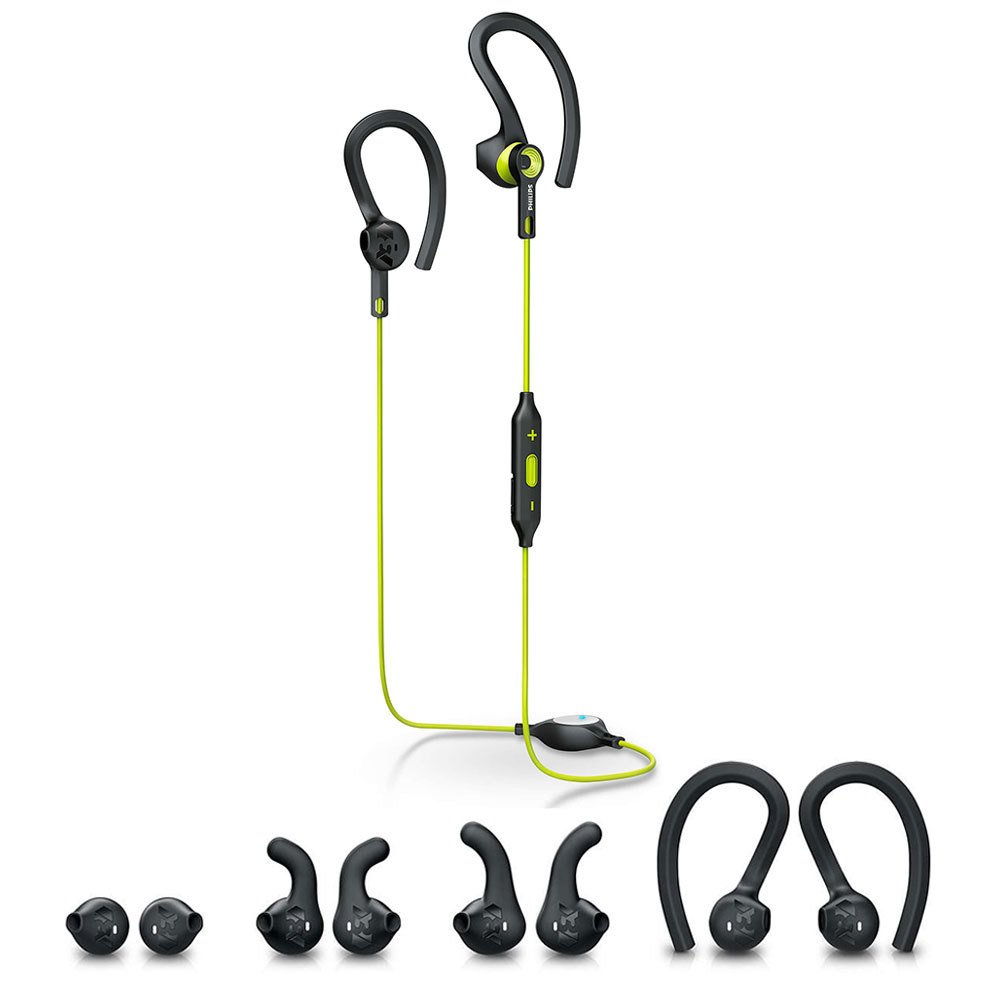
Image: The Philips SHQ7900CL headphones shown alongside their protective storage pouch.
6. Troubleshooting
If you encounter issues with your headphones, refer to the following common problems and solutions:
- Headphones do not turn on: Ensure the headphones are fully charged.
- Cannot pair with device:
- Make sure the headphones are in pairing mode (flashing blue and red).
- Ensure Bluetooth is enabled on your device and it is within 10 meters of the headphones.
- Try forgetting the device on your phone's Bluetooth settings and re-pairing.
- Restart both the headphones and your device.
- No sound or low volume:
- Check the volume levels on both the headphones and your connected device.
- Ensure the headphones are properly paired and connected.
- Verify that the correct audio output is selected on your device.
- Intermittent connection:
- Ensure there are no obstructions between the headphones and your device.
- Move closer to your device (within 10 meters).
- Avoid environments with strong Wi-Fi or other wireless interference.
- Charging issue:
- Ensure the USB cable is securely connected to both the headphones and the power source.
- Try a different USB port or charging adapter.
7. Specifications
| Feature | Detail |
|---|---|
| Model Name | SHQ7900CL |
| Brand | Philips |
| Connectivity Technology | Bluetooth 4.1 |
| Wireless Range | Up to 10 meters |
| Ear Placement | In Ear |
| Impedance | 32 Ohms |
| Sensitivity | 105 dB |
| Noise Control | Sound Isolation |
| Battery Life | Approximately 6.5 Hours |
| Water Resistance Level | Waterproof |
| Additional Features | Sweatproof, Tangle-Free Cable |
| Control Type | Volume Control, Touch (via multi-function button) |
| Audio Driver Size | 13.5 Millimetres |
| Item Weight | 0.02 Kilograms |
8. Warranty and Support
Your Philips SHQ7900CL Bluetooth Sports Headphones come with a 1 year and 3 months warranty from the date of purchase.
For detailed warranty terms, technical support, or further assistance, please visit the official Philips support website or contact their customer service.


