
Introduction
The Klein Tools IR5 is a professional-grade infrared thermometer designed for accurate and versatile temperature measurement. It features dual-laser targeting for precise area identification and a wide temperature range suitable for various industrial, automotive, and household applications. This manual provides essential information for the safe and effective operation of your IR5 thermometer.

The IR5 is built to withstand demanding jobsite conditions, offering 6.6 ft. (2 m) drop protection. Its advanced features include auto scan, max/min/avg/diff modes, high/low alarms, a backlit display, auto power-off, and adjustable emissivity, making it a comprehensive tool for professionals.
Safety Information
Please read and understand all safety warnings and instructions before using the Klein Tools IR5 Infrared Thermometer.
- This thermometer is NOT intended for use on people or animals.
- Do not direct the laser beam into eyes, as this can cause permanent eye damage.
- Do not use the instrument if the case is damaged in any way.
- Replace the battery as soon as the low battery indicator appears.
- Avoid using the instrument around strong electromagnetic fields.
Features
The Klein Tools IR5 Infrared Thermometer boasts a range of features designed for precision and ease of use:
- Precise Temperature Measurement: Optical Resolution (Distance-to-spot) of 12:1 ensures accurate temperature readings from a distance.
- Wide Measurement Range: Measures temperatures from -22°F to 752°F (-30°C to 400°C), covering a broad range of applications.
- Advanced Features: Dual laser targeting, auto scan, max/min/avg/diff calculation modes, high/low alarm, backlit display, auto power off, and adjustable emissivity.
- Adjustable Emissivity: Adjustable emissivity from 0.1-1.0 provides flexibility to address various applications, accommodating different surface materials.
- Enhanced Durability: 6.6 ft. (2 m) drop protection to meet jobsite demands.
- Complete Package: Includes a custom pouch and batteries, providing convenience and ensuring you have everything needed to start using the thermometer right away.

Setup
Battery Installation
The Klein Tools IR5 requires one 9V battery (included). To install or replace the battery:
- Locate the battery compartment on the handle of the thermometer.
- Open the battery compartment cover.
- Insert the 9V battery, ensuring correct polarity.
- Close the battery compartment cover securely.

Power On/Off
To power on the device, simply press the trigger. The device will automatically power off after a period of inactivity to conserve battery life.
Operating Instructions
Taking a Measurement
To take a temperature reading, point the IR5 at the desired surface and press the trigger. The dual lasers will indicate the measurement area, providing precise targeting. The temperature will be displayed on the backlit LCD screen.
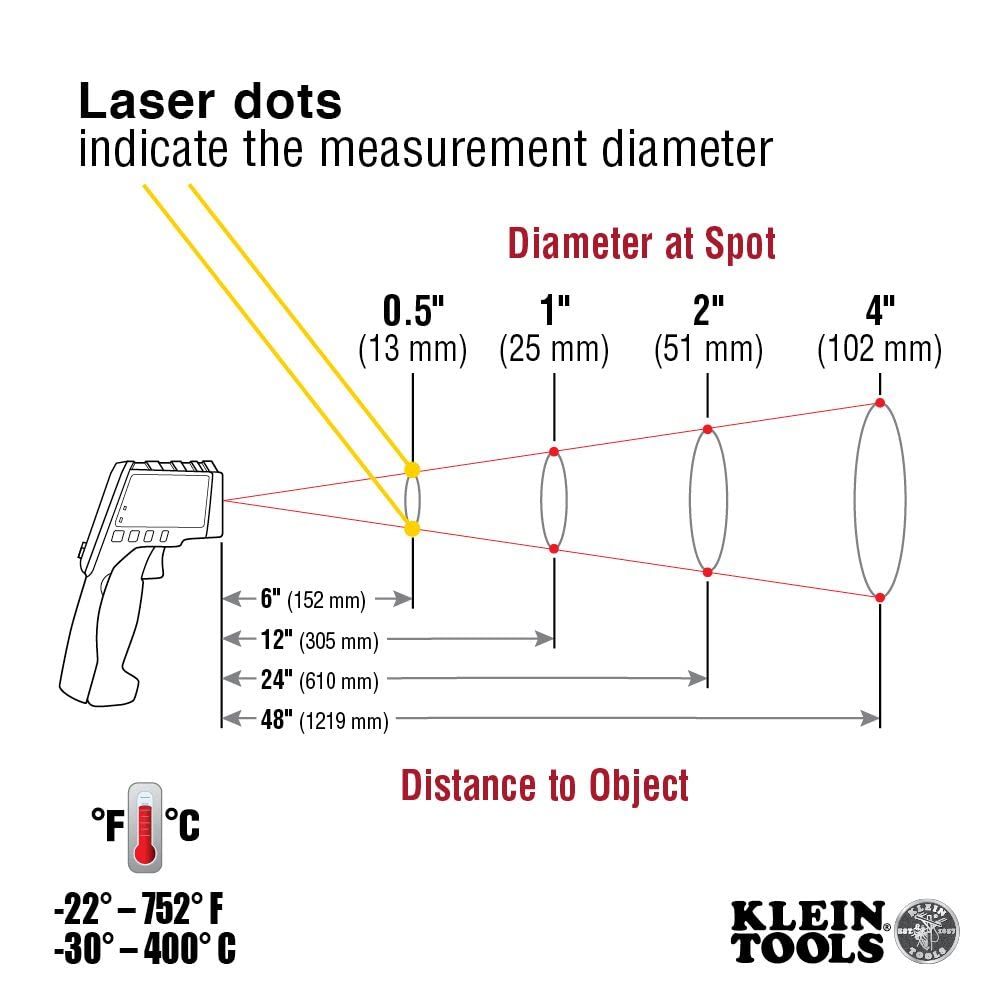
The IR5 has a 12:1 distance-to-spot ratio, meaning that at 12 inches away, the measurement spot will be approximately 1 inch in diameter. This ratio helps in understanding the area being measured from a distance.
Understanding Display Modes
The IR5 offers various measurement modes accessible via the 'MODE' button:
- MAX: Displays the maximum temperature recorded during a scan.
- MIN: Displays the minimum temperature recorded during a scan.
- AVG: Displays the average temperature recorded during a scan.
- DIFF: Displays the difference between the maximum and minimum temperatures recorded.
- High/Low Alarm: Set custom high and low temperature thresholds. The device will alert you if the measured temperature falls outside these limits.

Adjusting Emissivity
Emissivity (ε) is a measure of an object's ability to emit infrared energy. Different materials have different emissivities. The IR5 allows you to adjust the emissivity from 0.1 to 1.0 for more accurate readings on various surfaces. Consult a standard emissivity table for common materials to set the appropriate value.
To adjust emissivity, press the 'SET' button while in a measurement mode and use the up/down arrows to change the value. This feature is crucial for obtaining precise temperature measurements across diverse surfaces like concrete, metal, or wood.

Official Product Video
Video 1: Klein Tools IR5 Dual-Laser Infrared Thermometer (Official Merchant Video). This video provides a brief overview of the IR5's features and operation.
Maintenance
To ensure the longevity and accuracy of your Klein Tools IR5, follow these simple maintenance guidelines:
- Cleaning: Wipe the thermometer clean with a dry, soft cloth. Do not use abrasive cleaners or solvents.
- Storage: Store the device in its custom pouch in a cool, dry place when not in use.
- Battery: Replace the battery promptly when the low battery indicator appears to prevent operational issues.
Troubleshooting
If you encounter issues with your Klein Tools IR5, consider the following common troubleshooting steps:
- No Power: Check if the battery is correctly installed and has sufficient charge. Replace the battery if necessary.
- Inaccurate Readings: Ensure the emissivity setting is appropriate for the surface being measured. Verify that the target is within the optimal distance-to-spot ratio. Clean the sensor lens if it appears dirty.
- Laser Not Working: Check battery level. If the issue persists, contact customer support.
- Alarm Not Triggering: Verify that the high/low alarm thresholds are set correctly and the alarm function is enabled.
For persistent issues or complex problems, refer to the official user guide or contact Klein Tools customer support.
Specifications
| Specification | Value |
|---|---|
| Product Dimensions | 5.8 x 10.7 x 3.25 inches; 9.9 ounces |
| Item Model Number | IR5 |
| Batteries | 1 C batteries required. (included) |
| Manufacturer | Klein Tools |
| Country of Origin | China |
| Special Feature | Several Calculation Modes |
| Color | Orange |
| Included Components | Thermometer, Custom Pouch, and Batteries |
| Outer Material | Stainless Steel |
| Display Type | Digital |
| Connectivity Technology | Infrared |
| Product Care Instructions | Wipe Clean |
Warranty and Support
For detailed warranty information and customer support, please refer to the official Klein Tools website or the user guide provided with your product. You can also access the Instructions for Use (IFU) PDF directly via this link: Klein Tools IR5 User Guide (PDF).


