
Safety Instructions
Please read these instructions carefully before operating your Rockville RXM8BTW amplifier. Failure to follow these guidelines may result in damage to the unit or personal injury.
- Water Exposure: This amplifier is marine-grade and resistant to UV and saltwater. However, avoid submerging the unit. Ensure all connections are properly sealed to prevent water ingress.
- Power Supply: Connect the amplifier only to a 12V DC power source. Ensure correct polarity to prevent damage.
- Ventilation: Install the amplifier in a location with adequate ventilation to prevent overheating. Do not block cooling fins or air vents.
- Wiring: Use appropriate gauge wiring for power, ground, and speaker connections as specified in the installation section. Improper wiring can lead to fire or electrical shock.
- Fuse Protection: The amplifier is equipped with an 80A fuse. Do not replace it with a fuse of a different rating.
- Professional Installation: If you are unsure about any aspect of installation, seek assistance from a qualified professional.
Key Features
- High Power Output: 1500W Peak / 750W RMS (Dyno-Certified: 65W x 8 @ 4Ω, 95W x 8 @ 2Ω, or 190W x 4 bridged @ 4Ω).
- Integrated Bluetooth: Seamless wireless audio streaming from smartphones or tablets with auto-pairing.
- Marine-Grade Durability: UV and saltwater-resistant paint, silk screen, and heat sink enclosure. Conformal-coated circuitry and stainless steel terminals for corrosion resistance.
- Flexible Configuration: 4CH/8CH input selector, adjustable crossovers (LPF/HPF), RCA line out, and bridged output options.
- Compact Design: Dimensions of 6.7" x 2" x 11.5" for easy installation in various marine environments.
- Protection Circuitry: 4-way system protection (DC, Short, Thermal, Overload) for reliable operation.
- Efficient Class D Design: High-efficiency operation ensures cool and stable performance.
What's in the Box
Verify that all items are present upon unpacking:
- Rockville RXM8BTW 8-Channel Marine Amplifier
- Power/Speaker Wiring Harness
- Mounting Brackets and Screws
- Inline Fuse Holder with Fuse
- Remote Control (for Bluetooth functions, if applicable)
- User Manual (this document)

Image: Included accessories for the Rockville RXM8BTW amplifier, featuring mounting brackets, screws, and an inline fuse holder.
Setup & Installation
1. Mounting the Amplifier
Choose a dry, well-ventilated location away from direct sunlight and heat sources. Ensure sufficient space around the amplifier for air circulation. Use the provided mounting brackets and screws to secure the amplifier firmly.

Image: Top view of the Rockville RXM8BTW amplifier next to a ruler, illustrating its compact size for mounting.
2. Wiring Connections
All wiring should be done with the vehicle/boat's power disconnected. Refer to the diagram below for proper connections.
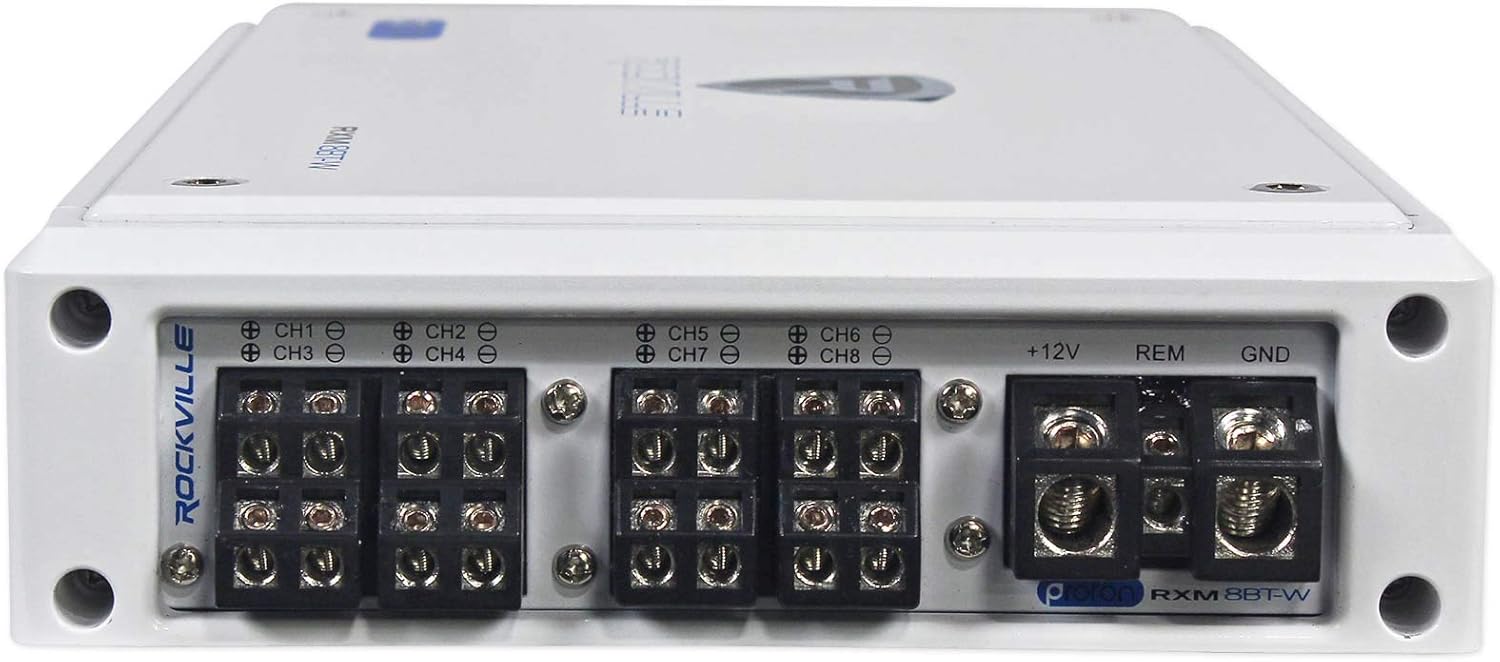
Image: Rear panel of the Rockville RXM8BTW amplifier showing power, ground, remote, and speaker output terminals.
- Power (+12V): Connect to the positive terminal of the battery using a heavy-gauge wire (e.g., 8-gauge or thicker). Install the inline fuse holder within 18 inches of the battery.
- Ground (GND): Connect to a clean, unpainted metal surface on the boat's chassis or directly to the negative terminal of the battery using a wire of the same gauge as the power wire.
- Remote (REM): Connect to the remote turn-on output of your head unit or a switched 12V source.
- Speaker Outputs (CH1-CH8): Connect your speakers to the corresponding channels. Ensure correct polarity (+ to + and - to -). For bridged mode, refer to the diagram on the amplifier or the specifications section.
- RCA Inputs (CH1&3, CH2&4, CH5&7, CH6&8): Connect RCA cables from your head unit's pre-amp outputs to these inputs.
- RCA Line Out (L/R): Use these outputs to daisy-chain another amplifier.

Image: Front panel of the Rockville RXM8BTW amplifier displaying gain, bass EQ, LPF, HPF, and input mode controls.
3. Initial Settings
- Gain Control: Start with the gain control set to minimum. Gradually increase it until you achieve a clear, undistorted sound at your desired volume level.
- Crossover (LPF/HPF): Adjust the Low Pass Filter (LPF) for subwoofers and High Pass Filter (HPF) for full-range speakers to optimize sound quality and prevent distortion.
- Bass EQ: Use the Bass Equalization control to fine-tune bass response (0-12dB at 45Hz).
- Input Mode (4CH/8CH): Select the appropriate input mode based on how many RCA input channels you are using from your head unit.
Operating Instructions
1. Powering On/Off
The amplifier will power on automatically when it receives a 12V signal on the remote turn-on wire. It will power off when this signal is removed.
2. Bluetooth Pairing
- Ensure the amplifier is powered on and the Bluetooth switch is in the "ON" position.
- On your smartphone or Bluetooth-enabled device, search for available Bluetooth devices.
- Select "Rockville RXM8BTW" from the list. The amplifier will automatically pair.
- Once paired, you can stream audio wirelessly from your device to the amplifier.
Note: The Bluetooth range may vary depending on environmental factors and device compatibility. For optimal performance, keep your device within close proximity to the amplifier.
3. Audio Playback
Adjust the volume on your head unit or Bluetooth device, and fine-tune the amplifier's gain control for optimal sound without distortion. Use the crossover settings to ensure speakers are playing within their optimal frequency range.
Video: An overview of the Rockville RXM8BTW 8-Channel Marine Amplifier, demonstrating its features and installation in a marine audio setup. This video highlights the amplifier's versatility and Bluetooth connectivity.
Maintenance
- Cleaning: Periodically wipe the amplifier's exterior with a soft, dry cloth. Avoid using harsh chemicals or abrasive cleaners.
- Connections: Regularly check all wiring connections for tightness and corrosion, especially in marine environments. Clean any corroded terminals.
- Ventilation: Ensure that the amplifier's cooling fins remain free of debris and obstructions to maintain proper heat dissipation.
- Fuse Replacement: If the fuse blows, replace it only with an 80A fuse of the same type. A repeatedly blown fuse indicates a potential problem that requires professional inspection.
Troubleshooting
| Problem | Possible Cause | Solution |
|---|---|---|
| No Power / Amplifier Not Turning On |
|
|
| No Sound Output |
|
|
| Distorted Sound |
|
|
| Amplifier Overheating (Protection Mode) |
|
|
| Bluetooth Not Connecting |
|
|
Specifications
| Feature | Detail |
|---|---|
| Model | RXM8BTW |
| Channels | 8-Channel |
| Peak Power | 1500 Watts System Power |
| RMS Power (4 Ohms) | 65 Watts x 8 Channels (<1% THD) |
| RMS Power (2 Ohms) | 95 Watts x 8 Channels (<1% THD) |
| RMS Bridged Power (4 Ohms) | 190 Watts x 4 Channels (<1% THD) |
| Amplifier Class | Class D (TI Digital Audio Topology) |
| Bluetooth | Built-in Wireless with Auto Pairing |
| Marine Grade | UV and Salt Water Resistant, Conformal Coated Boards, Stainless Steel Terminals |
| Bass Equalization | Fully Adjustable 0 - 12dB at 45Hz |
| Crossover | Adjustable LPF (50Hz-250Hz), HPF (50Hz-250Hz) |
| Input Mode | 4CH/8CH Selectable |
| Protection Circuitry | 4-Way System Protection (DC, Short, Thermal, Overload) |
| Fuse Rating | 80A |
| Dimensions (L x W x H) | 11.5" x 6.7" x 2" (approximate) |
| Weight | 0.01 ounces (Note: This value may be a placeholder and not reflect actual product weight.) |
| Frequency Response | 10Hz - 40KHz |
| Signal to Noise Ratio | 100dB |
Warranty & Support
For warranty information, technical support, or service inquiries, please contact Rockville customer service. Keep your purchase receipt as proof of purchase.
Online Support: Visit the official Rockville website for FAQs, product registration, and additional resources.
Contact Information: Refer to the contact details provided with your product packaging or on the Rockville website.


