
Introduction
Thank you for purchasing the Mitzu Kaiser PAK-8915 Dual Audio System. This system includes an amplified speaker and a passive speaker, designed to deliver powerful and clear sound. This manual provides essential information for the safe and efficient operation of your new audio system. Please read it thoroughly before use and retain it for future reference.
Safety Instructions
- Power Source: Ensure the power supply matches the voltage specified on the unit.
- Ventilation: Do not block ventilation openings. Maintain adequate space around the unit for proper airflow.
- Water and Moisture: Do not expose the unit to rain, moisture, or liquids. Keep away from water sources.
- Heat: Do not place the unit near heat sources such as radiators, heat registers, stoves, or other heat-producing appliances.
- Cleaning: Unplug the unit before cleaning. Use a dry cloth. Do not use liquid cleaners or aerosol cleaners.
- Servicing: Do not attempt to service this product yourself. Refer all servicing to qualified service personnel.
- Placement: Place the speakers on a stable, level surface. The amplified speaker features a rear knob for stand mounting.
- Cables: Use only the provided cables and ensure they are not damaged or pinched.
Package Contents
Please check that all the following items are included in your package:
- 1 x Amplified Speaker (with 15-inch woofer)
- 1 x Passive Speaker (with 15-inch woofer)
- 1 x Remote Control
- Connection Cables (10 meters in length for speaker connection)
- Power Cable
Product Overview
Amplified Speaker Rear Panel
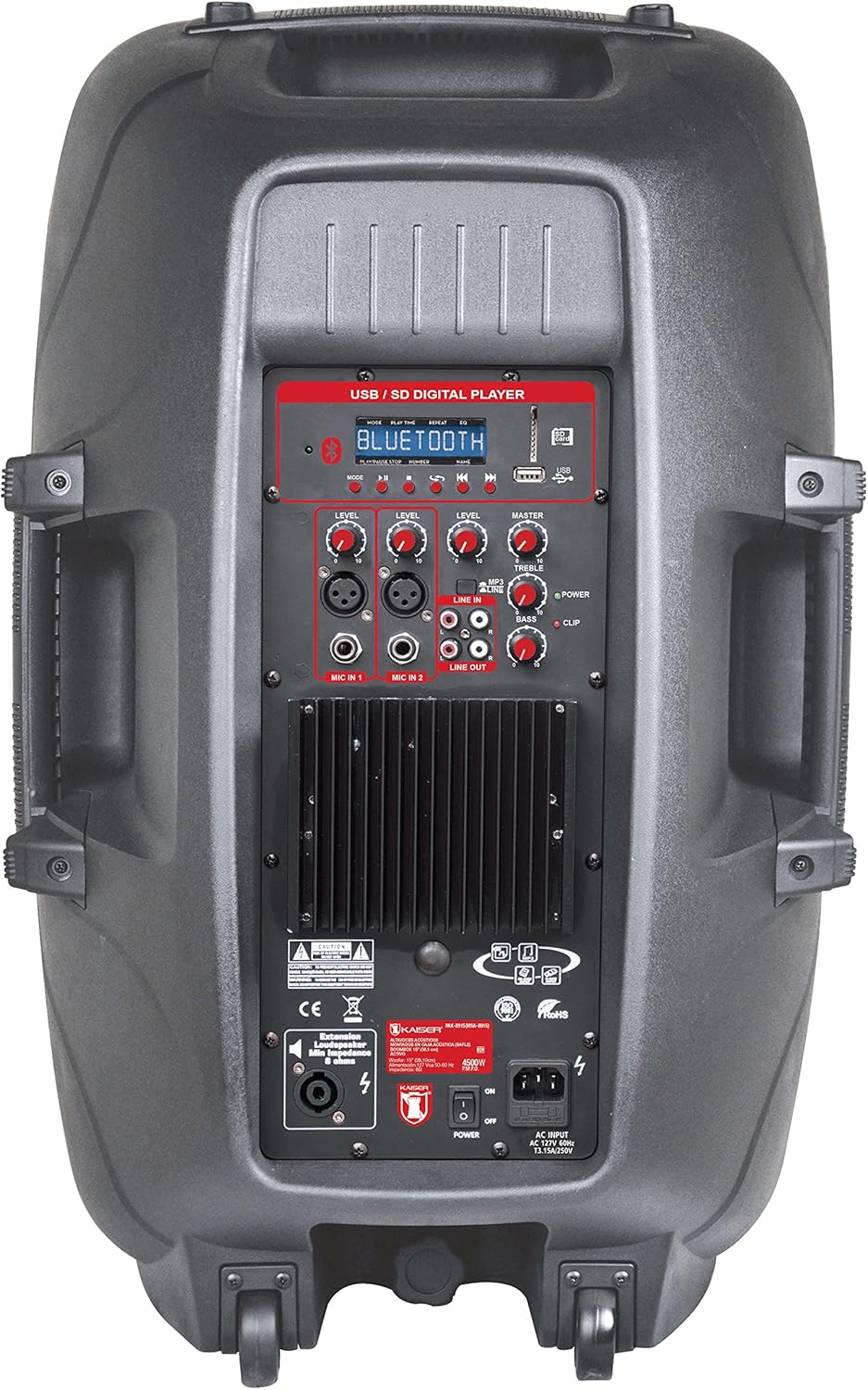
Figure 1: Amplified Speaker Rear Control Panel
The amplified speaker's rear panel houses all primary controls and connection ports:
- USB / SD Digital Player: Ports for USB drives and SD cards, along with a display and playback controls.
- Bluetooth Module: For wireless audio streaming.
- Level Knobs: Adjust input levels for MIC 1, MIC 2, LINE IN, and MASTER volume.
- Tone Controls: Knobs for TREBLE and BASS adjustment.
- Microphone Inputs: Two inputs (Cannon and 6.3mm) for connecting microphones.
- Line In (RCA): Stereo RCA inputs for connecting external audio devices.
- Line Out: RCA output to connect to another amplified speaker or audio system.
- Speaker Output: Speakon connector for connecting the passive speaker.
- Power Switch: On/Off switch for the unit.
- AC Input: For connecting the power cable.
- Clip Indicator: Lights up when the audio signal is clipping (distorting).
Passive Speaker Rear Panel

Figure 2: Passive Speaker Rear Panel
The passive speaker features simple input and output connections:
- Input: Speakon input for connection from the amplified speaker.
- Output: Speakon output for daisy-chaining to another passive speaker (if applicable).
Remote Control
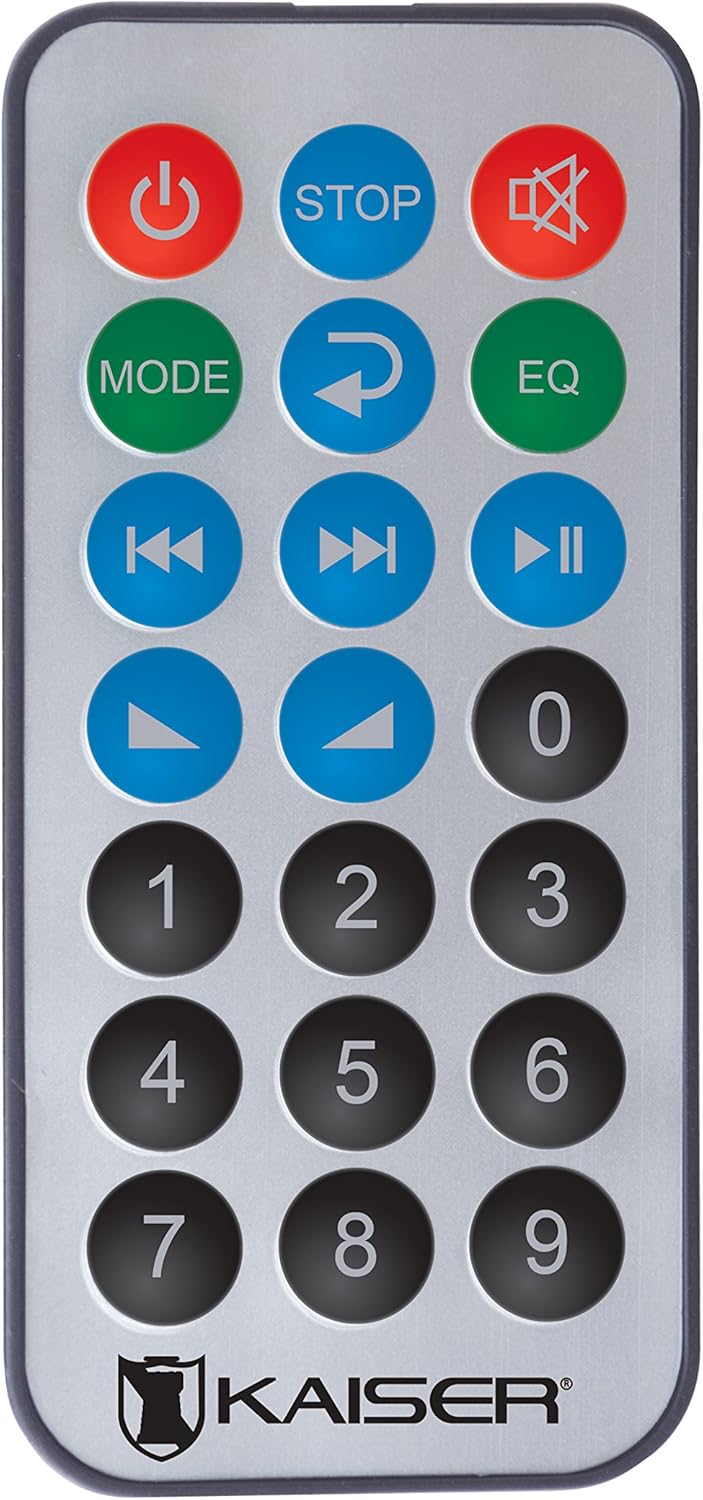
Figure 3: Remote Control
The remote control provides convenient access to various functions:
- Power Button: Turns the unit On/Off.
- STOP: Stops playback.
- Mute: Mutes/unmutes the sound.
- MODE: Switches between input modes (Bluetooth, USB, SD, FM, RCA).
- Repeat: Repeats the current track or playlist.
- EQ: Selects equalizer presets.
- Previous/Next Track: Skips to the previous or next track.
- Play/Pause: Starts or pauses playback.
- Volume Up/Down: Adjusts the master volume.
- Numeric Keypad: For direct track selection or FM station tuning.
Setup
- Placement: Position the amplified and passive speakers in your desired location. The amplified speaker has handles and wheels for transport. Both speakers can be mounted on a stand using the rear knob on the amplified speaker.
- Connect Passive Speaker: Use the provided speaker cable to connect the "Speaker Output" on the amplified speaker's rear panel to the "Input" on the passive speaker's rear panel. Ensure a secure connection.
- Power Connection: Connect the power cable to the AC input on the amplified speaker and then plug it into a suitable power outlet.
- Initial Power On: Ensure all volume knobs are set to minimum before turning on the power switch.
Operating Instructions
Power On/Off
Flip the "POWER" switch on the rear panel of the amplified speaker to turn the system on or off. You can also use the power button on the remote control.
Selecting Input Mode
Press the "MODE" button on the control panel or remote control to cycle through available input sources: Bluetooth, USB, SD, FM Radio, and RCA Line In.
Bluetooth Connection
- Switch the speaker system to Bluetooth mode using the "MODE" button. The display will show "Bluetooth" or a similar indicator.
- On your mobile device (smartphone, tablet, etc.), enable Bluetooth and search for available devices.
- Select "Kaiser PAK-8915" or a similar name from the list of devices.
- Once paired, you will hear a confirmation sound, and your device will show a connected status. You can now stream audio wirelessly from up to 30 meters away.
USB/SD Playback
- Insert a USB flash drive or SD card containing audio files into the respective port on the amplified speaker's rear panel.
- The system should automatically switch to USB or SD mode and begin playback. If not, press the "MODE" button to select the correct source.
- Use the playback controls (Play/Pause, Previous/Next, Stop) on the speaker panel or remote control to manage your music.
RCA Line In Connection
Connect an external audio device (e.g., DVD player, TV, computer) to the "LINE IN" RCA ports on the amplified speaker using an RCA cable. Select "LINE IN" mode using the "MODE" button.
Microphone Usage
Plug your microphone(s) into the "MIC IN 1" (Cannon) or "MIC IN 2" (6.3mm) ports. Adjust the individual "MIC LEVEL" knobs to control the microphone volume. Ensure the MASTER volume is also adjusted appropriately.
FM Radio
Switch to FM Radio mode using the "MODE" button. The system will automatically scan and store available stations. Use the Previous/Next track buttons to navigate between stations or the numeric keypad on the remote for direct tuning.
Volume and Tone Adjustment
Use the "MASTER" volume knob to control the overall output volume. Adjust the "BASS" and "TREBLE" knobs to fine-tune the audio's low and high frequencies. Individual input levels (MIC 1, MIC 2, LINE IN) can also be adjusted.
Maintenance
- Cleaning: Disconnect the power before cleaning. Use a soft, dry cloth to wipe the exterior surfaces. Do not use abrasive cleaners, waxes, or solvents.
- Storage: If not in use for an extended period, store the speakers in a cool, dry place, away from direct sunlight and extreme temperatures.
- Ventilation: Regularly check that the ventilation grilles are free from dust and debris to prevent overheating.
Troubleshooting
| Problem | Possible Cause | Solution |
|---|---|---|
| No power | Power cable not connected; Power switch off; Power outlet faulty. | Ensure power cable is securely connected. Turn the power switch ON. Test the power outlet with another device. |
| No sound output | Volume too low; Incorrect input mode selected; Audio source not playing; Passive speaker not connected. | Increase MASTER volume. Select the correct input mode. Ensure the audio source is playing. Verify the passive speaker is correctly connected to the amplified speaker. |
| Bluetooth not connecting | Speaker not in Bluetooth mode; Device too far; Device already connected to another speaker. | Ensure the speaker is in Bluetooth mode. Move your device closer to the speaker (within 30m). Disconnect from other Bluetooth devices. |
| USB/SD not playing | Incorrect file format; USB/SD card corrupted; Speaker not in USB/SD mode. | Ensure audio files are in a compatible format. Try another USB/SD card. Select USB/SD mode. |
| Sound distortion | Volume too high (clipping); Input level too high. | Reduce MASTER volume. Adjust individual input levels (MIC, LINE IN) to prevent the CLIP indicator from lighting up. |
Specifications
| Brand | Mitzu |
| Model | PAK-8915 |
| Amplified Speaker Power | 3500 W PMPO |
| Passive Speaker Power | 3000 W PMPO |
| Woofer Size | 15 inches (38.1 cm) |
| Impedance | 8 Ω |
| Connectivity Technology | Bluetooth, RCA, USB |
| Wireless Technology | Bluetooth |
| Bluetooth Range | Up to 30 meters |
| Audio Output Mode | Stereo |
| Frequency Response | 4 KHz |
| Control Method | Buttons, Remote Control |
| Power Source | Electric Cable |
| Item Weight | 34 Kilograms |
| Recommended Uses | Smartphones, Tablets, Computers, DVD Players, TVs, Surround Sound Systems, Microphones |
Warranty and Support
Specific warranty information for the Mitzu Kaiser PAK-8915 is not provided in this manual. Please refer to the warranty card included with your purchase or contact your retailer for details regarding warranty coverage and terms.
For technical support or service inquiries, please contact the Mitzu customer service department or your authorized dealer. Keep your purchase receipt as proof of purchase.

