1. Introduction
The ABB ATK300 Terminal Lug Kit is designed for secure electrical connections in industrial applications. This kit is specifically engineered for use with ABB A210 to A300 series contactors, facilitating the connection of conductors ranging from 4 AWG to 400 MCM. This manual provides essential information for the safe and correct installation, operation, and maintenance of the ATK300 Terminal Lug Kit.
2. Safety Information
WARNING: Electrical installations should only be performed by qualified personnel. Failure to follow these instructions can result in serious injury or death.
- Always disconnect power before installing or servicing electrical components.
- Use appropriate personal protective equipment (PPE), including insulated gloves and eye protection.
- Ensure all connections are tight and secure to prevent arcing and overheating.
- Verify that the conductor size and type are compatible with the terminal lug kit and the contactor.
- Adhere to all local and national electrical codes and regulations.
3. Package Contents
The ABB ATK300 Terminal Lug Kit typically includes:
- Terminal Lugs (quantity may vary based on specific kit configuration)
- Mounting Hardware (e.g., screws, washers)
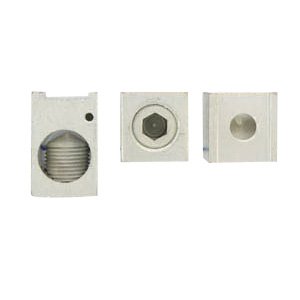
Figure 1: Components of the ABB ATK300 Terminal Lug Kit. This image displays three individual terminal lugs, showcasing their design and connection points.
4. Specifications
| Feature | Detail |
|---|---|
| Model Number | ATK300 |
| Brand | ABB |
| Compatible Contactors | ABB A210 - A300 Series |
| Conductor Size Range | 4 AWG - 400 MCM |
| Terminal Type | Ring Terminal |
| Dimensions (approx.) | 1.1 in Height x 1.05 in Width x 1.7 in Depth |
5. Setup and Installation
Follow these steps for proper installation of the ATK300 Terminal Lug Kit onto your ABB A210 - A300 series contactor:
- Power Disconnection: Ensure that all power to the contactor and associated circuitry is completely disconnected and locked out according to safety procedures. Verify with a voltage tester.
- Identify Connection Points: Locate the appropriate terminal connection points on the ABB A210 - A300 series contactor where the lugs will be installed.
- Prepare Conductors: Strip the insulation from the conductor ends to the length specified by the lug manufacturer or standard electrical practices, ensuring no stray strands. The ATK300 is designed for 4 AWG to 400 MCM conductors.
- Insert Conductor: Insert the prepared conductor fully into the barrel of the terminal lug. Ensure the conductor makes full contact with the lug's internal surface.
- Secure Conductor: Tighten the set screw on the terminal lug using an appropriate hex key or screwdriver. Apply the recommended torque specification (refer to contactor or lug documentation for exact values) to ensure a secure, low-resistance connection. Do not overtighten.
- Mount Lugs to Contactor: Attach the terminal lugs, with conductors secured, to the designated terminals on the A210 - A300 series contactor using the provided mounting hardware. Ensure a firm mechanical and electrical connection.
- Verify Connections: Visually inspect all connections for proper seating, tightness, and absence of exposed conductor strands.
- Restore Power: Once all connections are verified and secure, restore power to the system.
6. Operating Instructions
The ABB ATK300 Terminal Lug Kit is a passive component designed to facilitate electrical connections. Once properly installed as per Section 5, its operation is integrated with the contactor it serves. No specific operational steps are required for the lug kit itself beyond ensuring secure and correctly torqued connections.
7. Maintenance
Regular inspection of the terminal lug connections is recommended to ensure long-term reliability and safety.
- Periodic Inspection: Periodically check the tightness of all lug screws and mounting hardware, especially in environments subject to vibration or significant temperature fluctuations.
- Visual Check: Look for any signs of overheating (discoloration), corrosion, or physical damage to the lugs or conductors.
- Cleaning: If necessary, clean the lugs and surrounding areas with a dry, non-abrasive cloth. Ensure power is disconnected before cleaning.
- Replacement: Replace any damaged or corroded lugs immediately.
8. Troubleshooting
Most issues related to terminal lugs stem from improper installation or environmental factors. Always disconnect power before attempting any troubleshooting.
| Problem | Possible Cause | Solution |
|---|---|---|
| Overheating at connection point | Loose connection, incorrect conductor size, corrosion, excessive current. | Disconnect power. Re-tighten screws to specified torque. Verify conductor size is within 4 AWG - 400 MCM range. Clean or replace corroded lugs. Check system load. |
| Intermittent electrical contact | Loose conductor in lug, lug not securely mounted to contactor. | Disconnect power. Ensure conductor is fully inserted and set screw is tight. Verify lug mounting screws are secure. |
| Physical damage to lug | Overtightening, impact, environmental stress. | Disconnect power. Replace the damaged lug. Ensure proper torque is applied during installation. |
9. Warranty and Support
For specific warranty information and technical support regarding the ABB ATK300 Terminal Lug Kit, please refer to the official ABB documentation provided with your purchase or visit the official ABB website. Contact ABB customer service for assistance with product inquiries, troubleshooting, or replacement parts.
ABB Official Website: www.abb.com


