
DJI Phantom 3 Advanced
DJI Phantom 3 Advanced ADV Drone - New Vision Positioning Module (Part 36)
Instruction Manual
Model: Phantom 3 Advanced Vision Positioning Module
1. Introduction
This manual provides essential information for the installation, operation, and maintenance of the DJI Phantom 3 Advanced Vision Positioning Module (Part 36). This module is a critical component designed to enhance the stability and safety of your DJI Phantom 3 Advanced drone, particularly during indoor flights or in environments with weak GPS signals. It utilizes ultrasonic sensors and a camera to detect ground patterns and altitude, allowing for precise hovering and flight control at low altitudes.
2. Product Overview
The Vision Positioning Module consists of a circuit board with integrated ultrasonic sensors and a downward-facing camera, housed within a protective plastic casing. It is designed as a direct replacement or upgrade part for the DJI Phantom 3 Advanced drone.

Image 1: Top view of the DJI Phantom 3 Vision Positioning Module, showing the circuit board with sensors and the detached white protective cover.

Image 2: Bottom view of the DJI Phantom 3 Vision Positioning Module, displaying the underside of the circuit board and the detached white protective cover.

Image 3: Angled view of the DJI Phantom 3 Vision Positioning Module, showing the circuit board separated from its white casing.
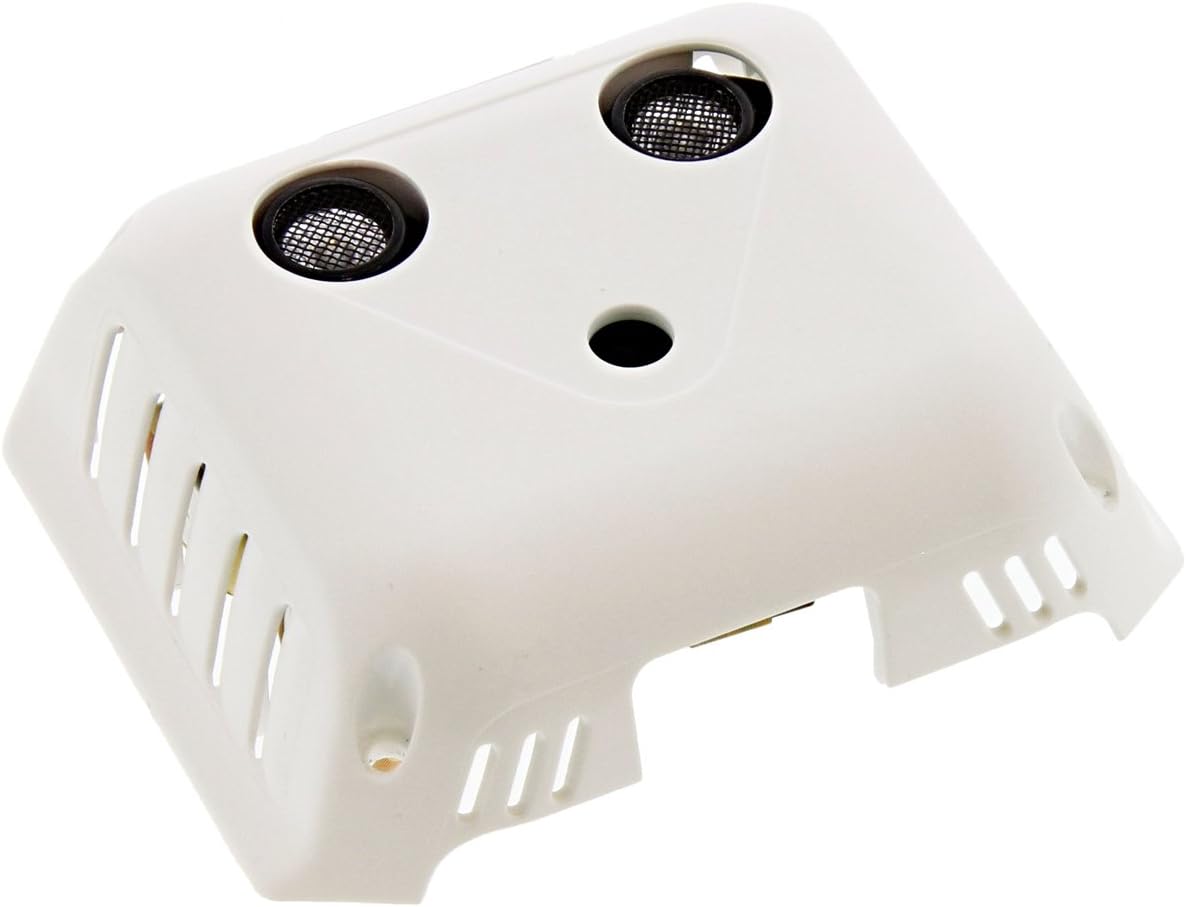
Image 4: Assembled view of the DJI Phantom 3 Vision Positioning Module, with the circuit board securely placed within its white protective casing.
3. Setup and Installation
This Vision Positioning Module is a replacement part. Installation requires careful handling and basic technical knowledge. It is recommended to consult the full DJI Phantom 3 Advanced service manual or a qualified technician for detailed installation procedures.
General Installation Steps:
- Power Off Drone: Ensure the DJI Phantom 3 Advanced drone is completely powered off and the battery is removed before beginning any installation.
- Access Module Compartment: Carefully open the drone's lower shell to access the Vision Positioning Module compartment. This may involve removing screws and gently separating plastic components.
- Disconnect Old Module: Disconnect the ribbon cable and any other connectors from the existing Vision Positioning Module.
- Remove Old Module: Carefully unmount and remove the old module from its position.
- Install New Module: Place the new Vision Positioning Module into the designated slot, ensuring proper alignment.
- Connect Cables: Reconnect the ribbon cable and any other necessary connectors to the new module. Ensure connections are secure and properly seated.
- Reassemble Drone: Carefully reassemble the drone's lower shell, ensuring all screws are tightened appropriately and no cables are pinched.
- Firmware Update (if necessary): After installation, connect the drone to the DJI GO app. The app may prompt for a firmware update to ensure compatibility with the new module. Follow on-screen instructions.
4. Operation
The Vision Positioning Module operates automatically when enabled in the DJI GO app and when environmental conditions are suitable. It is primarily active at low altitudes (typically below 3 meters) and in well-lit environments.
Key Operational Aspects:
- Automatic Activation: The system automatically engages when the drone is flying at low altitudes and detects sufficient ground patterns.
- Indoor Stability: Provides enhanced hovering precision and stability indoors or in areas where GPS signals are weak or unavailable.
- Altitude Hold: Assists in maintaining a stable altitude by using ultrasonic sensors to measure distance to the ground.
- Ground Pattern Recognition: The downward-facing camera analyzes ground patterns to detect horizontal movement and maintain position.
Conditions for Optimal Performance:
- Sufficient Lighting: Requires adequate light for the camera to detect ground patterns effectively.
- Textured Surface: Performs best over surfaces with clear, discernible patterns (e.g., carpet, concrete with markings). Avoid flying over uniform surfaces like plain white floors or water.
- Altitude: Most effective at altitudes between 0.3 and 3 meters (1 to 10 feet).
- Clean Sensors: Ensure the camera lens and ultrasonic sensors are clean and free from obstructions.
5. Maintenance
Proper maintenance of the Vision Positioning Module ensures its longevity and optimal performance.
- Keep Sensors Clean: Regularly inspect and gently clean the camera lens and ultrasonic sensor surfaces using a soft, dry, lint-free cloth. Avoid using abrasive materials or harsh chemicals.
- Avoid Physical Damage: Protect the module from impacts and drops, especially during installation or when the drone is being transported.
- Proper Storage: When not in use, store the drone in a clean, dry environment, away from extreme temperatures and direct sunlight.
- Check Connections: Periodically verify that the module's cable connections are secure and free from corrosion.
6. Troubleshooting
If you experience issues with the Vision Positioning Module, refer to the table below for common problems and their solutions.
| Issue | Possible Cause | Solution |
|---|---|---|
| Vision Positioning System (VPS) not active or unstable. | Insufficient lighting, uniform ground surface, altitude too high, dirty sensors, loose connection. | Ensure adequate lighting. Fly over textured surfaces. Maintain altitude below 3 meters. Clean camera lens and ultrasonic sensors. Check module connections. |
| Drone drifts indoors despite VPS being active. | Poor ground texture, strong air currents, module calibration issue. | Fly over surfaces with more distinct patterns. Avoid strong drafts. Perform IMU calibration via the DJI GO app. |
| Error message related to VPS in DJI GO app. | Module malfunction, firmware incompatibility. | Restart the drone and app. Ensure drone firmware is up to date. If the issue persists, the module may require replacement or professional inspection. |
7. Specifications
Key technical specifications for the DJI Phantom 3 Advanced Vision Positioning Module:
| Feature | Detail |
|---|---|
| Brand | DJI |
| Model Name | Phantom 3 Advanced (Vision Positioning Module) |
| Item Weight | Approximately 22.68 g (0.8 ounces) |
| Material | Plastic, Electronic Components |
| Optical Sensor Technology | CMOS (for camera) |
| Function | Indoor/Low Altitude Positioning and Stability |
| Compatibility | DJI Phantom 3 Advanced Drone |
8. Warranty and Support
For warranty information regarding your DJI Phantom 3 Advanced Vision Positioning Module, please refer to the original purchase documentation or contact the vendor from whom you acquired the product. DJI's official website also provides detailed warranty policies for their products.
For technical support, firmware updates, or further assistance, please visit the official DJI support website or contact DJI customer service directly. Ensure you have your product's serial number and purchase details ready when seeking support.