
Introduction
This manual provides detailed instructions for the setup, operation, and maintenance of your iLuv AUD Air WiFi and Bluetooth Portable Multi-Room Speaker. The AUD Air speaker is designed to deliver high-quality audio with versatile wireless connectivity options, including both Wi-Fi and Bluetooth, and supports multi-room audio configurations.
Product Overview
The iLuv AUD Air speaker combines advanced audio technology with flexible wireless streaming capabilities. Key features include:
- Multi-Room Audio: Connect multiple AUD Air speakers to create a synchronized audio system throughout your home.
- Dual Wireless Connectivity: Seamlessly switch between Wi-Fi for high-fidelity streaming and Bluetooth for portable use.
- Dedicated Control App: Manage your speaker settings, music playback, and multi-room configurations via a free app for iOS and Android devices.
- jAura Sound Technology: Engineered for a balanced audio experience across high, middle, and low frequencies.
- Versatile Music Sources: Stream from internet radio, popular streaming services, or your personal music library.
Speaker Components
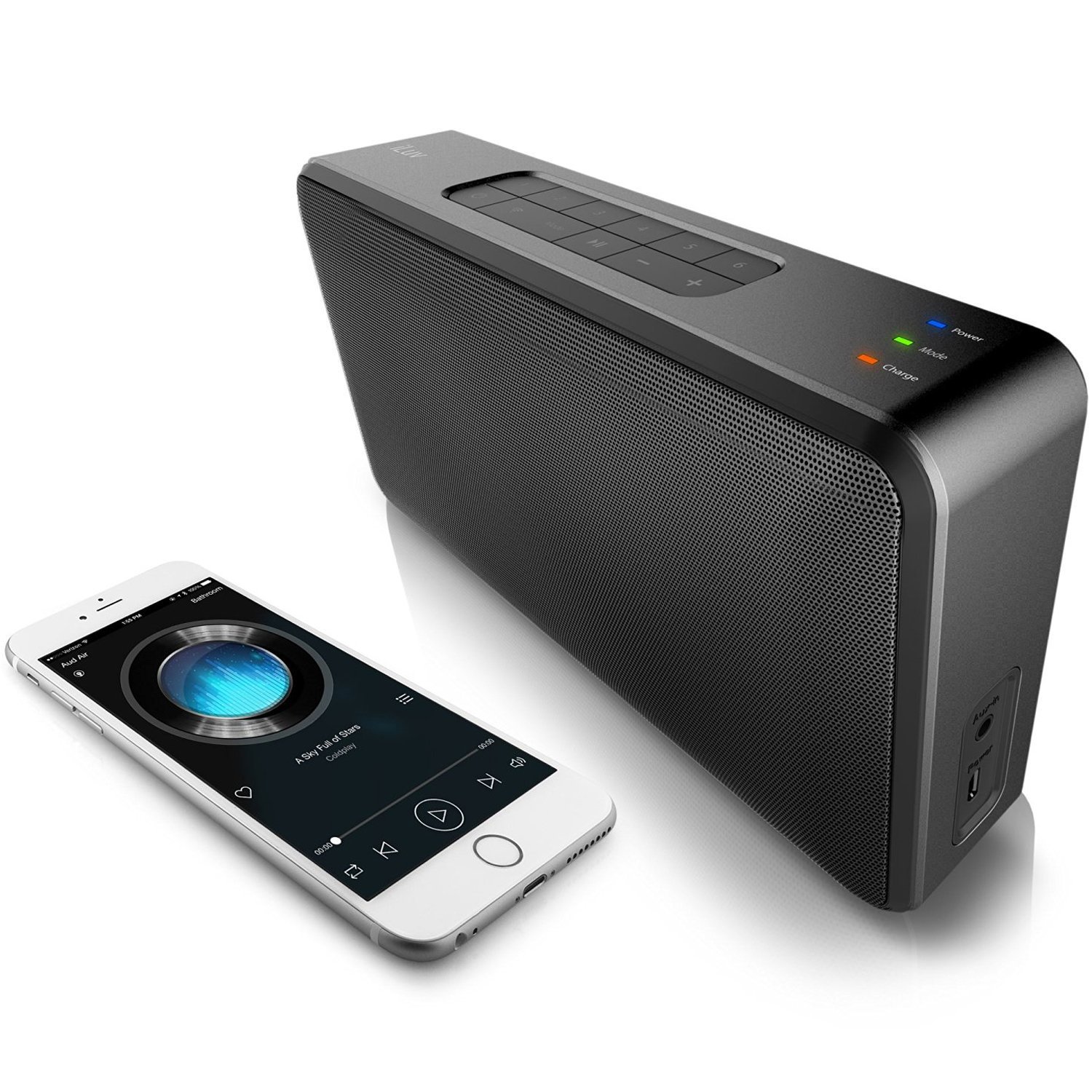
Figure 1: iLuv AUD Air speaker and smartphone.
The image above displays the iLuv AUD Air portable speaker in black, positioned next to a white smartphone. The speaker features a perforated metal grille on its front for sound output. On its right side, visible ports include an Aux-in port for wired audio connections and a Power port for charging or continuous power supply. The smartphone screen displays a music application with a playlist, illustrating the wireless control capability.
Setup
1. Initial Power On
- Connect the speaker to a power source using the provided power adapter.
- Press the Power button to turn on the speaker.
2. App Installation
For full functionality, including Wi-Fi setup and multi-room control, download the free iLuv AUD Air controller app.
- Search for "iLuv AUD Air" in your device's app store (Apple App Store for iOS, Google Play Store for Android).
- Install the app on your smartphone or tablet.
3. Wi-Fi Connection
- Open the iLuv AUD Air app.
- Follow the on-screen instructions within the app to connect your speaker to your home Wi-Fi network. This typically involves selecting your Wi-Fi network and entering the password.
4. Bluetooth Connection
If Wi-Fi is not available or preferred, you can connect via Bluetooth.
- Ensure the speaker is powered on and not currently connected via Wi-Fi. The speaker will automatically switch to Bluetooth mode if out of Wi-Fi range.
- On your mobile device, go to Bluetooth settings and enable Bluetooth.
- Select "AUD Air" from the list of available devices to pair.
Operating Instructions
Music Playback
- Via Wi-Fi (Recommended): Use the iLuv AUD Air app to select music from internet radio, streaming services (e.g., Spotify, Apple Music, Pandora), or your device's local music library. The app allows for volume control and playback management.
- Via Bluetooth: Once paired, play audio directly from any application on your Bluetooth-connected device.
- Via Aux-in: Connect an audio device directly to the Aux-in port on the speaker using a 3.5mm audio cable (not included).
Multi-Room Listening
With multiple AUD Air speakers connected to the same Wi-Fi network, you can create a multi-room audio experience:
- Open the iLuv AUD Air app.
- The app will detect all connected AUD Air speakers.
- Group speakers to play the same music simultaneously or assign different music to individual speakers.
- You can also configure two speakers to act as a stereo pair (one for left channel, one for right channel) for an enhanced soundstage.
Maintenance
Proper maintenance ensures the longevity and optimal performance of your iLuv AUD Air speaker.
- Cleaning: Use a soft, dry cloth to wipe the exterior of the speaker. Do not use liquid cleaners or aerosols directly on the speaker.
- Storage: Store the speaker in a cool, dry place away from direct sunlight and extreme temperatures when not in use for extended periods.
- Battery Care: For models with rechargeable batteries, avoid fully discharging the battery frequently. Charge the speaker regularly to maintain battery health.
- Environmental Conditions: Avoid exposing the speaker to moisture, rain, or excessive dust. This product is not waterproof.
Troubleshooting
If you encounter issues with your iLuv AUD Air speaker, refer to the following common solutions:
- No Power:
- Ensure the power adapter is securely connected to both the speaker and a working power outlet.
- Verify the power outlet is functional.
- If battery-powered, ensure the battery is charged.
- No Sound:
- Check the volume level on both the speaker and your connected device/app.
- Ensure the correct input source (Wi-Fi, Bluetooth, Aux-in) is selected.
- If using Bluetooth, ensure the speaker is paired and connected to your device.
- If using Wi-Fi, verify the speaker is connected to your network and the app is functioning correctly.
- Cannot Connect to Wi-Fi:
- Ensure your Wi-Fi network is active and within range.
- Double-check the Wi-Fi password entered in the app.
- Restart your router, smartphone, and the AUD Air speaker, then attempt connection again.
- Ensure your speaker's firmware is up to date via the app.
- Bluetooth Pairing Issues:
- Ensure the speaker is in Bluetooth pairing mode (usually indicated by a flashing LED).
- Disable and re-enable Bluetooth on your mobile device.
- Forget "AUD Air" from your device's Bluetooth list and attempt to pair again.
- Ensure no other devices are actively connected to the speaker via Bluetooth.
- Multi-Room Playback Problems:
- Verify all AUD Air speakers are connected to the same Wi-Fi network.
- Ensure the iLuv AUD Air app is updated to the latest version.
- Check network stability and bandwidth, especially if streaming high-quality audio to multiple speakers.
Specifications
| Feature | Detail |
|---|---|
| Model Number | AUDAIRULBK |
| Connectivity Technology | Bluetooth, Wi-Fi |
| Audio Output Mode | Mono (can be configured for stereo pairing) |
| Maximum Speaker Power Output | 50 Watts |
| Speaker Type | Multi Room |
| Control Method | App, Buttons |
| Power Source | Battery Powered |
| Battery Type | Lithium Ion (1 included) |
| Product Dimensions | 18.8 x 4.83 x 10.92 cm |
| Item Weight | 5 g (Note: This weight seems unusually low for a speaker of this size; please refer to product packaging for accurate weight.) |
| Color | Black |
| Is Waterproof | No |
Warranty and Support
For warranty information and technical support, please refer to the documentation included with your product packaging or visit the official iLuv website. Keep your proof of purchase for warranty claims.
Manufacturer: iLuv
Brand: I LUV LTD

