Introduction and Overview
The InstallerParts Folding TV Ceiling Mount is designed for versatile installation of televisions and monitors ranging from 17 to 37 inches, supporting up to 44 pounds (20 kg). Its adjustable flip-down and swivel angle features provide maximum flexibility for optimal viewing. This mount is ideal for various settings including kitchens, fitness centers, waiting areas, offices, garages, and RVs, offering a space-saving solution for your display needs.
The mount is VESA compliant, supporting VESA mounting hole patterns from 75x75mm to 200x200mm, ensuring compatibility with a wide range of TV brands such as Samsung, LG, Sony, Vizio, Toshiba, and Insignia.
Product Features
- Compatibility: Fits most 17" to 37" LCD/LED flat panels up to 44 lbs (20 kg).
- VESA Compliance: Meets VESA Mounting Interface Standards (MIS) with patterns from 75x75mm to 200x200mm.
- Adjustability: Tilts up to 90° downwards for wide range of motion.
- Adjustable Height: Extends from 10.6" (270mm) to 15.7" (400mm) from the ceiling.
- Swivel Angle: Up to 30° swivel for perfect screen viewing angle.
- Durable Construction: Made from high-quality, lightweight aluminum.
- Easy Installation: Includes full mounting hardware and a slide-in VESA plate for quick setup.
Specifications
| Brand | InstallerParts |
| Model Number | 15387 |
| TV Size Compatibility | 17" - 37" |
| Weight Capacity | 44 lbs (20 kg) |
| VESA Compatibility | 75x75mm to 200x200mm |
| Arm Length (from ceiling) | 10.6" (270mm) to 15.7" (400mm) |
| Tilt Angle | Up to 90° downwards |
| Swivel Angle | Up to 30° |
| Color | Black |
| Material | Aluminum |
| Product Dimensions | 13.2 x 9.1 x 3.6 inches |
| Item Weight | 3.6 pounds |
What's in the Box (Unboxing)
Upon opening the package, carefully inspect all components to ensure everything is present and undamaged. The box should contain the main folding ceiling mount assembly, various screws, washers, and other mounting hardware necessary for installation.

Image: All components included in the InstallerParts Folding TV Ceiling Mount package.
Video: Unboxing the InstallerParts Folding TV Ceiling Mount, showing the contents and initial inspection.
Tools Required
Before beginning installation, ensure you have the following tools readily available:
- Power Drill
- 3/16" (4.5mm) Drill Bit
- Metric Socket Wrench
- Blue Tape (Painter's Tape)
- Tape Measure
- Phillips Screwdriver (medium to large, preferably with a long handle)
- Pencil
- Stud Finder
- Level (optional, but recommended for precise alignment)
- Safety Glasses

Image: Essential tools for the installation process.
Video: Overview of tools required for installation, highlighting each item.
Setup and Installation
1. Wall Plate Installation
- Identify Mounting Location: Use a stud finder to locate a suitable wood stud or crossbeam in your ceiling. For masonry, refer to the specific instructions provided in your product's manual.
- Position and Mark: Hold the ceiling mount plate against the chosen location. Adjust its position and the arm's direction as desired. Use a pencil to mark the pilot holes for the screws. The mount offers multiple holes; select the ones that best align with your stud/beam and desired angle.
- Pre-Drill Pilot Holes: Using a power drill with a 3/16" (4.5mm) drill bit, pre-drill holes at the marked locations. Drill to a depth of approximately 55mm (2.2 inches).
- Attach Mounting Plate: Insert two screws into the "lock and slide" holes on the mounting plate, leaving them slightly loose. Carefully slide the mount onto the pre-drilled holes, ensuring the screws engage properly. Once the mount is hanging securely, insert the remaining screw into the third hole.
- Tighten Screws: Fully tighten all three screws to secure the mounting plate firmly to the ceiling. Ensure the mount is stable and does not wobble.

Image: The ceiling mount in its open position, ready for attachment to a ceiling beam.
Video: Detailed steps for installing the wall plate onto a wooden stud, including marking, pre-drilling, and securing the mount.
2. Bracket Installation (on TV)
- Select Proper Screws: Identify the correct screws from the provided hardware that fit the VESA mounting holes on the back of your TV. Test the depth to ensure they do not bottom out. If necessary, add washers to achieve a snug fit.
- Align and Attach Bracket: Align the TV mounting bracket with the VESA holes on the back of your TV. Secure the bracket using the selected screws. Ensure all screws are tightened firmly, as they will support the entire weight of the TV.

Image: Choosing the correct screws and washers for your TV's VESA mounting holes.
Video: Instructions for attaching the mounting bracket to the back of your television, including screw selection and tightening.
3. Hanging the TV
- Hook TV onto Mount: Carefully lift the TV with the attached bracket. Align the two small holes on the TV bracket with the corresponding hooks on the ceiling mount's arm. Gently lower the TV until it securely hangs on the hooks.
- Secure TV to Mount: Once the TV is hanging, insert the two Allen screws into the designated holes on the hanging arm to secure the TV in place. Tighten these screws using the provided Allen wrench.
- Adjust Slide (Optional): The mount allows for vertical adjustment of the TV along the rail. If desired, adjust the TV's height by sliding it up or down the rail before fully tightening the Allen screws.
- Final Tightening: Ensure all four Allen screws on the hanging arm are fully tightened to prevent any movement.
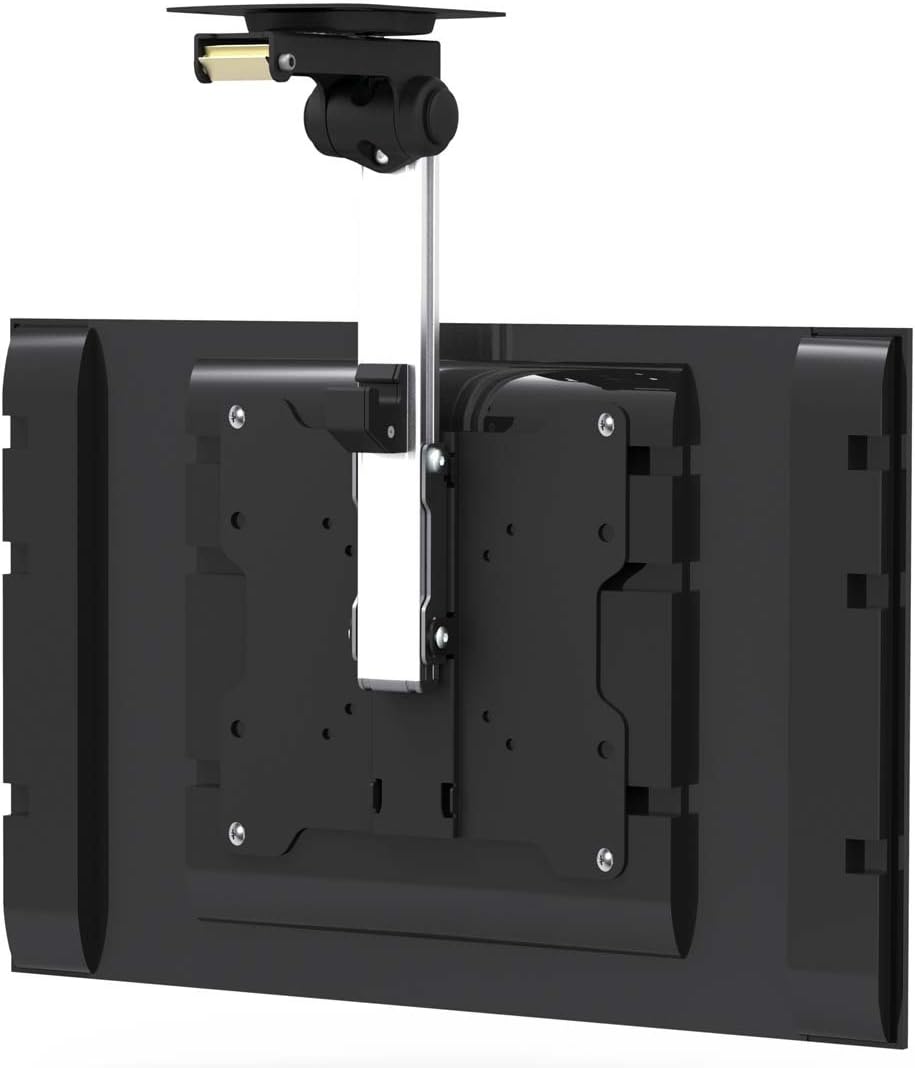
Image: The TV securely attached to the ceiling mount, demonstrating its compact folded position.
Video: Instructions on how to hang the TV onto the installed ceiling mount, secure it, and perform final adjustments.
Operating Instructions
The InstallerParts Folding TV Ceiling Mount offers easy operation for optimal viewing:
- Flip Down/Up: To lower the TV for viewing, gently pull it down until it clicks into the desired viewing position. To fold it back up against the ceiling for storage or to save space, push it upwards until it latches securely.
- Swivel Adjustment: The mount allows for up to 30° of swivel. Gently rotate the TV left or right to achieve your preferred viewing angle. Ensure the swivel mechanism is not overly tight or loose; adjust the nuts on the mount's arm if necessary.
Image: The mount demonstrating its full extension and swivel capabilities.
Maintenance
To ensure the longevity and safe operation of your InstallerParts Folding TV Ceiling Mount, follow these maintenance guidelines:
- Regular Inspection: Periodically check all screws and bolts to ensure they remain tight. Vibrations or frequent adjustments can sometimes loosen fasteners over time.
- Cleaning: Wipe the mount with a soft, dry cloth to remove dust. For stubborn marks, a slightly damp cloth can be used, followed by immediate drying. Avoid abrasive cleaners or solvents.
- Lubrication: If the folding or swivel mechanism becomes stiff, a small amount of silicone-based lubricant can be applied to the moving parts. Avoid oil-based lubricants that may attract dust.
Troubleshooting
If you encounter any issues with your InstallerParts Folding TV Ceiling Mount, consider the following common troubleshooting steps:
- Mount Feels Loose/Wobbly:
- Check all screws securing the mount to the ceiling stud/beam. Tighten any loose fasteners.
- Verify that the screws attaching the TV bracket to the TV are secure.
- Ensure the Allen screws securing the TV to the hanging arm are fully tightened.
- TV Not Level:
- Use a level to check the mount's alignment. Adjust the ceiling screws if necessary.
- Some mounts allow for minor leveling adjustments on the TV bracket itself. Consult the detailed manual if provided.
- Mechanism Stiff/Hard to Move:
- Apply a small amount of silicone lubricant to the pivot points and sliding mechanisms.
- Ensure no cables are snagging or obstructing movement.
- TV Does Not Latch Securely (Folded Up):
- Check for any obstructions preventing the TV from fully engaging the latch.
- Ensure the TV is pushed firmly upwards until a click is heard, indicating it's locked.
If problems persist after attempting these steps, please contact InstallerParts customer support for further assistance.
Warranty and Support
Specific warranty details for the InstallerParts Folding TV Ceiling Mount are not provided in the available product data. For information regarding warranty coverage, returns, or technical support, please refer to the warranty card included with your product or visit the official InstallerParts website.
You may also contact InstallerParts customer service directly for any inquiries or assistance with your product.

