
Important Safety Instructions
Read all instructions before using this air conditioner. Keep this manual for future reference. Your safety and the safety of others are very important. We have provided many important safety messages in this manual and on your appliance. Always read and obey all safety messages.
- Do not use this air conditioner if the power cord is damaged. It must be replaced by the manufacturer, its service agent, or similarly qualified persons to avoid a hazard.
- This appliance is not intended for use by persons (including children) with reduced physical, sensory or mental capabilities, or lack of experience and knowledge, unless they have been given supervision or instruction concerning use of the appliance by a person responsible for their safety.
- Children should be supervised to ensure that they do not play with the appliance.
- Always disconnect the power supply before cleaning or servicing the unit.
- Do not operate the air conditioner with a damaged power cord or plug.
- Do not block the air intake or exhaust openings.
Product Overview
The Frigidaire FFTA1033S1 is a 10,000 BTU wall-mounted air conditioner designed to cool rooms up to 450 square feet. It features multiple operating modes, fan speeds, a remote control with a temperature sensor, and an energy-efficient design.
Unit Components
- Front Grille
- Control Panel
- Air Filter
- Air Discharge Louvers
- Power Cord
- Remote Control
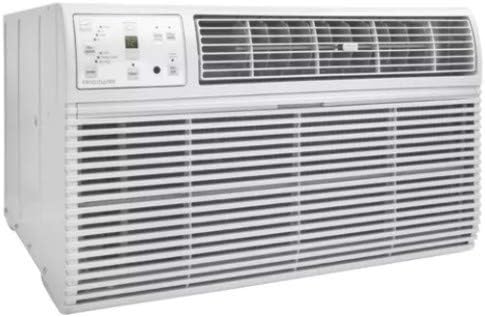
Image: Full view of the Frigidaire FFTA1033S1 Wall Air Conditioner, showing the front grille and control panel.
Control Panel
The control panel allows you to adjust settings directly on the unit. It includes buttons for power, mode, fan speed, timer, sleep, and filter reset, along with temperature adjustment arrows and a digital display.

Image: Close-up of the control panel with buttons for fan speed, mode, timer, sleep, filter reset, and temperature/timer adjustments. The digital display shows '72'.
Setup and Installation
Unpacking
Carefully remove the air conditioner from its packaging. Retain the carton and packing materials for future storage or shipping. Remove any protective film or tape from the unit.
Location Requirements
- Install the unit in a sturdy wall sleeve designed for through-the-wall air conditioners.
- Ensure there is adequate clearance around the unit for proper airflow.
- The unit should be installed slightly tilted outwards to allow for proper condensate drainage.
Electrical Requirements
This unit requires a 115 Volt, 15 Amp, 3-prong grounded outlet. Do not use extension cords or adapter plugs. Ensure the electrical circuit is dedicated to the air conditioner.
Installation Steps
- Prepare the wall sleeve according to the manufacturer's instructions, ensuring it is level and securely mounted.
- Carefully slide the air conditioner into the wall sleeve. Ensure the unit is centered and flush with the wall.
- Secure the unit within the sleeve using the provided mounting hardware.
- Seal any gaps around the unit and sleeve with weatherstripping or caulk to prevent air leakage.
- Plug the power cord into a grounded 115V outlet.
Operating Instructions
Powering On/Off
Press the ON/OFF button on the control panel or remote control to turn the unit on or off.
Setting Temperature
Use the Up (▲) or Down (▼) arrows on the control panel or remote to adjust the desired temperature. The temperature range is typically 62°F (17°C) to 86°F (30°C).
Mode Selection
Press the MODE button to cycle through the available operating modes:
- COOL: For cooling and dehumidifying. The compressor and fan operate.
- FAN ONLY: For air circulation without cooling. The compressor does not operate.
- ENERGY SAVER: The fan will continue to run for a short period after the compressor turns off to circulate air. The fan will cycle on periodically to sense room temperature.
Fan Speed Adjustment
Press the FAN SPEED button to select desired fan speed: Low, Medium, or High. In COOL mode, the fan runs continuously. In FAN ONLY mode, the fan runs at the selected speed.
Timer Function
The timer allows you to set the unit to turn on or off automatically after a set period (1-24 hours). Press the TIMER button, then use the Up (▲) or Down (▼) arrows to set the desired time.
Sleep Mode
Press the SLEEP button to activate sleep mode. In this mode, the set temperature will increase by 2°F (1°C) after 30 minutes and by another 2°F (1°C) after another 30 minutes. The fan will operate at low speed. This mode helps conserve energy and provides comfortable sleeping conditions.
Remote Control Operation
The remote control duplicates most functions of the control panel. It also features a remote temperature sensor, which allows the unit to sense the temperature at the remote's location for more accurate cooling.
Maintenance
Regular maintenance ensures optimal performance and extends the life of your air conditioner. Always disconnect power before performing any maintenance.
Air Filter Cleaning
The air filter should be cleaned every two weeks or more frequently depending on usage. A dirty filter reduces cooling efficiency and airflow.
- Open the front panel of the unit.
- Grasp the filter by its handle and pull it out.
- Wash the filter using warm, soapy water. Rinse thoroughly.
- Allow the filter to dry completely before reinstalling.
- Press the FILTER RESET button on the control panel after cleaning and reinstallation.

Image: Close-up of the air outlet grille, showing the location of the air filter for cleaning.
Cabinet Cleaning
Clean the cabinet with a soft cloth and mild soap or detergent. Do not use harsh cleaners, waxes, or polishes. Ensure no water enters the electrical components.
Winter Storage
If the unit will not be used for an extended period, especially during winter, it is recommended to clean the filter and cover the unit to protect it from dust and debris.
Troubleshooting
Before calling for service, review this list. It may save you time and expense. This list includes common occurrences that are not the result of defective workmanship or materials in this appliance.
| Problem | Possible Cause | Solution |
|---|---|---|
| Unit does not start | No power; circuit breaker tripped; unit unplugged. | Check power supply; reset circuit breaker; ensure unit is securely plugged in. |
| Unit does not cool | Temperature setting too high; dirty air filter; blocked airflow; open windows/doors. | Lower temperature setting; clean air filter; ensure no obstructions; close windows/doors. |
| Unit is noisy | Normal operating sounds (fan, compressor); loose parts. | Some sounds are normal. Check for any loose components or debris. |
| Water dripping outside | Normal condensation. | This is normal during high humidity. Ensure proper drainage tilt. |
Specifications
| Feature | Specification |
|---|---|
| Brand | Frigidaire |
| Model Number | FFTA1033S1 |
| Cooling Power | 10,000 British Thermal Units (BTU) |
| Voltage | 115 Volts |
| Refrigerant | R 410A |
| Item Weight | 80 Pounds |
| Floor Area Coverage | Up to 450 Square Feet |
| Special Feature | Remote Controlled |
| Control Method | Remote Control |
Warranty and Support
This Frigidaire appliance is covered by a limited warranty. For specific warranty details, including coverage periods and terms, please refer to the warranty card included with your product or visit the official Frigidaire website.
For technical assistance, troubleshooting not covered in this manual, or to schedule service, please contact Frigidaire Customer Service. Have your model number (FFTA1033S1) and serial number ready when contacting support.
You can find contact information and additional resources on the official Frigidaire website: www.frigidaire.com


