
BLACK+DECKER HHVI315JO42
BLACK+DECKER dustbuster Cordless Handheld Vacuum
Model: HHVI315JO42
Introduction and Key Features
The BLACK+DECKER dustbuster cordless handheld vacuum (Model HHVI315JO42) offers a balance of portability and cleaning capacity for your home and car. Its design focuses on efficient debris collection and ease of use, featuring a high-capacity dirt bowl, powerful lithium-powered suction, and convenient accessories for various cleaning tasks.

Image: The BLACK+DECKER dustbuster cordless handheld vacuum, showcasing its compact and ergonomic design.
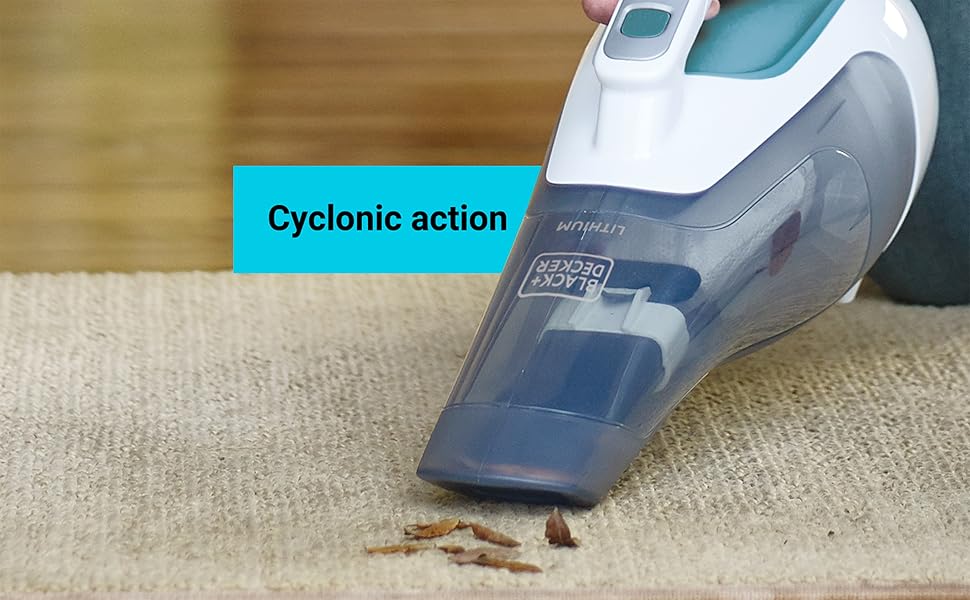
Image: An internal view diagram of the dustbuster, highlighting key features such as the wide mouth, large translucent dirt bowl, and cyclonic action.
Safety Information
Always read and understand all safety warnings and instructions before operating this appliance. Failure to follow the warnings and instructions may result in electric shock, fire, and/or serious injury.
- Do not use the appliance in wet conditions or immerse it in water.
- Do not pick up flammable or combustible liquids, such as gasoline, or use in areas where they may be present.
- Do not pick up anything that is burning or smoking, such as cigarettes, matches, or hot ashes.
- Keep hair, loose clothing, fingers, and all parts of body away from openings and moving parts.
- Use only as described in this manual. Use only manufacturer's recommended attachments.
- Do not charge the unit outdoors.
- Do not operate with a damaged cord or plug. If the appliance is not working as it should, has been dropped, damaged, left outdoors, or dropped into water, return it to a service center.
Package Contents
Your BLACK+DECKER dustbuster Cordless Handheld Vacuum package should include the following items:
- BLACK+DECKER dustbuster Cordless Lithium Hand Vacuum (Model HHVI315JO42)
- Wall-mount charging base
- Crevice tool (integrated)
- Push-in brush (integrated)
Setup
Before first use, ensure the vacuum is fully charged. The unit comes with a wall-mount charging base for convenient storage and charging.
- Charging: Connect the charging base to a power outlet. Place the vacuum onto the charging base. Ensure the vacuum is securely seated for proper charging. The battery is Lithium Ion and is included.
- Initial Charge: Allow the vacuum to charge for at least 10-12 hours before the first use to ensure optimal battery performance.
- Wall Mounting (Optional): The charging base can be mounted to a wall to save space and keep the vacuum accessible. Refer to the separate mounting instructions provided with the charging base for details.

Image: The cordless design of the vacuum, highlighting its portability for easy setup and use anywhere.
Operating Instructions
The BLACK+DECKER dustbuster is designed for quick and efficient cleaning of dry debris.
- Power On/Off: Press the power button located on the handle to turn the vacuum on. Press it again to turn it off.
- Cleaning: Direct the wide mouth of the vacuum towards the debris. The wide mouth design effortlessly scoops up larger debris.
- Using Attachments:
- Crevice Tool: Extend the integrated crevice tool for reaching narrow spaces and tight corners.
- Push-in Brush: Deploy the integrated push-in brush for agitating debris on surfaces like upholstery or carpets, aiding in more thorough cleaning.
- Cyclonic Action: The vacuum utilizes cyclonic action to maintain powerful and consistent suction throughout your cleaning tasks.

Image: A woman using the dustbuster to clean up spills on a hard floor, demonstrating its ease of use for everyday messes.

Image: Close-up view of the vacuum's nozzle on a carpet, illustrating the cyclonic action for effective debris collection.
Maintenance
Regular maintenance ensures optimal performance and longevity of your dustbuster.
- Emptying the Dirt Bowl: The translucent, bagless dirt bowl allows you to see when it's full. To empty, detach the dirt bowl from the main unit. Dispose of collected debris into a trash receptacle.
- Cleaning the Filter: The filter is washable for easy maintenance. Remove the filter from the dirt bowl. Tap off loose dirt. Rinse the filter under running water. Allow the filter to air dry completely before reinserting it into the dirt bowl. Do not use the vacuum without a dry filter.
- Cleaning the Dirt Bowl: The dirt bowl can also be washed with mild soap and water. Ensure it is completely dry before reattaching to the vacuum.

Image: The large, translucent dirt bowl, indicating its capacity and visibility for knowing when to empty.

Image: Hands demonstrating the process of detaching and emptying the dirt bowl, highlighting the easy-off feature.
Troubleshooting
If your BLACK+DECKER dustbuster is not performing as expected, refer to the following common issues and solutions:
| Problem | Possible Cause | Solution |
|---|---|---|
| Vacuum does not turn on. | Battery is not charged. | Place the vacuum on the charging base and ensure it is fully charged. |
| Reduced suction power. | Dirt bowl is full or filter is clogged. | Empty the dirt bowl and clean the filter. Ensure the filter is completely dry before reinserting. |
| Vacuum makes unusual noise. | Debris lodged in nozzle or motor area. | Turn off and unplug the vacuum. Inspect the nozzle and dirt bowl for any obstructions and remove them. |
| Battery does not hold charge. | Battery life cycle reached or improper charging. | Ensure proper charging procedures are followed. If the issue persists, contact customer support for battery replacement options. |
Specifications
| Feature | Detail |
|---|---|
| Brand | BLACK+DECKER |
| Model Name | Black & Decker DustBuster Cordless Lithium Hand Vacuum |
| Model Number | HHVI315JO42 |
| Special Feature | Portable, Lightweight, Bagless |
| Filter Type | Cloth |
| Is Cordless? | Yes |
| Capacity | 40 Liters |
| Wattage | 1.5 milliamp_hours |
| Form Factor | Handheld |
| Color | Blue/Grey/White |
| Product Dimensions | 5.5"L x 13.5"W x 7.5"H |
| Battery Description | Rechargeable Lithium Ion (included) |
| Noise Level | 75 dB |
| Item Weight | 2.11 pounds |
| Country of Origin | China |
Warranty and Support
This BLACK+DECKER dustbuster Cordless Handheld Vacuum comes with a 2-year limited warranty.
For detailed warranty information, troubleshooting, or to contact customer support, please refer to the official user manual or visit the BLACK+DECKER website.
You can also access the User Manual (PDF) online: Official User Manual
Related documentsHHVI315JO42


Ask a question about this manual
Ask about setup, troubleshooting, compatibility, parts, safety, or missing instructions. Manuals+ will review the question and use this page’s manual context to help answer it.