
Introduction
The Winix 5300-2 Air Purifier is designed to improve indoor air quality by capturing various airborne pollutants. This unit is suitable for medium to large living spaces, kitchens, or bedrooms, and features a 3-stage air cleaning system.
Key Features
- True HEPA Filter: Captures 99.97% of airborne pollutants, including dust mites, pet dander, pollen, and other allergens as small as 0.3 microns.
- 3-Stage Air Cleaning System: Effectively removes dust, cigarette smoke, pollen, odors, pet dander, mold spores, and organic chemicals.
- PlasmaWave Technology: Functions as a permanent filter to safely break down odors, allergens, chemical vapors, and other pollutants without producing harmful ozone.
- Smart Sensor & Auto Mode: An integrated air quality sensor monitors the environment and automatically adjusts the fan speed to maintain optimal air purification.
- Sleep Mode: Operates quietly with dimmed indicator lights for night-time use. The unit automatically activates Sleep Mode when the room is darkened and returns to Auto Mode in the presence of light.
- Coverage Area: CADR rated for rooms up to 360 square feet.

Image: Front view of the Winix 5300-2 Air Purifier, showcasing its sleek gray design.
Setup and Filter Installation
- Unpacking: Carefully remove the air purifier from its packaging. Ensure all components are present: the main unit, one True HEPA filter, and four Carbon pre-filters.
- Accessing Filter Compartment: Locate the front panel of the air purifier. Gently pull the panel to open the filter compartment.
- Installing Filters:
- Remove the protective plastic packaging from the True HEPA filter and the Carbon pre-filters.
- Insert the True HEPA filter into the main compartment. Ensure it fits snugly.
- Place the Carbon pre-filters on top of the True HEPA filter. These are designed to trap larger particles and odors.
- Closing the Panel: Securely close the front panel until it clicks into place.
- Placement: Position the air purifier on a flat, stable surface, ensuring adequate clearance around the air intake and outlet for optimal airflow.

Image: Top view of the Winix 5300-2 Air Purifier, showing the control panel and the "Check Filter" indicator light.
Operating Instructions
The control panel is located on the top of the unit. Familiarize yourself with the buttons and indicators for effective operation.
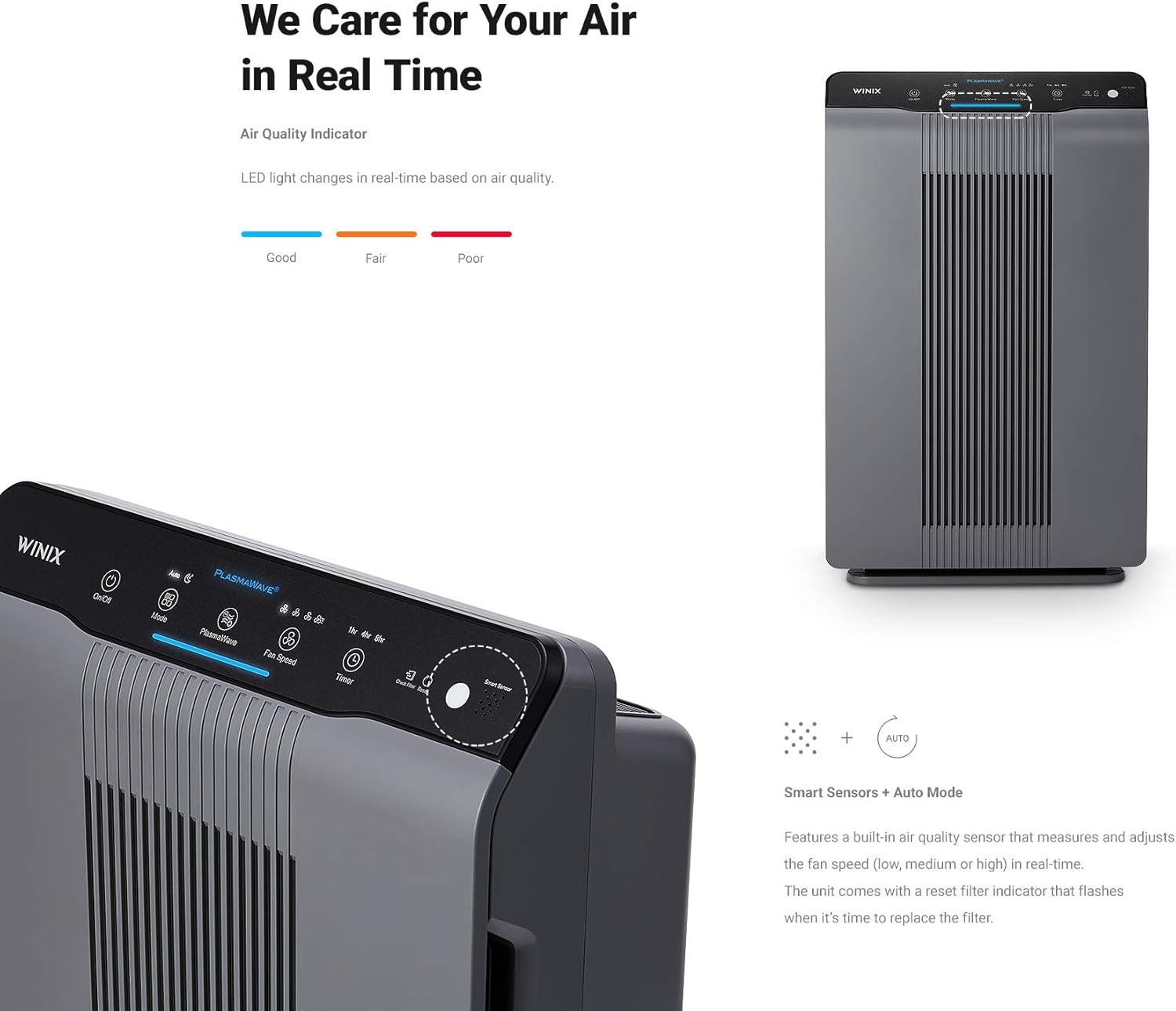
Image: Close-up of the Winix 5300-2 control panel, highlighting the air quality indicator lights (Good, Fair, Poor).
- Power On/Off: Press the On/Off button to turn the unit on or off.
- Mode Selection: Press the Mode button to cycle through operating modes:
- Auto Mode: The air quality sensor detects indoor air quality and automatically adjusts the fan speed.
- Sleep Mode: Operates quietly with dimmed indicator lights for night-time use. The unit automatically activates Sleep Mode when the room is darkened and returns to Auto Mode in the presence of light.
- PlasmaWave: Press the PlasmaWave button to enable or disable the PlasmaWave function. This technology helps break down pollutants at a molecular level.
- Fan Speed: In manual mode, press the Fan Speed button to select desired fan speed (Low, Medium, High, Turbo).
- Timer: Press the Timer button to set the unit to operate for a specific duration (e.g., 1 hour, 4 hours, 8 hours) before automatically turning off.
- Air Quality Indicator: The LED lights on the control panel change color to indicate real-time air quality:
- Blue: Good air quality
- Amber: Fair air quality
- Red: Poor air quality
Maintenance
Regular maintenance ensures optimal performance and extends the lifespan of your air purifier.
- Pre-Filter Cleaning: The washable pre-filter should be cleaned regularly (e.g., every 2-4 weeks, depending on usage and air quality).
- Turn off and unplug the unit.
- Open the front panel and remove the pre-filter.
- Vacuum or rinse the pre-filter with water. Allow it to air dry completely before re-installing.
- Carbon Filter Replacement: The Odor Reducing Carbon filters should be replaced approximately every 3 months, or as indicated by the filter replacement light.
- True HEPA Filter Replacement: The True HEPA filter should be replaced approximately every 12 months, or as indicated by the filter replacement light.
- Resetting Filter Indicator: After replacing a filter, use a small pointed object (like a pen tip) to press the Filter Reset button on the control panel. This will reset the filter replacement timer and turn off the indicator light.
Troubleshooting
If you encounter issues with your Winix 5300-2 Air Purifier, refer to the following common solutions:
- Unit Not Turning On:
- Ensure the power cord is securely plugged into a working electrical outlet.
- Check if the front panel is securely closed. The unit has a safety switch that prevents operation if the panel is open.
- Reduced Airflow or Odor:
- Clean the pre-filter.
- Replace the Carbon filters.
- Replace the True HEPA filter if it's due for replacement.
- Filter Replacement Indicator Remains On After Replacement:
- Ensure the new filter is correctly installed.
- Press and hold the Filter Reset button for a few seconds until the light turns off.
- Unusual Noise:
- Check for any obstructions in the air intake or outlet.
- Ensure filters are properly seated.
Specifications
| Specification | Detail |
|---|---|
| Model Number | 5300-2 |
| Color | Gray |
| Product Dimensions (D x W x H) | 8.2" x 15" x 23.6" |
| Item Weight | 14.8 pounds |
| Floor Area Coverage | 360 Square Feet (CADR rated) |
| Noise Level | 27.8 Decibels (lowest setting) |
| Filter Class | True HEPA, PlasmaWave, Carbon |
| Particle Retention Size | 0.01 Micrometer |
| Certifications | AHAM Certified, CARB Certified, Energy Star Certified |
| Included Components | One 5300-2 Air Purifier unit, one True HEPA Filter, four Carbon Filters |
Warranty and Support
The Winix 5300-2 Air Purifier comes with a one-year limited manufacturer's warranty.
For technical support, warranty claims, or further assistance, please refer to the contact information provided in your product packaging or visit the official Winix website.
Additional Information
No official seller videos were available for embedding in this manual. For visual guides on filter replacement or operation, please consult the manufacturer's official website or support channels.


