
1. Introduction
The AXTON N-A480DSP-ISO19 is a vehicle-specific Plug & Play connection cable designed for seamless integration with AXTON DSP amplifiers in compatible Ford vehicles. This cable simplifies the installation process by providing a direct connection between your vehicle's factory radio harness and your AXTON DSP amplifier, eliminating the need for complex wiring modifications.
Compatible AXTON DSP Amplifiers: A430DSP, A480DSP, A500DSP, A530DSP, A580DSP, A590DSP
Compatible Ford Vehicles: Ford Fiesta, Ford Focus, Ford Explorer
2. Safety Information
- Always disconnect the vehicle's battery before performing any electrical work to prevent short circuits and electrical shock.
- Ensure all connections are secure and properly insulated to avoid electrical hazards.
- Do not modify the cable. Any modifications may void the warranty and create safety risks.
- If you are unsure about any installation steps, consult a qualified car audio technician.
- Keep the cable away from moving parts, sharp edges, and sources of extreme heat or moisture.
3. Package Contents
Please check the package for the following item:
- 1x AXTON N-A480DSP-ISO19 Plug & Play Connection Cable (approx. 1.50 m length)
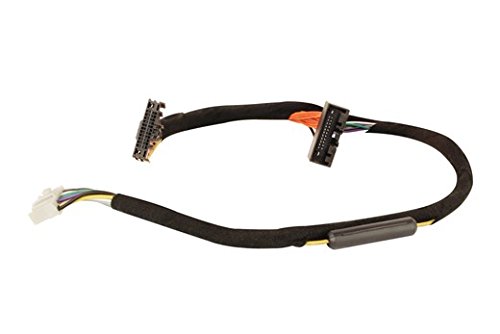
Image showing the AXTON N-A480DSP-ISO19 Plug & Play connection cable, featuring its multi-pin connectors designed for vehicle and amplifier integration.
4. Setup and Installation
Follow these steps for proper installation of the AXTON N-A480DSP-ISO19 connection cable:
- Prepare the Vehicle: Ensure the vehicle's ignition is off and the negative terminal of the battery is disconnected to prevent any electrical issues during installation.
- Access Radio Harness: Carefully remove the vehicle's factory radio or infotainment unit to gain access to the rear connections and the factory wiring harness. Refer to your vehicle's service manual for specific instructions on how to safely remove the radio.
- Connect to Vehicle Harness: Locate the factory radio harness. Connect one end of the AXTON N-A480DSP-ISO19 cable to the corresponding connectors on the vehicle's factory harness. The Plug & Play design ensures a precise fit.
- Connect to DSP Amplifier: Connect the other end of the N-A480DSP-ISO19 cable to the input/output ports of your compatible AXTON DSP amplifier (e.g., A430DSP, A480DSP, A580DSP). Ensure a firm and secure connection.
- Secure Wiring: Route the cable safely, ensuring it is not pinched, stretched, or exposed to sharp edges. Use cable ties if necessary to secure the wiring away from moving parts or heat sources.
- Reassemble and Reconnect: Carefully reassemble the vehicle's radio and trim panels. Reconnect the vehicle's battery.
- Test System: Turn on the vehicle's ignition and test the audio system to ensure proper functionality of the DSP amplifier and sound output.
5. Operating Instructions
The AXTON N-A480DSP-ISO19 cable acts as an interface, facilitating the audio signal and power connection between your Ford vehicle's audio system and the AXTON DSP amplifier. Once correctly installed, the cable requires no further direct operation.
The operation and configuration of your audio system, including sound adjustments and DSP settings, will be managed through your specific AXTON DSP amplifier and its accompanying software or controls. Please refer to the user manual provided with your AXTON DSP amplifier for detailed operating instructions.
6. Maintenance
The AXTON N-A480DSP-ISO19 connection cable is designed for durability and requires minimal maintenance. To ensure optimal performance and longevity:
- Periodic Inspection: Periodically check all connections to ensure they remain secure and free from corrosion.
- Cleanliness: Keep the cable and its connectors clean and free from dust or debris. Use a dry, soft cloth for cleaning.
- Environmental Protection: Avoid exposing the cable to extreme temperatures, direct sunlight for prolonged periods, or excessive moisture.
- Physical Damage: Ensure the cable is not subjected to physical stress, sharp bends, or crushing, which could damage the internal wiring.
7. Troubleshooting
If you encounter issues after installing the AXTON N-A480DSP-ISO19 cable, consider the following troubleshooting steps:
- No Sound Output:
- Verify that all connections between the vehicle harness, the N-A480DSP-ISO19 cable, and the DSP amplifier are firmly seated.
- Ensure the DSP amplifier is receiving power and is turned on. Check its power indicator light.
- Confirm that the vehicle's radio is functioning correctly and outputting an audio signal.
- Refer to your AXTON DSP amplifier's manual for specific troubleshooting related to the amplifier itself.
- Intermittent Sound or Static:
- Check for any loose connections along the cable path.
- Ensure the cable is not routed near sources of electromagnetic interference (e.g., power cables, ignition components).
- Inspect the cable for any visible damage or frayed wires.
- Incorrect Vehicle Compatibility:
- Double-check that your Ford vehicle model and year are listed as compatible with the N-A480DSP-ISO19 cable.
- Ensure your AXTON DSP amplifier model is compatible with this cable.
If problems persist after following these steps, contact AXTON customer support or an authorized dealer for further assistance.
8. Specifications
| Model: | N-A480DSP-ISO19 |
| Part Number: | N-A480DSP-ISO19 |
| Cable Length: | Approx. 1.50 m |
| Compatible AXTON DSPs: | A430DSP, A480DSP, A500DSP, A530DSP, A580DSP, A590DSP |
| Compatible Ford Vehicles: | Fiesta, Focus, Explorer |
| Approximate Package Dimensions: | 20.32 x 15.24 x 10.16 cm |
| Approximate Package Weight: | 340 g |
9. Warranty and Support
For detailed warranty information, terms, and conditions, please refer to the official AXTON website or the documentation provided with your purchase. For technical support, installation assistance, or any other inquiries, please contact your authorized AXTON dealer or visit the AXTON official support channels.