
HTP LED-86+ Wifi (FP1276L4-IV2)
HTP LED-86+ Wifi HD Projector User Manual
Model: LED-86+ Wifi (FP1276L4-IV2)
1. Introduction
Thank you for choosing the HTP LED-86+ Wifi HD Projector. This manual provides essential information for setting up, operating, and maintaining your projector to ensure optimal performance and longevity. Please read this manual thoroughly before using the product and keep it for future reference.
1.1 Key Features
- Native HD 720p (1280x720) resolution, supporting up to 1080p and 4K input.
- 3000 Lumens (International) / 300 Lumens (US) LED lamp with 20,000 hours life.
- Integrated Android 4.2 operating system for smart functionality.
- Multiple connectivity options: 2 x HDMI, 1 x VGA, 1 x component, 1 x AV, 2 x USB, SD Card Slot.
- Built-in speakers for audio output.
- Adjustable digital keystone correction (±15°).
- Projection screen size from 60 to 120 inches.
1.2 Package Contents
- HTP LED-86+ Wifi HD Projector
- Power Cable
- Remote Control
- AV Cable
- User Manual

Image 1.1: The HTP LED-86+ Wifi HD Projector, a black rectangular device with a large lens on the front and control buttons on the top surface.
2. Initial Setup
2.1 Unpacking
Carefully remove the projector and all accessories from the packaging. Inspect all items for any signs of damage. If any items are missing or damaged, contact your retailer immediately.
2.2 Placement
Place the projector on a stable, flat surface. Ensure there is adequate ventilation around the projector to prevent overheating. For optimal viewing, position the projector directly in front of the screen or wall. The ideal projection distance is between 2 to 4.5 meters for a screen size of 60 to 120 inches.

Image 2.1: Front view of the projector, highlighting the large projection lens and front ventilation grilles.
2.3 Power Connection
- Connect the power cable to the projector's power input port.
- Plug the other end of the power cable into a standard electrical outlet (110-240V).
- The power indicator light on the projector should illuminate.
2.4 Connecting Devices
The projector supports various input sources:
- HDMI: Connect Blu-ray players, gaming consoles (XBOX, PlayStation), laptops, or other HDMI-enabled devices using an HDMI cable to one of the HDMI ports.
- VGA: Connect a computer or laptop using a VGA cable to the VGA port.
- AV: Use the included 3-in-1 AV cable to connect older devices like DVD players.
- USB: Insert a USB flash drive into a USB port to play media files directly.
- SD Card: Insert an SD card into the SD card slot to play media files.
2.5 Focus and Keystone Adjustment
After powering on the projector and displaying an image:
- Focus: Rotate the lens ring (manual focus) until the projected image appears sharp and clear.
- Keystone Correction: If the image appears trapezoidal (wider at the top or bottom), use the digital keystone correction feature (usually a dial or button labeled 'Keystone' or 'K') to adjust the image geometry until it is rectangular. The projector supports ±15° digital keystone correction.
3. Operation Guide
3.1 Powering On/Off
- Power On: Press the power button on the projector or the remote control. The power indicator light will change color.
- Power Off: Press the power button again. The projector will go through a shutdown sequence. Do not unplug the power cable until the fan stops running.
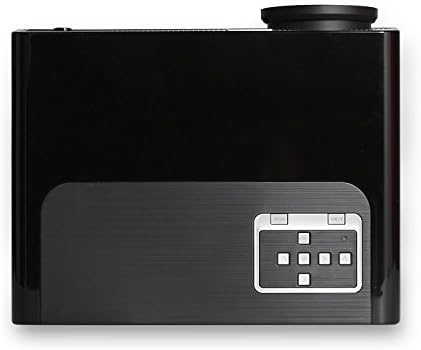
Image 3.1: Top view of the projector, showing the integrated control panel with navigation buttons and power button.
3.2 Input Source Selection
After powering on, use the 'Source' button on the remote control or the projector's control panel to cycle through available input sources (HDMI1, HDMI2, VGA, AV, USB, SD Card, TV).
3.3 Menu Navigation
Use the navigation buttons (up, down, left, right) and 'OK' button on the remote control or projector to navigate through the on-screen display (OSD) menu. Adjust settings such as picture mode, aspect ratio (4:3 or 16:9), sound, and system preferences.
3.4 Android OS Features
The projector runs on Android 4.2, providing smart functionalities. You can access pre-installed applications, browse the internet (via Wi-Fi connection), and potentially download more apps. Navigate the Android interface using the remote control.
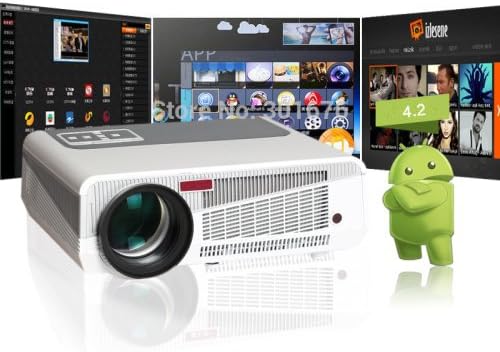
Image 3.2: The projector displaying its Android operating system interface, showing various app icons.
3.5 Media Playback
When a USB drive or SD card is inserted, the projector's built-in media player can play various file formats:
- Video Formats: MOV, H.264, AVI, FLV, RMVB, RM, MPG, M4A, MPEG, DAT, 3GP, VOB, MP4.
- Audio Formats: ACC/ACC+, CD, WAV, WMA, MP3, OGG.
- Picture Formats: JPG, PNG, GIF, BMP, JPEG.

Image 3.3: The projector displaying a vibrant array of movie posters, demonstrating its media playback capabilities.
4. Maintenance
Regular maintenance helps ensure the longevity and optimal performance of your projector.
4.1 Cleaning the Lens
Use a soft, lint-free cloth specifically designed for optical lenses to gently wipe the projector lens. Avoid using abrasive cleaners or excessive force, as this can scratch the lens.
4.2 Ventilation
The projector generates heat during operation. Ensure that the ventilation vents are not blocked. Regularly check and clean the vents to prevent dust buildup, which can impede airflow and lead to overheating.

Image 4.1: Side view of the projector, highlighting the extensive ventilation grilles designed for heat dissipation.
4.3 Lamp Life
The LED lamp in your projector has an estimated life of 20,000 hours. Unlike traditional lamps, it does not require frequent replacement. However, consistent proper ventilation and avoiding sudden power cuts will help maximize its lifespan.
5. Troubleshooting
If you encounter issues with your projector, refer to the following common problems and solutions:
| Problem | Possible Cause | Solution |
|---|---|---|
| No image projected | Power cable disconnected; Incorrect input source; Device not powered on. | Check power connection; Select correct input source; Ensure connected device is on. |
| Image is blurry | Lens out of focus; Projector too close/far from screen. | Adjust the focus ring; Adjust projection distance. |
| Image is trapezoidal | Projector not perpendicular to screen. | Adjust digital keystone correction. |
| No sound | Volume too low; Muted; Audio cable disconnected; Incorrect audio output setting on source device. | Increase volume; Unmute; Check audio connections; Adjust source device audio settings. |
| Remote control not working | Batteries low/dead; Obstruction between remote and projector; Remote sensor blocked. | Replace batteries; Remove obstructions; Ensure remote sensor is clear. |
| Projector overheats and shuts down | Blocked ventilation; Excessive ambient temperature. | Ensure vents are clear; Operate in a well-ventilated area. |
6. Technical Specifications
| Feature | Specification |
|---|---|
| Brand | HTP |
| Model | LED-86+ Wifi (FP1276L4-IV2) |
| Projection Technology | LCD |
| Native Resolution | 720P (1280x720) |
| Supported Resolution | 1080P (1920x1080), 720P (1280x720), 4K input |
| Operating System | Android 4.2 |
| Input Voltage | 110-240V |
| Brightness | 3000 Lumens (International) / 300 Lumens (US) |
| Aspect Ratio | 4:3 and 16:9 |
| Contrast Ratio | 2000:1 |
| OSD Languages | Russian, Portuguese, Italian, Spanish, German, French, Dutch, English, Chinese |
| Projection Screen Size | 60-120 inches |
| Projection Distance | 2-4.5 meters |
| Lens | Manual Focus |
| Video Formats | MOV, H.264, AVI, FLV, RMVB, RM, MPG, M4A, MPEG, DAT, 3GP, VOB, MP4 |
| Audio Formats | ACC/ACC+, CD, WAV, WMA, MP3, OGG |
| Picture Formats | JPG, PNG, GIF, BMP, JPEG |
| Connectors | VGA Port, 3-in-1 AV In, YPbPr, TV, HDMI Input (x2), SD Card Slot, USB (x2) |
| Speakers | Built-in |
| Lamp Type | LED |
| Lamp Life | 20,000 hours |
| Power Consumption | 220W |
| Digital Keystone Correction | ±15° |
| Connectivity Technology | Wired & Wireless (Wifi) |
| Color | Black |
| Dimensions (cm) | 35 x 27 x 15 |
| Net Weight (kg) | 3 kg |
7. Warranty and Support
This product may be an international version and might not include a US warranty. Please refer to the warranty information provided at the time of purchase or contact your retailer for details regarding warranty coverage and support services.
For technical assistance or further inquiries, please contact the customer support channels provided by your point of purchase.
Ask a question about this manual
Ask about setup, troubleshooting, compatibility, parts, safety, or missing instructions. Manuals+ will review the question and use this page’s manual context to help answer it.