
1. Product Overview
The Mount-It! Full Motion TV Wall Mount (Model MI-3991B) is designed to securely hold flat-screen televisions ranging from 26 to 55 inches. This articulating bracket offers versatile viewing options with swivel, tilt, and extension capabilities, allowing you to optimize your viewing experience from various angles in a room. It features a robust alloy steel construction and includes cable management for a tidy installation.

Image: Mount-It! Full Motion TV Wall Mount with a television displaying a frog on a leaf, viewed from an angle.
Key Features:
- Universal TV Mount: Compatible with VESA patterns 75x75mm, 100x100mm, 200x100mm, 200x150mm, 200x200mm, 300x200mm, 300x300mm, 400x200mm, 400x300mm, and 400x400mm.
- Full Motion Capability: Articulating arms allow 90-degree left and right swivel, 15-degree downward tilt, and 10-degree upward tilt.
- Adjustable Rotation: Features 3-degree rotation for post-installation level adjustment.
- Extending Arm: Retracts to 2.5 inches from the wall and extends up to 17 inches.
- Cable Management: Integrated clips on the arms help keep cables organized and out of sight.
- Construction: Made from durable alloy steel.
- Weight Capacity: Supports TVs up to 77 lbs.
2. Installation Guide
This section provides step-by-step instructions for mounting your TV wall bracket and attaching your television. Ensure you have all necessary tools and hardware before beginning. A bubble level is included for accurate installation.
2.1 Mounting the Wall Plate
- Mark Pilot Holes: Use the mounting plate as a template to mark the desired pilot hole locations on your wall. Ensure the location is on a single wall stud for secure installation.
- Drill Pilot Holes: Drill pilot holes at the marked locations. The appropriate drill bit size will depend on your wall material and chosen hardware.
- Insert Hardware: Insert the appropriate hardware (e.g., lag bolts for wood studs, anchors for concrete/brick) into the pilot holes.
- Secure Wall Plate: Attach the wall plate of the mount to the wall using the provided hardware, ensuring it is level and securely fastened.

Image: Technical diagram of the MI-3991B mount showing its components, swivel points, and cable management clips.

Image: The TV mount arm in its compressed position (2.25 inches from wall) and extended position (17 inches from wall).

Image: Detailed dimensions of the Mount-It! TV wall mount components.
2.2 Attaching the TV to the Mount
- Install Mounting Brackets on TV: Attach the vertical mounting brackets to the back of your television using the appropriate screws and spacers for your TV's VESA pattern. Ensure they are securely tightened.
- Hook TV onto Wall Plate: Carefully lift the television and hook the brackets attached to the TV onto the wall plate.
- Secure with Safety Screws: Engage the safety screw bracket locking system to prevent accidental dislodgement of the TV from the mount.
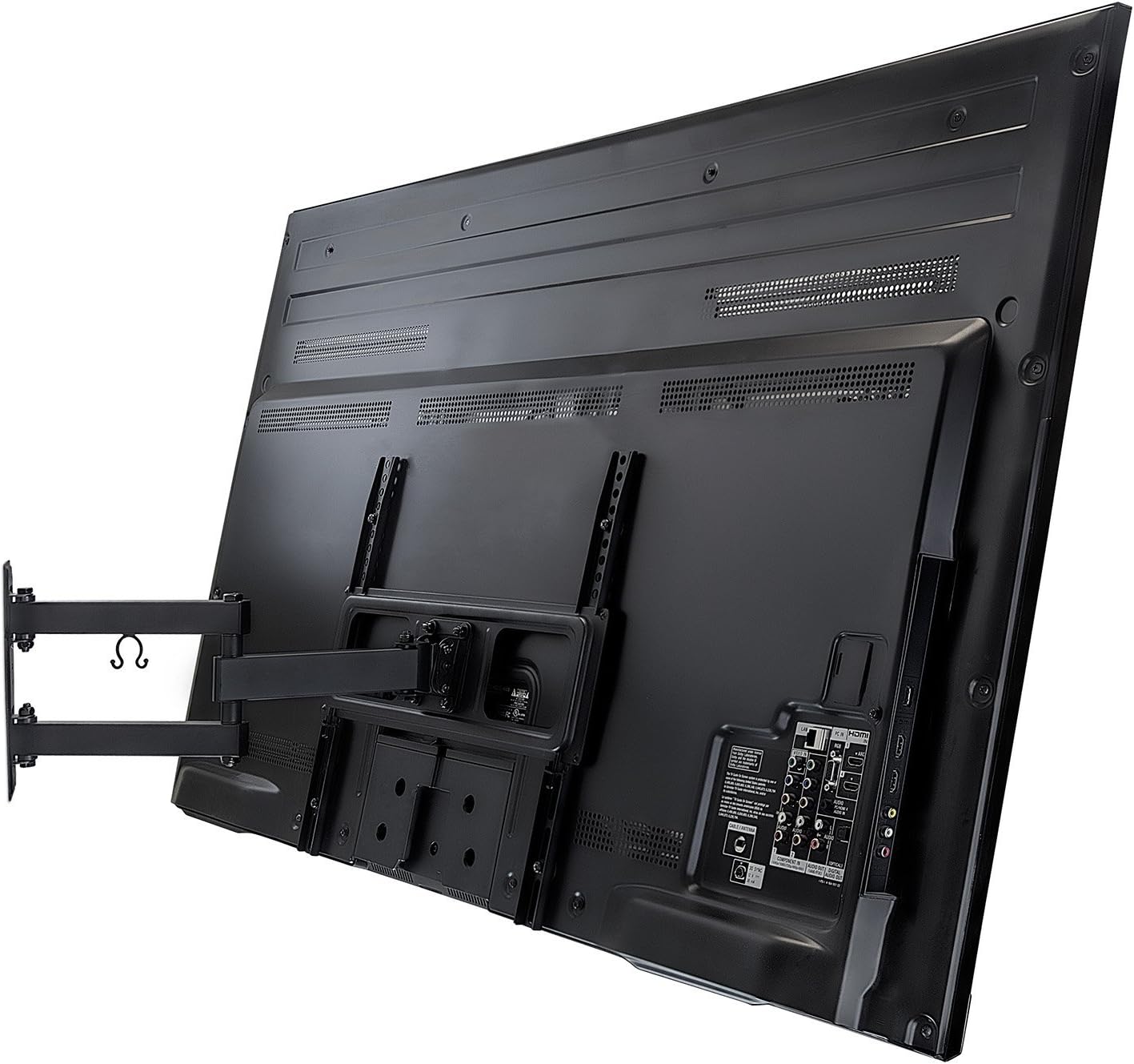
Image: Rear view of a television with the vertical mounting brackets attached, ready to be hung on the wall plate.
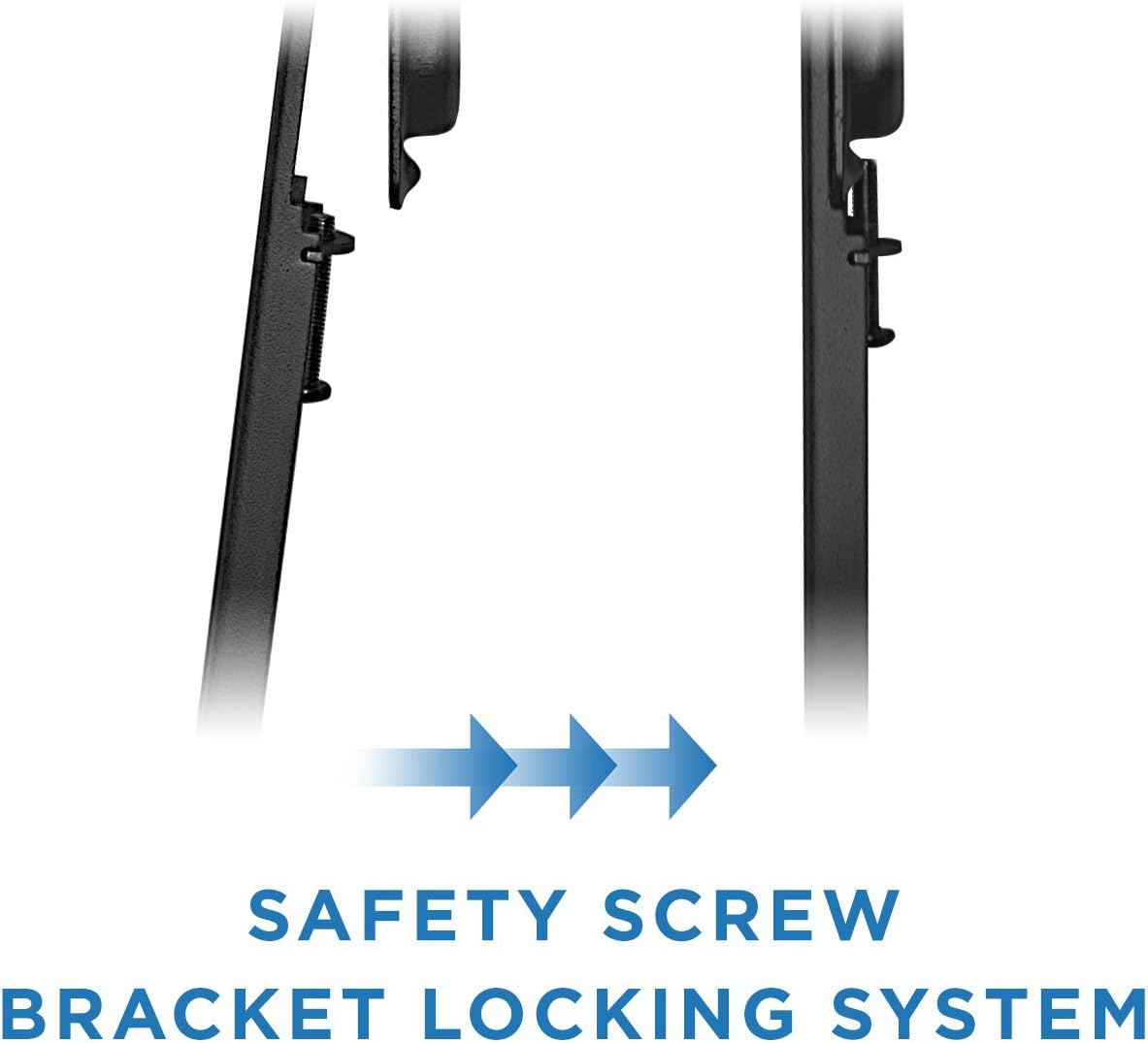
Image: Diagram illustrating the safety screw bracket locking system to secure the TV to the wall mount.

Image: A television screen with a diagonal arrow, indicating the mount fits most flat panel televisions up to 55 inches.

Image: Diagram showing VESA compliant arm brackets that fit VESA patterns up to 400mm x 400mm.
2.3 Installation Video
For a visual guide on the installation process, please refer to the official product video below:
Video: Official Mount-It! installation guide for the MI-3991B articulating TV mount. This video demonstrates how to mount the bracket to the wall and attach the TV, including marking pilot holes, drilling, securing hardware, and hooking the TV onto the mount.
3. Operating Instructions
The Mount-It! Full Motion TV Wall Mount provides flexible positioning for your television. Adjustments should be made carefully to avoid damage to the TV or mount.
- Swivel: The articulating arms allow the TV to swivel 90 degrees left and right. Gently push or pull the TV to achieve the desired horizontal viewing angle.
- Tilt: The mount supports a 15-degree downward tilt and a 10-degree upward tilt. This feature helps reduce glare and optimize viewing from different heights. Adjust the tilt by loosening the tilt mechanism, setting the angle, and then re-tightening.
- Extension/Retraction: The arm can extend up to 17 inches from the wall for maximum flexibility and retract to 2.5 inches to save space. Gently pull the TV forward or push it back towards the wall.
- Level Adjustment: After installation, a 3-degree rotation feature allows for minor post-installation level adjustments to ensure your TV is perfectly horizontal.
- Cable Management: Utilize the built-in cable management clips on the arms to route and secure your TV cables, maintaining a clean and organized appearance.

Image: Side view of a television mounted on the articulating wall mount, demonstrating its ability to extend and swivel away from the wall.
4. Maintenance
To ensure the longevity and safe operation of your Mount-It! TV wall mount, follow these maintenance guidelines:
- Regular Inspection: Periodically check all screws and bolts to ensure they remain tight. Loose connections can compromise stability.
- Cleaning: Wipe the mount with a soft, dry cloth to remove dust. Avoid using abrasive cleaners or solvents, which may damage the finish.
- Lubrication: The articulating joints are designed for smooth movement. If any stiffness occurs, a small amount of silicone-based lubricant can be applied to the moving parts, avoiding contact with the TV screen.
- Weight Limit: Never exceed the maximum weight capacity of 77 lbs. Overloading can lead to structural failure and damage.
5. Troubleshooting
This section addresses common issues you might encounter with your TV wall mount.
- TV is not level: Use the 3-degree rotation adjustment feature to fine-tune the TV's horizontal position. Ensure the wall plate itself was installed level.
- Mount feels loose: Re-check all wall mounting bolts and TV attachment screws. Tighten any loose fasteners. If the issue persists, consult a professional installer.
- Difficulty adjusting movement: Ensure no cables are snagged or obstructing movement. Check if any locking mechanisms (if present) are fully disengaged. Applying a small amount of silicone lubricant to the joints may help.
- TV does not fit VESA pattern: Verify your TV's VESA pattern against the mount's supported patterns (75x75mm to 400x400mm). If your TV's pattern is outside this range, the mount is not compatible.
6. Specifications
| Specification | Detail |
|---|---|
| Model Number | MI-3991B |
| Brand | Mount-It! |
| Mounting Type | Wall Mount |
| Movement Type | Articulating, Rotate, Swivel, Tilt |
| Material | Alloy Steel |
| Color | Black |
| Compatible Devices | Television (26-55 inches) |
| VESA Compatibility | 75x75mm, 100x100mm, 200x100mm, 200x150mm, 200x200mm, 300x200mm, 300x300mm, 400x200mm, 400x300mm, 400x400mm |
| Maximum Tilt Angle | 15 Degrees (down), 10 Degrees (up) |
| Swivel Angle | 90 Degrees Left/Right |
| Rotation Adjustment | 3 Degrees |
| Arm Extension | 2.5 inches (retracted) to 17 inches (extended) |
| Item Weight | 6.59 pounds |
| Product Dimensions | 19.2 x 9.3 x 2.8 inches |
| UPC | 684758420008 |
7. Warranty and Support
For warranty information or technical support regarding your Mount-It! Full Motion TV Wall Mount, please contact Mount-It! directly through their official website or customer service channels. Keep your purchase receipt as proof of purchase for any warranty claims.
Manufacturer: Mount-It!


