Introduction
Thank you for choosing Symphonized NRG 3.0 Premium Wood In-ear Noise-isolating Headphones. These headphones are handcrafted from real wood, offering a unique acoustical experience with crisp, powerful sound and strong deep bass. This manual provides essential information for setting up, operating, maintaining, and troubleshooting your new headphones to ensure optimal performance and longevity.
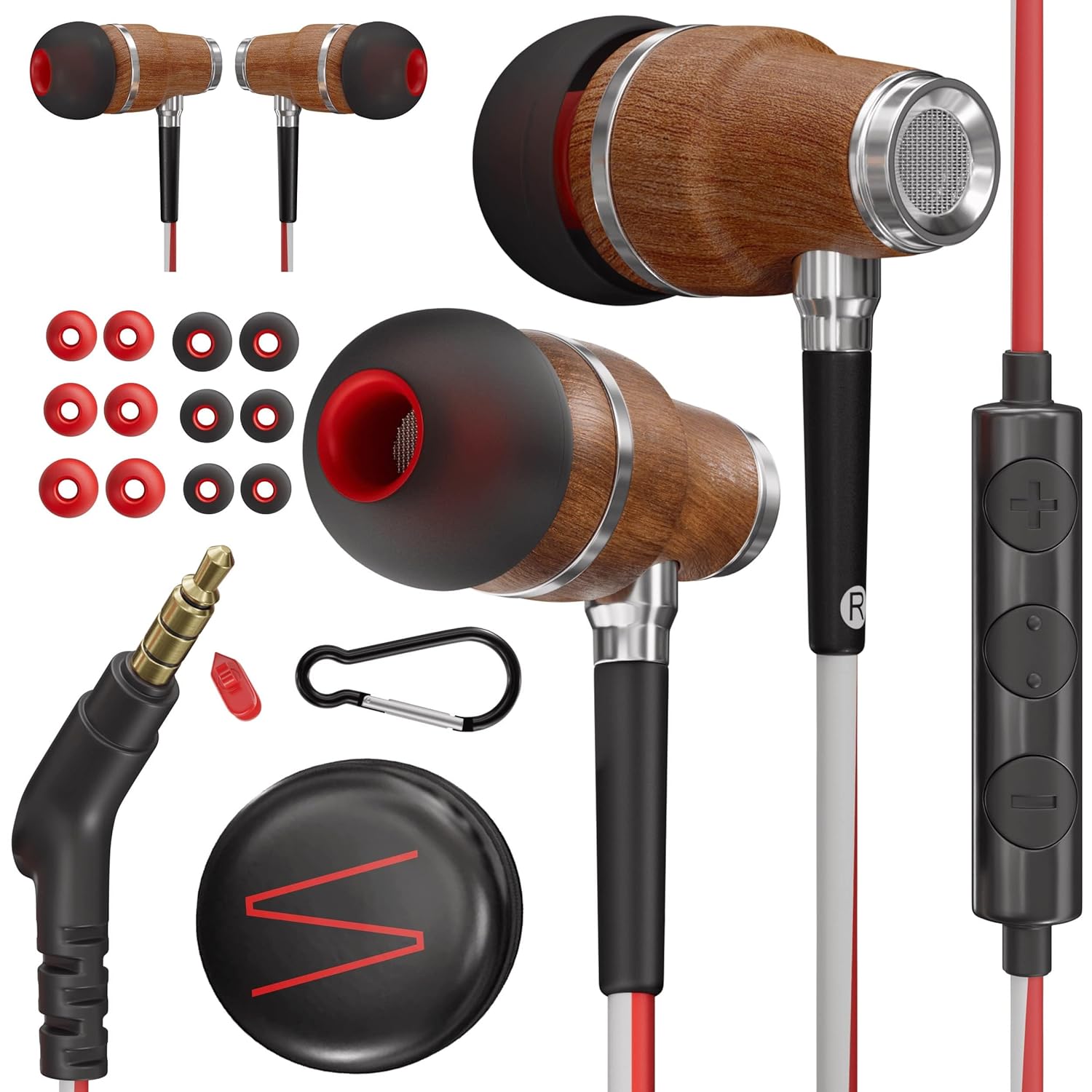
Image: Overview of the Symphonized NRG 3.0 headphones and included accessories.
Setup
1. Ear Tip Selection and Fitting
For optimal sound quality and noise isolation, it is crucial to select the correct size ear tips. Your Symphonized NRG 3.0 headphones come with three sizes (S/M/L) of custom comfortable silicone ear tips.
- Experiment with each size to find the tips that provide a snug and comfortable fit in your ear canal.
- A good fit will create a seal that enhances bass response and effectively blocks out external noise.
- Gently insert the earbud into your ear canal and twist slightly until it feels secure.

Image: Illustration of different ear tip sizes (S, M, L) and how they fit in the ear for optimal comfort and sound.
2. Connecting to Your Device
The Symphonized NRG 3.0 headphones feature a standard 3.5mm jack for universal compatibility.
- Insert the 3.5mm audio jack firmly into the headphone port of your device (e.g., smartphone, tablet, MP3 player, laptop).
- Ensure the connection is secure to prevent audio interruptions.

Image: The 3.5mm audio jack of the headphones, highlighting its compatibility with various devices such as laptops, tablets, and smartphones.
Operating Instructions
In-line Microphone and Volume Control
Your Symphonized NRG 3.0 headphones are equipped with a smart built-in in-line microphone and volume control for convenient management of your audio and calls.

Image: Detailed diagram of the in-line remote control, illustrating the functions of each button for music playback and call management.
| Action | Function |
|---|---|
| + Button | Volume Up |
| - Button | Volume Down |
| Center Button (Single Click) | Play/Pause Music, Answer or End Calls |
| Center Button (Long Press) | Activate Voice Control, End Call |
| Center Button (Double Click) | Skip Track (Next Song) |
| Center Button (Triple Click) | Previous Song |
These headphones also feature noise isolation, which helps to reduce ambient noise for a more immersive listening experience. This is achieved through the design of the earbuds and the proper fit of the silicone ear tips.
Maintenance
Cleaning Your Headphones
- Ear Tips: Regularly remove the silicone ear tips and clean them with a mild soap and water solution. Rinse thoroughly and allow them to air dry completely before reattaching.
- Earbud Grilles: Gently wipe the earbud grilles with a dry, soft cloth to remove any earwax or debris. Avoid using liquids directly on the grilles.
- Wood Housing: The real wood housing can be wiped with a dry, soft cloth. Avoid excessive moisture or harsh cleaning agents, as these can damage the wood finish.
- Cable: Wipe the cable with a damp cloth to remove dirt or oils.
Storage
To prolong the life of your headphones, store them properly when not in use.
- Your headphones come with an eco-friendly convenient carrying pouch. Always store your headphones in this pouch to protect them from dust, dirt, and tangling.
- Avoid wrapping the cable too tightly, as this can cause damage over time.
- Keep headphones away from extreme temperatures and direct sunlight.

Image: The Symphonized headphones displayed with their included accessories, such as the carrying pouch and different ear tip sizes, emphasizing proper storage and care.
Troubleshooting
If you encounter any issues with your Symphonized NRG 3.0 headphones, please refer to the following common troubleshooting steps:
- No Sound or Intermittent Sound:
- Ensure the 3.5mm jack is fully inserted into your device's audio port.
- Check the volume level on both your device and using the in-line controls.
- Test the headphones with a different audio source or device to rule out a device-specific issue.
- Inspect the cable for any visible damage or kinks.
- Distorted Sound:
- Ensure the ear tips are clean and properly seated on the earbuds. A poor seal can affect sound quality.
- Lower the volume on your device; very high volumes can sometimes cause distortion.
- Test with another audio file or streaming service to check if the issue is with the audio source.
- Microphone Not Working or Poor Call Quality:
- Ensure the 3.5mm jack is fully inserted. Some devices require a specific type of 3.5mm jack for microphone functionality.
- Check your device's audio settings to ensure the external microphone is selected.
- Clean any debris from the microphone opening on the in-line control.
- Test the microphone with a different application or device.
- Earbuds Falling Out:
- Re-evaluate your ear tip size. You may need a larger size to achieve a secure fit.
- Ensure you are inserting the earbuds correctly, with a slight twist to secure them.
Specifications
| Feature | Detail |
|---|---|
| Model Name | NRG 3 |
| Model Number | nrg3.0rg |
| Brand | Symphonized |
| Connectivity Technology | Wired (3.5 mm Jack) |
| Ear Placement | In Ear |
| Noise Control | Sound Isolation |
| Material | Wood (Housing), Silicone (Ear Tips) |
| Microphone Format | In-Line, Built-In |
| Control Type | Voice Control, Button Control |
| Compatible Devices | MP3 Player, Tablet, Smartphone (e.g., iPhone) |
| Item Weight | 67.9 g (2.4 Ounces) |
| Product Dimensions | 5.1 x 5.1 x 2.5 cm |
| Included Components | Ear Cushions (Ear Tips), Carrying Pouch (implied from feature bullets) |
| UPC | 700600920509 |
Warranty and Support
Symphonized products are designed for durability and performance. While specific warranty details are not provided in this manual, Symphonized typically offers support for their products.
- For warranty claims or technical assistance, please refer to the official Symphonized website or contact their customer support directly.
- Keep your proof of purchase for any warranty-related inquiries.
- Extended warranty options may be available through your retailer.
For the most up-to-date information on product support and warranty, please visit the official Symphonized website or the retailer's support page where you purchased the product.


