Introduction
This manual provides comprehensive instructions for the setup, operation, and maintenance of your Wharfedale Diamond 225 Bookshelf Loudspeakers. Please read this manual thoroughly before use to ensure optimal performance and longevity of your speakers.

Image: A pair of Wharfedale Diamond 225 Bookshelf Loudspeakers in black finish, showcasing their front and side profiles. The speaker on the left shows the tweeter and woofer, while the speaker on the right shows the grille in place.
Safety Information
Always adhere to the following safety guidelines:
- Do not expose speakers to water or excessive moisture.
- Ensure proper ventilation to prevent overheating.
- Disconnect from power before cleaning or servicing.
- Use only recommended amplifier power (25-120W).
- Keep out of reach of children.
Package Contents
Your Wharfedale Diamond 225 package should contain the following items:
- 2 x Wharfedale Diamond 225 Bookshelf Loudspeakers
- Instruction Manual (this document)
Note: Speaker cables are typically sold separately and are not included.
Setup
1. Placement
Optimal speaker placement is crucial for sound quality. The Diamond 225 speakers feature a slot-loaded port, allowing for flexible placement closer to walls than traditional rear-ported designs.
- Place speakers on sturdy, level surfaces such as dedicated speaker stands or bookshelves.
- For best stereo imaging, position speakers equidistant from the listening position, forming an equilateral triangle.
- Maintain a distance of at least 2 feet (60 cm) from the rear wall for optimal bass response, though closer placement is possible due to the slot-loaded port design.
- Angle the speakers slightly inward (toe-in) towards the listening position for improved focus. Experiment with toe-in to find the best soundstage for your room.

Image: Front view of a single Wharfedale Diamond 225 speaker with the protective grille removed, revealing the 1-inch soft-dome tweeter and the 6 1/2-inch woven Kevlar cone bass driver.
2. Connections
Ensure your amplifier is turned off before making any connections.
- Identify the positive (+) and negative (-) terminals on both your speakers and your amplifier. The positive terminal is typically red, and the negative is black.
- Connect the positive (+) terminal of the amplifier to the positive (+) terminal of the speaker using one conductor of your speaker cable.
- Connect the negative (-) terminal of the amplifier to the negative (-) terminal of the speaker using the other conductor of your speaker cable.
- Ensure all connections are secure and there are no stray wire strands that could short-circuit the terminals.
Note: The Diamond 225 speakers are designed for a nominal impedance of 8 ohms.
Operating Instructions
1. Powering On
Once all connections are secure, you can power on your amplifier. Start with the volume control at its lowest setting.
2. Volume Control
Gradually increase the volume to a comfortable listening level. Avoid excessively high volumes that may cause distortion or damage to the speakers or your hearing.
3. Break-in Period
Like many high-fidelity speakers, the Wharfedale Diamond 225 benefits from a break-in period. Allow approximately 50-100 hours of normal listening for the drivers to fully settle and achieve their optimal performance characteristics. During this period, the sound may evolve, typically becoming smoother and more detailed.
4. Amplifier Compatibility
These speakers are compatible with amplifiers providing 25-120W of power. Using an amplifier outside this range may result in suboptimal performance or potential damage.
Maintenance
1. Cleaning
- Dust the speaker cabinets regularly with a soft, dry, lint-free cloth.
- For stubborn marks, lightly dampen the cloth with water. Avoid harsh chemicals or abrasive cleaners.
- Do not apply pressure to the speaker cones or tweeters when cleaning.
2. Grille Care
The speaker grilles protect the drivers. They can be removed for cleaning or for a different aesthetic preference. Handle them gently to avoid bending or damaging the frame or fabric.

Image: Front view of a single Wharfedale Diamond 225 speaker with the protective grille attached, showing the clean, minimalist appearance.
3. Environmental Considerations
- Avoid placing speakers in direct sunlight or near heat sources.
- Maintain a stable room temperature and humidity level.
Troubleshooting
| Problem | Possible Cause | Solution |
|---|---|---|
| No Sound | Loose or incorrect speaker connections. Amplifier not powered on or input selected incorrectly. | Check all speaker wire connections at both the speaker and amplifier. Ensure amplifier is on and correct input is selected. |
| Distorted Sound | Volume too high. Amplifier clipping. Damaged speaker driver. | Reduce volume. Ensure amplifier power is within recommended range (25-120W). Inspect drivers for visible damage. |
| Weak Bass | Incorrect speaker placement. Phase issue. | Adjust speaker placement, ensuring adequate distance from walls. Verify positive and negative connections are consistent for both speakers. |
| Imbalanced Sound (one speaker louder/quieter) | Incorrect balance setting on amplifier. Faulty speaker cable. | Check amplifier balance control. Swap speaker cables between left and right channels to identify if cable is faulty. |
Specifications
| Feature | Detail |
|---|---|
| Model Name | Diamond 225 |
| Speaker Type | Bookshelf |
| Frequency Response (+/-3dB) | 45Hz ~ 20kHz |
| Sensitivity (2.83V @ 1m) | 87dB |
| Nominal Impedance | 8 ohms Compatible |
| Recommended Amplifier Power | 25-120W |
| Woofer Diameter | 6.5 Inches (Woven Kevlar Cone) |
| Tweeter Diameter | 1 Inch (Soft-dome) |
| Product Dimensions (D x W x H) | 17"D x 19.7"W x 13.8"H |
| Item Weight | 11.7 Pounds (per speaker) |
| Color | Black |
| Included Components | 2 Speakers |
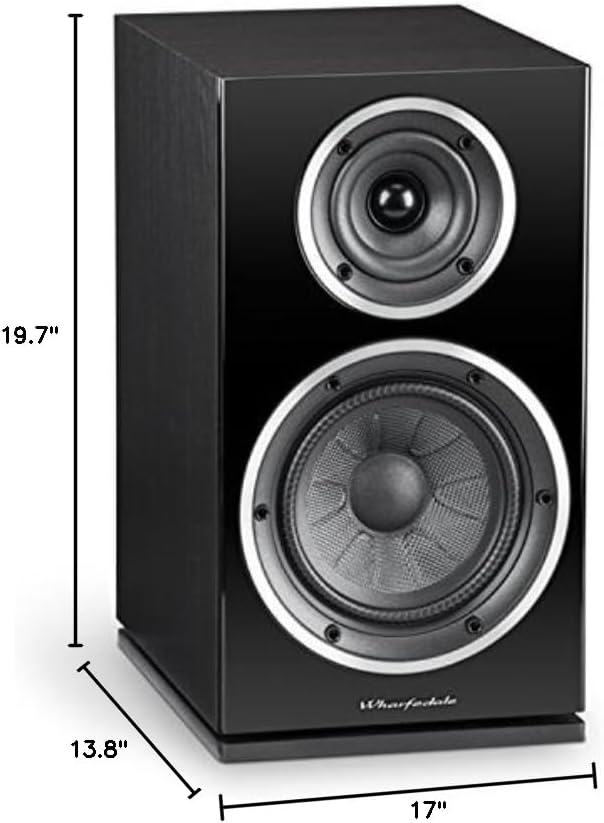
Image: A Wharfedale Diamond 225 speaker with overlaid measurements indicating its dimensions: 19.7 inches wide, 13.8 inches high, and 17 inches deep.
Warranty and Support
Wharfedale products are manufactured to the highest standards. Your Diamond 225 speakers come with a limited warranty. For specific warranty terms and conditions, please refer to the warranty card included with your purchase or visit the official Wharfedale website.
For technical support, service, or warranty claims, please contact your authorized Wharfedale dealer or distributor. You can also visit the Wharfedale Store on Amazon for more information.
Warranty Type: Limited


