
LG LW1216ER
LG 12,000 BTU Window Air Conditioner User Manual
Model: LW1216ER

Front view of the LG 12,000 BTU Window Air Conditioner, showcasing its white exterior and control panel.
1. Safety Information
Read all instructions before using this appliance to prevent personal injury or property damage. Follow all safety warnings and precautions.
Important Safety Instructions:
- Always plug into a grounded 3-prong outlet. Do not remove the grounding prong.
- Do not use an adapter or extension cord.
- Do not operate any air conditioner with a damaged cord or plug.
- Do not block air openings.
- Do not use in wet areas like bathrooms or laundry rooms.
- Unplug the unit before cleaning or servicing.
- Keep flammable materials away from the unit.
Proposition 65 Warning: This product may contain chemicals known to the State of California to cause cancer and birth defects or other reproductive harm.
2. Setup and Installation
Unpacking the Unit:
Carefully remove the air conditioner from its packaging. Ensure all components, including the remote control, mesh filter, and installation kit, are present.
Window Installation:
The LG LW1216ER is designed for standard double-hung windows. Follow these steps for proper installation:
- Measure Your Room: Determine the square footage of the room to ensure the 12,000 BTU capacity is appropriate. This unit is ideal for rooms up to 550 sq. ft. (approximately 22' x 25').
- Verify Window Opening: Ensure your window opening meets the required dimensions. The air conditioner cabinet dimensions are 23.6"W x 22.2"D x 15"H. The window must be at least 16" high and between 27" and 39" wide.
- Install Mounting Brackets: Securely attach the provided mounting brackets to the window sill according to the installation kit instructions.
- Place the Unit: Carefully lift and place the air conditioner into the window opening, ensuring it is level or slightly tilted outwards for proper condensation drainage. Due to its weight (81 pounds), it is recommended to have assistance.
- Extend Side Panels: Extend the accordion side panels to fill the gaps between the unit and the window frame. Secure them with screws.
- Seal Gaps: Use foam gaskets or weatherstripping to seal any remaining gaps around the unit to prevent air leakage.
- Electrical Requirements: Ensure your electrical circuit is adequate. The unit requires 115 Volts AC, 15 Amps, and draws 9.3 Amps. It includes a 72-inch grounded cord.

This diagram illustrates how to measure your room for appropriate BTU selection and provides minimum/maximum window dimensions for installation, along with electrical requirements.

The image shows the physical dimensions of the LG window air conditioner: 23.62 inches wide, 22.20 inches deep, and 15.00 inches high.
3. Operating Instructions
Control Panel and Remote Control:
The unit features an easy-to-use digital control panel and comes with a remote control for convenient operation from a distance.
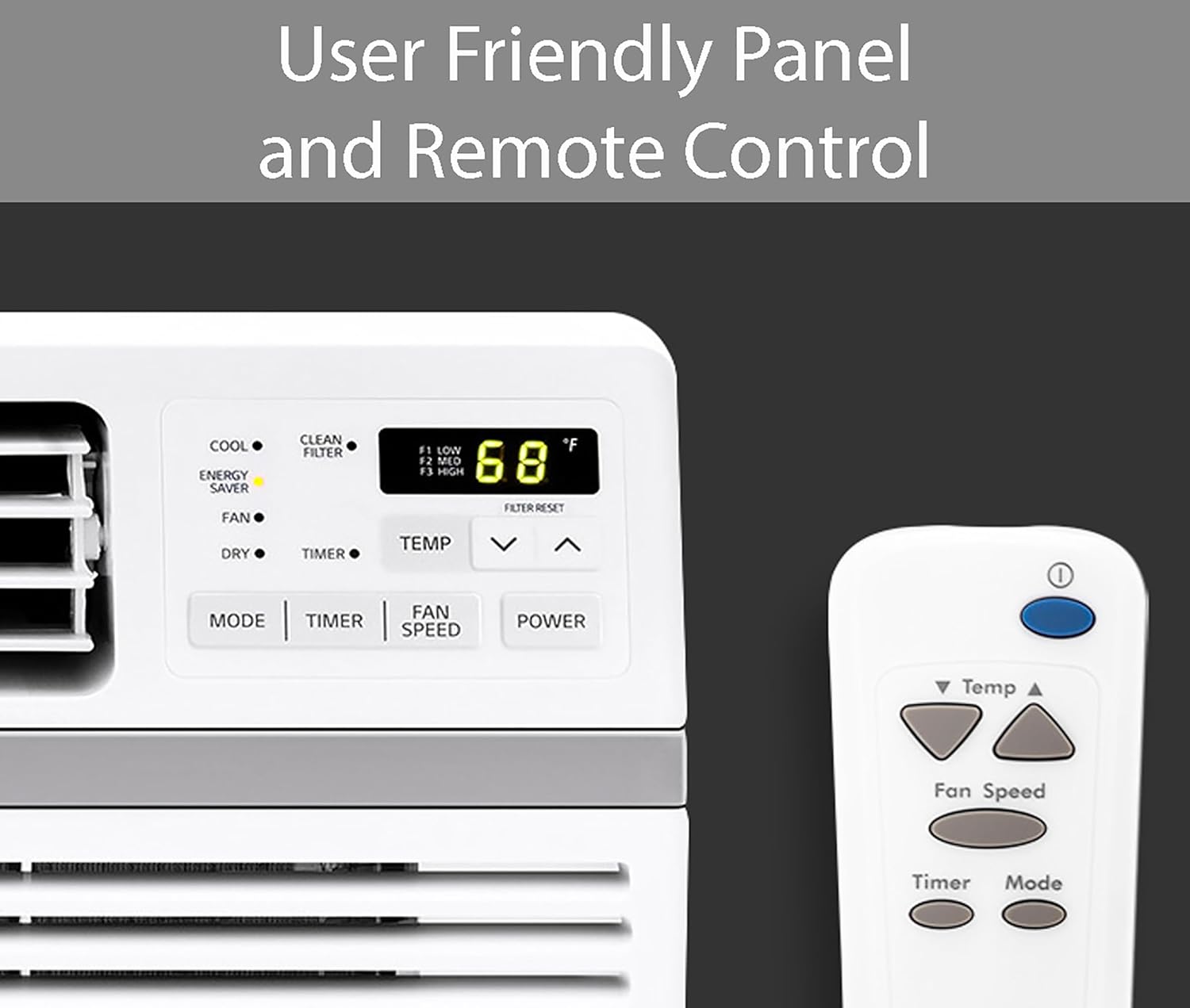
Close-up view of the air conditioner's user-friendly control panel and the accompanying remote control, showing various buttons for mode, timer, fan speed, and temperature adjustment.
Button Functions:
- POWER: Turns the unit On or Off.
- MODE: Cycles through operating modes: Cool, Energy Saver, Fan, Dry.
- TEMP & / ∨: Adjusts the desired temperature setting.
- FAN SPEED: Selects fan speed: Low, Medium, High.
- TIMER: Sets the 24-hour On/Off timer.
- CLEAN FILTER: Illuminates to remind you to clean the air filter. Press the Filter Reset button after cleaning.
Operating Modes:

This image visually represents the three primary operating modes: Cool (ice), Fan (wind), and Dry (water droplets), indicating the unit's versatility.
- Cool Mode: Provides cooling and dehumidification. Adjust temperature and fan speed for optimal comfort.
- Fan Mode: Circulates air without cooling. Use when cooling is not needed, but air circulation is desired.
- Dry Mode: Primarily dehumidifies the air. The fan speed is automatically controlled.
- Energy Saver Mode: The fan turns off when the compressor cycles off, saving energy. The fan will turn on periodically to sense the room temperature.
Special Features:
- Low Noise Performance: Operates at sound levels as low as 53dB in low mode, designed for quiet operation.
- Auto Restart: In case of a power outage, the unit will automatically resume operation with the previous settings once power is restored.
- 24-Hour On/Off Timer: Program the unit to turn on or off at specific times to optimize energy usage and comfort.
- 4-Way Air Deflection: Adjust the horizontal and vertical louvers to direct airflow precisely where needed for optimal cooling distribution.

A chart comparing the noise level of the LG Window Air Conditioner (53dB) to other common sounds like a train, street, inside a car, and a library, highlighting its quiet operation.
4. Care and Maintenance
Air Filter Cleaning:
Regular cleaning of the air filter is crucial for maintaining the unit's efficiency and air quality. The "Clean Filter" light will illuminate as a reminder.

The image displays the removable and washable air filter, along with an icon indicating the "Check Filter Light" reminder on the unit.
- Remove Filter: Gently slide out the air filter from the front of the unit.
- Clean Filter: Wash the filter with lukewarm water and mild soap. Rinse thoroughly. For heavily soiled filters, use a vacuum cleaner to remove loose dirt before washing.
- Dry Filter: Allow the filter to air dry completely before reinserting it. Do not expose to direct sunlight or heat.
- Reset Filter Light: After reinserting the clean filter, press the "Filter Reset" button on the control panel or remote to turn off the indicator light.
Recommended cleaning frequency: Every two weeks, or more often depending on usage and air quality.
General Cleaning:
- Exterior: Wipe the exterior of the unit with a soft, damp cloth. Do not use harsh cleaners or abrasives.
- Coils: Periodically check the condenser coils at the back of the unit for dirt and debris. If necessary, gently brush them clean.
- Storage: If storing the unit for an extended period, clean it thoroughly, cover it with plastic, and store it in a dry place.
5. Troubleshooting Guide
Before contacting service, review this table for common issues and their solutions.
| Problem | Possible Cause | Solution |
|---|---|---|
| Unit does not turn on. | No power, tripped circuit breaker, unit unplugged. | Check power cord connection, reset circuit breaker, ensure outlet is functional. |
| Unit does not cool sufficiently. | Dirty air filter, blocked air intake/outlet, room too large, windows/doors open. | Clean air filter, remove obstructions, ensure room size is within unit's capacity, close windows/doors. |
| Water dripping inside. | Unit not tilted slightly outwards, drain hole blocked. | Ensure proper tilt during installation, clear any blockages from the drain hole. |
| Noisy operation. | Loose installation, foreign object in fan, unit vibrating against window frame. | Check installation for tightness, inspect fan for obstructions, ensure proper cushioning. |
6. Product Specifications
| Feature | Detail |
|---|---|
| Model Number | LW1216ER |
| Cooling Capacity | 12,000 BTU |
| Coverage Area | Up to 550 sq. ft. |
| Voltage | 115 Volts |
| Noise Level (Low Mode) | 53 dB |
| Dimensions (D x W x H) | 22.2"D x 23.6"W x 15"H |
| Item Weight | 81 pounds |
| Fan Speeds | 3 (Cooling & Fan) |
| Control Type | Electronic with Remote |
| Filter Type | Removable, Washable Mesh Filter |
| Cable Length | 6 Feet |
| Included Components | Air conditioner, remote control, mesh filter, installation kit, manual/installation instructions, warranty |
7. Warranty and Support
Warranty Information:
This LG Window Air Conditioner (Model LW1216ER) comes with a 1-year parts and labor warranty from the date of purchase. Please retain your proof of purchase for warranty claims.
Customer Support:
For further assistance, technical support, or to inquire about service, please refer to the official LG customer support channels.
- Official User Manual (PDF): Download PDF Manual
- Visit the LG Store: LG Official Store on Amazon
Related Documents - LW1216ER
 |
Emerson Quiet Kool Electronic Window Air Conditioner Owner's Manual This owner's manual provides detailed instructions for the installation, operation, and care of Emerson Quiet Kool electronic window air conditioners. It covers safety precautions, installation requirements, operating modes, remote control usage, and troubleshooting. |
 |
Amazon Basics Window-Mounted Air Conditioner with Mechanical Control User Manual This user manual provides instructions for installing and operating the Amazon Basics Window-Mounted Air Conditioner with Mechanical Control. It covers safety precautions, product overview, installation steps, and intended use. |
 |
Compact Window Air Conditioner Installation Guide Step-by-step instructions for installing a compact window air conditioner (10,000-12,000 BTU), including warnings, cautions, and hardware requirements. |
 |
LG Window Air Conditioner Owner's Manual LW1016ER LW1216ER This owner's manual provides comprehensive instructions for the LG LW1016ER and LW1216ER window air conditioners, covering safety, installation, operation, maintenance, and troubleshooting. |
 |
LG LW1016ER LW1216ER Window Air Conditioner Owner's Manual Comprehensive owner's manual for LG LW1016ER and LW1216ER window air conditioners, covering safety, installation, operation, maintenance, and troubleshooting. |
 |
Frigidaire Compact Window Air Conditioner Installation Guide Comprehensive installation instructions for Frigidaire compact window air conditioners (10,000-12,000 BTU), covering mounting hardware, assembly, storm window considerations, and final checks for proper operation and drainage. |
Ask a question about this manual
Ask about setup, troubleshooting, compatibility, parts, safety, or missing instructions. Manuals+ will review the question and use this page’s manual context to help answer it.