Introduction
This user manual provides comprehensive instructions for the installation, operation, and maintenance of your SCS Sentinel SCS1 Standard Motorisation Kit for Swing Gate, 24V. Please read this manual carefully before beginning installation or operation to ensure safe and efficient use of the product. Keep this manual for future reference.
Safety Information
Always prioritize safety during installation and operation. Failure to follow safety guidelines may result in injury or damage to the product.
- Ensure all electrical connections are made by a qualified professional and comply with local regulations.
- Disconnect power before performing any maintenance or troubleshooting.
- Keep children and pets away from the gate area during operation.
- Do not attempt to repair damaged components yourself. Contact qualified service personnel.
- Ensure the gate operates freely without obstruction before and after motorization.
Package Contents
Verify that all components listed below are present in your package:
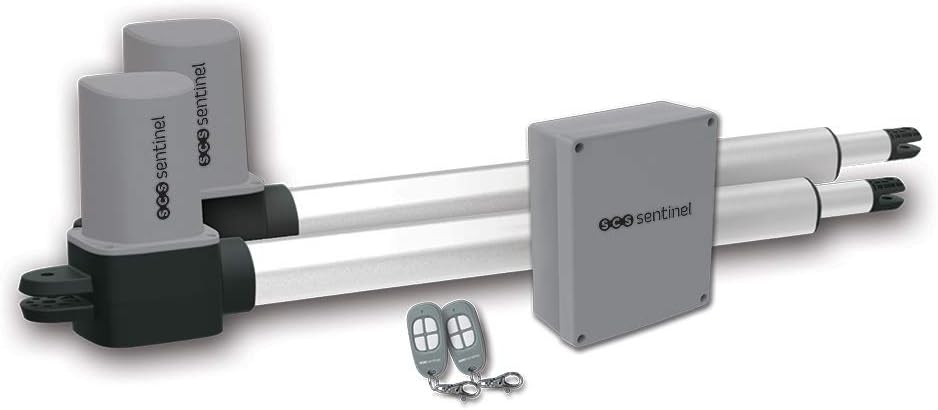
Image: Overview of the SCS Sentinel SCS1 Motorisation Kit, showing the two 24V motors, the electronic control box, and two remote controls.
- 2 x 24V Motors (actuators)
- 1 x Electronic Control Box
- 2 x 4-Channel Rolling Code Remote Controls
- 2 x Gate Mounting Lugs
- 2 x Pillar Mounting Lugs
- 1 x User Manual (this document)
- Assorted Screws and Fittings

Image: The product packaging displaying the kit contents in multiple languages, confirming the inclusion of motors, control unit, remote controls, screws, and user manual.
Setup
The installation process involves three main steps: mechanical installation, electrical connection, and programming/synchronization.

Image: A visual representation of the three quick installation steps: 1. Mechanical installation, 2. Electrical connection, and 3. Programming and synchronization.
1. Mechanical Installation
Mount the motors to your swing gate and pillars using the provided mounting lugs. Ensure the gate is within the specified dimensions (up to 3m wide and 300kg per leaf). Proper alignment is crucial for smooth operation.

Image: An illustration showing the SCS Sentinel SCS1 motors installed on a swing gate, demonstrating the mechanical setup.
Refer to the included diagram for optimal mounting angles and distances to ensure the actuators operate with minimal stress. The system is designed for gates up to 1.5m wide and 150kg per leaf, or 3m wide and 300kg total for a double gate.
2. Electrical Connection
Connect the motors and power supply to the electronic control box. Follow the wiring diagram provided in the detailed manual (not included in this summary). Ensure all connections are secure and insulated. The system operates on 24V.
3. Programming and Synchronization
Once mechanical and electrical installations are complete, program the control unit and synchronize the remote controls. This typically involves a learning procedure where the system records the gate's opening and closing limits. Refer to the detailed manual for specific programming steps, including setting pedestrian opening and automatic closing functions.
Operating Instructions
Your SCS Sentinel SCS1 kit offers convenient and reliable gate operation.
Remote Control Operation

Image: A close-up view of the two 4-channel rolling code remote controls included with the kit.
- Press the designated button on your 4-channel remote control to open or close the gate.
- A second press during operation will stop the gate. A third press will reverse its direction.
- The remote controls can be programmed for full opening or partial (pedestrian) opening.
Automatic Closing
If photocells are installed and configured, the gate can be set to close automatically after a set delay once it has fully opened. This feature enhances security and convenience.
Obstacle Detection
The system is equipped with obstacle detection. If the gate encounters an obstruction during closing, it will stop and reverse direction to prevent damage or injury.
Manual Override
In case of power failure or system malfunction, the motors can be manually disengaged using the provided hexagonal keys. This allows the gate to be opened or closed by hand.
Maintenance
Regular maintenance ensures the longevity and optimal performance of your gate motorization system.
- Monthly: Inspect the gate for any physical obstructions, ensure hinges are lubricated, and check that the gate moves freely.
- Quarterly: Clean the motor actuators and control box to prevent dust and debris buildup. Check all mounting points for tightness.
- Annually: Have a qualified technician inspect the electrical connections and overall system for wear and tear.
- Do not use abrasive cleaners or solvents on any components.
Troubleshooting
This section addresses common issues you might encounter. For more complex problems, consult a qualified technician.
| Problem | Possible Cause | Solution |
|---|---|---|
| Gate does not respond to remote. | No power; remote battery low; remote not programmed; obstruction. | Check power supply; replace remote battery; re-program remote; clear obstructions. |
| Gate stops mid-operation. | Obstruction detected; motor overload; faulty sensor. | Remove obstruction; check gate movement for friction; inspect sensors. |
| Gate opens partially. | Pedestrian mode activated; limit switch issue. | Check remote button pressed; re-calibrate limit switches. |
| Unusual noise during operation. | Lack of lubrication; loose components; motor wear. | Lubricate hinges/moving parts; tighten fasteners; contact support if noise persists. |
Specifications
Key technical specifications for the SCS Sentinel SCS1 Standard Motorisation Kit:

Image: A graphic detailing key features and specifications of the SCS1 motorization kit, including ease of use, 24V operation, silent motors, and 3-year warranty.
| Feature | Detail |
|---|---|
| Model Number | 3760074136520 |
| Power Supply | 24V |
| Max Gate Length (per leaf) | 3 meters |
| Max Gate Weight (per leaf) | 300 kg |
| Max Opening Angle | 120° |
| Product Dimensions | 71 x 98 x 19.2 cm |
| Item Weight | 12.2 Kilograms |
| Included Components | 2 motors, 1 electronic control box, 2 remote controls, mounting lugs, fittings |
Warranty and Support
SCS Sentinel products are designed for reliability and durability. This product typically comes with a manufacturer's warranty. Please refer to the warranty card included in your package for specific terms and conditions, including the warranty period (often 3 years as indicated in some product images).
For technical support, spare parts, or warranty claims, please contact SCS Sentinel customer service. Contact details can usually be found on the manufacturer's website or on the product packaging.
Manufacturer: SCS Sentinel
Address: 110, rue Pierre Gilles de Gennes, 49300 Cholet - France


