
1. Introduction
This manual provides comprehensive instructions for the installation, operation, and maintenance of the SCS Sentinel Standard 24V Swing Gate Motorization system. This kit is designed to automate two-leaf swing gates made of aluminum, iron, wood, or PVC, with a maximum width of 5 meters and a maximum weight of 500 kg (2.5 meters and 250 kg per leaf).
Please read this manual carefully before proceeding with installation or use to ensure proper functioning and safety.
2. Safety Information
Important Safety Instructions:
- Always disconnect power to the system before performing any installation, maintenance, or repair work.
- Ensure all electrical connections are made by a qualified professional and comply with local regulations.
- Keep children and pets away from the gate area during operation.
- Do not attempt to operate the gate if any part of the system is damaged or malfunctioning.
- Regularly inspect the gate and motorization system for signs of wear, damage, or misalignment.
- Do not modify the system components. Use only original replacement parts.
3. Package Contents
Verify that all components are present and undamaged before beginning installation:
- 2 x Articulated Arms (one with integrated motor)
- 1 x Control Unit
- 2 x 4-Channel Remote Controls
- Mounting Hardware and Brackets
- Instruction Manual (this document)
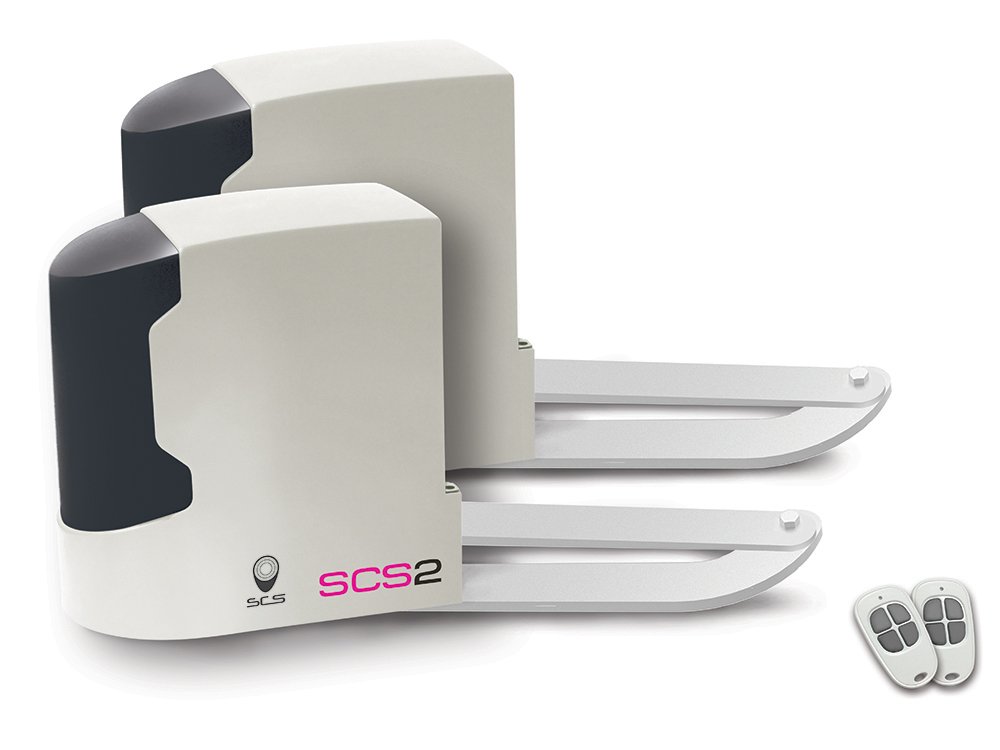
Image: Main components of the SCS Sentinel Standard 24V swing gate motorization kit, including the articulated arms and control unit.
4. Setup and Installation
The SCS Sentinel Standard 24V motorization kit is designed for easy installation. Follow these general steps:
- Gate Preparation: Ensure your gate is in good working order, moves freely, and has appropriate mechanical stops for both open and closed positions. The system is suitable for gates up to 2.5 meters wide and 250 kg per leaf.
- Motor Placement: The main control unit and motor must be mounted on the right-hand side of the gate when viewed from inside your property (looking outwards). Incorrect placement can lead to reversed gate operation.
- Mechanical Release: Before initial setup, activate the mechanical emergency release mechanism on the motor. This mechanism can be stiff initially but will loosen with use. Apply sufficient force to move the levers.
- Mounting Motors: Attach the articulated arms and motors to the gate posts and gate leaves using the provided brackets. Ensure the gate is in the fully closed position during this step.
- Limit Switches: Install and adjust the mechanical limit switches for both the open and closed positions of the gate. Manually move the gate (with the mechanical release activated) to set these positions accurately.
- Electrical Connection: Connect the system to a 230V power supply. Ensure all wiring is secure and protected.
- Remote Control Pairing:
- Press the programming button on the control board.
- While the indicator light is active, press the desired button on your remote control. The light will confirm successful pairing.
- System Learning: Press the "SYS LEARNING" button on the control board. The gate will perform several open and close cycles to learn its travel limits and optimize operation. Once complete, the system is ready for use.
Note: The system does not have an inversion function for motor direction. Correct initial placement of the main control unit on the right-hand side is crucial.
5. Operating Instructions
The SCS Sentinel Standard motorization system offers several operational features:
- Standard Opening/Closing: Use the paired remote control to open or close the gate completely.
- Pedestrian Opening (Partial Opening): A dedicated button on the remote control (if configured) allows for partial opening of one gate leaf, ideal for pedestrian access.
- Soft Stop/Start: The system features a soft start and end-of-travel slowdown for smooth and quiet operation, reducing wear on the gate and motor.
- Obstacle Detection: The system is equipped with an obstacle detection feature that stops the gate's movement if an obstruction is encountered, enhancing safety.
- Automatic Closing: If photocells are installed and configured, the gate can be set to close automatically after a predetermined time.
- Self-Locking System: The motors feature a self-locking mechanism to secure the gate in the closed position.
- Emergency Release: In case of power failure, use the mechanical emergency release to manually open or close the gate.
6. Maintenance
Regular maintenance ensures the longevity and reliable operation of your gate motorization system:
- Visual Inspection: Periodically check all mechanical components, hinges, and mounting points for signs of wear, corrosion, or damage.
- Cleanliness: Keep the area around the motors and gate clear of debris, leaves, and other obstructions that could impede movement.
- Lubrication: Lubricate moving parts of the gate (hinges, pivots) as recommended by your gate manufacturer. Avoid lubricating the motor's internal components unless specifically instructed.
- Electrical Connections: Annually inspect all electrical connections for tightness and signs of corrosion. Ensure the power cable is undamaged.
- Functionality Test: Regularly test the obstacle detection system and emergency release mechanism to ensure they are working correctly.
7. Troubleshooting
If you encounter issues with your SCS Sentinel Standard motorization system, refer to the following common problems and solutions:
- Gate Moves in the Wrong Direction:
This is often caused by incorrect initial installation of the main control unit. Ensure the main control unit with the motor is mounted on the right-hand side of the gate when looking from inside your property. The system does not have a motor inversion function, so correct physical placement is critical.
- Gate Does Not Respond to Remote Control:
- Check the remote control battery.
- Ensure the remote control is properly paired with the control unit (refer to Section 4: Remote Control Pairing).
- Verify that the control unit has power.
- Gate Stops Mid-Operation or Does Not Close Fully:
- Check for physical obstructions in the gate's path.
- Inspect the photocells (if installed) for alignment or blockage.
- Re-run the system learning procedure (Section 4: System Learning) to recalibrate the gate's travel limits.
- System Loses Programming After Power Outage:
While the system is designed to retain programming during short power interruptions, extended outages may require re-programming. Re-run the system learning procedure (Section 4: System Learning) and re-pair remote controls if necessary.
- Mechanical Emergency Release is Stiff:
This is normal during initial use. Apply firm, steady force. It will become easier with repeated use.
If problems persist, contact SCS Sentinel customer support for assistance.
8. Specifications
| Feature | Specification |
|---|---|
| Power Supply Voltage | 230 V |
| Operating Voltage | 24 V |
| Max. Gate Leaf Width | 2.5 meters |
| Max. Gate Leaf Weight | 250 kg |
| Max. Total Gate Width | 5 meters |
| Max. Total Gate Weight | 500 kg |
| Cycles per Day | 25 max |
| Opening Time (90°) | Approx. 15 seconds |
| Maximum Opening Angle | 120° |
| Operating Temperature | -10°C to +50°C |
| Product Dimensions (L x W x H) | 16 x 27 x 26 cm |
| Product Weight | 19 kg |
9. Warranty and Support
For warranty information, please refer to the documentation provided with your purchase or contact SCS Sentinel customer service. Keep your proof of purchase for any warranty claims.
For technical support or further assistance, please visit the official SCS Sentinel website or contact their customer service department. Contact details can typically be found on the product packaging or the manufacturer's website.


