
1. Product Overview
The Samsonite Paradiver Light Laptop Backpack is designed for daily use, travel, and carrying laptops or tablets. It features a lightweight construction with durable, weather-resistant materials, including polyurethane and polyester. This backpack offers ergonomic comfort and practical storage solutions for your essentials.

Figure 1: Front view of the Samsonite Paradiver Light Laptop Backpack.
2. Setup and Adjustment
Before using your backpack, adjust the straps for optimal comfort and weight distribution.
- Shoulder Straps: Place the backpack on your back. Adjust the shoulder straps using the buckles at the bottom until the backpack sits comfortably and securely on your shoulders. The top of the backpack should align with your shoulders.
- Chest Strap: Fasten the chest strap across your chest. Adjust its height and tension to further stabilize the backpack and distribute weight, reducing strain on your shoulders.

Figure 2: Ergonomic padded shoulder straps and back panel for comfort.

Figure 3: Detail of the adjustable chest strap for secure fit.
3. Operation and Features
The Paradiver Light backpack offers various compartments and features for organized storage.
3.1 Main Compartment
The primary compartment is spacious, designed to hold larger items. It includes a dedicated padded sleeve for laptops up to 15.6 inches.

Figure 4: Main compartment with laptop sleeve.

Figure 5: Main compartment demonstrating capacity with a laptop and binder.
3.2 Front Pocket Organization
A front zippered pocket provides organizational features for smaller items such as pens, a phone, and other accessories.
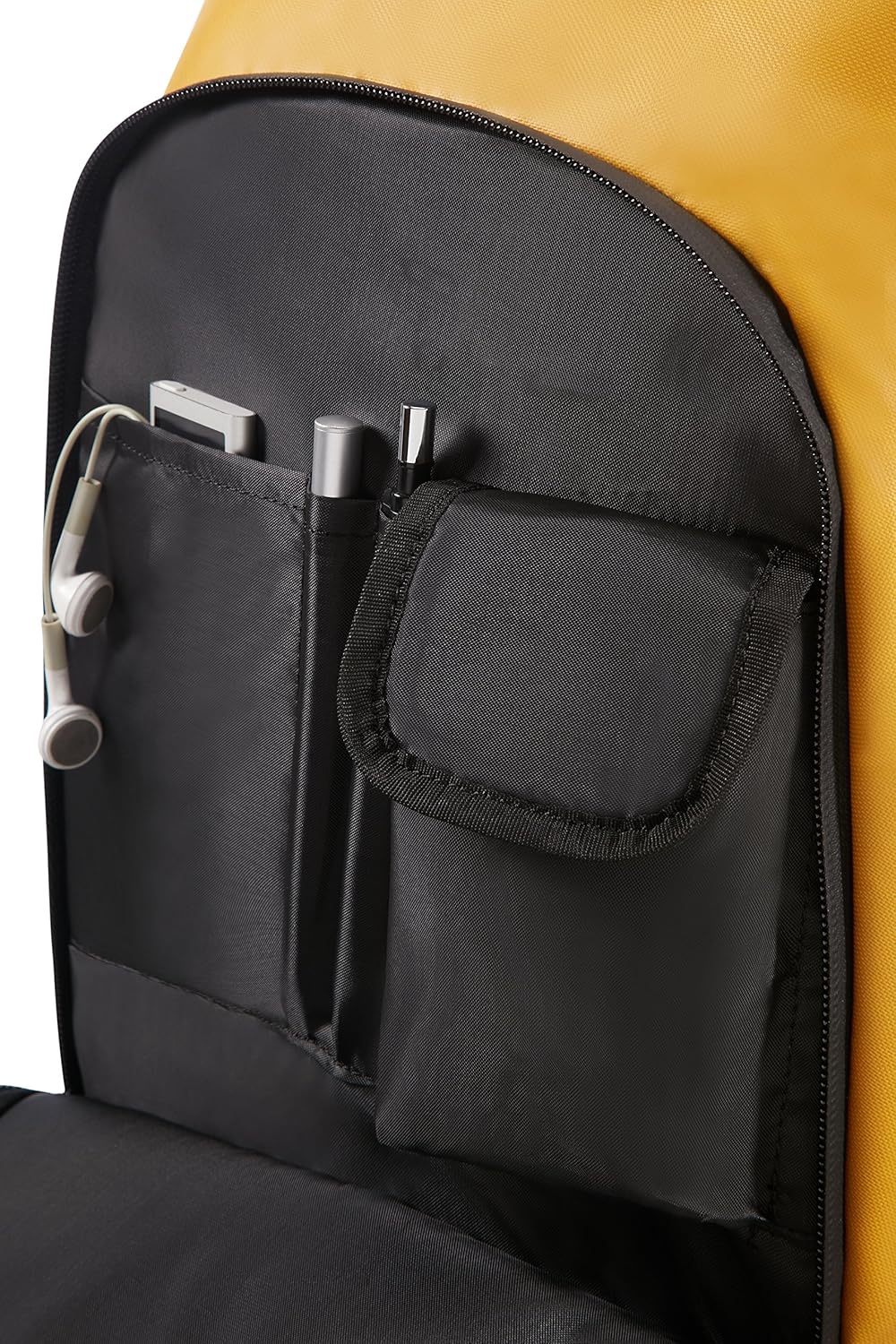
Figure 6: Organized front pocket for accessories.
3.3 Bottle Holder
The backpack includes an external mesh pocket designed to securely hold a water bottle.

Figure 7: External bottle holder.
3.4 Zipper Operation
All compartments are secured with durable zippers. Ensure zippers are fully closed to protect contents from weather and prevent items from falling out.

Figure 8: Zipper detail.
3.5 Integrated ID Tag
The backpack features an integrated ID tag slot for personal identification.

Figure 9: ID tag slot.

Figure 10: ID tag extended from its slot.
4. Maintenance and Care
Proper care will extend the life of your Samsonite Paradiver Light Laptop Backpack.
- Cleaning: The manufacturer recommends Hand Wash Only. Use a mild soap and a soft cloth to clean soiled areas. Do not machine wash, bleach, tumble dry, iron, or dry clean.
- Drying: Allow the backpack to air dry completely away from direct sunlight or heat sources.
- Storage: Store the backpack in a cool, dry place when not in use.
- Material Care: The weather-resistant polyurethane and polyester materials are designed for durability. Avoid harsh chemicals or abrasive cleaners that could damage the fabric.
5. Troubleshooting
This section addresses common issues you might encounter with your backpack.
- Strap Discomfort: If shoulder straps feel uncomfortable, re-adjust them to ensure even weight distribution. Utilize the chest strap for added stability. Ensure the backpack is not overloaded beyond its intended capacity.
- Sticking Zippers: If a zipper becomes difficult to operate, apply a small amount of zipper lubricant (e.g., beeswax or a specialized zipper wax) to the teeth. Avoid forcing the zipper, which can cause damage.
- Water Resistance: While the materials are weather-resistant, the backpack is not fully waterproof. In heavy rain, consider using a rain cover for sensitive electronics.
6. Specifications
Key technical specifications for the Samsonite Paradiver Light Laptop Backpack.
| Model Name: | Paradiver Light |
| Model Number: | 74775/1908 |
| Dimensions (D x W x H): | 7.87" x 12.2" x 17.72" (20 x 31 x 45 cm) |
| Storage Volume: | 19 Liters |
| Item Weight: | 0.7 Kilograms |
| Compatible Device Size (Max): | 15.6 Inches (Laptop) |
| Material Type: | Polyester, Polyurethane |
| Water Resistance Level: | Water Resistant |
| Product Care Instructions: | Hand Wash Only |
| Number of Compartments: | 1 (Main) |
| Number of Pockets: | 1 (Front organizer pocket) |
| Special Features: | Bottle Holder, Chest Strap, ID Function |
7. Warranty and Support
For detailed information regarding warranty coverage, product support, or to contact customer service, please visit the official Samsonite website or refer to the warranty card included with your purchase.
Manufacturer: Samsonite
