
1. Product Overview
The Vonyx STM3030 is a compact and versatile 4-channel DJ mixer designed for various audio applications. Despite its size, it offers extensive connectivity, including two switchable phono/line inputs for turntables and three dedicated line inputs for external audio sources such as CD players, laptops, or smartphones. An integrated MP3 player allows direct music playback from USB drives or SD cards. For wireless convenience, the STM3030 features a Bluetooth receiver, enabling seamless audio streaming from compatible devices. Additionally, it includes a recording function, allowing users to capture their mixes directly to a USB drive or SD card. The mixer is equipped with an LED VU meter for visual signal monitoring and illuminated potentiometers for enhanced visibility in low-light environments. Microphone inputs are provided for vocal performances or announcements, and a headphone output facilitates pre-listening to tracks before they go live.
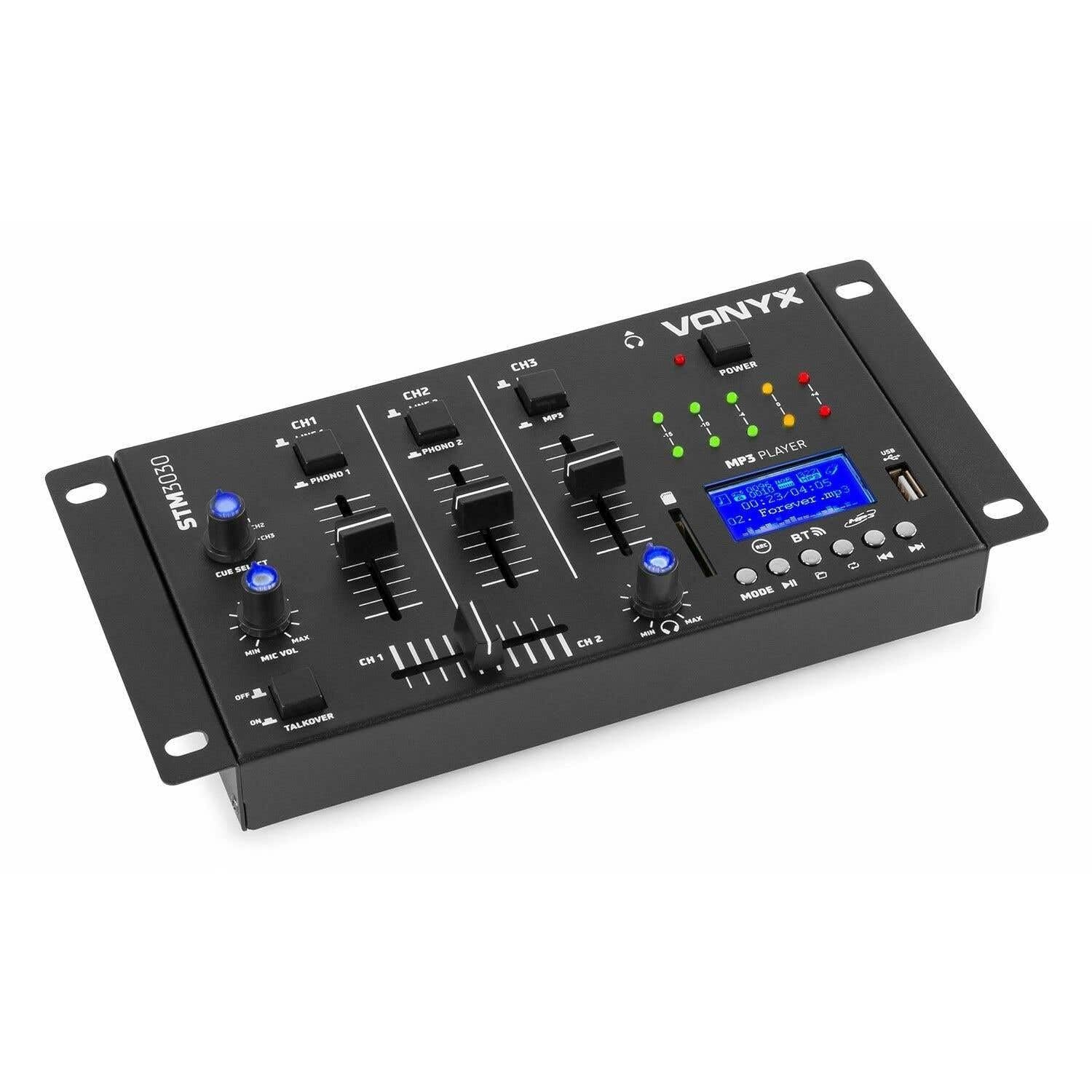
Image 1.1: Front view of the Vonyx STM3030 DJ Mixer, showcasing its compact design and control layout.
2. Key Features
- 4-Channel Mixer: Provides four input channels for connecting multiple audio sources.
- Versatile Connectivity: Includes Jack and RCA inputs for various devices.
- Bluetooth Interface: Enables wireless music streaming from smartphones, tablets, or computers.
- Integrated MP3 Player: Supports direct playback from USB drives and SD cards.
- USB Recording Function: Allows recording of live mixes to USB or SD storage.
- Cue Function: For pre-listening to tracks through headphones.
- LED VU Meter: Provides visual feedback on audio signal levels.
- Illuminated Controls: Potentiometers are illuminated for easy operation in dark environments.
- Crossfader: For smooth transitions between channels.
- Talkover Function: Automatically reduces music volume when the microphone is used.
- Compact Design: Easy to integrate into any DJ setup.
3. Safety Instructions
Please read these safety instructions carefully before operating the device and retain them for future reference. Incorrect use may result in electric shock, fire, or other hazards.
- Power Supply: Only use the provided power adapter. Ensure the voltage matches the requirements specified on the device.
- Water and Moisture: Do not expose the device to rain, moisture, or liquids. Never place objects filled with liquids on the device.
- Ventilation: Ensure proper ventilation. Do not block any ventilation openings. Install the device according to the manufacturer's instructions.
- Heat Sources: Do not install near any heat sources such as radiators, heat registers, stoves, or other apparatus (including amplifiers) that produce heat.
- Power Cord Protection: Protect the power cord from being walked on or pinched, particularly at plugs, convenience receptacles, and the point where they exit from the apparatus.
- Cleaning: Unplug the device from the power outlet before cleaning. Use only a dry, soft cloth.
- Servicing: Do not attempt to service this product yourself. Refer all servicing to qualified service personnel. Servicing is required when the apparatus has been damaged in any way, such as power-supply cord or plug is damaged, liquid has been spilled or objects have fallen into the apparatus, the apparatus has been exposed to rain or moisture, does not operate normally, or has been dropped.
- Lightning: Unplug this apparatus during lightning storms or when unused for long periods of time.
4. Controls and Connections
4.1 Front Panel Controls

Image 4.1: Angled top view of the Vonyx STM3030, highlighting the front panel controls.
- CH1 / CH2 / CH3: Input channels.
- LINE 1 / PHONO 1 (CH1): Selector switch for Channel 1 input source.
- LINE 2 / PHONO 2 (CH2): Selector switch for Channel 2 input source.
- LINE 3 / MP3 (CH3): Selector switch for Channel 3 input source.
- Channel Faders: Adjust the volume level for each channel.
- Crossfader: Blends audio between Channel 1 and Channel 2.
- CUE SELECT: Rotary knob to select which channel(s) to monitor through headphones.
- MIC VOL (MIN/MAX): Adjusts the volume of the microphone input.
- TALKOVER (OFF/ON): Activates the talkover function, which automatically lowers music volume when the microphone is in use.
- POWER LED: Indicates when the mixer is powered on.
- LED VU Meter: Displays the output level of the master mix.
- MP3 PLAYER Display: Shows track information, mode, and status.
- USB Port: For connecting USB flash drives.
- SD Card Slot: For inserting SD memory cards.
- MP3 Player Controls (MODE, Play/Pause, Skip, REC, BT):
- MODE: Switches between USB, SD, and Bluetooth modes.
- Play/Pause: Starts or pauses playback.
- Skip (Previous/Next): Navigates between tracks.
- REC: Initiates or stops recording to USB/SD.
- BT: Activates Bluetooth pairing mode.

Image 4.2: Close-up of the integrated MP3 player, showing the display, controls, USB port, and SD card slot.
4.2 Rear Panel Connections

Image 4.3: Rear panel of the Vonyx STM3030, detailing all input and output connections.
- AC 12V 500mA: Power input jack for the included AC adapter.
- Headphone Output (6.3mm Jack): For connecting headphones for monitoring.
- OUTPUT (RCA L/R): Main stereo RCA output to connect to an amplifier or powered speakers.
- LINE 3 (RCA L/R): Stereo RCA input for Channel 3.
- LINE 2 / PHONO 2 (RCA L/R): Stereo RCA input for Channel 2, switchable between Line and Phono.
- LINE 1 / PHONO 1 (RCA L/R): Stereo RCA input for Channel 1, switchable between Line and Phono.
- MIC 1 / MIC 2 (6.3mm Jack): Microphone input jacks.
5. Setup Guide
- Unpack and Place: Carefully remove the mixer from its packaging. Place it on a stable, flat surface with adequate ventilation.
- Connect Power: Connect the provided AC power adapter to the 'AC 12V 500mA' input on the rear panel of the mixer. Plug the adapter into a suitable wall outlet. The POWER LED on the front panel should illuminate.
- Connect Main Output: Connect the 'OUTPUT' RCA jacks on the rear panel to the input of your amplifier or powered speakers using RCA cables.
- Connect Audio Sources:
- Turntables: Connect turntables to the 'PHONO 1' and 'PHONO 2' RCA inputs. Ensure the corresponding channel selector switches (CH1, CH2) are set to 'PHONO'.
- CD Players/Laptops/Other Line Devices: Connect these devices to the 'LINE 1', 'LINE 2', or 'LINE 3' RCA inputs. Set the corresponding channel selector switches to 'LINE'.
- Connect Microphones: If using microphones, plug them into the 'MIC 1' or 'MIC 2' 6.3mm jack inputs on the rear panel.
- Connect Headphones: Plug your headphones into the 6.3mm headphone output jack on the rear panel for monitoring.
6. Operating Instructions
6.1 Basic Operation
- Power On: Ensure all connections are secure. Turn on your amplifier/speakers first, then the STM3030 mixer.
- Select Input: For each channel, use the LINE/PHONO/MP3 selector switch to choose the desired audio source.
- Adjust Channel Volume: Use the individual channel faders (CH1, CH2, CH3) to adjust the volume of each input.
- Monitor Output: Observe the LED VU meter to ensure your master output level is not clipping (reaching the red indicators).
6.2 Using the MP3 Player (USB/SD)
- Insert Media: Insert a USB flash drive into the USB port or an SD card into the SD card slot.
- Select MP3 Mode: Ensure the CH3 selector switch is set to 'MP3'. Press the 'MODE' button on the MP3 player until 'USB' or 'SD' is displayed.
- Playback: Use the Play/Pause button to start or pause playback. Use the Skip buttons to navigate between tracks.
6.3 Bluetooth Connectivity
- Activate Bluetooth: Ensure the CH3 selector switch is set to 'MP3'. Press the 'MODE' button on the MP3 player until 'BT' is displayed. The display will show 'BT' and typically flash, indicating it's in pairing mode.
- Pair Device: On your smartphone, tablet, or laptop, go to Bluetooth settings and search for available devices. Select 'Vonyx STM3030' (or similar name) to pair.
- Stream Audio: Once paired, you can stream audio wirelessly from your device through Channel 3 of the mixer.
6.4 Recording Function
- Prepare Storage: Insert a USB flash drive or SD card into the MP3 player section. Ensure it has sufficient free space and is formatted correctly (FAT32 is generally recommended).
- Start Recording: Press the 'REC' button on the MP3 player. The display will indicate that recording has started.
- Monitor Levels: Adjust your channel faders and monitor the VU meter to ensure optimal recording levels without distortion.
- Stop Recording: Press the 'REC' button again to stop recording. The recorded file will be saved to your USB drive or SD card.
6.5 Microphone Usage and Talkover
- Connect Microphone: Plug your microphone(s) into the MIC 1 or MIC 2 jacks on the rear panel.
- Adjust Mic Volume: Use the 'MIC VOL' knob on the front panel to adjust the microphone's volume.
- Activate Talkover: If you wish for the music volume to automatically decrease when you speak into the microphone, set the 'TALKOVER' switch to 'ON'. Set it to 'OFF' to disable this function.
6.6 Headphone Monitoring (Cue)
- Connect Headphones: Plug your headphones into the headphone output jack.
- Select Channels: Use the 'CUE SELECT' rotary knob to choose which channel(s) you want to pre-listen to in your headphones without affecting the main output.
7. Troubleshooting
- No Sound Output:
- Check if the mixer is powered on and the POWER LED is lit.
- Ensure all audio cables are securely connected to the correct inputs and outputs.
- Verify that channel faders and the master output level are raised.
- Confirm the correct input source (LINE/PHONO/MP3) is selected for each channel.
- Check the volume and input selection on your connected amplifier or powered speakers.
- Distorted Sound:
- Reduce the input level of the audio source.
- Lower the channel faders or master output level to prevent clipping (indicated by red LEDs on the VU meter).
- Ensure the correct input type (LINE/PHONO) is selected for turntables; incorrect selection can cause distortion.
- Bluetooth Not Connecting:
- Ensure the mixer's MP3 player is in 'BT' mode and flashing, indicating pairing mode.
- Make sure your Bluetooth device is within range (typically up to 10 meters) and has Bluetooth enabled.
- Try unpairing and re-pairing the device.
- USB/SD Recording Not Working:
- Check if the USB drive or SD card is properly inserted.
- Ensure the storage device is formatted to FAT32.
- Verify that there is sufficient free space on the USB drive or SD card.
8. Specifications
| Brand | Vonyx |
| Model | STM3030 |
| Number of Channels | 4 |
| Connectivity Technology | Bluetooth, USB |
| Power Source | Mains powered (AC 12V / 500mA adapter included) |
| Frequency Response | 20 Hz - 20 kHz |
| Audio Inputs | 2x Phono (RCA), 3x Line (RCA), 2x Microphone (6.3mm Jack), USB, SD, Bluetooth |
| Audio Outputs | 1x Master (RCA), 1x Headphone (6.3mm Jack) |
| Supported Data Types | MP3, WAV |
| Dimensions (L x W x H) | 125 x 267 x 55 mm |
| Item Weight | 0.9 kg (Product weight), 1.3 kg (Shipping weight) |
9. Maintenance
To ensure the longevity and optimal performance of your Vonyx STM3030 DJ Mixer, follow these maintenance guidelines:
- Cleaning: Regularly wipe the mixer with a dry, soft, lint-free cloth. Do not use abrasive cleaners, solvents, or strong detergents, as these can damage the finish and internal components.
- Dust Protection: Keep the mixer free from dust. When not in use for extended periods, consider covering it with a dust cover.
- Environment: Avoid operating the mixer in excessively hot, cold, humid, or dusty environments. Keep it away from direct sunlight and sources of vibration.
- Cable Management: Ensure cables are not tangled or pinched, which can lead to damage over time.
10. Warranty and Support
The Vonyx STM3030 DJ Mixer comes with a 24-month warranty from the date of purchase. This warranty covers manufacturing defects and material faults under normal use.
For warranty claims, technical support, or service inquiries, please contact your retailer or the manufacturer directly. Please retain your proof of purchase for warranty validation.


