
Scosche GM2000SW
Contents
Scosche GM2000SW Factory Stereo Replacement Interface Adapter User Manual
Model: GM2000SW | Brand: Scosche
Introduction
The Scosche GM2000SW Factory Stereo Replacement Interface Adapter is designed to facilitate the installation of an aftermarket stereo in select 2000-2013 GM vehicles. This interface allows for the retention of factory steering wheel controls and integration with OEM amplified sound systems, ensuring a seamless upgrade while preserving essential vehicle functions. It utilizes standard wire color codes for straightforward installation.
What's in the Box
The GM2000SW package includes the following components:
- Interface Module
- Steering Wheel Control Harness
- Interface Harness
- User Manual

Image: Overview of the Scosche GM2000SW kit components, showing the interface module, the main interface harness, the steering wheel control harness, and the instruction booklet.
Vehicle Compatibility
This interface adapter is compatible with select 2000-2013 GM vehicles. Please refer to the detailed fit guide below to verify your vehicle's compatibility. Note that this product is not designed for OnStar functionality, which will be disabled, and is not compatible with Digital "Premium Bose" Systems (RPO codes: Y91/Y92/Z75).
Compatible Vehicle List:
BUICK
- LaCrosse: 2005-06
- Rainer: 2004-07
- Rendezvous: 2001-07
- Terrazza: 2005-07
CADILLAC
- Escalade/ESV/EXT: 2003-06
CHEVROLET
- Avalanche: 2003-06
- Blazer S-10: 2003-05
- Cavalier: 2000-05
- Classic: 2004
- Colorado: 2004-12
- Corvette: 2005-13
- Express Van: 2003-07
- Impala: 2000-05
- Malibu: 2001-03
- Monte Carlo: 2000-05
- S-10: 2003-04
- Silverado 1500-3500: 2003-06
- Silverado 1500-3500 Classic: 2007
- SSR: 2004-06
- Suburban: 2003-06
- Tahoe: 2003-06
- Trailblazer: 2002-09
- Uplander: 2005-08
- Venture: 2002-05
GMC
- Canyon: 2004-12
- Envoy: 2002-09
- Savana: 2003-07
- Sierra 1500-3500: 2003-06
- Sierra 1500-3500 Classic: 2007
- Sonoma: 2002-04
- Yukon: 2003-06
- Yukon XL: 2003-06
HUMMER
- H2: 2003-07
- H2T: 2005-07
- H3: 2006-09
- H3T: 2006-09
ISUZU
- Ascender: 2003-08
- I280/I350: 2006-08
OLDSMOBILE
- Alero (RDS Radio): 2002-04
- Bravada: 2002-04
- Silhouette: 2000-01
PONTIAC
- Aztek: 2001-05
- Grand Am: 2001-05
- Montana: 2002-04
- Montana SV6: 2005-06
- Sunfire: 2000-04
SATURN
- Relay: 2005-07

Image: Page 1 of the fit guide for the GM2000SW-WM1, detailing compatible Buick, Cadillac, Chevrolet, and GMC vehicle models and years. Includes notes about OnStar and Bose system incompatibility.
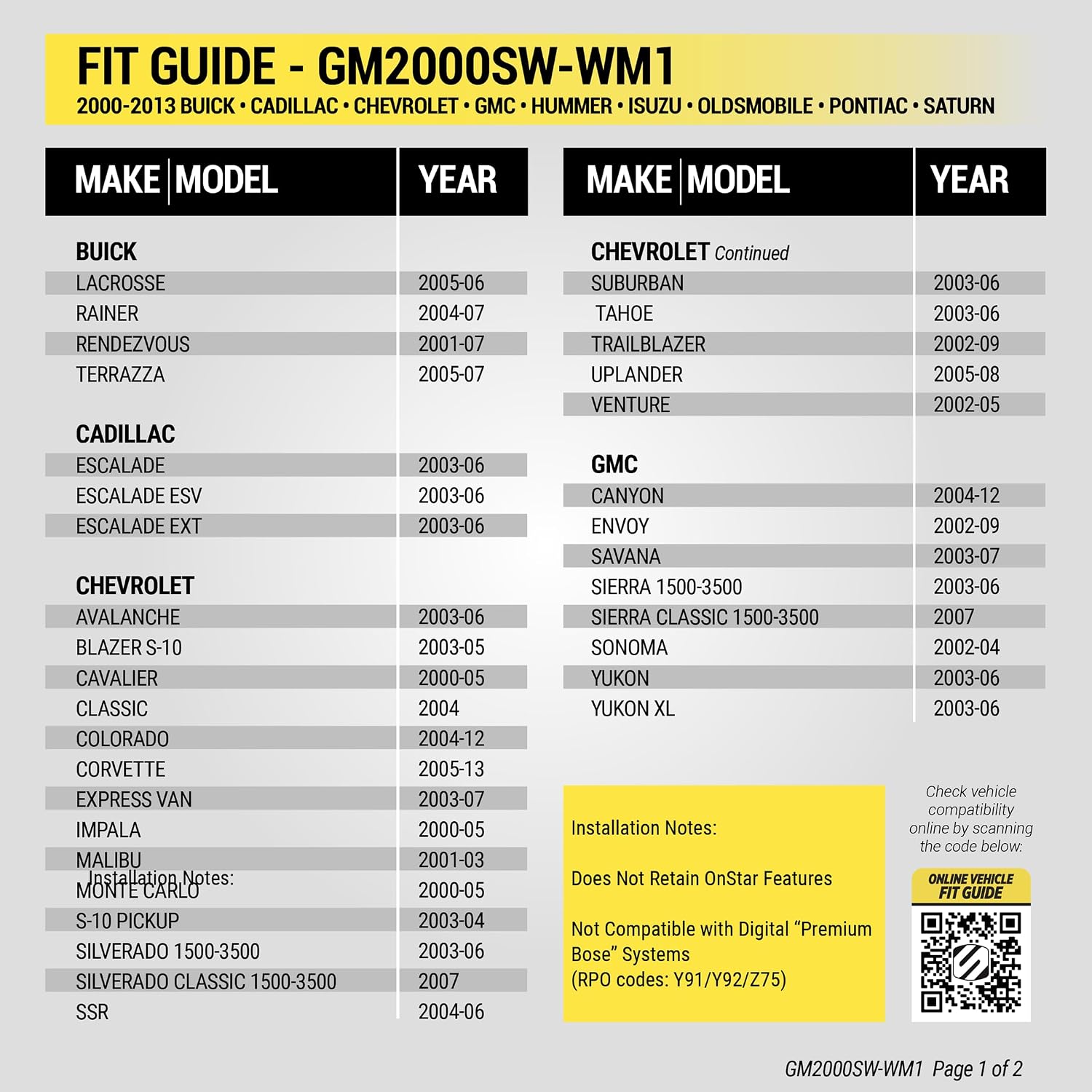
Image: Page 2 of the fit guide for the GM2000SW-WM1, detailing compatible Hummer, Isuzu, Oldsmobile, Pontiac, and Saturn vehicle models and years. Reinforces notes about OnStar and Bose system incompatibility.
For the most up-to-date compatibility information, please visit the official Scosche website: scosche.com/walmart
Setup and Installation
Proper installation of the Scosche GM2000SW interface is crucial for optimal performance. Follow these steps carefully. It is recommended to consult a professional if you are unsure about any part of the installation process.
Safety Precautions:
- Always disconnect the negative battery terminal before beginning any electrical work on your vehicle.
- Ensure all connections are secure to prevent short circuits.
- Refer to your vehicle's service manual for specific dashboard disassembly instructions.
Installation Steps:
- Disconnect Battery: Disconnect the negative battery terminal of your vehicle.
Video: Demonstrates disconnecting the negative battery terminal. This is a crucial first step for any car audio installation to prevent electrical shorts and damage.
- Prepare Wiring Harnesses: Connect the aftermarket stereo's wiring harness to the Scosche interface harness. Match wire colors according to the EIA standard 12V wiring color code. Use appropriate splice connectors for secure connections. Some wires, such as amplifier turn-on, parking sense, and steering wheel control connections, may not connect directly to the vehicle harness and require specific routing or connection to the interface module.

Image: Close-up of the Scosche interface harness, showing the various color-coded wires for connecting to the aftermarket stereo.

Image: The steering wheel control harness, which connects to the interface module to retain factory steering wheel audio controls.

Image: The main interface module, a compact black box that processes signals between the vehicle and the aftermarket stereo.
Video: Illustrates the process of connecting the aftermarket radio harness to the Scosche interface harness using splice connectors, emphasizing color-matching.
- Connect to Vehicle: Plug the vehicle harness into the vehicle's factory wiring and the radio harness into the new aftermarket radio. Ensure all connections are firm and properly seated.
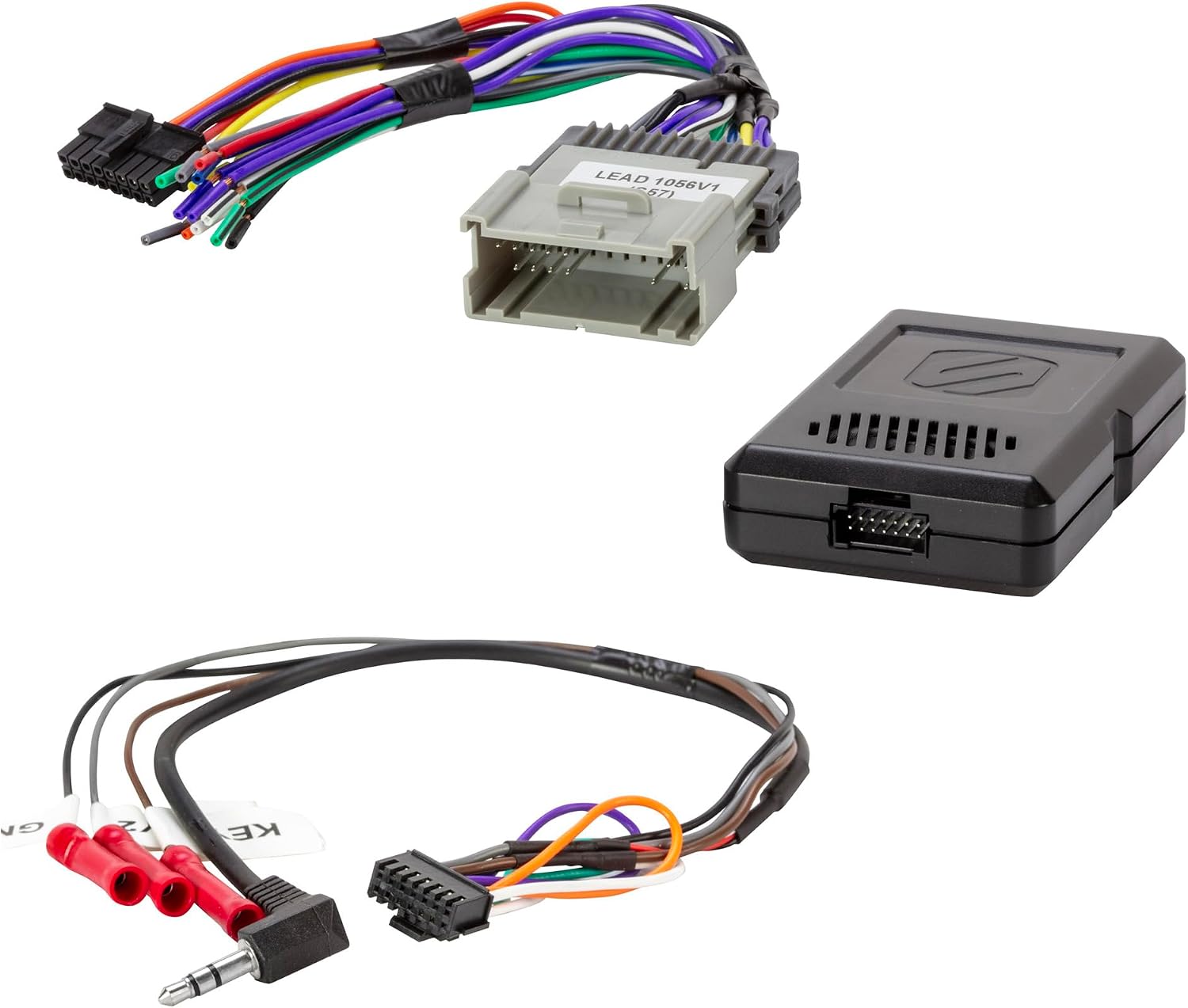
Image: The complete Scosche GM2000SW kit, illustrating how the interface module connects the vehicle's factory harness to the aftermarket stereo's harness.
Video: Shows the final connections being made inside the vehicle's dashboard, connecting the interface to the vehicle's wiring and the aftermarket radio.
- Mount Stereo: Secure the aftermarket stereo into the dashboard opening using appropriate mounting hardware (sold separately, if not included with your stereo).
- Reassemble Dash: Carefully reassemble the vehicle's dashboard components, ensuring no wires are pinched.
- Reconnect Battery: Reconnect the negative battery terminal.
Video: Demonstrates reconnecting the negative battery terminal after installation is complete.
Operating Instructions
Once the Scosche GM2000SW interface is installed, your aftermarket stereo should function seamlessly with your vehicle's electrical system and retained features.
Initial Power-Up:
- Turn the vehicle's ignition to the ACC or ON position.
- Power on your aftermarket stereo.
- Verify that the stereo receives power and functions correctly.
Steering Wheel Control Functionality:
The GM2000SW is designed to retain the use of your car's factory steering wheel controls. Test each button (volume up/down, track skip, mode, etc.) to ensure proper communication with your new stereo. Refer to your aftermarket stereo's manual for any specific programming or setup required for steering wheel controls.
Video: Demonstrates turning on the radio and checking its functions after installation, including verifying steering wheel control operation.
Safety and Warning Chimes:
This interface retains all factory safety and warning chimes. Listen for these chimes (e.g., seatbelt warning, door ajar) to confirm they are functioning as expected.
Maintenance
The Scosche GM2000SW interface module requires minimal maintenance. Once installed correctly, it is designed for long-term reliable operation.
- Connections: Periodically check the wiring connections behind the stereo to ensure they remain secure, especially if you experience intermittent issues.
- Cleaning: Keep the area around the interface module free from dust and debris.
- Software/Firmware: There are no user-updatable software or firmware components for this interface.
Troubleshooting
If you encounter issues after installing the GM2000SW interface, refer to the following common troubleshooting steps:
| Problem | Possible Cause | Solution |
|---|---|---|
| No power to aftermarket stereo. |
|
|
| No sound from speakers. |
|
|
| Steering wheel controls not working. |
|
|
| No warning chimes. |
|
|
Specifications
| Feature | Detail |
|---|---|
| Model Number | GM2000SW |
| Brand | Scosche |
| Material | Acrylonitrile Butadiene Styrene |
| Item Dimensions (L x W x H) | 6 x 3 x 4 inches |
| Item Weight | 0.25 Pounds (4 ounces) |
| Cable Type | Automotive Wiring Harness |
| Connector Type | Automotive Wiring Harness Connector |
| Voltage | 12 Volts |
| Steering Wheel Control Retention | Yes |
| OEM Amplifier Retention | Yes (Not compatible with Digital "Premium Bose" Systems) |
| OnStar Retention | No (OnStar function will be disabled) |
| RAP (Retained Accessory Power) Output | Yes, data-driven +12V accessory output |
Warranty and Support
The Scosche GM2000SW Factory Stereo Replacement Interface Adapter is backed by Scosche's commitment to quality and customer satisfaction.
- Limited Lifetime Warranty: This product comes with a Limited Lifetime Warranty from Scosche.
- Lifetime Tech Support: Scosche provides Lifetime Tech Support for this product.
For technical assistance, warranty claims, or additional information, please visit the official Scosche website or contact their customer support directly. You can also refer to the official installation manual (PDF) available online for detailed diagrams and instructions: Installation Manual (PDF).
Ask a question about this manual
Ask about setup, troubleshooting, compatibility, parts, safety, or missing instructions. Manuals+ will review the question and use this page’s manual context to help answer it.