1. Introduction
This manual provides comprehensive instructions for the assembly, operation, and maintenance of your VIVO STAND-V002E Dual Monitor Desk Mount. This mount is designed to accommodate two LCD/LED monitors ranging from 21 to 32 inches, with a maximum weight capacity of 22 lbs per screen. It supports VESA patterns of 75x75mm and 100x100mm. The unique telescoping arms and robust design ensure a stable and ergonomic workspace.

Figure 1: VIVO STAND-V002E Dual Monitor Desk Mount
2. Safety Information
WARNING:
- Read and understand all instructions before installation and use. Failure to do so may result in serious personal injury or property damage.
- Ensure the mounting surface (desk) can safely support the combined weight of the mount and monitors.
- Do not exceed the maximum weight capacity of 22 lbs (10 kg) per monitor.
- Use only the hardware provided. If any parts are missing or defective, contact VIVO for assistance.
- Keep children away from small parts and packaging materials.
3. Package Contents
Verify that all components are present and undamaged before proceeding with assembly.
- Main Pole with Desk Clamp
- Horizontal Arm with VESA Plates (2x)
- Cable Management Clips
- Mounting Hardware (screws, washers, Allen keys)
- Optional Grommet Mount Components

Figure 2: Mount Dimensions and VESA Compatibility
4. Specifications
| Feature | Detail |
|---|---|
| Model Number | STAND-V002E |
| Screen Size Compatibility | 21" to 32" (per screen) |
| Weight Capacity | 22 lbs (10 kg) per screen |
| VESA Compatibility | 75x75mm, 100x100mm |
| Mounting Type | Tabletop (C-clamp or Grommet) |
| Max Desktop Thickness | 3.25" (8.25 cm) |
| Movement Type | Articulating |
| Tilt Range | +90° to -90° |
| Swivel Range | 180° |
| Rotation Range | 360° |
| Material | Aluminum, Stainless Steel |
| Color | Black |
| Item Weight | 8.55 lbs (3.88 kg) |
5. Setup and Installation
5.1 Choose Your Mounting Option
The VIVO STAND-V002E offers two installation methods: C-clamp or grommet mount. Select the method best suited for your desk.
C-Clamp Installation:
- Attach the C-clamp to the edge of your desk.
- Tighten the C-clamp screw until the mount is securely fastened to the desk. Ensure it is stable and does not wobble.
Grommet Mount Installation (Optional):
- If your desk has a grommet hole, insert the grommet mount components through the hole.
- Secure the grommet mount from underneath the desk using the provided hardware.
5.2 Attaching Monitors
- Attach the VESA plates to the back of your monitors using the appropriate screws. Ensure the screws are tightened securely.
- Slide the monitors (with attached VESA plates) onto the horizontal arms of the desk mount.
- Secure the monitors to the arms using the provided locking mechanisms.

Figure 3: Example of a Dual Monitor Setup

Figure 4: Rear View of Monitors on Mount
6. Operating and Adjustments
The VIVO STAND-V002E offers extensive adjustability to customize your viewing experience.
6.1 Height Adjustment
Adjust the height of the horizontal arm along the central pole to achieve your desired ergonomic viewing level. Loosen the locking mechanism on the central pole, slide the arm to the new height, and then re-tighten to secure.
6.2 Articulation and Extension
The telescoping arms allow you to extend or retract your monitors. The arms slide into each other for added strength and stability, enabling a flush-to-wall setup without arms extending past the back edge of your desk.

Figure 5: Telescoping Arm Mechanism
6.3 Tilt, Swivel, and Rotation
Each monitor can be independently adjusted for optimal viewing angles:
- Tilt: Adjust the monitor +90° to -90° vertically.
- Swivel: Swivel the monitor 180° horizontally.
- Rotation: Rotate the monitor 360° to switch between landscape and portrait orientation.
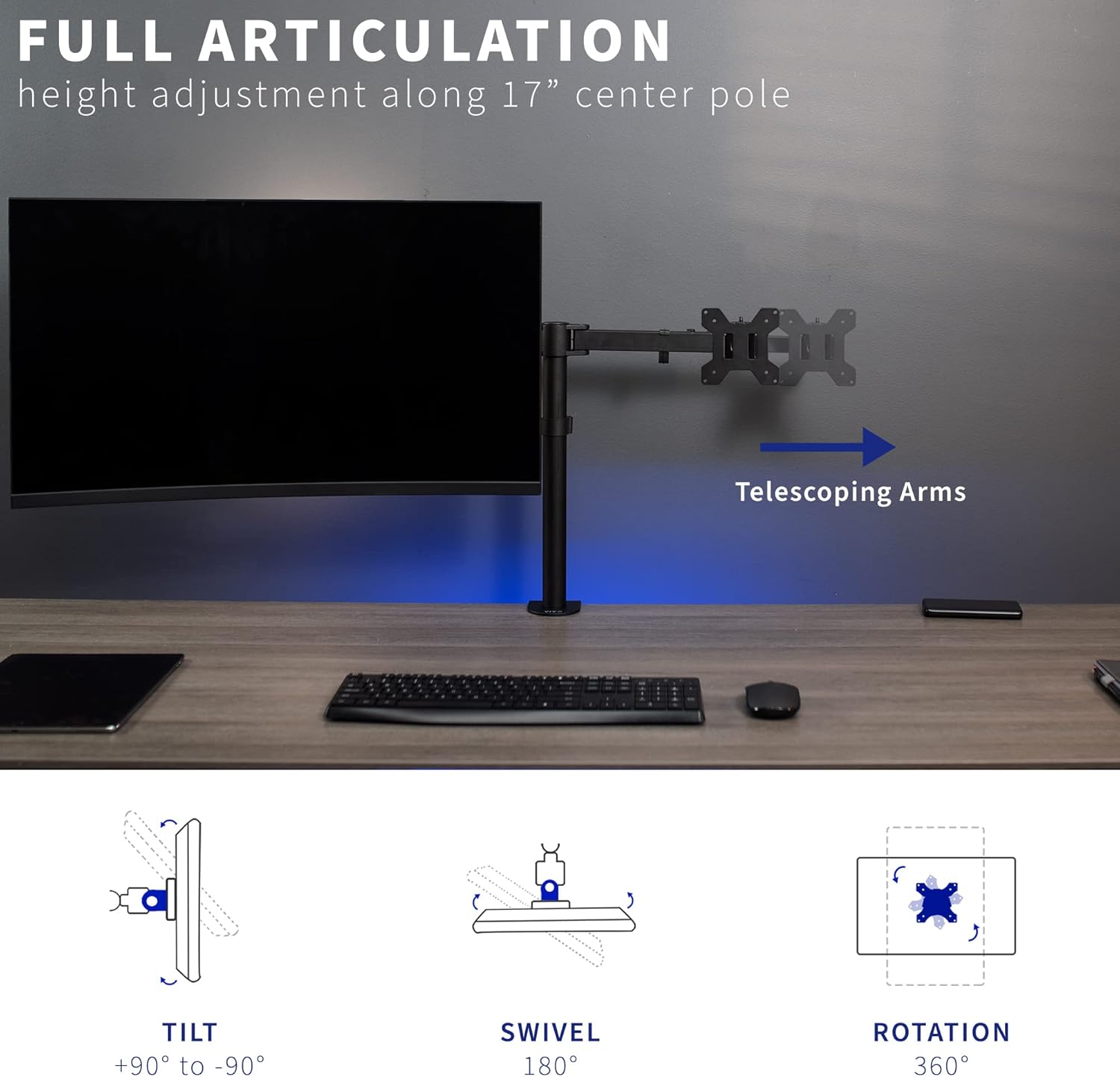
Figure 6: Full Articulation and Movement Ranges
7. Cable Management
Utilize the integrated cable management clips along the arms and central pole to keep your workspace tidy and organized. Route your monitor and power cables through these clips to prevent clutter.

Figure 7: Integrated Cable Management
8. Maintenance
To ensure the longevity and optimal performance of your VIVO monitor mount, follow these maintenance guidelines:
- Regularly check all screws and connections to ensure they remain tight. Re-tighten if necessary.
- Clean the mount with a soft, damp cloth. Avoid abrasive cleaners or solvents that could damage the finish.
- Periodically inspect the arms and VESA plates for any signs of wear or damage.
9. Troubleshooting
If you encounter any issues with your VIVO monitor mount, refer to the following common solutions:
- Monitor Sagging: Ensure all tilt and height adjustment screws are securely tightened. The mount is designed for monitors up to 22 lbs; verify your monitor weight does not exceed this limit.
- Mount Wobbling: Check that the desk clamp or grommet mount is firmly secured to the desk. Ensure your desk thickness is within the recommended 3.25" maximum.
- Difficulty Adjusting Arms: Loosen the hex screws at the joints slightly to allow for smoother movement. Re-tighten to desired tension once adjusted.
10. Warranty and Support
VIVO products are backed by a 3-year manufacturer warranty and friendly tech support to help with any questions or concerns. For warranty claims, technical assistance, or missing parts, please contact VIVO customer support directly. Refer to the official VIVO website for the most up-to-date contact information.
Thank you for choosing VIVO for your ergonomic workspace solutions.


