
1. Product Overview
This Ceaco Disney Dreams multipack contains four distinct 500-piece jigsaw puzzles, each featuring beautifully composed artwork by Thomas Kinkade. The collection includes scenes from Aladdin, Winnie the Pooh, Beauty and the Beast, and The Little Mermaid. This multipack is designed to provide an engaging puzzle experience for individuals and families.
Key Features:
- Contains four (4) individual 500-piece jigsaw puzzles.
- Includes a bonus poster for reference.
- Features standard-sized pieces for comfortable handling.
- Artwork curated in collaboration with Thomas Kinkade Studios.
- High-quality construction for durability.

Image 1.1: The packaging for the 4-in-1 Disney Dreams Collection jigsaw puzzle multipack, showcasing the four distinct puzzle images.
Video 1.1: An overview of Ceaco Puzzles, highlighting their premium quality and unique piece designs. This video demonstrates the general characteristics of Ceaco jigsaw puzzles.
2. Setup Instructions
Before beginning assembly, ensure you have a clean, flat, and adequately sized workspace. Each of the four 500-piece puzzles is individually bagged within the multipack to prevent mixing.
- Unpack: Carefully open the product box and remove the individually sealed bags containing the puzzle pieces.
- Identify Puzzles: The box side indicates which puzzle image corresponds to which numbered bag. Refer to this guide to select the puzzle you wish to assemble first.
- Prepare Workspace: Clear a large enough area to accommodate the assembled puzzle, which measures approximately 18 x 14 inches (46 x 36 cm).
- Reference Image: Use the bonus poster or the images on the product box as a visual guide during assembly.

Image 2.1: The product box, illustrating the four distinct puzzle images and highlighting the inclusion of a bonus poster for assembly reference.
3. Operating Instructions (Puzzle Assembly)
Assembling a jigsaw puzzle involves a systematic approach to connect pieces and reveal the complete image.
- Sort Pieces: Begin by emptying the contents of one puzzle bag onto your workspace. Turn all pieces face up. Separate the edge pieces (those with one flat side) from the interior pieces.
- Build the Border: Assemble the edge pieces first to create the frame of the puzzle. This defines the puzzle's perimeter and provides a starting point.
- Group by Color/Pattern: Sort the remaining interior pieces by color, pattern, or distinct features. This makes it easier to locate specific pieces as you work on different sections of the image.
- Assemble Sections: Work on distinct sections of the puzzle, such as characters, prominent objects, or areas of unique color. Refer frequently to the bonus poster or box image.
- Connect Sections: Once smaller sections are complete, connect them to the border and to each other until the entire image is formed.

Image 3.1: The completed Aladdin puzzle, showcasing the intricate details and vibrant colors of the Thomas Kinkade artwork.

Image 3.2: The completed Beauty and the Beast puzzle, featuring Belle and the Beast in a romantic setting.

Image 3.3: The completed Winnie the Pooh puzzle, depicting Pooh and friends in the Hundred Acre Wood.

Image 3.4: The completed Little Mermaid puzzle, illustrating Ariel and Prince Eric by the sea.
4. Maintenance
Proper care and storage will ensure the longevity of your jigsaw puzzles.
- Storage: After assembly, carefully disassemble the puzzle and return the pieces to their original bags or a suitable storage container. Store the box in a cool, dry place away from direct sunlight to prevent fading or warping.
- Cleaning: If pieces become dusty, gently wipe them with a dry, soft cloth. Avoid using liquids or abrasive cleaners, as these can damage the puzzle's finish.
- Handling: Handle puzzle pieces by their edges to avoid transferring oils or dirt from your hands to the printed surface.
5. Troubleshooting
Encountering issues during puzzle assembly is uncommon but can occur. Here are some common concerns and solutions:
- Missing Pieces: Double-check your workspace, under furniture, and within the puzzle box for any misplaced pieces. If a piece is genuinely missing, contact Ceaco customer support for assistance.
- Pieces Don't Fit: Ensure you are using pieces from the correct puzzle bag if working with multiple puzzles simultaneously. Some pieces may appear to fit but are incorrect; verify the image alignment and color matching before forcing pieces together.
- Difficulty: If a puzzle proves too challenging, try sorting pieces into smaller, more manageable groups based on color, texture, or specific elements of the image. Working on the border first can also provide a helpful framework.
Safety Information: This product contains small parts and is not suitable for children under 3 years of age due to choking hazards. Adult supervision is recommended for younger children.
6. Specifications
| Specification | Detail |
|---|---|
| Product Dimensions (Box) | 12 x 10 x 2.6 inches |
| Item Weight | 2 pounds |
| Model Number | 3667-1 |
| Manufacturer Recommended Age | 5 years and up |
| Number of Puzzles | 4 |
| Pieces Per Puzzle | 500 |
| Assembled Puzzle Size (Each) | 18 x 14 inches (46 x 36 cm) |
| Manufacturer | Ceaco (Games) |
| Release Date | March 18, 2019 |
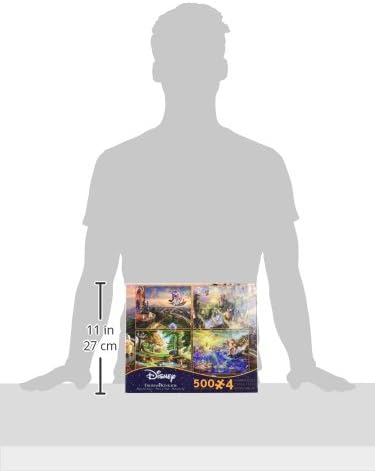
Image 6.1: A diagram illustrating the dimensions of the puzzle box.
7. Warranty and Support
For any questions regarding this product, including inquiries about missing pieces or manufacturing defects, please contact Ceaco customer support directly. Specific warranty details may vary and are typically provided with the product packaging or available on the manufacturer's official website.
Manufacturer: Ceaco (Games)
Website: Visit the Ceaco Store on Amazon