
Introduction
Thank you for choosing the TEC.BEAN SG-009 12 MP HD 1080P Trail Camera. This manual provides detailed instructions for setting up, operating, and maintaining your camera. Please read this manual thoroughly before using the device to ensure optimal performance and longevity. This camera is designed for outdoor use, including wildlife observation, hunting, and property surveillance.
Product Overview
Key Features
- High Resolution Imaging: Captures 12 MP still images and Full HD 1080P videos with sound.
- Fast Trigger Speed: Detects motion and triggers recording in 0.6-0.8 seconds.
- Advanced Night Vision: Equipped with 36 940nm black IR LEDs for clear black and white night vision up to 23 meters (75 feet).
- Multiple Capture Modes: Supports Photo, Video, Photo+Video (Hybrid), Time Lapse, and Motion Detection modes.
- Durable and Waterproof: IP66 rated for protection against dust, shocks, and corrosion, suitable for temperatures from -30°C to 60°C.
- 2.0-inch Color LCD Screen: For easy menu navigation, viewing photos/videos, and displaying essential information like time, date, temperature, and moon phase.
- Password Protection: Secures your device from unauthorized access.
Package Contents
- 1x TEC.BEAN SG-009 Trail Camera
- 1x USB Cable
- 1x TV Output Cable
- 1x Mounting Belt
- 1x User Manual
- 1x Warranty Card
Note: 8x AA batteries and an SD card (up to 32GB) are required and not included.
Setup
1. Battery Installation
- Open the camera casing.
- Locate the battery compartment.
- Insert 8 AA batteries, ensuring correct polarity.
- Close the battery compartment securely.

Image: Detailed view of the TEC.BEAN SG-009 camera with labels for components, including the battery slot. Pull the battery slot out to insert 8 AA batteries.
2. SD Card Insertion
- Ensure the camera is powered off.
- Locate the SD card slot.
- Insert a Class 10 SD card (up to 32GB) into the slot until it clicks.
- To remove, press the card gently until it springs out.
3. Initial Configuration
- Switch the camera to the TEST position. The 2.0-inch LCD screen will turn on.
- Press the MENU button to access settings.
- Navigate using the UP/DOWN buttons and confirm with ENTER.
- Set the current Date and Time.
- Select your preferred Language (English, French, etc.).
- Format the SD card (recommended for first use) via the Format Card option in the menu.
- Configure other settings such as Image Resolution, Video Resolution, PIR Sensitivity, Capture Mode, etc., according to your needs.
Operating Instructions
Modes of Operation
The camera features three main operating positions:
- OFF: Power off the camera.
- TEST: Allows you to adjust settings, view captured media, and manually take photos/videos. The PIR sensor is active in this mode for testing detection range.
- ON: Activates the camera for automatic recording based on your configured settings. The screen will turn off after a few seconds to conserve power, and the camera will enter surveillance mode.
Setting Capture Modes
In TEST mode, access the menu to select your desired capture mode:
- Photo Mode: Captures still images when motion is detected. You can set the number of shots per trigger (1-9).
- Video Mode: Records video clips when motion is detected. You can set the video length (5-90 seconds).
- Hybrid Mode (Photo + Video): Captures a still image followed by a video clip upon motion detection.
- Time Lapse Mode: Takes photos at set intervals (1 second to 60 minutes) regardless of motion.

Image: Examples of Hybrid (Photo + Video) and Motion Detection modes in action, showing a bear and a chameleon being captured by the camera.

Image: Illustration of the camera's 0.6-0.8 second trigger speed and multi-shooting capability, capturing a squirrel in successive frames.
Night Vision Operation
The camera automatically switches to night vision mode when ambient light is low. The 36 940nm IR LEDs provide invisible illumination, capturing clear black and white images and videos without disturbing wildlife.
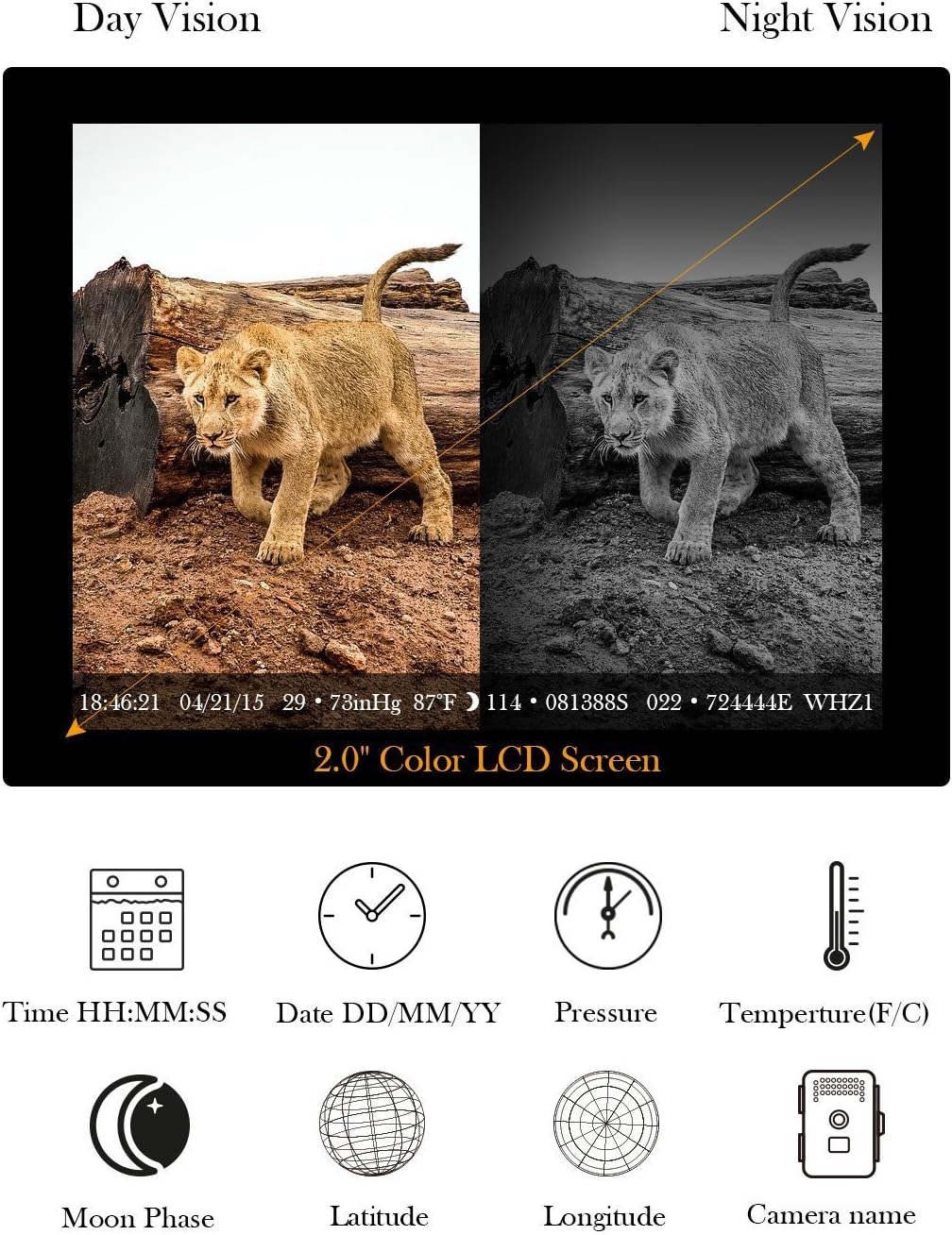
Image: Split image showing a lion cub in Day Vision (color) and Night Vision (black and white), demonstrating the camera's automatic mode switching.

Image: Visual comparison of 8MP and 12MP image quality, highlighting the 36 940nm black IR LEDs and their 23m (75ft) night vision range.
Mounting the Camera
Use the provided mounting belt to secure the camera to a tree or pole. Ensure the camera is stable and positioned to capture the desired area. The camera also features a tripod nut for alternative mounting options.
Maintenance
- Cleaning: Wipe the camera lens and PIR sensor window with a soft, dry cloth. Avoid abrasive materials or harsh chemicals.
- Battery Replacement: Replace all 8 AA batteries when the low battery indicator appears on the screen or when performance degrades.
- SD Card Management: Regularly check the SD card capacity. Format the card periodically to maintain optimal performance and prevent data corruption.
- Environmental Protection: While the camera is IP66 waterproof, avoid submerging it in water. Ensure the casing is securely closed to prevent moisture ingress.

Image: The TEC.BEAN SG-009 camera in a rainy environment, illustrating its IP66 waterproof grade for outdoor durability.
Troubleshooting
| Problem | Possible Cause | Solution |
|---|---|---|
| Camera not powering on |
|
|
| No photos/videos captured |
|
|
| Poor night vision quality |
|
|
| Short battery life |
|
|
| Incorrect language display (e.g., "oui" for "no") |
|
|
Specifications
| Feature | Detail |
|---|---|
| Display | 2.0-inch TFT LCD Color Screen |
| Image Sensor Resolution | 12.0 MP |
| PIR Angle of View | 65° |
| Lens FOV | 60° (Max: 62°), F=2.4, Automatic IR Filter |
| IR LEDs | 36 PCS / 940nm Black IR LEDs |
| Night Vision Range | 0-23 meters (0-75 feet) |
| Memory | SD Card (not included), up to 32 GB (Class 10 recommended) |
| Image Resolution | 12MP (4000x3000), 8MP (3840x2160), 5MP (2944x1656), 2MP (1920x1080) (JPEG) |
| Video Resolution | HD 1920x1080 (15fps), 1080x720 (30fps) (AVI) |
| Audio Recording | Yes |
| Digital Zoom | 2x, 3x, 4x |
| Trigger Speed | 0.6-0.8 seconds |
| Trigger Interval | 1 second - 60 minutes (programmable) |
| Multi-shot Capability | 1-9 photos per trigger (programmable) |
| Video Length | 5-90 seconds (programmable) |
| Power Supply | 8x AA batteries, 12V DC external power (solar panel or external battery, not included) |
| Standby Time | Up to 6 months (with 8x AA batteries) |
| Ports | TV Out (NTSC, PAL), USB, SD Card, Micro SD |
| Waterproof Rating | IP66 |
| Operating Temperature | -30°C to 60°C (-22°F to 140°F) |
| Operating Humidity | 20% to 85% (non-condensing) |
| Dimensions | 13.5 x 6 x 9 cm |
| Weight | 380 Grams |
| Safety Standards | CE, FCC, RoHS |
Warranty and Support
The TEC.BEAN SG-009 Trail Camera comes with a 1-year warranty from the date of purchase. Please retain your proof of purchase for warranty claims.
For technical support, troubleshooting assistance, or warranty inquiries, please refer to the contact information provided on your warranty card or visit the official TEC.BEAN website.