
Lenovo T460 (20FN002JUS)
Lenovo Thinkpad T460 14-Inch Laptop User Manual
1. Introduction
Welcome to the user manual for your Lenovo Thinkpad T460 14-Inch Laptop. This guide provides essential information to help you set up, operate, maintain, and troubleshoot your device. Please read this manual thoroughly to ensure optimal performance and longevity of your laptop.
2. Product Overview
2.1 Key Features
- Processor: Intel i5-6300U (2.4GHz up to 3.0GHz) with 3MB Cache, 2133MHz
- Graphics & Memory: Intel HD Graphics 520, 8GB RAM, 256GB Opal2 Solid State Drive
- Display & Camera: 14" FHD Display (1920x1080) IPS, 720p Integrated Webcam
- Connectivity: Backlit Keyboard, Fingerprint Reader, Bluetooth 4.1
- Battery Life: 3-Cell (23Wh) Up to 10 Hours of Battery Life
- Operating System: Windows 7 Pro 64 (preinstalled through downgrade rights in Windows 10 Pro)
2.2 Components and Layout
Familiarize yourself with the various components of your Thinkpad T460.

Front view of the Lenovo Thinkpad T460 laptop, showcasing its full display, keyboard, and trackpad.

Left side profile of the Lenovo Thinkpad T460, illustrating the various connectivity ports including USB, HDMI, and power input.

Detailed view of the Lenovo Thinkpad T460's 14-inch Full HD IPS display, showing screen clarity.

Top-down perspective of the closed Lenovo Thinkpad T460, highlighting the sleek design and ThinkPad branding.

Angled open view of the Lenovo Thinkpad T460, providing a clear look at the keyboard layout and screen angle.
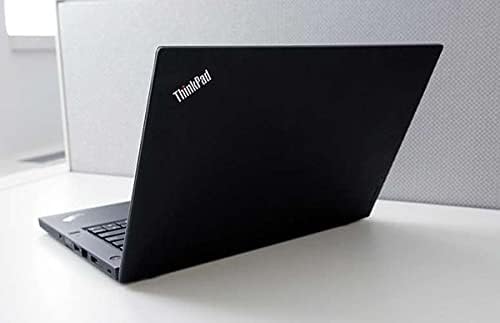
Rear angled view of the Lenovo Thinkpad T460, emphasizing its robust build and design from the back.
3. Setup
3.1 Initial Power-On
- Connect the AC adapter to the laptop's power input and then to a functional power outlet.
- Open the laptop lid and locate the power button, typically situated on the top right side of the keyboard. Press it to turn on the laptop.
- Follow the on-screen prompts to complete the initial Windows setup, which includes selecting your language, region, and creating a user account.
3.2 Connecting Peripherals
The Thinkpad T460 is equipped with various ports to connect external devices:
- USB 3.0 Ports: For connecting external hard drives, USB flash drives, mice, and keyboards.
- HDMI Port: For connecting to external monitors or projectors to extend or duplicate your display.
- Ethernet Port: For stable wired network connections.
- Audio Jack: For connecting headphones or external speakers.
Ensure all devices are securely and correctly inserted into their respective ports.
4. Operating the Laptop
4.1 Keyboard and Trackpad
The Thinkpad T460 features a comfortable backlit keyboard, ideal for typing in various lighting conditions. The integrated trackpad supports multi-touch gestures for intuitive navigation. Additionally, the TrackPoint (the red pointing stick located between the G, H, and B keys) offers an alternative, precise method for cursor control.
4.2 Battery Management
Your laptop is designed with a dual-battery system (a 3-cell front battery and a 3-cell rear battery) to provide extended usage, offering up to 10 hours of battery life. To maximize battery longevity and performance, consider these tips:
- Adjust screen brightness to a comfortable yet energy-efficient level.
- Close applications and programs that are not actively in use.
- Utilize the power-saving modes available in your Windows settings.
4.3 Wireless Connectivity
The Thinkpad T460 offers robust wireless capabilities:
- Wi-Fi: Connect to available wireless networks by accessing the Wi-Fi settings in the Windows taskbar.
- Bluetooth 4.1: Easily pair with Bluetooth-enabled devices such as wireless headphones, speakers, or mice through the Bluetooth settings in your operating system.
5. Maintenance
5.1 Cleaning
To keep your laptop in optimal condition:
- Use a soft, lint-free cloth to gently clean the screen and exterior surfaces.
- For more persistent smudges, slightly dampen the cloth with water or a specialized screen-cleaning solution.
- Avoid spraying any liquids directly onto the laptop to prevent internal damage.
5.2 Software Updates
Regularly updating your operating system (Windows) and device drivers is crucial for maintaining optimal performance, security, and compatibility. Check for updates via Windows Update settings.
5.3 Data Backup
Periodically back up your important data to an external storage device or a cloud service. This practice is essential to prevent data loss in case of system issues or hardware failure.
6. Troubleshooting
6.1 Common Issues and Solutions
Laptop Not Powering On
- Ensure the AC adapter is securely connected to both the laptop and a working power outlet.
- Check if the battery is completely drained. Allow it to charge for a few minutes before attempting to power on again.
No Display
- If connected to an external monitor, verify that the monitor is powered on and set to the correct input source.
- Try pressing the display toggle function key (often Fn + F7 or similar, consult your keyboard layout) to cycle through display modes.
Wi-Fi Connectivity Issues
- Confirm that Wi-Fi is enabled in your Windows settings.
- Restart your wireless router and then restart the laptop.
- Check for updated wireless drivers from the Lenovo support website.
Slow Performance
- Close any unnecessary applications running in the background.
- Check your disk space and free up storage if it is low.
- Run a comprehensive virus and malware scan.
- Restart the laptop to clear temporary files and processes.
7. Specifications
| Component | Detail |
|---|---|
| Processor | Intel Core i5-6300U (2.4 GHz) |
| RAM | 8 GB DDR3L SDRAM |
| Storage | 256 GB SSD |
| Display | 14 Inches, 1920 x 1080 pixels (FHD IPS) |
| Graphics Coprocessor | Intel HD Graphics 520 |
| Operating System | Windows 10 DG Windows 7 Pro 64 |
| Wireless Type | Bluetooth 4.1 |
| USB Ports | 2 x USB 3.0 |
| Average Battery Life | Up to 10 Hours |
| Item Weight | 3.8 pounds |
| Product Dimensions (LxWxH) | 13.4 x 0.8 x 9.2 inches |
| Model Number | 20FN002JUS |
8. Warranty and Support
Your Lenovo Thinkpad T460 comes with a standard manufacturer's warranty. Please refer to the warranty card included with your purchase for specific terms and conditions regarding coverage and duration.
For technical support, driver downloads, service inquiries, or to find authorized service centers, please visit the official Lenovo support website or contact their customer service directly.
Lenovo Support Website: support.lenovo.com
Related Documents - T460 (20FN002JUS)
 |
Lenovo ThinkPad E14 Gen 5 (21JK00C3YA) Product Specifications Comprehensive technical specifications for the Lenovo ThinkPad E14 Gen 5 laptop, covering performance, display, connectivity, security, environmental factors, and certifications. Model: 21JK00C3YA. |
 |
Lenovo ThinkPad X240 Ultrabook: Features, Specifications, and Accessories Discover the thin and light Lenovo ThinkPad X240 Ultrabook, featuring 4th generation Intel Core processors with vPro, long battery life, MIL-SPEC durability, and comprehensive technical specifications. Explore accessories and service offerings. |
 |
Lenovo ThinkPad T14 Gen 2, T15 Gen 2, P14s Gen 2, P15s Gen 2 User Guide Comprehensive user guide for Lenovo ThinkPad T14 Gen 2, T15 Gen 2, P14s Gen 2, and P15s Gen 2 laptops. Covers setup, features, security, advanced settings, CRU replacement, and support resources. |
 |
Lenovo ThinkPad P15 Gen 2 Technical Specifications Detailed technical specifications for the Lenovo ThinkPad P15 Gen 2 workstation laptop, covering system overview, supported components, CPU, memory, storage, display, I/O, audio, battery, BIOS, security, environmental, and manageability features. |
 |
Lenovo IdeaPad Flex 5i Chromebook Plus User Guide Discover the features, setup, and usage of your Lenovo IdeaPad Flex 5i Chromebook Plus (14-inch) with this comprehensive user guide. Learn about connectivity, troubleshooting, and support resources. |
 |
Lenovo ThinkStation P3 Ultra Power Configurator Guide Detailed guide to the Lenovo ThinkStation P3 Ultra power configurations, including CPU and GPU power ratings, architectural design, and external power adapter options. |