
1. Introduction
The Maclean MCE132 is an advanced microwave motion detector designed for automatic lighting control and energy saving. It utilizes high-frequency electromagnetic waves (5.8 GHz) to detect movement within its range, offering enhanced security and convenience. This sensor can detect motion through non-metallic obstacles such as doors, windows, and thin walls, providing a wide and reliable detection field.
This manual provides essential information for the safe and efficient installation, operation, and maintenance of your Maclean MCE132 Microwave Motion Detector. Please read it thoroughly before use and retain it for future reference.
2. Safety Information
WARNING: Risk of Electric Shock. Installation must be performed by a qualified electrician in accordance with all local and national electrical codes.
- Ensure the power supply is disconnected before installation or maintenance.
- Do not exceed the specified electrical load ratings.
- Do not install in locations with high humidity or extreme temperatures.
- Keep the device away from strong electromagnetic interference sources.
- This device is for indoor use only unless otherwise specified.
3. Product Overview
The Maclean MCE132 features adjustable settings for ambient light sensitivity (LUX), detection sensitivity (SENS), and lighting duration (TIME). It also includes an operating mode switch.

Figure 1: Front view of the Maclean MCE132 Microwave Motion Detector, showing its white square casing and central circular sensor.
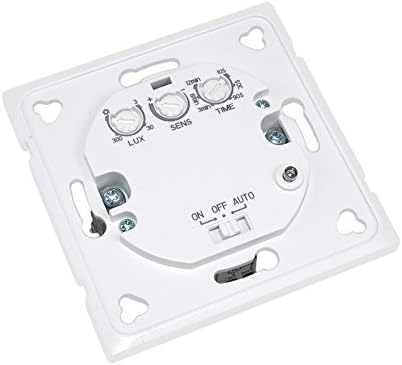
Figure 2: Rear view of the Maclean MCE132, displaying the 'LUX', 'SENS', and 'TIME' adjustment dials, along with the 'ON/OFF/AUTO' switch.

Figure 3: Side view of the Maclean MCE132, illustrating the electrical wiring terminals for connection.
4. Setup and Installation
4.1. Mounting Location
Choose a suitable wall-mount location, typically between 1 and 1.8 meters in height, where the sensor can cover the desired detection area without obstruction from large metal objects. Avoid mounting near heat sources or areas with significant air movement (e.g., air conditioning vents) to prevent false triggers.
4.2. Wiring Instructions
- Disconnect Power: Before starting any wiring, ensure the main power supply to the circuit is turned off at the circuit breaker.
- Prepare Wires: Strip approximately 6-8mm of insulation from the ends of the live, neutral, and load wires.
- Connect Wires: Refer to the wiring diagram (Figure 3) and connect the wires as follows:
- Connect the Live (L) wire from the power supply to the 'L' terminal on the sensor.
- Connect the Neutral (N) wire from the power supply to the 'N' terminal on the sensor.
- Connect the Load (L') wire (to your light fixture or other device) to the 'L’' terminal on the sensor.
- Secure Mounting: Mount the sensor securely to the wall using appropriate screws and anchors.
- Restore Power: Once all connections are secure and the sensor is mounted, restore power to the circuit.
5. Operating Instructions
The Maclean MCE132 features three adjustable settings and a mode switch:
5.1. Mode Switch (ON/OFF/AUTO)
- ON: The connected load (e.g., light) will remain continuously on, bypassing the sensor function.
- OFF: The connected load will remain continuously off.
- AUTO: The sensor will operate automatically based on its detection and ambient light settings.
5.2. Adjustment Dials
- LUX (Ambient Light Sensitivity): This dial controls the ambient light level at which the sensor will activate. Rotate towards the 'sun' symbol for activation in brighter conditions (daylight) or towards the 'moon' symbol for activation only in darker conditions (nighttime). Range: <3-2000 lux.
- SENS (Detection Sensitivity): This dial adjusts the sensitivity of the microwave detection. Rotate clockwise to increase the detection range (up to 15m) and counter-clockwise to decrease it (down to 5m). Adjust this to prevent unwanted triggers.
- TIME (Lighting Duration): This dial sets how long the connected load remains on after motion is detected and no further motion is sensed. Rotate clockwise to increase the duration (up to 12 minutes) and counter-clockwise to decrease it (down to 10 seconds).
6. Maintenance
The Maclean MCE132 Microwave Motion Detector requires minimal maintenance.
- Cleaning: Periodically wipe the sensor surface with a soft, dry cloth to remove dust or dirt. Do not use abrasive cleaners or solvents.
- Inspection: Regularly check for any visible damage to the casing or wiring. If damage is found, disconnect power and have it inspected by a qualified technician.
7. Troubleshooting
If you experience issues with your motion detector, refer to the following table for common problems and solutions:
| Problem | Possible Cause | Solution |
|---|---|---|
| Light does not turn on when motion is detected. | No power; LUX setting too high; SENS setting too low; faulty wiring. | Check power supply; adjust LUX to 'moon' symbol for testing; increase SENS; verify wiring connections. |
| Light stays on continuously. | Mode switch set to 'ON'; continuous motion in detection area; faulty sensor. | Set mode switch to 'AUTO'; reduce SENS or adjust mounting location; contact support if issue persists. |
| Light turns on randomly. | SENS setting too high; interference from external sources (e.g., microwave ovens, strong Wi-Fi signals); small animals. | Decrease SENS; relocate sensor away from interference; adjust mounting height or angle. |
| Detection range is too short/long. | SENS setting incorrect; obstructions. | Adjust SENS dial; ensure clear line of sight for microwave signals (though it can penetrate thin materials, dense objects will reduce range). |
8. Specifications
| Input Voltage | 220-240 V/AC, 50/60 Hz |
| Detection Range | 5-15 meters (adjustable) |
| Ambient Light (LUX) | <3-2000 lux (adjustable) |
| Lighting Duration (TIME) | Min. 10 seconds ± 3 seconds, Max. 12 minutes ± 1 minute (adjustable) |
| Rated Load | 1200 W (incandescent), 300 W (LED/fluorescent) |
| Power Consumption | 0.9 W |
| Installation Height | 1-1.8 meters |
| Response Speed | 0.6-1.5 m/s |
| Detection Angle | 180° |
| Dimensions (L x W x H) | 9 x 6 x 8 cm |
| Weight | 130 grams |
9. Warranty and Support
Maclean products are designed for quality and reliability. For warranty information, please refer to the terms and conditions provided at the point of purchase or visit the official Maclean website. If you encounter any issues not covered in this manual or require technical assistance, please contact Maclean customer support.
Maclean Customer Support: Please refer to your product packaging or the official Maclean website for contact details.
