
Introduction
The Maclean MCE135 is an infrared motion sensor designed for automatic control of lighting based on door movement. This device detects when a door is opened or closed, triggering connected lights to turn on or off. It is suitable for various indoor applications such as wardrobes, cabinets, storage rooms, and other areas where automatic illumination upon entry is desired.
Safety Information
- Always disconnect power before installation or maintenance to prevent electric shock.
- Installation should be performed by a qualified electrician or in accordance with local electrical codes.
- Do not exceed the maximum load capacity specified in the product specifications.
- Ensure the device is installed in a dry environment, away from direct moisture or extreme temperatures.
- Keep out of reach of children.
Product Overview
The Maclean MCE135 sensor unit consists of a main control box and a connected infrared sensor head. The control box houses the wiring terminals and internal electronics, while the sensor head detects proximity changes, typically when a door opens or closes within its detection range.

Figure 1: Maclean MCE135 Infrared Motion Sensor unit, showing the main control box, connecting cable, and the sensor head.

Figure 2: Close-up view of the compact infrared sensor head, designed for discreet installation.
Specifications
| Feature | Specification |
|---|---|
| Input Voltage | 110-240 V/AC |
| Power Frequency | 50/60 Hz |
| Rated Current | 5 A |
| Max Load (Incandescent) | 500 W |
| Max Load (LED) | 200 W |
| Detection Range | 5-6 cm |
| Operating Temperature | -20 ℃ to +50 ℃ |
| Dimensions (Control Box) | Approx. 10 x 5 x 5 cm |
| Weight | 80 grams |
| Power Source | AC adapter powered |
| Mounting Type | Door mount |
Setup
Follow these steps for proper installation of your Maclean MCE135 motion sensor:
- Prepare the Installation Area: Choose a suitable location for the sensor head and the control box. The sensor head should be positioned near the edge of the door frame or inside the cabinet, facing the door, to detect its opening and closing movement. Ensure the detection range of 5-6 cm is considered.
- Mount the Control Box: Secure the control box in a hidden but accessible location using the provided screws and wall plugs.
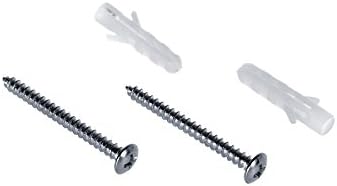
Figure 3: Included mounting hardware: screws and wall plugs.
- Wiring:
- Disconnect Power: Before making any electrical connections, ensure the main power supply to the circuit is turned off at the breaker.
- Connect Input Power: Connect the live (L) and neutral (N) wires from your main power supply to the 'IN' terminals on the control box. Refer to the diagram on the unit for correct polarity.
- Connect Output Load: Connect the live (L) and neutral (N) wires of your light fixture (load) to the 'OUT' terminals on the control box.
- Connect Sensor Head: The sensor head is pre-wired to the control box. Ensure the connection is secure.

Figure 4: Detailed view of the wiring terminals on the control box. Ensure correct connection of Live (L) and Neutral (N) for both input power and output load.
- Test the Installation: Once all connections are secure and the control box is mounted, restore power to the circuit. Test the sensor by opening and closing the door. The light should turn on when the door opens and turn off when the door closes.
Operating Instructions
The Maclean MCE135 operates automatically based on the detection of door movement:
- Door Open: When the door moves away from the sensor head, breaking the proximity, the sensor will detect this change and activate the connected light.
- Door Closed: When the door moves back towards the sensor head, restoring the proximity, the sensor will detect this change and deactivate the connected light.
There are no adjustable settings for this sensor; its operation is purely based on the presence or absence of the door within its detection range.
Maintenance
The Maclean MCE135 motion sensor requires minimal maintenance:
- Cleaning: Periodically wipe the sensor head with a soft, dry cloth to remove dust or debris that might obstruct its detection capabilities. Do not use abrasive cleaners or solvents.
- Inspection: Regularly check the wiring connections for any signs of wear, damage, or looseness. Ensure the sensor head and control box are securely mounted.
- Power Cycle: If the sensor appears to be malfunctioning, try turning off the power to the circuit for a few minutes and then restoring it. This can sometimes resolve minor electronic glitches.
Troubleshooting
| Problem | Possible Cause | Solution |
|---|---|---|
| Light does not turn on when door opens. | No power to the sensor. Incorrect wiring. Sensor head obstructed or out of range. Faulty light bulb. | Check circuit breaker and power supply. Verify wiring connections according to the diagram. Ensure sensor head is clean and within 5-6 cm of the door. Test the light bulb with another fixture. |
| Light does not turn off when door closes. | Sensor head not detecting door closure. Sensor head obstructed. | Ensure the door fully closes within the sensor's detection range. Clean the sensor head. |
| Light flickers or behaves erratically. | Loose wiring connections. Interference. Overloaded circuit. | Check and tighten all wiring connections. Ensure no other devices are causing electrical interference. Verify the total wattage of connected lights does not exceed the sensor's maximum load. |
Warranty and Support
Maclean products are designed for reliability and performance. For warranty information, please refer to the specific terms and conditions provided at the point of purchase or contact your retailer. For technical support or further assistance, please reach out to Maclean customer service or visit the official Maclean website.
Keep your purchase receipt as proof of purchase for any warranty claims.