
1. Introduction
This manual provides essential instructions for the safe and effective use of your CHATTANOOGA CEFAR TENS device, Model 22240. Please read this manual thoroughly before operating the device and retain it for future reference. This device is designed for Transcutaneous Electrical Nerve Stimulation (TENS) to help manage pain.
2. Safety Information
WARNING: Consult a healthcare professional before using this device, especially if you have a pacemaker, heart condition, epilepsy, or are pregnant. Do not apply electrodes over open wounds, irritated skin, or directly over the heart or carotid sinus nerves.
- Do not use while driving or operating heavy machinery.
- Keep out of reach of children.
- Use only the electrodes and cables supplied or recommended by the manufacturer.
- Discontinue use if skin irritation or discomfort occurs.
3. Package Contents
Verify that all items are present in your CHATTANOOGA CEFAR TENS package:
- 1 x CHATTANOOGA CEFAR TENS Device (Model 22240)
- 2 x Bipolar Cables
- 4 x Electrodes (50 mm diameter)
- 2 x 1.5 V Batteries
- 1 x User Manual (this document)
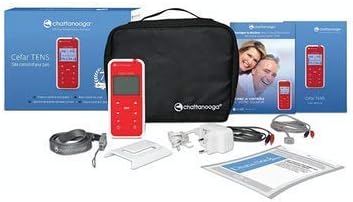
Image 3.1: Overview of the CHATTANOOGA CEFAR TENS device and its included accessories, such as the main unit, electrode cables, self-adhesive electrodes, and batteries, all neatly arranged with the product packaging.
4. Device Overview
The CHATTANOOGA CEFAR TENS device features a digital screen and intuitive controls for selecting programs and adjusting intensity. It is a compact, portable unit designed for ease of use.

Image 4.1: Front view of the CHATTANOOGA CEFAR TENS device, showcasing its digital display which shows program numbers (P2, P3), time remaining, and intensity levels. Below the screen are navigation buttons (up/down arrows) and an 'OK' button for selection, along with power buttons and program selection buttons at the bottom.

Image 4.2: Four different views of the CHATTANOOGA CEFAR TENS device. From left to right: front view with the screen and buttons, a slim side profile, the back of the device showing a belt clip and regulatory labels, and an angled front view. This illustrates the device's compact design and portability.
5. Setup
5.1 Battery Installation
- Locate the battery compartment on the back of the device.
- Open the compartment cover.
- Insert the two 1.5 V batteries, ensuring correct polarity (+/-).
- Close the battery compartment cover securely.
5.2 Electrode Connection
- Connect the bipolar cables to the output ports on the top of the device.
- Attach the electrodes to the ends of the bipolar cables.
- Ensure the skin where electrodes will be placed is clean and dry.
- Apply the electrodes firmly to the skin in the desired treatment area. Refer to a healthcare professional for appropriate electrode placement for your specific condition.
6. Operating Instructions
6.1 Power On/Off
Press and hold the power button (usually marked with an '①') to turn the device on or off.
6.2 Program Selection
- Once powered on, the device will display available programs (e.g., P1, P2, P3).
- Use the 'P' buttons or arrow keys to navigate through the programs.
- Press the 'OK' button to select a program. Each program has pre-defined pulse width and frequency settings.
6.3 Intensity Adjustment
- After selecting a program, the display will show the current intensity level for each channel.
- Use the up/down arrow buttons for each channel to gradually increase or decrease the intensity.
- Adjust the intensity until you feel a strong, comfortable tingling sensation, without causing pain or muscle contraction.
6.4 Treatment Duration
The treatment duration is typically pre-set for each program. The digital screen will display the remaining time. Do not exceed recommended treatment times without professional guidance.
7. Maintenance
7.1 Cleaning
- Turn off the device and disconnect all cables before cleaning.
- Wipe the device surface with a soft, damp cloth. Do not use abrasive cleaners or immerse the device in water.
- Clean electrodes according to their specific instructions, usually by wiping with a damp cloth and allowing them to air dry.
7.2 Storage
- Store the device and accessories in a cool, dry place, away from direct sunlight and extreme temperatures.
- Remove batteries if the device will not be used for an extended period to prevent leakage.
8. Troubleshooting
| Problem | Possible Cause | Solution |
|---|---|---|
| Device does not turn on | Dead or incorrectly inserted batteries | Replace batteries or check polarity |
| No sensation or weak sensation | Electrodes not properly attached; Cables loose; Intensity too low; Batteries low | Re-attach electrodes; Check cable connections; Increase intensity gradually; Replace batteries |
| Skin irritation under electrodes | Electrodes dry or worn out; Allergic reaction; Excessive intensity | Replace electrodes; Discontinue use and consult doctor; Reduce intensity |
9. Specifications
- Model: 22240
- Channels: 2 independent
- Current Type: Constant, rectangular, asymmetrical compensated
- Power Output: 0 to 60 mA
- Pulse Width: Pre-defined per program (50 to 180 µs)
- Frequency: Pre-defined per program (2 to 120 Hz)
- Display: Digital screen
- Power Supply: 2 x 1.5 V Batteries
- Dimensions: 120 mm (L) x 53 mm (W) x 33 mm (H)
- Weight: 160 g (without batteries)
- Manufacturer: MEDIQ
- ASIN: B01C7TK74A
10. Warranty and Support
For warranty information and technical support, please refer to the documentation provided with your purchase or contact your retailer. Keep your proof of purchase for warranty claims.
For further assistance, you may also visit the official CHATTANOOGA website or contact NMmedical, the brand's distributor.


