
1. Introduction
The deleyCON Infrared Motion Detector is designed for reliable motion detection in both indoor and outdoor environments. It provides automatic lighting control for security, convenience, and energy saving. The sensor head is rotatable and tiltable, allowing for flexible adjustment of the detection area.
2. Important Safety Information
Please read these safety instructions carefully before installation and use. Failure to follow these instructions may result in electric shock, fire, or other hazards.
- Installation must be performed by a qualified electrician in accordance with local electrical codes and regulations.
- Disconnect power at the main circuit breaker before installation, maintenance, or servicing.
- Ensure the device is installed in a location protected from direct water jets, despite its splash-proof (IP44) rating.
- Do not open the device or attempt repairs yourself. Contact qualified personnel for service.
- Keep children away from electrical components.
3. Package Contents
Verify that all items are present in the package:
- 1x deleyCON Infrared Motion Detector
- 1x User Manual
- 2x Screws with wall plugs
4. Product Overview
The deleyCON Infrared Motion Detector consists of a main housing and an adjustable sensor head. The sensor head contains the infrared sensor and two adjustment dials for 'TIME' and 'LUX'.

Image showing the deleyCON Infrared Motion Detector with its adjustable sensor head and the 'TIME' and 'LUX' control dials. The sensor (1) detects motion, the 'TIME' dial (2) adjusts the lighting duration, and the 'LUX' dial (3) adjusts photosensitivity. A cover (4) protects the wiring.
5. Installation
Warning: Ensure power is disconnected before proceeding with installation.
5.1 Mounting Location
- Choose a suitable wall-mount location, ideally between 1.8m and 2.5m high, where the detector can cover the desired area without obstruction.
- The device is splash-proof (IP44) for outdoor use, but avoid direct exposure to heavy rain or water jets.
- Avoid mounting near heat sources (e.g., air vents, windows exposed to direct sunlight) or areas with strong air currents, which can cause false triggers.
5.2 Mounting Steps
- Preparation: Ensure the power supply is disconnected at the main circuit breaker before starting installation.
- Disassembly: Carefully open the detector housing to access the mounting plate and wiring terminals.
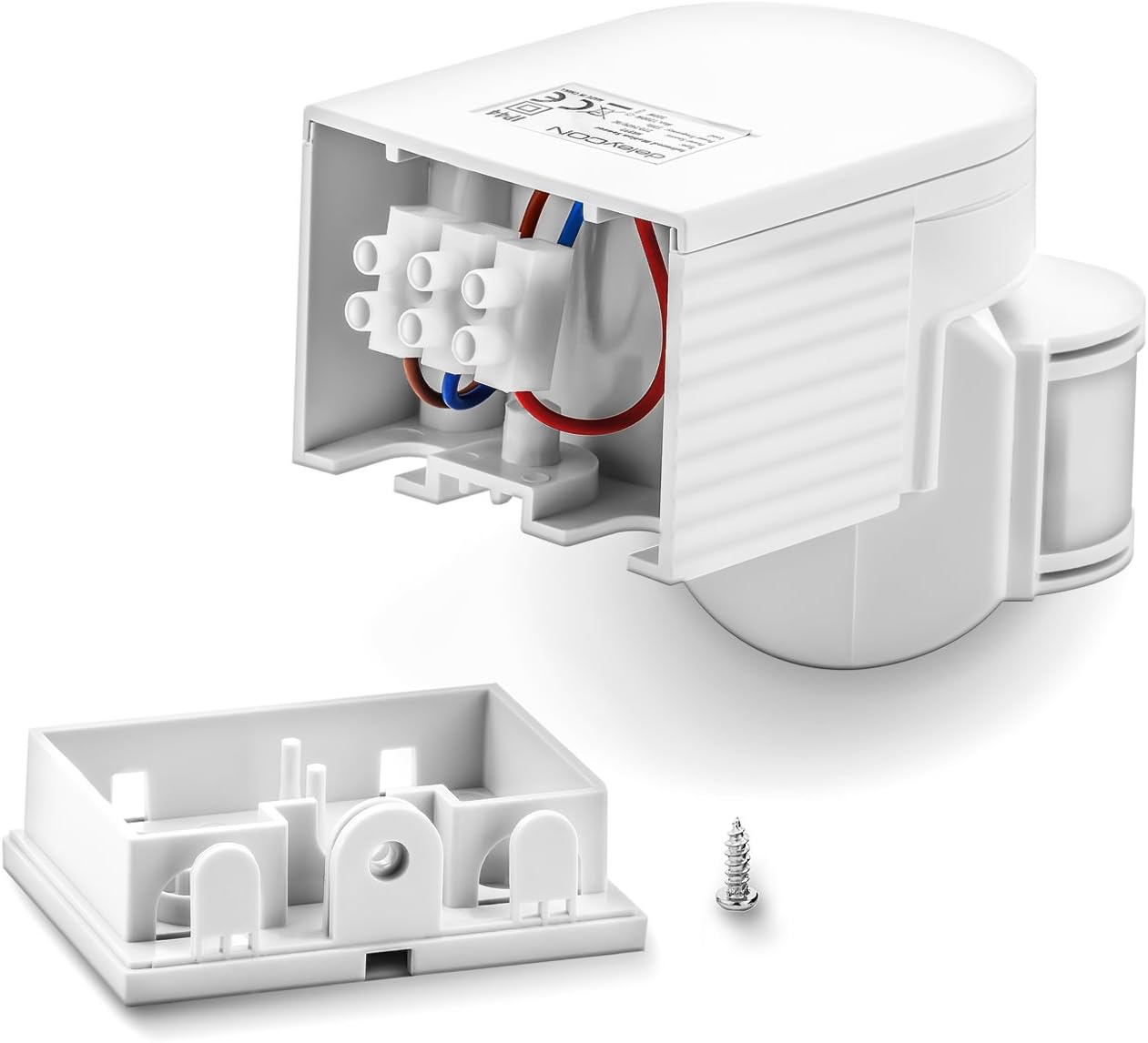
Image showing the deleyCON Infrared Motion Detector disassembled, revealing the internal wiring terminals and the separate mounting base. This view illustrates how to access the wiring compartment for installation.
- Mounting the Base: Use the provided screws and wall plugs to securely attach the mounting base to the wall.
- Wiring: Connect the power supply cables and the load (e.g., light fixture) to the terminals as shown in the wiring diagram. Ensure all connections are secure and correctly insulated.

Diagram illustrating the wall mounting process for the deleyCON Infrared Motion Detector. It shows the mounting base being attached to the wall with screws and then the main unit sliding onto the base. A wiring diagram is also included, showing connections for Live (L), Neutral (N), and Load (A) to a light fixture.
- L: Phase (Live) conductor
- N: Neutral conductor
- A: Consumer (Lamp) / Load
- Reassembly: Close the detector housing, ensuring all wires are properly tucked away and the cover is securely fastened.
- Power On: Restore power to the circuit.
6. Setup and Configuration
The motion detector features two adjustable dials located on the underside of the sensor head:
- TIME (Lighting Duration): This dial controls how long the connected light remains on after motion is detected. It can be adjusted from a minimum of 10 seconds to a maximum of 7 minutes.
- Turn towards '–' for shorter duration.
- Turn towards '+' for longer duration.
- LUX (Photosensitivity): This dial determines the ambient light level at which the motion detector becomes active.
- Turn towards 'moon symbol' for activation only in low light conditions (e.g., night).
- Turn towards 'sun symbol' for activation in brighter conditions (e.g., day and night).
Adjust these settings according to your specific needs and environmental conditions. Test the settings after adjustment to ensure desired operation.
7. Operating Instructions
The deleyCON Infrared Motion Detector uses passive infrared (PIR) technology to detect heat radiation from moving objects, such as people or animals, within its detection zone.
When motion is detected and the ambient light level (as set by the LUX dial) is below the threshold, the connected light will switch on for the duration set by the TIME dial. After the set time, if no further motion is detected, the light will switch off. If motion continues, the timer will reset, and the light will remain on.
8. Detection Area and Placement
The detector offers a 180° detection field with a maximum range of 12 meters. For optimal performance, consider the following:
- Angle: The sensor head can be rotated and tilted to precisely cover the desired area.
- Obstructions: Avoid placing the detector where large objects, walls, or dense foliage might obstruct its field of view.
- Heat Sources: Do not aim the detector directly at heat sources (e.g., vents, windows exposed to direct sunlight) or rapidly changing temperatures, as this can cause false triggers.
- Movement Direction: The detector is most sensitive to movement across its field of view rather than directly towards or away from it.

Diagram illustrating the detection capabilities of the deleyCON Infrared Motion Detector. It shows a 180° detection angle, a maximum range of 12 meters, adjustable sensor, suitability for indoor and outdoor use, and an IP44 protection class.

Cross-section diagram of a house showing various potential installation points for motion detectors, highlighting different detection zones (blue shaded areas) for comprehensive coverage around a property.
9. Maintenance
The deleyCON Infrared Motion Detector requires minimal maintenance.
- Periodically clean the sensor lens with a soft, dry cloth to ensure optimal detection performance.
- Do not use abrasive cleaners or solvents, as these can damage the device.
10. Troubleshooting
If you encounter issues with your motion detector, refer to the table below for common problems and solutions.
| Problem | Possible Cause | Solution |
|---|---|---|
| Light does not turn on when motion is detected. |
|
|
| Light stays on continuously. |
|
|
| Light turns on without apparent motion. |
|
|
11. Technical Specifications
| Feature | Detail |
|---|---|
| Model Number | MK892 |
| Voltage | 220-240 V AC 50 Hz |
| Rated Load (Incandescent) | 1200 W |
| Rated Load (LED / Energy Saving) | 300 W |
| Ambient Light (LUX) | Adjustable 3-2000 lux |
| Time Delay (TIME) | Min. 10 seconds / Max. 7 minutes |
| Detection Angle | 180° |
| Detection Range | Up to 12 meters |
| Installation Height | 1.8 m to 2.5 m |
| Protection Class | IP44 (Splash-proof) |
| Operating Temperature | -20 °C to +40 °C |
| Humidity | < 93% RH (non-condensing) |
| Power Consumption (Standby) | 0.52 W |
| Power Consumption (Operating) | 0.49 W |
| Minimum Load | 1 W |
| Dimensions (L x W x H) | 104 x 73 x 82.5 mm |
| Weight | 220 Grams |
| Color | White |
12. Warranty and Customer Support
For warranty information and customer support, please refer to the documentation provided with your purchase or contact deleyCON directly through their official website or your retailer. Keep your proof of purchase for warranty claims.