
1. Introduction
Thank you for purchasing the Axess 2.1 HiFi Bluetooth Speaker SPBT1038BK. This portable speaker system is designed to provide clear audio and robust bass, suitable for various environments. It features Bluetooth connectivity, USB and SD card support, and a line-in function for versatile audio playback. This manual provides essential information for the safe and efficient use of your speaker.
Key features include:
- 2.1 outdoor passive HIFI Bluetooth speaker with 3-inch subwoofer.
- Secure and simple Bluetooth pairing with an operating range of up to 32 feet (10 meters).
- Support for USB drives, SD cards, and a line-in function for compatibility with various audio devices.
- Integrated slide panel control for volume adjustment.
- Durable leather handle for convenient portability.
- Built-in 1000mAh Lithium rechargeable battery.
2. Safety Information
Please read all safety instructions carefully before using this product. Failure to follow these instructions may result in electric shock, fire, or other hazards.
- Do not expose the speaker to extreme temperatures, direct sunlight, or high humidity.
- Avoid dropping or subjecting the speaker to strong impacts.
- Do not disassemble, repair, or modify the unit. Refer all servicing to qualified personnel.
- Keep the speaker away from water and other liquids.
- Use only the provided charging cable or a certified equivalent.
- Ensure proper ventilation when operating the speaker.
- Dispose of batteries according to local regulations. Do not expose batteries to excessive heat.
3. Package Contents
Verify that all items are present in your package:
- Axess SPBT1038BK Bluetooth Speaker
- USB Charging Cable
- 3.5mm Audio (AUX) Cable
- User Manual
4. Product Overview
Familiarize yourself with the speaker's components and controls.
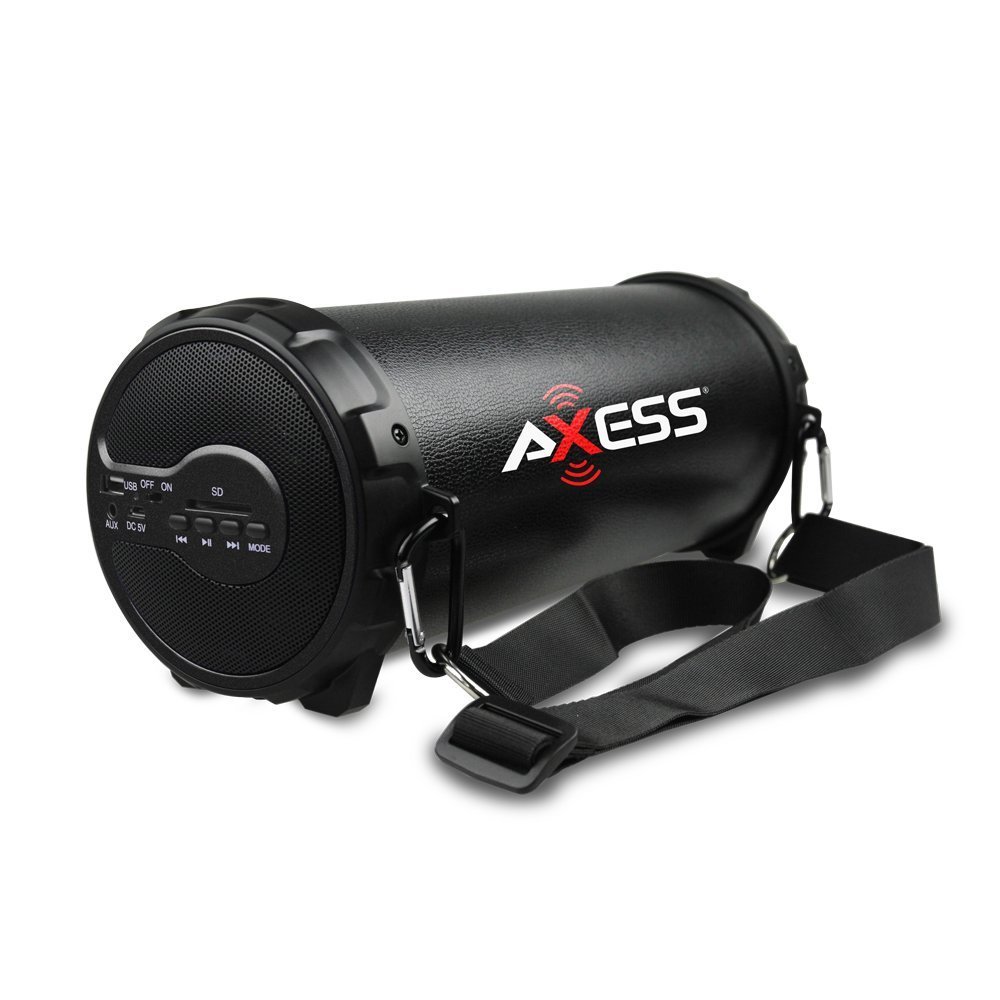
Figure 1: Front view of the Axess SPBT1038BK Bluetooth Speaker, showcasing the speaker grille and overall design.

Figure 2: Side view of the Axess SPBT1038BK, illustrating the control panel and input ports.
Controls and Ports (Typical Layout)
- Power Button: Press and hold to turn the speaker ON/OFF.
- Mode Button: Short press to switch between Bluetooth, AUX, USB, and SD card modes.
- Volume Slider: Slide to adjust the master volume level.
- Play/Pause Button: In Bluetooth/USB/SD mode, press to play or pause audio.
- Previous/Next Track Buttons: In Bluetooth/USB/SD mode, press to skip tracks.
- USB Port: For connecting USB flash drives for audio playback.
- SD Card Slot: For inserting SD memory cards for audio playback.
- AUX Input (3.5mm): For connecting external audio devices via the 3.5mm audio cable.
- DC 5V Charging Port: For connecting the USB charging cable to recharge the battery.
5. Setup
5.1 Charging the Battery
- Connect the small end of the USB charging cable to the DC 5V charging port on the speaker.
- Connect the larger end of the USB charging cable to a USB power adapter (not included) or a computer's USB port.
- The charging indicator light (if present) will illuminate, typically red, during charging.
- Once fully charged, the indicator light may change color (e.g., turn off or turn blue/green). A full charge takes approximately 3-4 hours.
Note: For optimal battery life, fully charge the speaker before first use.
5.2 Powering On/Off
- To turn ON: Press and hold the Power Button for a few seconds until you hear an audible prompt or see an indicator light.
- To turn OFF: Press and hold the Power Button again for a few seconds.
5.3 Bluetooth Pairing
- Ensure the speaker is powered ON and in Bluetooth mode. If not, press the Mode Button until you hear a Bluetooth pairing prompt. The Bluetooth indicator light will typically flash.
- Enable Bluetooth on your mobile device (smartphone, tablet, etc.).
- Search for available Bluetooth devices. You should see "SPBT1038BK" or a similar name in the list.
- Select "SPBT1038BK" to connect. Once paired, you will hear a confirmation tone, and the Bluetooth indicator light will stop flashing and remain solid.
- You can now play audio from your device through the speaker.
Note: The speaker will attempt to reconnect to the last paired device automatically when powered on.
5.4 Connecting via AUX Input
- Connect one end of the 3.5mm audio cable to the AUX input port on the speaker.
- Connect the other end of the 3.5mm audio cable to the headphone jack or audio output of your external device (e.g., MP3 player, computer, TV).
- Press the Mode Button on the speaker until it enters AUX mode.
- Play audio from your external device.
5.5 Using USB/SD Card
- Insert a USB flash drive into the USB Port or an SD card into the SD Card Slot. Ensure the card is inserted correctly.
- The speaker should automatically switch to USB or SD card mode and begin playing audio files. If not, press the Mode Button to select the correct mode.
- Use the Play/Pause and Previous/Next Track buttons to control playback.
6. Operating the Speaker
6.1 Volume Control
Adjust the overall volume by sliding the Volume Slider on the speaker. You can also control the volume from your connected Bluetooth device or external audio source.
6.2 Playback Control
- Play/Pause: Press the Play/Pause Button to toggle between playing and pausing audio.
- Next Track: Press the Next Track Button to skip to the next song.
- Previous Track: Press the Previous Track Button to go back to the beginning of the current song or to the previous song.
Note: Playback controls are primarily functional in Bluetooth, USB, and SD card modes. For AUX mode, control playback directly from your connected device.
7. Maintenance
7.1 Cleaning
- Always power off the speaker before cleaning.
- Use a soft, dry cloth to wipe the exterior surfaces.
- Do not use abrasive cleaners, waxes, or solvents.
- Avoid getting moisture into any openings.
7.2 Storage
- Store the speaker in a cool, dry place away from direct sunlight and extreme temperatures.
- If storing for an extended period, charge the battery to approximately 50% every few months to maintain battery health.
7.3 Battery Care
- Do not overcharge the battery. Disconnect the charger once the battery is full.
- Avoid completely draining the battery frequently, as this can reduce its lifespan.
8. Troubleshooting
If you encounter issues with your speaker, refer to the following common problems and solutions:
| Problem | Possible Cause | Solution |
|---|---|---|
| Speaker does not power on. | Battery is depleted. | Charge the speaker using the provided USB cable. |
| No sound. | Volume is too low; incorrect mode selected; device not connected properly. | Increase speaker volume and device volume. Ensure the correct mode (Bluetooth, AUX, USB, SD) is selected. Reconnect the device. |
| Bluetooth pairing fails. | Speaker not in pairing mode; device Bluetooth off; too far from speaker. | Ensure speaker is in Bluetooth pairing mode. Turn device Bluetooth ON. Move device closer to speaker (within 32 feet). Forget previous pairings on your device and try again. |
| USB/SD card not playing. | Incorrect mode; unsupported file format; corrupted media. | Ensure speaker is in USB or SD mode. Check if audio files are in a supported format (e.g., MP3). Try a different USB drive or SD card. |
| Poor audio quality. | Low battery; device too far (Bluetooth); interference. | Charge the speaker. Move the Bluetooth device closer. Avoid sources of wireless interference. |
9. Specifications
| Feature | Specification |
|---|---|
| Model | SPBT1038BK |
| Speaker Type | 2.1 HiFi Outdoor Passive Bluetooth Speaker with 3-inch Subwoofer |
| Connectivity Technology | Bluetooth |
| Bluetooth Operating Range | Up to 32 feet (10 meters) |
| Power Source | Battery Powered |
| Battery Type | Lithium Ion |
| Battery Capacity | 1000 mAh |
| Item Weight | 1.16 kg (2.56 lbs) |
| Product Dimensions (L x W x H) | 29.21 x 11.43 x 11.43 cm (11.5 x 4.5 x 4.5 inches) |
| Special Features | Portable, USB/SD Card Support, Line-in Function |
10. Warranty and Support
This product is covered by a limited warranty. For specific warranty terms and conditions, please refer to the documentation provided with your purchase or contact Axess customer support.
For technical assistance, troubleshooting not covered in this manual, or general inquiries, please visit the official Axess website or contact their customer service department. Contact information can typically be found on the product packaging or the manufacturer's website.


