
Introduction
This manual provides instructions for the safe and efficient operation of your Axess MS3912 Mini Entertainment System. Please read this manual thoroughly before using the device and retain it for future reference.
Key Features:
- AM/FM Radio
- Cassette Player and Recorder
- CD Player
- USB Port for MP3 Playback
- Auxiliary Input
- Headphone Jack
- Portable/Detachable Speakers
- Remote Control
- AC/DC Power Operation
Safety Information
WARNING:
This product contains chemicals known to the State of California to cause cancer and birth defects or other reproductive harm.
Always follow basic safety precautions when using electrical appliances to reduce the risk of fire, electric shock, and personal injury.
- Do not expose this appliance to rain or moisture.
- Do not block any ventilation openings.
- Ensure proper voltage supply (AC 120V/60Hz for US models, check local specifications).
- Do not open the unit's casing; refer all servicing to qualified personnel.
- Keep the unit away from heat sources, direct sunlight, and strong magnetic fields.
- Unplug the unit during lightning storms or when unused for long periods.
Package Contents
Verify that all items listed below are included in your package:
- Axess MS3912 Main Unit
- Detachable Speakers (2)
- Remote Control
- AC Power Cord
- User Manual (this document)
Controls and Connections
Familiarize yourself with the various controls and connection points on your MS3912 system.
Front Panel Controls
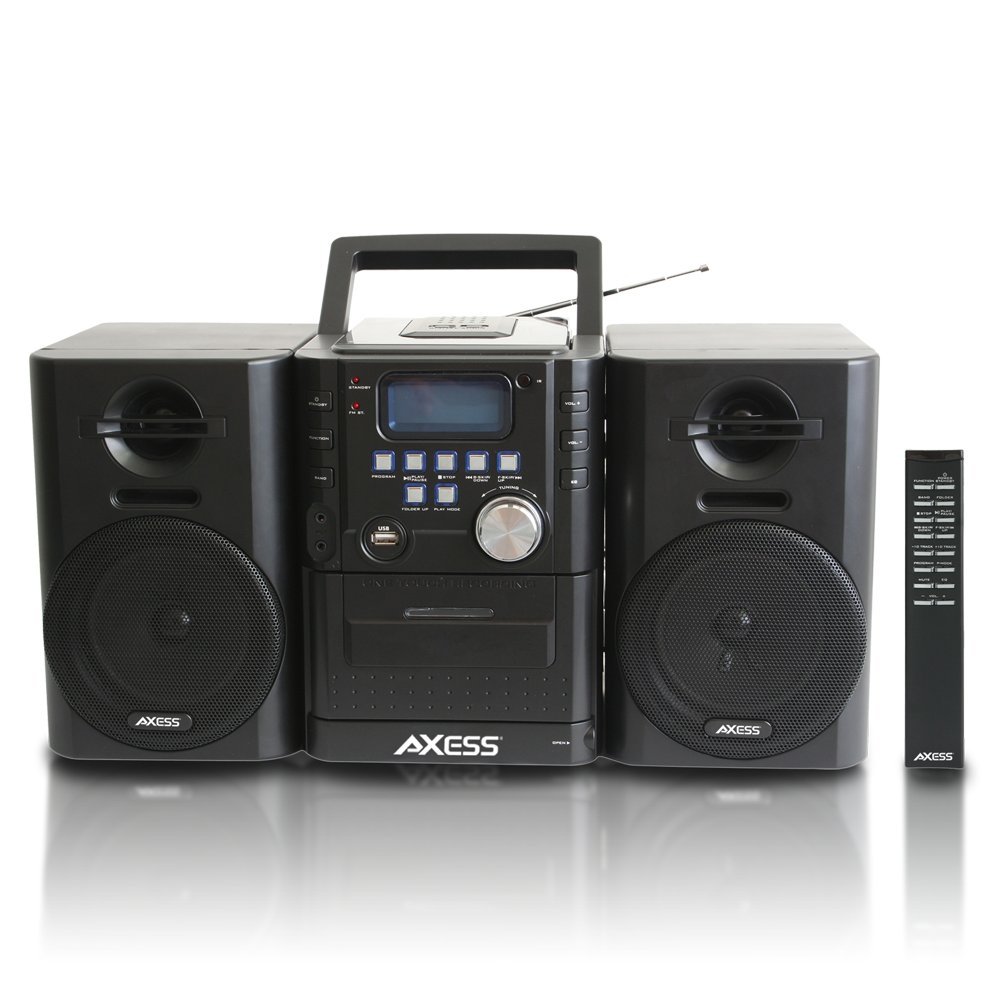
Image: Front view of the Axess MS3912 Mini Entertainment System, showing the central unit with display, control buttons, USB port, CD tray, cassette deck, and two detachable speakers. A remote control is also visible on the right.
- STANDBY Button: Powers the unit on or off.
- FUNCTION Button: Selects between CD, USB, TAPE, AUX, and RADIO modes.
- BAND Button: In Radio mode, switches between AM and FM bands.
- PROGRAM Button: Used for programming CD/USB tracks.
- PLAY/PAUSE Button: Starts or pauses playback for CD, USB, or Cassette.
- STOP Button: Stops playback.
- SKIP/SEARCH Buttons (<< / >>): Skips tracks or fast forwards/rewinds.
- FOLDER UP / PLAY MODE Buttons: Navigates folders on USB or changes play mode.
- VOLUME Knob: Adjusts the audio output level.
- USB Port: Connects USB flash drives for MP3 playback.
- PC/AUX IN Jack: Connects external audio devices.
- HEADPHONE Jack: Connects headphones for private listening.
- CD Compartment: Top-loading CD player.
- Cassette Deck: Front-loading cassette player/recorder.
- Display: Shows current function, track number, radio frequency, etc.
Rear Panel Connections

Image: Rear view of the Axess MS3912 Mini Entertainment System, showing the FM antenna, battery compartment, AC power input, and speaker connection jacks.
- FM Antenna: Extend for optimal FM reception.
- Speaker Jacks: Connect the left and right speakers.
- AC Power Input: Connect the AC power cord.
- Battery Compartment: Holds batteries for portable operation.
Setup
1. Connecting the Speakers
Connect the speaker wires from the detachable speakers to the corresponding speaker jacks on the rear of the main unit. Ensure the polarity (+/-) matches for optimal sound quality.
2. Powering the Unit
AC Power Operation:
Insert the AC power cord into the AC power input jack on the rear of the unit, then plug the other end into a standard wall outlet (AC 120V/60Hz).
DC (Battery) Power Operation:
Open the battery compartment cover on the rear of the unit. Insert the required number of C-size batteries (not included), ensuring correct polarity. Close the battery compartment cover securely. The unit will automatically switch to battery power when AC power is disconnected.
3. Antenna Setup
For FM radio reception, fully extend the telescopic FM antenna. For AM reception, the unit has a built-in AM antenna, which may require rotating the unit for best reception.
Operating Instructions
1. Power On/Off
Press the STANDBY button on the front panel or remote control to turn the unit on or off.
2. Function Selection
Press the FUNCTION button repeatedly to cycle through the available modes: CD, USB, TAPE, AUX, and RADIO.
3. CD Player Operation
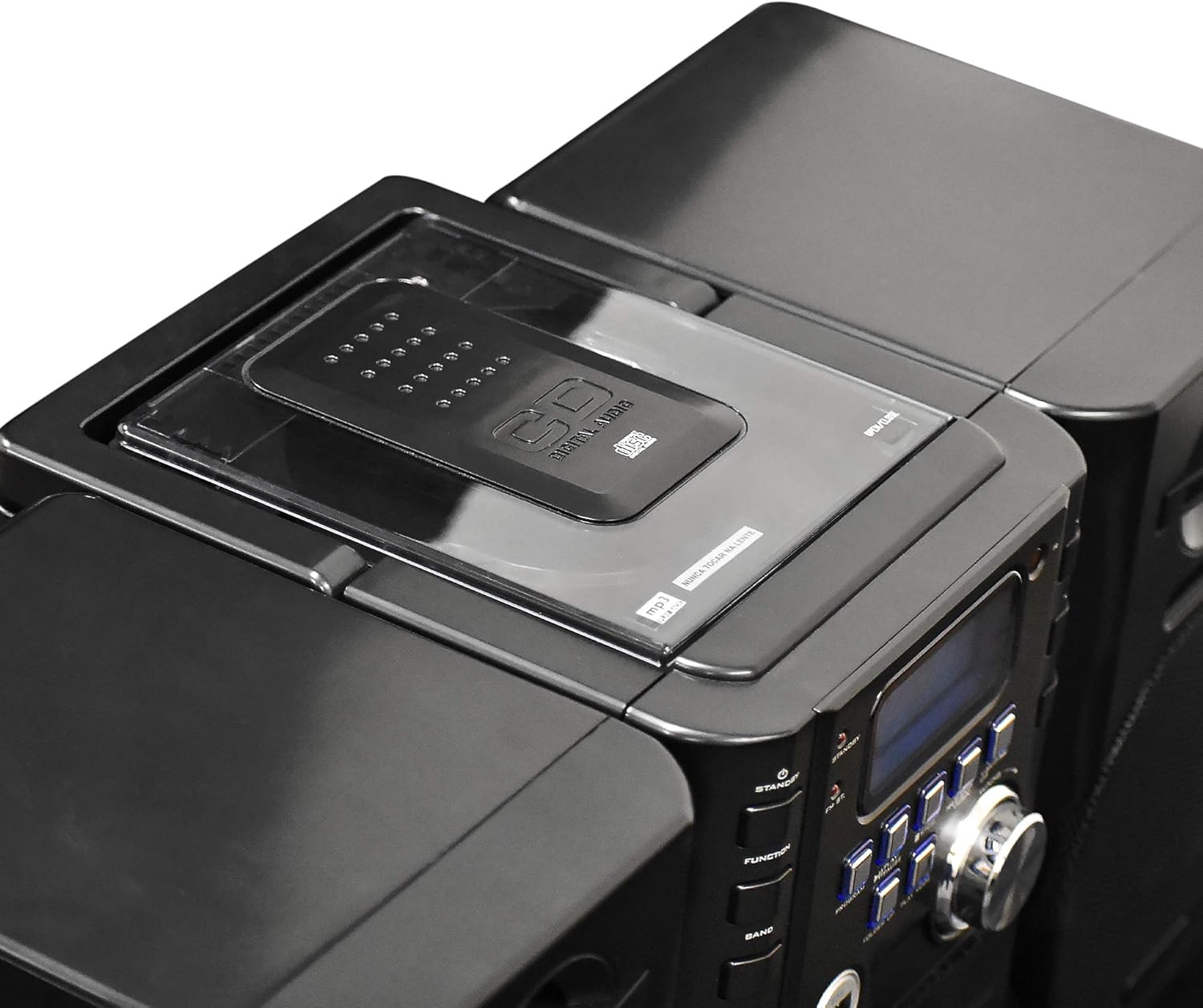
Image: Top view of the Axess MS3912 Mini Entertainment System, showing the transparent lid of the top-loading CD compartment.
- Press FUNCTION to select CD mode.
- Open the CD compartment cover.
- Place a CD with the label side facing up.
- Close the CD compartment cover. The unit will read the disc.
- Press PLAY/PAUSE to start playback.
- Use the SKIP/SEARCH buttons to navigate tracks.
- Press STOP to end playback.
4. USB/MP3 Player Operation

Image: Side view of the Axess MS3912 Mini Entertainment System, highlighting the USB port and PC/AUX IN jack on the central unit.
- Insert a USB flash drive into the USB port.
- Press FUNCTION to select USB mode.
- The unit will automatically begin playing MP3 files from the USB drive.
- Use PLAY/PAUSE, STOP, and SKIP/SEARCH buttons for control.
- Use FOLDER UP to navigate between folders on the USB drive.
5. Cassette Player/Recorder Operation
- Press FUNCTION to select TAPE mode.
- Open the cassette deck door and insert a cassette tape.
- Press PLAY/PAUSE to start playback.
- Use the FAST FORWARD and REWIND buttons (often combined with SKIP/SEARCH buttons) to move through the tape.
- Press STOP to end playback.
- Recording: To record from CD, USB, or Radio, select the desired source, then press the RECORD button on the cassette deck (if available, or a combination of PLAY and RECORD). Ensure a blank, recordable cassette is inserted.
6. AM/FM Radio Operation
- Press FUNCTION to select RADIO mode.
- Press BAND to select AM or FM.
- Use the TUNING knob or SKIP/SEARCH buttons to tune to your desired station.
- For FM, extend the telescopic antenna. For AM, rotate the unit for best reception.
- Presetting Stations: Tune to a station, press PROGRAM, then use SKIP/SEARCH to select a preset number, and press PROGRAM again to save.
7. Auxiliary Input (AUX) Use
Connect an external audio device (e.g., smartphone, MP3 player) to the PC/AUX IN jack using a 3.5mm audio cable (not included). Press FUNCTION to select AUX mode. Audio from the external device will play through the MS3912 speakers.
8. Headphone Use
Plug standard 3.5mm headphones into the HEADPHONE jack for private listening. The speakers will automatically mute when headphones are connected.
9. Remote Control
The included remote control allows for convenient operation of most functions from a distance. Ensure batteries are correctly inserted into the remote control.
Maintenance
Cleaning the Unit
Wipe the exterior of the unit with a soft, dry cloth. Do not use abrasive cleaners, waxes, or solvents. For the CD lens, use a specialized CD lens cleaner disc. For the cassette deck, use a head cleaning cassette.
Storage
If storing the unit for an extended period, remove all batteries to prevent leakage. Store in a cool, dry place away from direct sunlight and extreme temperatures.
Troubleshooting
| Problem | Possible Cause | Solution |
|---|---|---|
| No power | AC cord not plugged in; Batteries depleted or incorrectly inserted. | Check AC cord connection; Replace batteries or ensure correct polarity. |
| No sound | Volume too low; Headphones connected; Speakers not connected properly; Incorrect function selected. | Increase volume; Disconnect headphones; Check speaker connections; Select correct function (CD, USB, TAPE, AUX, RADIO). |
| CD skips or does not play | CD is dirty or scratched; CD inserted incorrectly; Unit is vibrating. | Clean CD with a soft cloth; Reinsert CD label side up; Place unit on a stable surface. |
| Poor radio reception | FM antenna not extended; Unit position for AM is poor; Interference. | Fully extend FM antenna; Rotate unit for better AM reception; Move unit away from other electronic devices. |
| USB not playing | USB drive not formatted correctly; Incompatible file types; USB drive not inserted fully. | Ensure USB is FAT32 format; Only MP3 files are supported; Reinsert USB drive. |
| Cassette recording not working | Tape is write-protected; No blank tape inserted; Incorrect source selected. | Check tape's write-protect tab; Insert a blank, recordable tape; Select the desired audio source (CD, USB, Radio, AUX). |
Specifications
| Feature | Specification |
|---|---|
| Model Number | MS3912 |
| Brand | AXESS |
| Power Output | 12W Speakers |
| Power Source | AC 120V/60Hz or DC (C-size batteries, not included) |
| Radio Frequencies | AM/FM |
| Supported Media | CD, MP3 (via USB), Cassette Tape |
| Inputs | USB Port, 3.5mm AUX Input |
| Outputs | 3.5mm Headphone Jack |
| Dimensions (L x W x H) | 43.82 x 21.59 x 24.13 cm (17.25 x 8.5 x 9.5 inches approx.) |
| Weight | 3.88 kg (8.55 lbs approx.) |
