
1. Introduction
Thank you for purchasing the Caliber HPG415BT/B Portable Bluetooth Speaker. This manual provides important information regarding the safe and efficient operation of your device. Please read it thoroughly before use and retain it for future reference.
Package Contents
- Caliber HPG415BT/B Portable Bluetooth Speaker
- USB to Mini USB Charging Cable
- 3.5mm Audio Cable
- Remote Control
- Instruction Manual
2. Safety Information
To ensure safe operation and prevent damage, please observe the following safety guidelines:
- Do not expose the device to rain, moisture, or extreme temperatures.
- Avoid placing the speaker near heat sources such as radiators, stoves, or other heat-producing appliances.
- Do not disassemble, repair, or modify the unit yourself. Refer all servicing to qualified personnel.
- Use only the specified charging cable and power adapter (5V USB) to charge the battery.
- Keep the device away from strong magnetic fields.
- Clean the device only with a dry, soft cloth. Do not use liquid cleaners.
3. Product Features
The Caliber HPG415BT/B speaker offers a range of features for versatile audio playback:
- Wireless Bluetooth Technology: Connect wirelessly to compatible devices within a 10-meter range (Bluetooth version 2.1, supports A2DP and AVRCP profiles).
- Multiple Playback Options: Play audio from USB drives and SD cards (up to 32GB).
- FM Radio: Enjoy your favorite radio stations with automatic search and storage functions.
- LED Display: Provides clear information on current mode and status.
- High Power Sound: Equipped with 2x 3W speakers for a total of 6W RMS output.
- Integrated Rechargeable Battery: Offers up to 5 hours of continuous playback.
- Intuitive Controls: Features buttons for previous/next track, play/pause, mode selection, EQ adjustment, and volume control.
- 3.5mm Audio Input: Connect external audio devices via the included audio cable.
- Remote Control: Conveniently operate the speaker from a distance.
4. Controls and Connections
Familiarize yourself with the speaker's controls and connection ports:
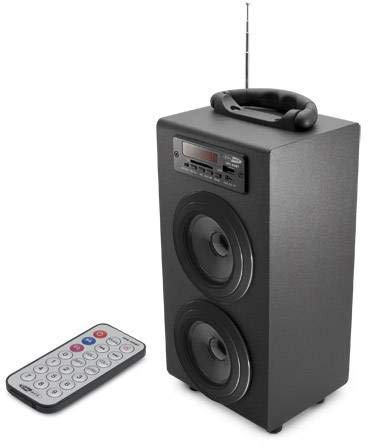
Image 1: Caliber HPG415BT/B Portable Bluetooth Speaker. This image shows the overall design of the speaker, featuring a tubular shape, front-facing speakers, and a control panel on the top or front.
Control Panel (Typical Layout)
- MODE Button: Switches between Bluetooth, FM Radio, USB, SD, and AUX modes.
- PLAY/PAUSE Button: Starts or pauses playback.
- PREVIOUS/NEXT Buttons: Skips tracks in media modes or changes radio stations in FM mode.
- VOLUME +/- Buttons: Adjusts the audio output level.
- EQ Button: Cycles through equalizer presets.
- Power ON/OFF Switch: Located typically on the rear or side.
Connection Ports (Typical Layout)
- USB Port: For connecting USB flash drives.
- SD Card Slot: For inserting SD memory cards.
- AUX Input (3.5mm): For connecting external audio devices via cable.
- Mini USB Charging Port: For connecting the charging cable.
5. Setup
5.1 Initial Charging
- Before first use, fully charge the speaker's internal battery.
- Connect the supplied Mini USB cable to the speaker's charging port.
- Connect the other end of the USB cable to a 5V USB power source (e.g., a computer USB port or a USB wall adapter, not included).
- The LED indicator will show charging status. Once fully charged, the indicator may change color or turn off.
5.2 Powering On/Off
- To power on, slide the Power ON/OFF switch to the 'ON' position. The LED display will light up.
- To power off, slide the Power ON/OFF switch to the 'OFF' position.
6. Operating Instructions
6.1 Bluetooth Mode
- Power on the speaker. It will automatically enter Bluetooth pairing mode, indicated by a flashing Bluetooth icon on the LED display.
- Enable Bluetooth on your smartphone, tablet, or other Bluetooth-enabled device.
- Search for available Bluetooth devices and select "HPG415BT" from the list.
- Once paired, the speaker will emit a confirmation sound, and the Bluetooth icon on the display will stop flashing.
- You can now play audio from your connected device through the speaker. Use the PLAY/PAUSE and PREVIOUS/NEXT buttons on the speaker or remote to control playback.
6.2 FM Radio Mode
- Press the MODE button repeatedly until "FM" appears on the LED display.
- To perform an automatic station scan, press and hold the PLAY/PAUSE button. The speaker will scan and save available FM stations.
- Use the PREVIOUS/NEXT buttons to navigate through the saved stations.
6.3 USB/SD Card Playback
- Insert a USB flash drive into the USB port or an SD card into the SD card slot.
- The speaker will automatically switch to USB or SD mode and begin playing audio files. If not, press the MODE button to select the correct source.
- Use the PLAY/PAUSE and PREVIOUS/NEXT buttons to control playback.
6.4 AUX Input Mode
- Connect one end of the supplied 3.5mm audio cable to the speaker's AUX input port.
- Connect the other end of the cable to the headphone jack or audio output of your external audio device.
- Press the MODE button repeatedly until "AUX" appears on the LED display.
- Control playback and volume directly from your external audio device.
7. Charging the Battery
When the battery is low, the speaker may emit an audible warning or the LED indicator will show a low battery status. To charge:
- Connect the Mini USB charging cable to the speaker's charging port.
- Connect the USB end to a 5V USB power source.
- The charging indicator will illuminate. Charging typically takes several hours.
- Once fully charged, the indicator will change or turn off. Disconnect the charging cable.
8. Maintenance
- Cleaning: Use a soft, dry cloth to wipe the exterior of the speaker. Do not use abrasive cleaners, waxes, or solvents.
- Storage: When not in use for extended periods, store the speaker in a cool, dry place, away from direct sunlight and extreme temperatures.
- Battery Care: To prolong battery life, avoid fully discharging the battery frequently. Charge it regularly, even if not in use.
9. Troubleshooting
| Problem | Possible Cause | Solution |
|---|---|---|
| No power | Battery is discharged; Power switch is OFF. | Charge the battery; Slide the power switch to ON. |
| No sound | Volume is too low; Incorrect mode selected; Device not connected properly. | Increase volume; Press MODE to select correct source; Reconnect device. |
| Bluetooth not connecting | Speaker not in pairing mode; Device Bluetooth is off; Speaker too far from device. | Ensure speaker is in Bluetooth mode and flashing; Enable Bluetooth on your device; Move devices closer (within 10m). |
| FM radio static | Weak signal; Interference. | Relocate the speaker for better reception; Perform an auto-scan again. |
10. Specifications
- Model: HPG415BT/B
- Output Power: 6W RMS (2x 3W)
- Bluetooth Version: 2.1
- Bluetooth Operating Range: Up to 10 meters
- Connectivity: Bluetooth, USB, SD Card, 3.5mm AUX Input
- Supported Media: USB drives, SD cards (up to 32GB)
- FM Radio: Yes, with auto-scan
- Display: LED
- Battery Type: Integrated Rechargeable
- Battery Life: Up to 5 hours
- Charging: USB 5V
- Dimensions (L x W x H): 140 x 120 x 280 mm
- Weight: Approximately 1.04 kg (2.29 lbs)
- Control Type: Buttons, Remote Control
11. Warranty and Support
Caliber products are designed and manufactured to the highest quality standards. For warranty information or technical support, please refer to the warranty card included with your product or visit the official Caliber website for contact details.


