1. Introduction
Thank you for purchasing the Wharfedale WH-S8 Active Subwoofer. This manual provides essential information for the safe and efficient operation of your new subwoofer. Please read this manual thoroughly before installation and use, and retain it for future reference. The WH-S8 is designed to enhance the low-frequency performance of your audio system, delivering powerful and clear bass.
2. Safety Information
Always observe the following safety precautions to prevent electric shock, fire, or damage to the unit:
- Power Source: Connect the subwoofer only to an AC power outlet of the specified voltage. Ensure the power cord is securely plugged in.
- Ventilation: Do not block any ventilation openings. Ensure adequate space around the unit for proper airflow to prevent overheating.
- Water and Moisture: Do not expose the unit to rain, moisture, dripping, or splashing. Do not place objects filled with liquids, such as vases, on the unit.
- Heat: Keep the unit away from heat sources such as radiators, heat registers, stoves, or other apparatus (including amplifiers) that produce heat.
- Cleaning: Unplug the unit from the wall outlet before cleaning. Use a dry cloth only.
- Servicing: Do not attempt to service this product yourself. Refer all servicing to qualified service personnel.
- Placement: Place the subwoofer on a stable, level surface to prevent it from falling.
3. Package Contents
Please check that all items are present in the box:
- Wharfedale WH-S8 Active Subwoofer Unit
- Power Cable
- User Manual (this document)
If any items are missing or damaged, please contact your dealer immediately.
4. Product Overview
The Wharfedale WH-S8 is a compact yet powerful active subwoofer designed to deliver deep and impactful bass. Below are images illustrating the product's appearance.

Figure 4.1: Front View (Driver Exposed)
This image shows the front of the Wharfedale WH-S8 active subwoofer with its main driver visible. The driver is centrally located, indicating the primary source of low-frequency sound. The Wharfedale logo is positioned at the bottom center of the unit.
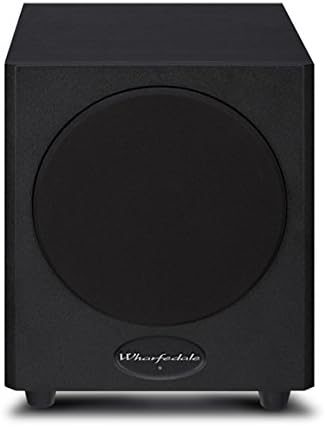
Figure 4.2: Front View (Grille Attached)
This image displays the Wharfedale WH-S8 active subwoofer with its protective grille attached. The grille covers the main driver, providing protection and a more discreet aesthetic. The Wharfedale logo remains visible at the bottom center.
While not pictured, the rear panel typically features controls for volume, crossover frequency, and phase, along with input connections for audio signals and the power input.
5. Setup
5.1 Placement
The placement of your subwoofer can significantly affect its performance. Experiment with different locations to find the best sound for your room. Generally, placing the subwoofer in a corner can enhance bass output, but may also lead to boomy sound. Placing it near the front speakers can improve integration with the main soundstage.
- Avoid placing the subwoofer directly against a wall or in a cabinet without proper ventilation.
- Ensure the subwoofer is on a stable, level surface.
5.2 Connections
Before making any connections, ensure all audio equipment is turned off and unplugged from the power outlet.
- Audio Input: Connect the subwoofer output (LFE or Subwoofer Out) from your AV receiver or amplifier to the LFE/Line In input on the WH-S8 using a single RCA cable. If your receiver does not have a dedicated subwoofer output, you may use the stereo line-level outputs (left and right) and connect them to the corresponding inputs on the subwoofer.
- Power Connection: Once all audio connections are made, connect the supplied power cable to the AC IN socket on the subwoofer and then to a suitable wall power outlet.
Note: Always connect the audio cables before connecting the power cable.
6. Operating Instructions
6.1 Powering On/Off
After connecting the subwoofer, locate the power switch on the rear panel. Flip the switch to the 'ON' position. The subwoofer may have an auto-standby feature, which will automatically turn the unit on when an audio signal is detected and off after a period of inactivity.
6.2 Adjusting Controls
The WH-S8 typically features the following controls on its rear panel:
- Volume/Gain: Adjusts the output level of the subwoofer. Start with a low setting and gradually increase until the bass blends seamlessly with your main speakers.
- Crossover Frequency: This control determines the highest frequency the subwoofer will reproduce. Set it to match the low-frequency capabilities of your main speakers. A common starting point is 80Hz-100Hz. If your receiver has a built-in bass management system, set the subwoofer's crossover to its maximum setting or bypass it if possible, and manage the crossover through the receiver.
- Phase Control: This switch (0° or 180°) helps to ensure the subwoofer's output is in phase with your main speakers. Experiment with both settings to find the one that produces the most impactful and coherent bass.
Tip: Play a familiar piece of music with strong bass and adjust the controls until the bass sounds natural and integrated, not overpowering or disconnected.
7. Maintenance
Proper maintenance ensures the longevity and optimal performance of your subwoofer.
- Cleaning: Use a soft, dry, lint-free cloth to clean the cabinet. Do not use liquid or aerosol cleaners, as they may damage the finish.
- Dust: Regularly dust the unit to prevent accumulation, which can affect ventilation.
- Storage: If storing the subwoofer for an extended period, disconnect it from power, clean it, and store it in a cool, dry place, preferably in its original packaging.
8. Troubleshooting
If you experience issues with your Wharfedale WH-S8 subwoofer, refer to the following common problems and solutions:
| Problem | Possible Cause | Solution |
|---|---|---|
| No sound from subwoofer |
|
|
| Distorted or boomy bass |
|
|
| Humming or buzzing noise |
|
|
If the problem persists after trying these solutions, please contact your dealer or qualified service personnel.
9. Specifications
The following are the technical specifications for the Wharfedale WH-S8 Active Subwoofer:
| Model Number | WH-S8 |
| Speaker Type | Active Subwoofer |
| Maximum Output Power | 150 Watts |
| Item Weight | 8.6 kg (18.96 lbs) |
| Color | Black |
| Power Source | Corded Electric |
| Manufacturer | Wharfedale |
10. Warranty and Support
Wharfedale products are manufactured to the highest standards. For information regarding warranty coverage, terms, and conditions, please refer to the warranty card included with your product or visit the official Wharfedale website. For technical support or service inquiries, please contact your authorized Wharfedale dealer or distributor.
Online Resources: For the latest information, FAQs, and support, please visit the official Wharfedale website: www.wharfedale.co.uk


