
Red Lion Controls GEM20000
REDLION GEM20000 Counter 115VAC User Manual
Model: GEM20000
1. Introduction
This manual provides comprehensive instructions for the installation, operation, and maintenance of the Red Lion Controls GEM20000 Counter. The GEM20000 is a 115VAC powered industrial counter designed for reliable performance in various applications. Please read this manual thoroughly before operating the device to ensure proper functionality and safety.
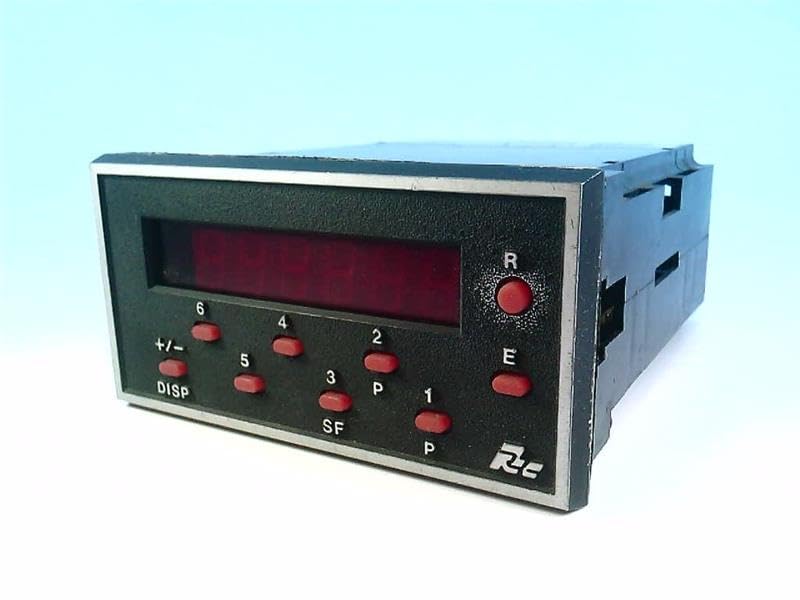
Figure 1: Front view of the Red Lion Controls GEM20000 Counter. The device features a digital display and several control buttons for operation and configuration.
2. Setup and Installation
Proper installation is crucial for the optimal performance and longevity of the GEM20000 Counter. Ensure all power is disconnected before proceeding with any wiring.
2.1 Mounting
The GEM20000 is designed for panel mounting. Cut an appropriate opening in the panel according to the dimensions provided in the specifications section. Secure the counter using the supplied mounting hardware.
2.2 Wiring
Connect the 115VAC power supply to the designated terminals. Refer to the wiring diagram for input and output connections. Ensure all connections are secure and comply with local electrical codes.
- Power Input: Connect 115VAC to terminals L and N.
- Sensor Inputs: Connect counting sensors (e.g., proximity switches, encoders) to the appropriate input terminals.
- Output Relays: If applicable, connect control circuits to the relay output terminals.
Caution: Incorrect wiring can damage the unit and pose a safety hazard. Consult a qualified electrician if unsure.
3. Operating Instructions
The GEM20000 Counter features a user-friendly interface for setting parameters and monitoring counts.
3.1 Front Panel Controls
| Button/Indicator | Function |
|---|---|
| Display: | Shows current count, preset values, and programming parameters. |
| R (Reset): | Resets the counter to zero or a preset value. |
| E (Enter): | Confirms selections and enters programming mode. |
| +/- (Direction): | Changes counting direction (up/down) or increments/decrements values during programming. |
| DISP (Display): | Cycles through different display modes or parameters. |
| 1-6 (Numeric/Function): | Used for numeric input and specific function selection during programming. |
3.2 Basic Counting Operation
- Ensure the counter is powered on.
- The display will show the current count.
- As pulses are received from the sensor, the count will increment or decrement based on the configured direction.
- Press the R button to reset the count.
3.3 Programming Modes
The GEM20000 offers various programming modes for setting presets, scaling, and output functions. Refer to the detailed programming guide for advanced configurations.
4. Maintenance
The Red Lion Controls GEM20000 Counter is designed for minimal maintenance. Regular inspection can help ensure continued reliable operation.
- Cleaning: Periodically clean the front panel with a soft, damp cloth. Do not use abrasive cleaners or solvents.
- Connections: Routinely check all wiring connections for tightness and signs of corrosion.
- Environment: Ensure the operating environment remains within the specified temperature and humidity ranges to prevent damage.
Note: There are no user-serviceable parts inside the unit. Do not attempt to open the enclosure.
5. Troubleshooting
This section provides solutions to common issues encountered with the GEM20000 Counter.
| Problem | Possible Cause | Solution |
|---|---|---|
| No Display/Power: | No power supply; incorrect wiring; blown fuse. | Check 115VAC power connection; verify wiring; check external fuse (if applicable). |
| Counter Not Counting: | Sensor not connected; faulty sensor; incorrect input type setting; wiring issue. | Verify sensor connection and functionality; check input wiring; confirm input type in programming. |
| Incorrect Count: | Incorrect scaling factor; noise on input line; sensor double-counting. | Adjust scaling factor in programming; ensure proper shielding for input cables; reposition sensor or adjust sensitivity. |
| Buttons Unresponsive: | Unit frozen; internal fault. | Cycle power to the unit. If issue persists, contact technical support. |
If the problem persists after attempting these solutions, please contact Red Lion Controls technical support.
6. Specifications
Key technical specifications for the Red Lion Controls GEM20000 Counter.
- Model: GEM20000
- Brand: Red Lion Controls
- Power Input: 115VAC
- Function: Industrial Counter
- Display Type: Digital (LED)
- ASIN: B01C3W7PHI
- Date First Available: February 23, 2016
- Manufacturer: Red Lion Controls
7. Warranty and Support
Red Lion Controls products are manufactured to the highest quality standards. For information regarding product warranty, technical support, or service, please visit the official Red Lion Controls website or contact their customer service department.
Note: Unauthorized repairs or modifications will void the product warranty.
Ask a question about this manual
Ask about setup, troubleshooting, compatibility, parts, safety, or missing instructions. Manuals+ will review the question and use this page’s manual context to help answer it.