
Introduction
Thank you for purchasing the Quorum 78525-95 European Influence 52-inch Ceiling Fan. This manual provides detailed instructions for the safe installation, operation, and maintenance of your new ceiling fan. Please read all instructions carefully before beginning installation and retain this manual for future reference.
Important Safety Information
- WARNING: To reduce the risk of fire, electric shock, or personal injury, mount fan directly from building structure and/or to an outlet box marked acceptable for fan support of 35 lbs (15.9 kg) and use the mounting screws provided with the outlet box.
- Installation must be performed by a qualified electrician in accordance with all local and national electrical codes.
- Always disconnect power at the main circuit breaker before installation or servicing.
- Ensure all electrical connections are secure and properly insulated.
- Do not operate the fan with damaged wiring or if any parts are missing or damaged.
- This fan is designed for Indoor Use Only in dry locations. Do not expose to water or moisture.
- Keep hands, clothing, and other objects clear of the fan blades when the fan is operating.
Package Contents
Carefully unpack your fan and inspect the contents. You should have the following items:
- Fan Motor Assembly
- Fan Blades (5)
- Blade Brackets
- Canopy and Mounting Bracket
- Downrod Assembly
- Remote Control and Receiver
- Hardware Pack (screws, washers, wire nuts)
- Instruction Manual
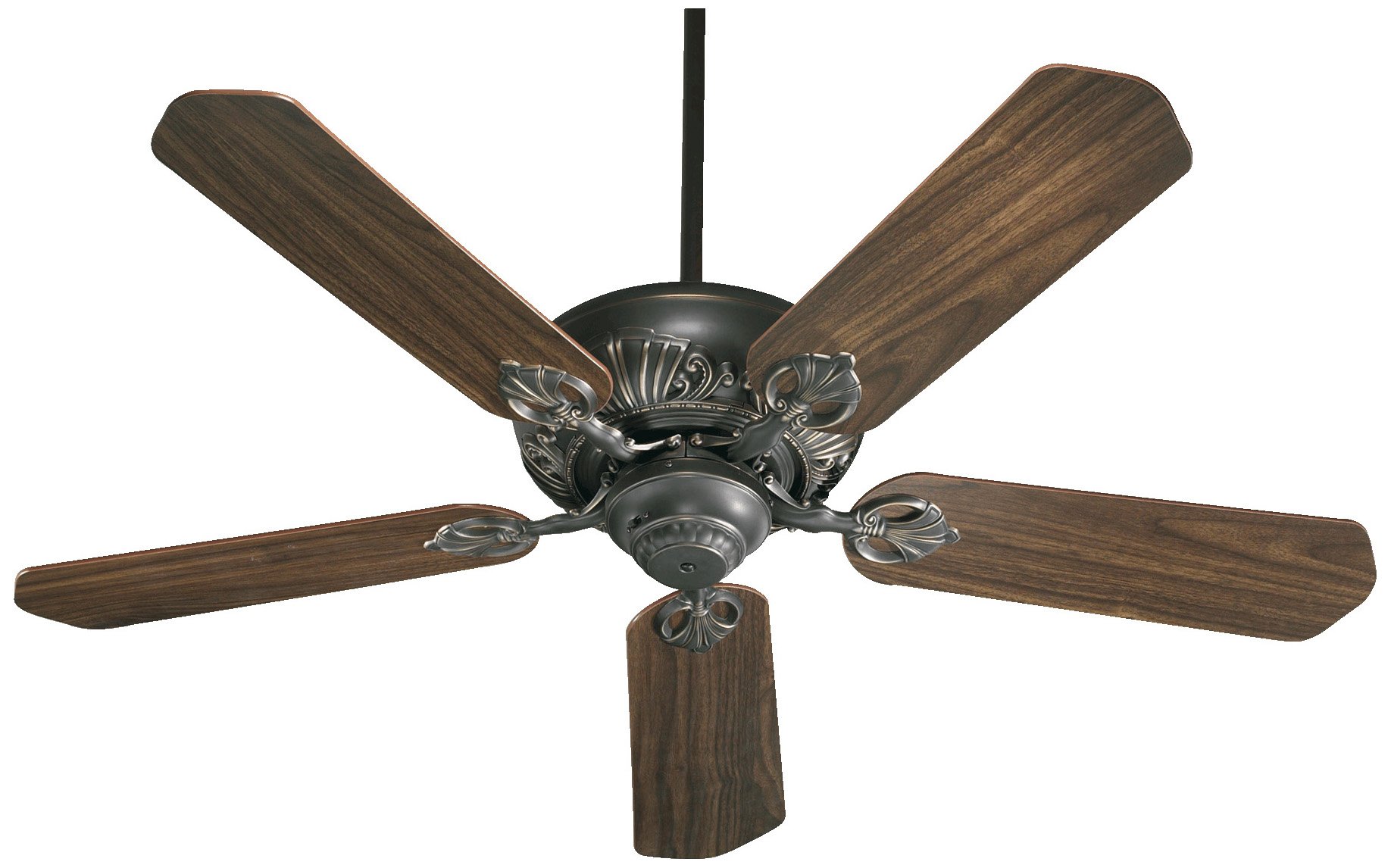
Figure 1: Illustration of the Quorum 78525-95 ceiling fan and its main components. This image shows the motor housing, five fan blades, downrod, and canopy, all in an Old World finish.
Setup and Installation
Before starting, ensure the power is turned off at the circuit breaker. You will need basic tools such as a screwdriver, wire strippers, and a ladder.
1. Mounting the Bracket
- Secure the mounting bracket to the ceiling outlet box using the screws provided with the outlet box. Ensure the bracket is firmly attached and can support the fan's weight.
Figure 2: Diagram illustrating the secure attachment of the mounting bracket to the ceiling electrical box. This step is crucial for safe fan installation.
2. Assembling the Fan
- Insert the downrod through the canopy and then into the fan motor assembly. Secure with the provided pin and screw.
- Attach the fan blades to the blade brackets, then secure the blade brackets to the motor housing. Ensure all screws are tightened.
3. Wiring the Fan
- Hang the fan assembly onto the mounting bracket.
- Connect the fan's electrical wires to the household wiring according to the wiring diagram (typically: Black to Black, White to White, Green/Bare Copper to Ground). Use the provided wire nuts.
- Install the remote receiver into the canopy, ensuring all wires are tucked neatly.
4. Final Assembly
- Slide the canopy up and secure it to the mounting bracket with the provided screws.
- Restore power at the circuit breaker.
Operating Instructions
Your Quorum 78525-95 ceiling fan can be operated using the included remote control or the integrated pull chain.
Remote Control Operation
- Fan ON/OFF: Press the FAN button to turn the fan on or off.
- Speed Control: Press the 1 (low), 2 (medium), or 3 (high) buttons to adjust fan speed.
- Light Control: (If applicable, this model does not specify a light kit, but many fans do) Press the LIGHT button to turn the light on or off. Hold the button to dim the light.
- Reverse Function: Locate the reverse switch on the fan motor housing (usually a small slide switch). This switch changes the direction of blade rotation for summer (downward airflow) or winter (upward airflow) operation. Ensure the fan is off before changing the direction.
Figure 3: Example of a remote control for a ceiling fan. This image shows typical buttons for fan speed, power, and light control.
Pull Chain Operation (if remote is not used or as backup)
- Fan Speed: Pull the fan chain repeatedly to cycle through speeds (High, Medium, Low, Off).
- Light Control: (If applicable) Pull the light chain repeatedly to cycle through light settings (On, Off).
Maintenance
Regular maintenance ensures optimal performance and extends the life of your ceiling fan.
- Cleaning: Periodically clean the fan blades and motor housing with a soft, damp cloth. Do not use abrasive cleaners or solvents. Ensure power is off before cleaning.
- Blade Tightness: Check blade screws annually to ensure they are tight. Loose blades can cause wobbling and noise.
- Lubrication: The fan motor is permanently lubricated and does not require oiling.
Troubleshooting
| Problem | Possible Cause | Solution |
|---|---|---|
| Fan does not start | No power to the fan; Loose wire connections; Remote control battery dead. | Check circuit breaker; Verify all wire connections are secure; Replace remote control battery. |
| Fan wobbles | Loose blade screws; Unbalanced blades; Loose mounting bracket. | Tighten all blade screws; Use a balancing kit (not included) to balance blades; Ensure mounting bracket is secure. |
| Noisy operation | Loose screws; Motor hum; Blades hitting an obstruction. | Check and tighten all screws; Ensure fan is properly installed and balanced; Verify no obstructions are in the blade path. |
| Remote control not working | Dead battery; Incorrect frequency setting (if applicable); Receiver issue. | Replace battery; Consult remote manual for frequency setting; Contact customer support if receiver is suspected. |
Specifications
| Model Number | 78525-95 |
| Brand | Quorum |
| Dimensions (Diameter x Height) | 52 inches x 10.91 inches |
| Number of Blades | 5 |
| Finish | Old World |
| Power Source | Hardwire |
| Voltage | 120 Volts |
| Wattage | 80 Watts |
| Air Flow Capacity | 6323 Cubic Feet Per Minute |
| Control Method | Remote, Pull Chain |
| Safety Rating | Dry Locations (Indoor Use Only) |
| Item Weight | 21.6 Pounds |
Warranty and Support
Warranty information for the Quorum 78525-95 ceiling fan is not explicitly provided in the product data. For specific warranty details or technical support, please contact Quorum customer service directly or refer to the warranty card included with your purchase.
You may visit the manufacturer's website or contact their support line for further assistance.