
1. Product Overview
The Planet Audio PATV85 is a weatherproof powersports sound system designed for ATVs, UTVs, and other outdoor vehicles. It features integrated 8-inch speakers, 1.5-inch tweeters, a built-in amplifier, Bluetooth connectivity, an auxiliary input, a USB charging port, and an LED lightbar. The unit is fully marinized for protection against outdoor elements.

Figure 1: Planet Audio PATV85 ATV UTV Sound System, front view with LED lightbar illuminated.
Key Features:
- Bluetooth Connectivity: Stream audio wirelessly from compatible devices.
- Auxiliary Input: Connect devices via a 3.5mm audio cable.
- Weatherproof Design: IPX5 rated for protection against water and elements.
- Integrated Amplifier: Powers the speakers and tweeters for clear sound.
- LED Lightbar: Provides additional illumination.
- USB Charging Port: Conveniently charge mobile devices.
- Storage Compartment: Secure space for small items.
- Reinforced Handles: Durable metal handles for transport and mounting.
2. What's in the Box
Verify that all components are present before beginning installation.
- PATV85 Sound System Unit
- Bluetooth Multi-function Controller
- Handlebar Mounting Kit
- Quick-connect Power Accessory Extension Adaptor (cigarette lighter plug)
- High-strength Nylon Mounting Straps
- User’s Manual
3. Setup and Installation
Professional installation is strongly recommended to ensure proper and safe functionality.
3.1 Mounting the Sound System
- Position the PATV85 unit securely on your ATV, UTV, or other vehicle. Ensure it does not obstruct your view or interfere with vehicle controls.
- Use the provided high-strength nylon mounting straps to firmly secure the unit. Thread the straps through the designated mounting points on the unit and around a stable part of your vehicle's frame or rack.
- Tighten the straps to prevent movement during operation.

Figure 2: Side view of the PATV85 showing mounting strap attachment points.
3.2 Power Connection
The PATV85 requires a 12V power source.
- Connect the quick-connect power accessory extension adaptor (cigarette lighter plug) to a 12V power outlet on your vehicle.
- Alternatively, for a more permanent installation, use a hard wire adapter (not included) to connect directly to your vehicle's battery. Ensure proper fusing and wiring practices are followed.

Figure 3: Rear view of the PATV85 showing the power input and auxiliary port.
3.3 Controller Mounting
Mount the Bluetooth multi-function controller in an easily accessible location using the provided handlebar mounting kit.
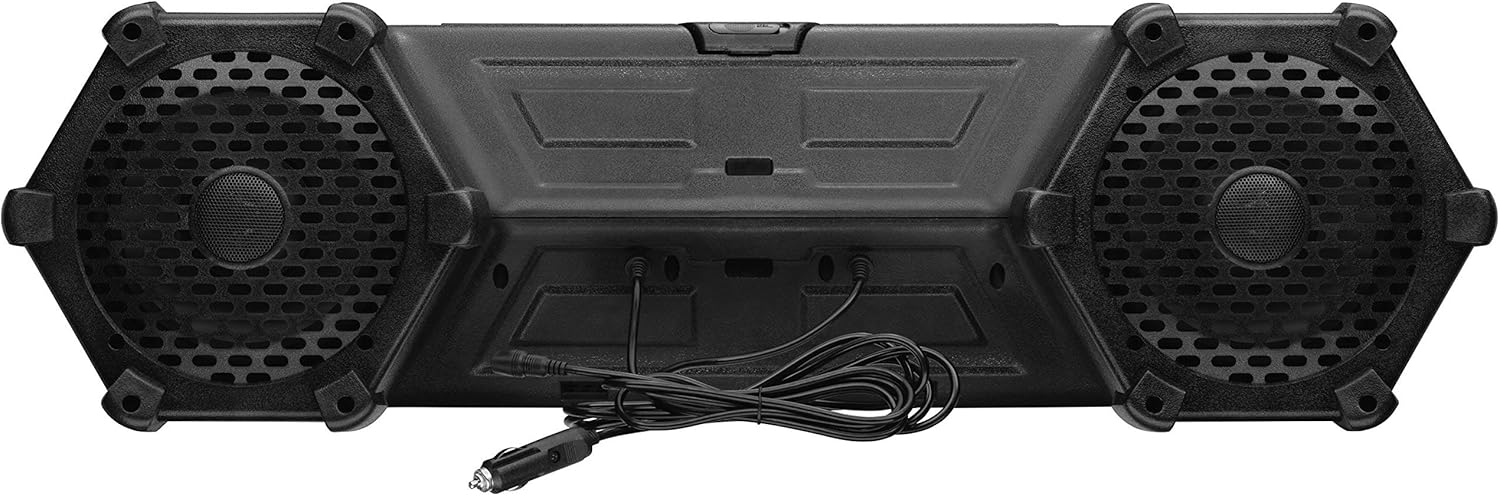
Figure 4: The Bluetooth multi-function remote control for the PATV85.
4. Product Videos
Video 1: Overview of the Planet Audio PATV85 ATV UTV Weatherproof Sound System, highlighting its features and ease of installation.
5. Operating Instructions
5.1 Power On/Off
- Press and hold the Power button on the multi-function controller to turn the unit on or off.
5.2 Bluetooth Pairing
- Ensure the PATV85 is powered on.
- On your mobile device, enable Bluetooth and search for available devices.
- Select "Planet Audio PATV85" from the list.
- Once paired, the Bluetooth indicator on the controller will illuminate steadily.
5.3 Auxiliary Input
- Connect your audio device (e.g., MP3 player, smartphone) to the 3.5mm AUX-IN port on the PATV85 using an audio cable (not included).
- Press the AUX button on the multi-function controller to switch to auxiliary input mode.
5.4 Music Control
- Play/Pause: Press the Play/Pause button.
- Next Track: Press the Next Track button.
- Previous Track: Press the Previous Track button.
- Volume Up: Press the Volume Up button.
- Volume Down: Press the Volume Down button.
5.5 LED Lightbar Operation
- Press the Light button on the multi-function controller to turn the LED lightbar on or off.
5.6 USB Charging Port
- The USB port located inside the storage compartment is for charging devices only. It does not support data transfer.
5.7 Storage Compartment
- Open the lid on the top of the unit to access the storage compartment. Ensure the lid is securely closed before operating the vehicle.

Figure 5: Top view of the PATV85, illustrating the storage compartment.
6. Maintenance
- Cleaning: Clean the unit with a soft, damp cloth. Avoid using harsh chemicals or abrasive cleaners.
- Weather Protection: Although the unit is weatherproof, prolonged exposure to extreme conditions should be minimized. Ensure all covers and ports are sealed when not in use.
- Strap Inspection: Periodically check the mounting straps for wear and tear. Replace if damaged to ensure secure attachment.
7. Troubleshooting
| Problem | Possible Cause | Solution |
|---|---|---|
| No power | Power cable disconnected; vehicle's 12V outlet not functioning; blown fuse. | Check power cable connection; test 12V outlet with another device; inspect and replace fuse if necessary. |
| No sound | Volume too low; incorrect input mode selected; device not playing audio; Bluetooth not connected. | Increase volume; switch to correct input mode (Bluetooth/AUX); ensure audio is playing on connected device; re-pair Bluetooth device. |
| Bluetooth not connecting | Device too far; interference; unit not in pairing mode. | Move device closer to the unit; clear obstructions; ensure unit is discoverable (check manual for specific pairing instructions if needed). |
| Distorted sound | Volume too high; poor audio source quality; loose connections. | Reduce volume; try a different audio source; check all cable connections. |
8. Specifications
| Feature | Detail |
|---|---|
| Model Name | PATV85 |
| Speaker Type | Outdoor |
| Speaker Size | 8 Inches |
| Tweeter Diameter | 1.5 Inches |
| Speaker Maximum Output Power | 700 Watts |
| Impedance | 4 Ohms |
| Connectivity Technology | Auxiliary, Bluetooth |
| Wireless Communication Technology | Bluetooth |
| Bluetooth Range | 10 Meters |
| Water Resistance Level | Water Resistant (IPX5) |
| Input Voltage | 12 Volts |
| Control Method | Remote |
| Product Dimensions | 15.16"D x 32.68"W x 9.25"H |
| Item Weight | 31 Pounds |
| Manufacturer | Planet Audio |
9. Warranty and Support
Planet Audio provides a 3-year Platinum Online Dealer Warranty for this product when purchased through authorized channels. For warranty claims or technical support, please contact Planet Audio customer service.
For optimal performance and safety, professional installation of this product is strongly encouraged.


