1. Introduction and Overview
The Akai Professional MPC Studio Black is an ultra-portable music production controller designed to integrate seamlessly with the powerful MPC Software. It combines the tactile experience of MPC pads and workflow with the processing capabilities of your computer, offering a comprehensive solution for beat making, sequencing, and audio production.
1.1 What's in the Box
- MPC Studio Black Unit
- MPC Studio QuickStart Guide
- MPC Software Reference Manual V1.1 (Digital)
- Safety Instructions & Warranty Information
- MPC Software Installation Instruction Card
- MPC Software (Download)
- The Bank MPC Expansion (Download)
- The 809 MPC Expansion (Download)
- USB Cable
- Pair of MIDI breakout cables (5-Pin to 1/8")

Image 1.1: The Akai Professional MPC Studio Black controller. This image displays the compact, black brushed aluminum body with its LCD screen, 16 velocity-sensitive pads, Q-Link knobs, and various control buttons.
2. Setup
2.1 System Requirements
The MPC Studio Black requires a compatible computer running either Mac or PC operating systems. Ensure your system meets the minimum requirements specified in the MPC Software Installation Instruction Card for optimal performance.
2.2 Hardware Connection
- Connect the included USB cable from the MPC Studio Black to an available USB port on your computer. The device is USB-powered and does not require an external power adapter.
- If you plan to connect external MIDI devices, use the included 5-Pin to 1/8" MIDI breakout cables to connect to the MIDI IN and MIDI OUT ports on the MPC Studio Black.
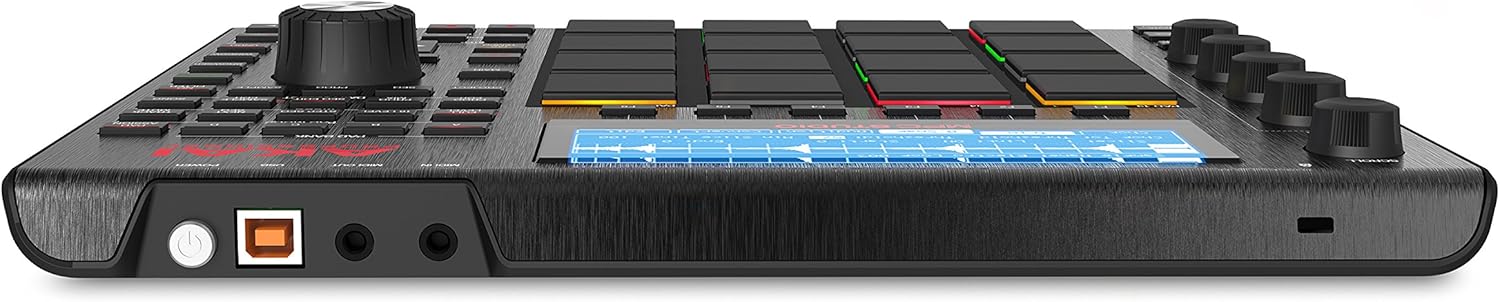
Image 2.1: Side view of the MPC Studio Black, showing the USB port for computer connection and the 1/8-inch MIDI IN/OUT jacks for external MIDI devices.
2.3 Software Installation
- Refer to the MPC Software Installation Instruction Card for detailed steps on downloading and installing the MPC Software 2. This software is essential for the operation of your MPC Studio Black.
- Follow the on-screen prompts to register your product and download the MPC Software, along with the included sound expansions like 'The Bank' and 'The 809'.
- Once installed, launch the MPC Software. The MPC Studio Black should be automatically recognized and ready for use.
3. Operating the MPC Studio Black
The MPC Studio Black is designed for intuitive control over the MPC Software, providing a hands-on production experience.
3.1 Core Controls
- 16 Velocity-Sensitive RGB Pads: These pads are the heart of the MPC workflow, used for triggering samples, playing instruments, and inputting drum patterns. They are pressure-sensitive and light up in various colors to indicate status.
- Q-Link Knobs: Four touch-sensitive Q-Link knobs allow for real-time control over various parameters within the MPC Software, such as filter cutoff, resonance, and effects.
- Data Dial: The large data dial is used for navigating menus, adjusting values, and scrolling through lists on the LCD screen and within the software.
- LCD Screen: The integrated LCD screen provides visual feedback on parameters, track status, and menu navigation, allowing for focused work without constantly looking at your computer screen.
- Transport Controls: Dedicated buttons for Play, Stop, Record, and other transport functions provide quick access to session control.
- Note Repeat & Full Level: Essential MPC features for dynamic performance and consistent velocity.

Image 3.1: Top-down view of the MPC Studio Black, clearly showing the LCD screen, the 16 pads, Q-Link knobs, and the data dial, along with various function buttons.
3.2 MPC Software Workflow
The MPC Software is a comprehensive production suite that mirrors the hardware's workflow. It offers:
- 128-Track Sequencing: Create complex arrangements with multiple tracks for drums, instruments, and audio.
- Advanced Sampling & Audio Editing: Record, chop, and manipulate samples with precision.
- Real-Time Time Stretching: Adjust the tempo of audio without altering its pitch.
- VST Compatibility: Integrate your favorite third-party virtual instruments and effects.
- MIDI Editing: Fine-tune your MIDI performances with a detailed piano roll editor.

Image 3.2: Screenshot of the MPC Software's sequencer interface, displaying multiple tracks and MIDI events arranged in a grid.

Image 3.3: Screenshot of the MPC Software's sample editing interface, showing a waveform being chopped and assigned to pads.

Image 3.4: Screenshot of the MPC Software's program edit interface, allowing detailed adjustment of individual pad parameters and layers.

Image 3.5: Screenshot of the MPC Software's mixer interface, showing faders and controls for multiple tracks and submixes.
For detailed instructions on using the MPC Software, refer to the comprehensive MPC Software Reference Manual V1.1, available for download after product registration.
4. Maintenance
4.1 Cleaning and Care
- To clean the MPC Studio Black, use a soft, dry cloth. Avoid abrasive cleaners, solvents, or strong detergents, as these can damage the finish and components.
- For the LCD screen, use a microfiber cloth specifically designed for electronics.
- Keep the device free from dust and debris. When not in use, store it in a clean, dry environment, ideally using the included neoprene sleeve for protection.

Image 4.1: The MPC Studio Black shown with its custom neoprene sleeve, illustrating how to protect the device during transport or storage.
4.2 Software Updates
Regularly check the Akai Professional website for software updates for the MPC Software. Updates often include new features, performance enhancements, and bug fixes.
5. Troubleshooting
If you encounter issues with your MPC Studio Black, consider the following common troubleshooting steps:
- Device Not Recognized: Ensure the USB cable is securely connected to both the MPC Studio Black and your computer. Try a different USB port or cable. Verify that the MPC Software is correctly installed and updated.
- Software Installation Issues: If you experience difficulties downloading or installing the MPC Software, check your internet connection and ensure your computer meets the system requirements. Refer to the Akai Professional support website for specific installation guides and FAQs.
- No Sound: Check your computer's audio output settings and ensure the MPC Software's audio preferences are correctly configured to your desired output device.
- Pads Not Responding: Ensure the MPC Studio Black is powered via USB and connected to the MPC Software. Check the software's settings to ensure the pads are correctly mapped.
5.1 Contacting Support
If troubleshooting steps do not resolve your issue, visit the Akai Professional support website for further assistance, including knowledge base articles, FAQs, and contact information for technical support.
6. Specifications
| Feature | Specification |
|---|---|
| Model Name | MPC Studio |
| Item Weight | 2.55 pounds (1.16 kg) |
| Product Dimensions | 10.1 x 11.2 x 1.55 inches (25.65 x 28.45 x 3.94 cm) |
| Color Name | Black |
| Material Type | Aluminum |
| Connectivity Technology | USB |
| Connector Type | USB |
| Hardware Interface | USB |
| Compatible Devices | Mac, PC |
| Supported Software | Ableton Live, Avid Pro Tools, FL Studio (via MPC Software) |
| Mixer Channel Quantity | 128 (within MPC Software) |
| Special Feature | Portable |
| Standing Screen Display Size | 3.6 inches |
7. Warranty and Support
For detailed information regarding the product warranty, limitations, and terms of service, please refer to the 'Safety Instructions & Warranty Information' document included in your product packaging. This document contains important legal information regarding your rights and obligations.
For technical support, product registration, software downloads, and additional resources, please visit the official Akai Professional website. The website provides access to user forums, FAQs, and direct contact methods for customer service.


