
1. Introduction
The AVerMedia AW330 Wireless Voice Amplifier is a portable audio system designed to enhance vocal clarity and projection in various settings such as classrooms, training sessions, meetings, and public speaking events. Its lightweight design, wireless microphone, and powerful speaker ensure your voice is heard clearly and effortlessly.
Key Features:
- Portable Design: Lightweight and compact for easy transport and use.
- Wireless Microphone: 2.4 GHz wireless lavalier microphone for stable 360° transmission.
- Powerful Sound: Built-in 20W speaker delivers loud, clear audio.
- Long Battery Life: Rechargeable lithium polymer battery provides 4 to 5 hours of use, or up to 8 hours of continuous use (depending on volume and usage).
- Multimedia Connectivity: Audio input port for connecting smartphones, tablets, or laptops.
- Quick Smart Pairing: Automatic microphone-to-speaker pairing for simple setup.
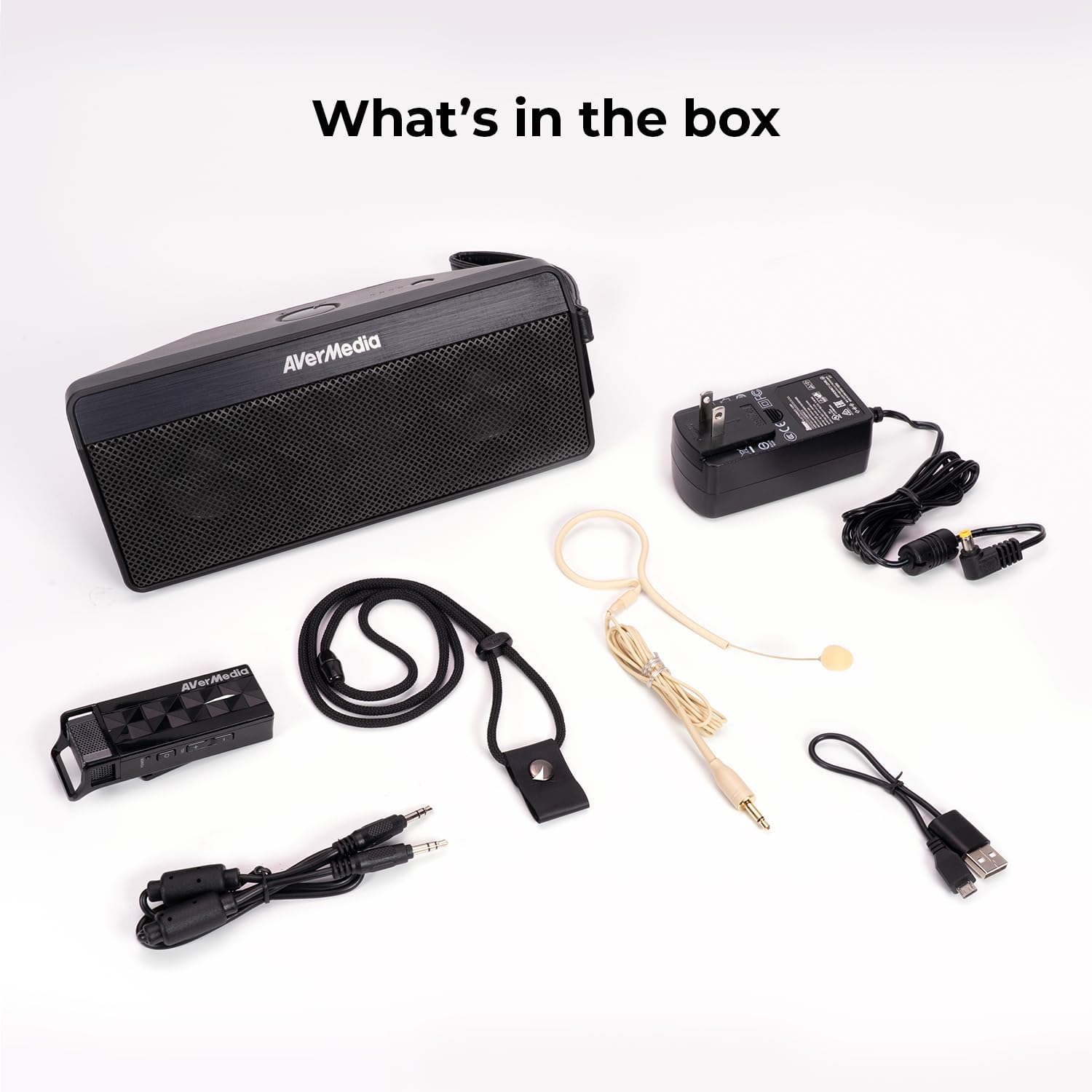
2. What's in the Box
- Microphone & Headset Mic
- Speaker
- AC Power Adapter & USB Power Cable
- 3.5 mm Audio Cable
- Lanyard & Buckle
3. Product Overview
Speaker Unit

The main speaker unit features a power button, volume controls, and an audio input port for connecting external devices. It also includes a clip for attaching to clothing or a strap.
Wireless Microphone
The wireless microphone includes a flexible gooseneck boom with a windscreen, volume controls, and a power button. It can be worn as a headset or clipped onto clothing.

4. Setup
- Charge the Devices: Before first use, fully charge both the speaker unit and the wireless microphone using the provided AC power adapter and USB power cable. The microphone uses a USB-C connection.
- Connect Microphone: Plug the headset microphone into the wireless microphone unit.
- Power On: Turn on the speaker unit by pressing its power button. Turn on the wireless microphone unit by pressing its power button.
- Pairing: The speaker microphone system features automatic microphone-to-speaker pairing for hassle-free setup. They should pair automatically upon powering on.
- Adjust Volume: Adjust the volume on both the speaker and the microphone to your desired level.
5. Operating Instructions
- Voice Amplification: Once paired, speak into the microphone. Your voice will be amplified through the speaker. Adjust volume as needed.
- External Audio Input: To play multimedia audio alongside your voice, connect your smartphone, tablet, or laptop to the speaker unit's Audio In port using the 3.5 mm audio cable.
- Wearing Options: Utilize the clip on the speaker to attach it to your clothing, or use the lanyard and buckle for hands-free operation. The microphone can be worn as a headset or clipped directly.
- Power Saving: If the microphone is turned off, the speaker will automatically turn off after five minutes to conserve battery.

6. Maintenance
- Cleaning: Use a soft, dry cloth to clean the surfaces of the speaker and microphone. Do not use liquid cleaners or aerosols.
- Storage: Store the device in a cool, dry place away from direct sunlight and extreme temperatures.
- Battery Care: To prolong battery life, avoid fully discharging the battery frequently. Recharge the device regularly, even if not in use for extended periods.
- Avoid Water: The device is not waterproof. Keep it away from water and moisture.
7. Troubleshooting
- No Sound:
- Ensure both the speaker and microphone are powered on and fully charged.
- Check that the microphone and speaker are successfully paired.
- Increase the volume on both the speaker and the microphone.
- Feedback/Squealing Sound:
- Reduce the volume on the speaker or microphone.
- Increase the distance between the microphone and the speaker.
- Ensure the microphone is not pointing directly at the speaker.
- Poor Sound Quality:
- Check for obstructions between the microphone and speaker.
- Ensure the microphone is positioned correctly near your mouth.
- Verify that the microphone windscreen is properly attached.
- Device Not Charging:
- Ensure the charging cables are securely connected to both the device and the power source.
- Try a different power outlet or USB port.
8. Specifications
| Feature | Specification |
|---|---|
| Brand | AVerMedia |
| Model Number | AW330 |
| Speaker Maximum Output Power | 20 Watts |
| Connectivity Technology | Bluetooth, Wi-Fi |
| Audio Output Mode | Mono |
| Mounting Type | Tabletop Mount |
| Additional Features | Volume Control |
| Controller Type | Battery powered |
| Battery Average Life | 4 Hours (up to 8 hours continuous use) |
| Maximum Range | 60 Feet |
| Control Method | Touch |
| Item Weight | 2.6 Pounds |
| Specific Uses For Product | Educational/Classroom |
9. Warranty and Support
The AVerMedia AW330 Wireless Voice Amplifier comes with a 3-year manufacturer's warranty. For technical support, troubleshooting, or warranty claims, please contact AVerMedia customer service.
10. Product Videos
AVerMedia AW330 Wireless Classroom Audio System
Video: An official product video from AVerMedia showcasing the AW330 Wireless Classroom Audio System. It highlights its features and benefits in a classroom environment, demonstrating how teachers can use it to project their voice clearly and effectively to students.


