
Introduction
This manual provides comprehensive instructions for the safe and efficient operation of your Ibiza SPLBOX120 portable sound system. Please read this manual thoroughly before using the device and retain it for future reference. The SPLBOX120 is an all-in-one portable sound system designed to deliver powerful audio with rich bass, featuring integrated LED lighting on the speakers. It offers versatile connectivity options including Bluetooth, USB, SD card, FM radio, and LINE-IN, along with a recording function and remote control.
Safety Instructions
- Read all instructions before operating the device.
- Keep the unit away from water and moisture.
- Do not block any ventilation openings.
- Ensure the power source matches the voltage requirements of the unit.
- Protect the power cord from being walked on or pinched.
- Unplug the unit during lightning storms or when unused for long periods.
- Refer all servicing to qualified service personnel.
- Do not open the casing; there are no user-serviceable parts inside.
- Avoid exposing the unit to extreme temperatures or direct sunlight.
Package Contents
Verify that all items are present upon unpacking:
- Ibiza SPLBOX120 Portable Sound System
- Remote Control
- Power Adapter (not explicitly mentioned but implied for a battery-powered device)
- User Manual (this document)
Product Overview
Familiarize yourself with the main components and controls of your SPLBOX120.

Figure 1: Front view of the Ibiza SPLBOX120 portable sound system, showcasing the speaker grille and overall design.

Figure 2: Top control panel of the SPLBOX120, featuring rotary knobs, playback buttons, and an LCD display.

Figure 3: The included remote control, providing access to various functions including mode selection, LED control, and audio adjustments.
Control Panel Features:
- Power Button: Turns the unit on or off.
- Mode Button: Switches between Bluetooth, USB, SD, FM, and LINE-IN modes.
- Play/Pause Button: Controls media playback.
- Previous/Next Track Buttons: Navigates through tracks or FM stations.
- Volume Knobs: Adjusts master volume.
- Bass/Treble Controls: Adjusts low and high frequencies.
- Microphone Input: For connecting an external microphone (not included).
- Microphone Volume/Echo: Adjusts microphone volume and echo effect.
- USB Port: For USB flash drives.
- SD Card Slot: For SD memory cards.
- LINE-IN (AUX) Port: For connecting external audio devices via a 3.5mm cable.
- LED ON/OFF Button: Controls the speaker LED lights.
- Record Button: Initiates audio recording (to USB/SD).
Setup
1. Powering On and Charging:
- Connect the power adapter to the unit's DC input and then to a wall outlet.
- Allow the unit to fully charge before first use for optimal battery life. The charging indicator will show the status.
- Press the Power button to turn the unit on.
2. Initial Placement:
- Place the sound system on a stable, flat surface.
- Ensure adequate ventilation around the unit.
Operating Instructions
1. Bluetooth Mode:
- Press the Mode button until "Bluetooth" or "BT" appears on the display.
- On your mobile device, enable Bluetooth and search for available devices.
- Select "SPLBOX120" from the list to pair. A confirmation tone will sound upon successful connection.
- You can now stream audio from your device to the SPLBOX120.
2. USB/SD Card Playback:
- Insert a USB flash drive or SD card (pre-loaded with MP3 audio files) into the respective slot.
- The unit will automatically switch to USB or SD mode and begin playback. If not, press the Mode button to select.
- Use the Play/Pause and Previous/Next buttons to control playback.
3. FM Radio Mode:
- Press the Mode button until "FM" appears on the display.
- Press and hold the Play/Pause button to initiate an automatic station scan. The unit will save all found stations.
- Use the Previous/Next buttons to navigate through saved FM stations.
4. LINE-IN (AUX) Mode:
- Connect an external audio device (e.g., smartphone, MP3 player) to the LINE-IN port using a 3.5mm audio cable (not included).
- Press the Mode button until "LINE" or "AUX" appears on the display.
- Control playback from your connected device.
5. Microphone Usage:
- Connect a microphone (not included) to the microphone input jack.
- Adjust the microphone volume and echo effect using the dedicated controls on the top panel.
6. LED Lighting Control:
- Press the LED ON/OFF button on the control panel or remote control to toggle the speaker LED lights.
7. Recording Function:
- Ensure a USB drive or SD card is inserted.
- Press the Record button to start recording audio from the microphone input or LINE-IN source to the inserted media.
- Press the Record button again to stop recording.
8. Bass and Treble Adjustment:
- Use the Bass and Treble rotary controls on the top panel or the corresponding buttons on the remote control to fine-tune the audio output.
Maintenance
- Cleaning: Use a soft, dry cloth to clean the exterior of the unit. Do not use liquid cleaners or abrasive materials.
- Storage: When not in use for extended periods, store the unit in a cool, dry place, away from direct sunlight and extreme temperatures.
- Battery Care: To prolong battery life, avoid fully discharging the battery frequently. Charge the unit regularly, even if not in use.
Troubleshooting
| Problem | Possible Cause | Solution |
|---|---|---|
| No power | Unit not charged or power cable disconnected. | Ensure the unit is charged and the power cable is securely connected. |
| No sound | Volume too low, incorrect mode selected, or source device issues. | Increase volume, select the correct input mode (Bluetooth, USB, SD, FM, LINE-IN), check source device's volume and connection. |
| Bluetooth pairing fails | Device too far, Bluetooth not enabled, or incorrect device selected. | Ensure the unit is in Bluetooth mode, device is within range, and "SPLBOX120" is selected. Try restarting both devices. |
| USB/SD playback issues | Unsupported file format, corrupted files, or media not properly inserted. | Ensure files are in MP3 format. Reinsert USB/SD card. Try a different USB/SD card. |
| FM radio static | Weak signal or interference. | Relocate the unit for better reception. Perform an auto-scan again. |
Specifications
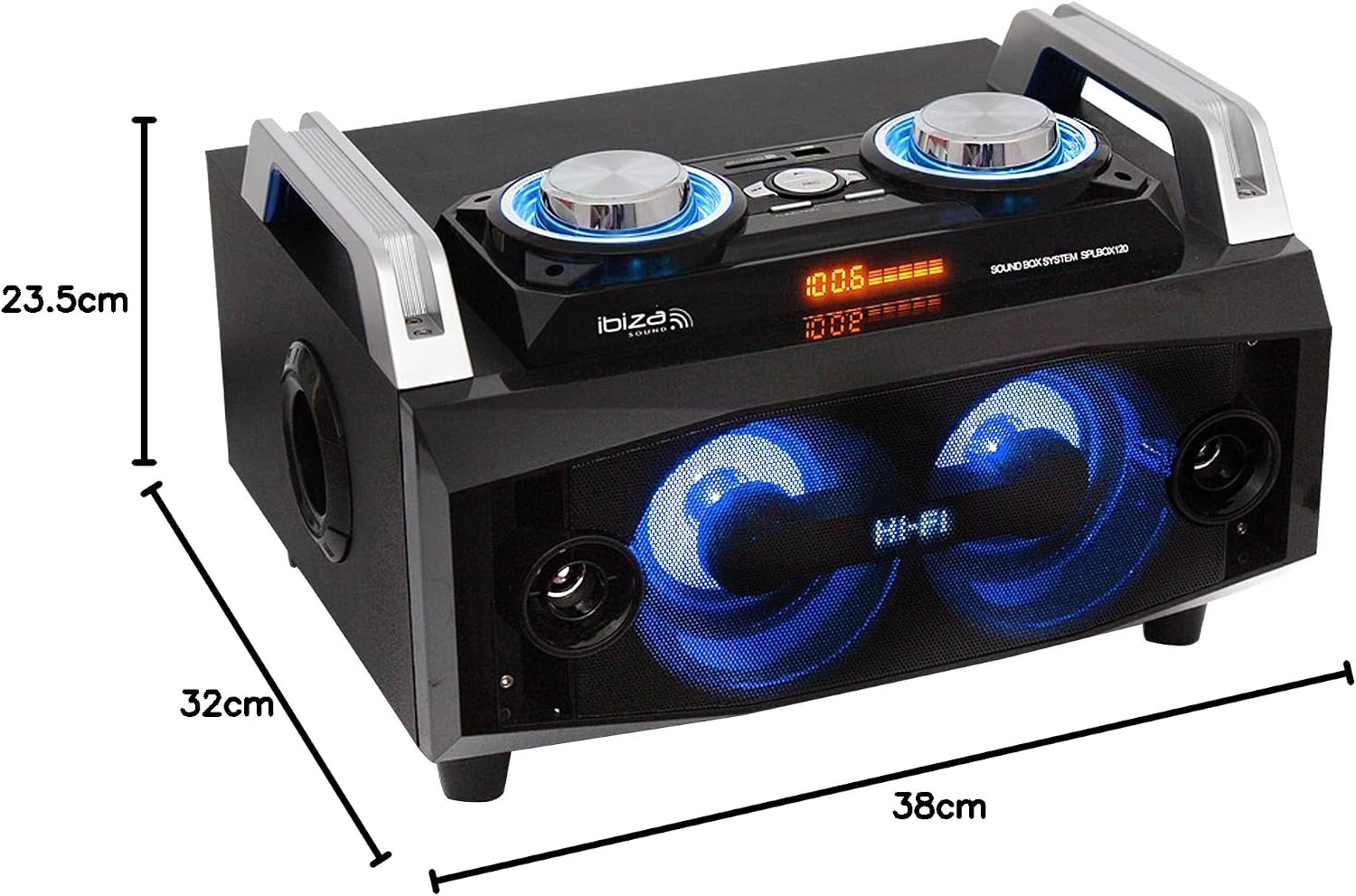
Figure 4: Dimensions of the SPLBOX120: Length 38cm, Width 32cm, Height 23.5cm.
| Feature | Detail |
|---|---|
| Brand | Ibiza |
| Model Name | SPLBOX120 |
| Item Model Number | 15-2522 |
| Manufacturer | LOTRONIC |
| Product Dimensions (L x W x H) | 38 x 32 x 23.5 cm |
| Item Weight | 7.47 Kilograms |
| Maximum Power Output | 120 Watts |
| Connectivity Technology | Bluetooth, USB |
| Connectivity Protocol | Bluetooth, USB, FM, LINE-IN |
| Audio Output Mode | Stereo |
| Speaker Type | Woofer |
| Special Feature | 2 x 4” Mid-range, 2 x 1.5” Tweeter, 5.5” Woofer |
| Speaker Size | 5.5 Inches |
| Audio Driver Type | Dynamic |
| Mounting Type | Tabletop |
| Color | Black |
| Waterproof | True |
| Control Method | Remote |
| Power Source | Battery Powered |
| Compatible Devices | Bluetooth-enabled devices |
| Recommended Uses | Ambient sound system, portable sound system, outdoor use, portable audio |
| Box Contents | Remote Control |
| Discontinued by Manufacturer | No |
Warranty and Support
Your Ibiza SPLBOX120 portable sound system comes with a legal warranty of 2 years from the date of purchase. This warranty covers manufacturing defects under normal use. Please retain your proof of purchase for warranty claims.
For technical support or warranty inquiries, please contact Ibiza customer service. Spare parts are available for 2 years.
Contact Information: 03-44-02-72-88 (Please note: This contact number was provided in the original product description and may be region-specific.)


