
Nautica NAI19523G
Nautica NAI19523G Men's Digital Quartz Watch Instruction Manual
Model: NAI19523G | Brand: Nautica
Introduction
Welcome to your new Nautica NAI19523G Men's Digital Quartz Watch. This manual provides detailed instructions for the proper setup, operation, and maintenance of your timepiece. Designed for durability and functionality, your watch features a digital display, quartz movement, and water resistance up to 100 meters, making it suitable for various activities. Please read this manual thoroughly to ensure optimal performance and longevity of your watch.
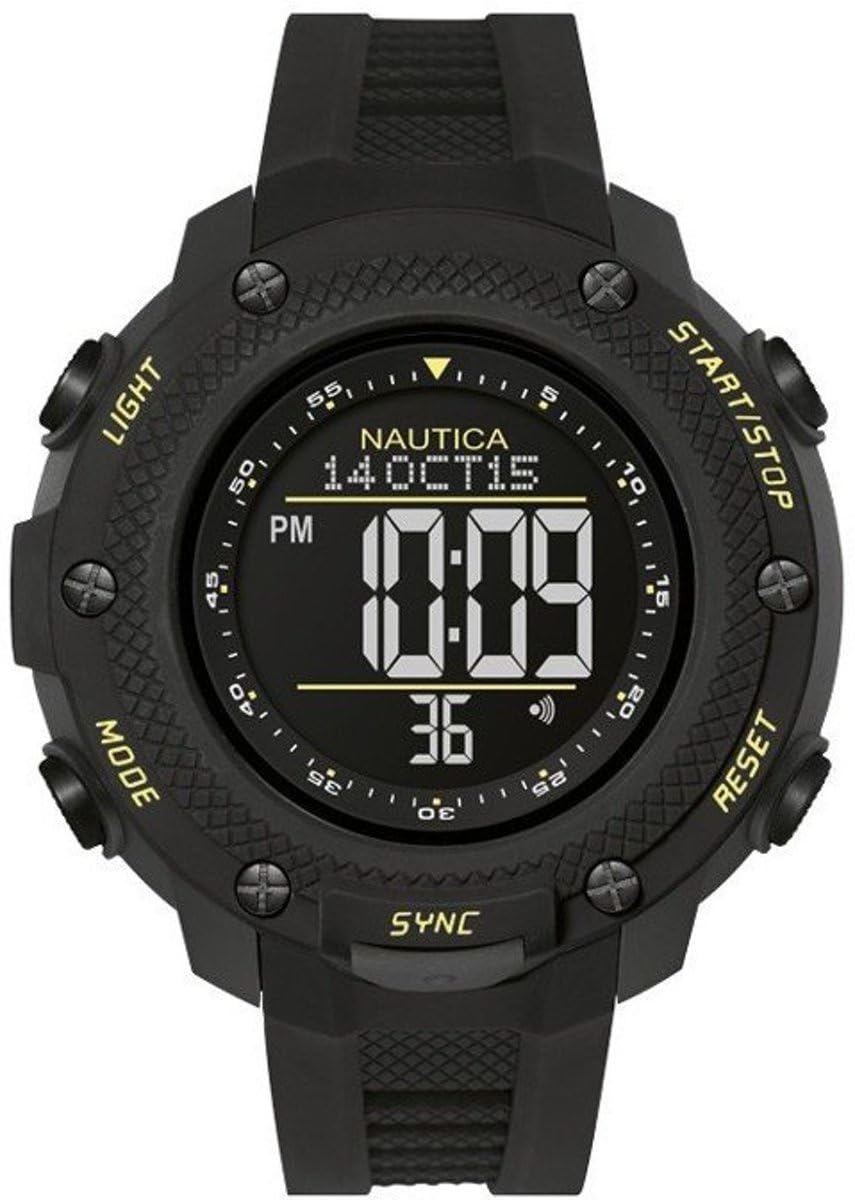
Image: Front view of the Nautica NAI19523G men's digital quartz watch, showcasing its black case and digital display.
Package Contents
- Nautica NAI19523G Digital Quartz Watch
- Instruction Manual (this document)
- Warranty Information

Image: The Nautica NAI19523G watch presented in its original black Nautica branded box, ready for unboxing.
Setup
Initial Inspection
Upon unboxing, carefully inspect your watch for any signs of damage. Ensure all protective films are removed from the display and case back. The watch comes with a battery pre-installed.
Setting the Time and Date
Your Nautica NAI19523G watch typically features multiple buttons for setting and operating its functions. While specific button labels may vary, common functions include:
- MODE Button: Cycles through different modes (Time, Alarm, Chronograph, Timer).
- ADJUST Button: Used to enter and exit setting modes, or confirm selections.
- START/STOP Button: Used to increment values during setting, or start/stop functions like chronograph/timer.
- RESET/LIGHT Button: Used to reset values during setting, reset chronograph/timer, or activate the backlight.
To set the time and date:
- Press the MODE button until the time display is shown.
- Press and hold the ADJUST button until the seconds begin to flash, indicating you are in setting mode.
- Press the MODE button to cycle through the settings: seconds, hours, minutes, year, month, day.
- Use the START/STOP button to increase the flashing value. Use the RESET/LIGHT button to decrease or reset the value (if applicable).
- Once all settings are correct, press the ADJUST button again to exit the setting mode.
Operating Instructions
Using the Alarm Function
- Press the MODE button until the alarm display (often indicated by "AL" or a bell icon) appears.
- Press and hold the ADJUST button until the alarm time digits begin to flash.
- Use the MODE button to select between hours and minutes.
- Use the START/STOP button to adjust the flashing value.
- Press the ADJUST button to confirm the alarm time and exit setting mode.
- To activate/deactivate the alarm, typically press the START/STOP button while in the alarm display mode. An alarm icon will appear/disappear to indicate its status.
Using the Chronograph (Stopwatch)
- Press the MODE button until the chronograph display (often indicated by "ST" or "CHRO") appears.
- Press the START/STOP button to start the chronograph.
- Press the START/STOP button again to pause the chronograph.
- To resume, press START/STOP.
- To reset the chronograph to zero, press the RESET/LIGHT button while the chronograph is stopped.
Using the Timer (Countdown)
- Press the MODE button until the timer display (often indicated by "TR" or "TIMER") appears.
- Press and hold the ADJUST button until the timer digits begin to flash.
- Use the MODE button to select between hours, minutes, and seconds.
- Use the START/STOP button to adjust the flashing value.
- Press the ADJUST button to confirm the timer setting.
- Press the START/STOP button to start the countdown.
- To pause, press START/STOP. To resume, press START/STOP again.
- To reset the timer to its initial set value, press the RESET/LIGHT button while the timer is stopped.
Activating the Backlight
To illuminate the display in low-light conditions, press the RESET/LIGHT button. The backlight will typically stay on for a few seconds.
Water Resistance (100 Meters)
Your Nautica NAI19523G watch is water resistant up to 100 meters (10 ATM). This means it is suitable for swimming, snorkeling, and showering. However, it is not suitable for scuba diving or high-impact water sports.
- Do not operate buttons underwater.
- Avoid exposing the watch to hot water or steam, as this can compromise the water-resistant seals.
- After exposure to saltwater, rinse the watch with fresh water and dry thoroughly.
Maintenance
Cleaning Your Watch
To maintain the appearance of your watch, wipe the case and strap regularly with a soft, dry cloth. For stubborn dirt, a slightly damp cloth can be used, followed by immediate drying. Avoid harsh chemicals or abrasive cleaners.
Battery Replacement
Your watch is powered by a single 'A' type battery (included). When the display becomes dim or the watch stops functioning, it's time for a battery replacement. It is highly recommended to have the battery replaced by a qualified watch technician to ensure the water resistance is maintained. Improper battery replacement can damage the watch and void the warranty.
Storage
When not in use for extended periods, store your watch in a cool, dry place away from direct sunlight and extreme temperatures.
Troubleshooting
- Watch not functioning / Display is blank: The battery may be depleted. Refer to the "Battery Replacement" section.
- Incorrect time/date: Refer to the "Setting the Time and Date" section to re-adjust.
- Water inside the watch: Immediately cease use and take the watch to a professional watch repair service. Do not attempt to open the watch yourself, as this will void the warranty and likely cause further damage.
- Buttons are unresponsive: Ensure the watch is not in a locked mode (if applicable, check specific model features). If the issue persists, a reset may be required (consult a professional).
Specifications
| Brand: | Nautica |
| Model Number: | NAI19523G (S0339722) |
| Display Type: | Digital |
| Movement Type: | Quartz |
| Water Resistance: | 100 Meters (10 ATM) |
| Special Features: | Alarm, Luminous, Chronograph, Timer |
| Case Material: | Resin |
| Case Diameter: | 56 mm |
| Case Thickness: | 19 mm |
| Crystal Type: | Mineral |
| Strap Material: | Silicone |
| Strap Width: | 22 mm |
| Closure Type: | Buckle |
| Power Source: | Battery (1 'A' type, included) |
| Product Weight: | 90 Grams |
| UPC: | 656086071900 |
Warranty and Support
Warranty Information
Your Nautica NAI19523G watch is covered by a 2-year manufacturer's warranty from the date of purchase. This warranty covers manufacturing defects under normal use. It does not cover damage resulting from improper handling, accidents, unauthorized repairs, or normal wear and tear. Please retain your proof of purchase for warranty claims.

Image: Example of a Nautica product warranty certificate, detailing authenticity and guarantee.
Customer Support
For any questions, technical assistance, or warranty service, please contact Nautica customer support. Refer to the official Nautica website or your purchase documentation for the most current contact information.
Ask a question about this manual
Ask about setup, troubleshooting, compatibility, parts, safety, or missing instructions. Manuals+ will review the question and use this page’s manual context to help answer it.