
Introduction
This manual provides comprehensive instructions for the operation and maintenance of your BAOFENG BF-9700 Dual Band Two-Way Radio. Please read this manual thoroughly before using the device to ensure proper functionality and safety. The BF-9700 is designed for reliable communication, featuring IP67 waterproof and dustproof capabilities, making it suitable for various environments.
Package Contents
The following items are included in your BAOFENG BF-9700 package:
- 1 x BAOFENG BF-9700 Waterproof Radio
- 1 x Antenna
- 1 x 7.4V 1800mAh Li-ion Battery
- 1 x Belt Clip
- 1 x Desktop Charger
- 1 x Adapter
- 1 x User Manual
- 1 x Earphone Mic/Headset
- 1 x Hand Strap
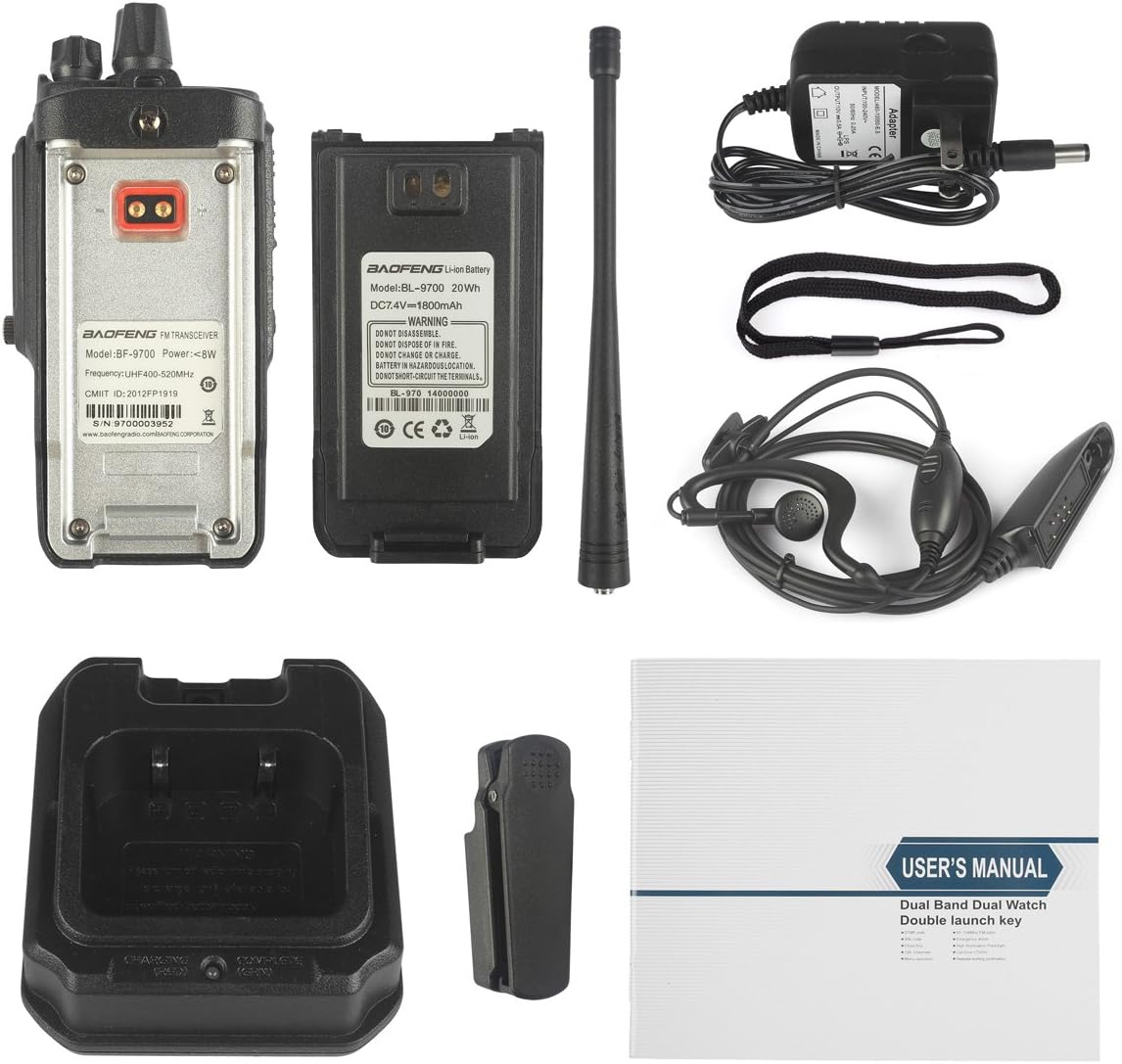
Image showing all components included in the BAOFENG BF-9700 package, including the radio unit, antenna, battery, charger, belt clip, earphone mic, hand strap, and user manual.
Product Overview
Familiarize yourself with the various parts and controls of your BF-9700 radio.

Diagram illustrating the key components and controls of the BAOFENG BF-9700 radio, including the Channel knob, Power/Volume knob, Alert button, PTT button, Side Keys, and Microphone.
Key Components:
- Channel Knob: Used to select communication channels.
- Power (On/Off, Volume) Knob: Rotates to turn the radio on/off and adjust the speaker volume.
- Alert Button: Activates the alarm function.
- PTT (Push-to-Talk) Button: Press and hold to transmit, release to receive.
- Side Key 1 [F]: Programmable function key.
- Side Key 2 [MONI]: Programmable function key, often used for monitor function.
- MIC: Microphone for voice input.
Setup
1. Battery Installation
Align the battery pack with the grooves on the back of the radio and slide it upwards until it clicks into place. To remove, press the release latch and slide the battery downwards.

Close-up view of the BAOFENG BF-9700 radio's back panel and the removable Li-ion battery, showing the contact points for installation.
2. Antenna Attachment
Screw the antenna clockwise into the connector on the top of the radio until it is firmly seated. Do not overtighten.
3. Charging the Battery
Place the radio with the battery installed into the desktop charger. Ensure the charging contacts align. The charger indicator light will typically show red during charging and green when fully charged. Use only the supplied charger and adapter.
Operating Instructions
1. Power On/Off and Volume Adjustment
Rotate the Power/Volume knob clockwise to turn the radio on. Continue rotating to increase the volume. Rotate counter-clockwise to decrease volume and turn the radio off.
2. Channel Selection
Rotate the Channel knob to select your desired communication channel. The radio supports up to 16 channels.
3. Transmitting and Receiving
To transmit, press and hold the PTT (Push-to-Talk) button. Speak clearly into the microphone. Release the PTT button to receive incoming transmissions.
4. VOX Function
The Voice Operated Transmit (VOX) function allows for hands-free operation. When VOX is enabled, the radio will automatically transmit when it detects your voice. Refer to the full user manual for detailed VOX sensitivity adjustment.
5. Squelch Adjustment
The Squelch function mutes the speaker when no signal is present, reducing background noise. The squelch level is adjustable from 0 to 9, with higher levels requiring a stronger signal to open the squelch.
6. Privacy Codes (QT/DQT)
The BF-9700 incorporates 105 codes "DQT" and 50 privacy codes "QT" programmable. These codes help filter out unwanted conversations on the same channel, ensuring more private communication. Both parties must use the same privacy code to communicate.
7. Alarm Function
Press the Alert button to activate the alarm function, which can be used in emergency situations to send out an alert signal.
8. Busy Channel Lock (BCL)
The BCL function prevents transmission on a channel that is already in use, avoiding interference with ongoing conversations.
9. 1750 Tone
The radio can transmit a 1750Hz tone, often used for accessing repeaters.
10. Broadband (Wide) / Narrowband (Narrow) Selection
The radio supports both wide and narrow band operation. Wideband provides better audio quality but uses more spectrum, while narrowband conserves spectrum. Consult your local regulations for appropriate band usage.
11. High Power / Low Power Selection
You can select between high, medium, and low power output levels (7W/5W/1W) to conserve battery life or extend communication range as needed.
12. Battery Saving Function (SAVE)
The "SAVE" function automatically reduces power consumption when no signal is being received, extending the battery life of your radio.
13. Timer Transmission (TOT)
The "TOT" (Time-Out Timer) function limits the duration of a single transmission to prevent accidental continuous transmission and channel hogging. If transmission exceeds the set time, the radio will stop transmitting and emit an alert tone.
14. Scan Mode
The scan mode allows the radio to automatically scan through programmed channels to detect active transmissions. When a signal is detected, the radio will stop on that channel.
15. Channel Frequency-Report
The radio can report the frequency of the currently selected channel, which is useful for verification.
Maintenance
Cleaning
Wipe the radio's surface with a soft, damp cloth. Do not use harsh chemicals or abrasive cleaners. Ensure the charging contacts are clean and dry.
Battery Care
To prolong battery life, avoid overcharging or completely discharging the battery. Store the battery in a cool, dry place when not in use for extended periods.
Waterproof and Dustproof Care
While the BF-9700 is IP67 rated, ensure all covers (e.g., accessory jack cover) are securely closed before exposing the radio to water or dusty environments. Do not intentionally submerge the radio beyond its rated depth or duration.
Troubleshooting
| Problem | Possible Cause | Solution |
|---|---|---|
| Radio does not turn on | Battery is low or not installed correctly. | Charge the battery or re-install it properly. |
| No sound from speaker | Volume is too low; Squelch level is too high; Earphone connected. | Increase volume; Adjust squelch level; Disconnect earphone. |
| Cannot transmit or receive | Wrong channel selected; Battery low; Antenna not connected; Privacy codes mismatch. | Select correct channel; Charge battery; Attach antenna securely; Ensure matching QT/DQT codes. |
| Short battery life | Battery not fully charged; Battery nearing end of life. | Ensure full charge; Consider replacing battery if old. |
Specifications
| Feature | Detail |
|---|---|
| Frequency Range | UHF 400-520 MHz, 65-108 MHz (FM radio reception) |
| Output Power | 7W(H)/5W(M)/1W(L) |
| Memory Channels | Up to 16 channels |
| Frequency Stability | 2.5ppm |
| Frequency Step | 12.5/25 KHz |
| Antenna Impedance | 50Ω |
| Operating Temperature | -20℃ to +60℃ |
| Supply Voltage | 7.4V/1800mAh Li-ion |
| Water Resistance Level | IP67 (Waterproof & Dustproof) |
| Dimensions | 62.5x123x36mm (2.46"W x 4.84"H x 1.42"D) |
| Weight | Approx. 252g (0.55 lbs) |
| Manufacturer | BAOFENG |
| Model Number | BF-9700 |
Warranty and Support
The BAOFENG BF-9700 comes with a standard manufacturer's warranty. Please refer to the warranty card included in your package or visit the official BAOFENG website for detailed warranty terms and conditions.
For technical support, troubleshooting assistance, or to inquire about replacement parts, please contact BAOFENG customer service. You can also visit the official BAOFENG store on Amazon for product information and support resources:
Visit the BAOFENG Store on Amazon
For product authenticity verification and additional information, you may visit the official BAOFENG website: www.baofengradio.com/BAOFENG CORPORATION
Your product's serial number (S/N) can be found on the label on the back of the radio, for example: S/N 9700003952.