1. Introduction
The BAOFENG GT-3WP is a robust IP67-rated dual-band two-way radio designed for reliable communication in various environments. This manual provides essential information for the proper setup, operation, and maintenance of your device.

Image 1.1: The BAOFENG GT-3WP Dual Band Two-Way Radio, showcasing its compact design and antenna.
2. Package Contents
Verify that all items are present in your package:
- BAOFENG GT-3WP Two-Way Radio
- Antenna
- Li-ion Battery (1 included)
- Desktop Charger
- Power Adapter
- Earpiece
- Wrist Strap
- Belt Clip
- Car Charger (optional, may vary by package)
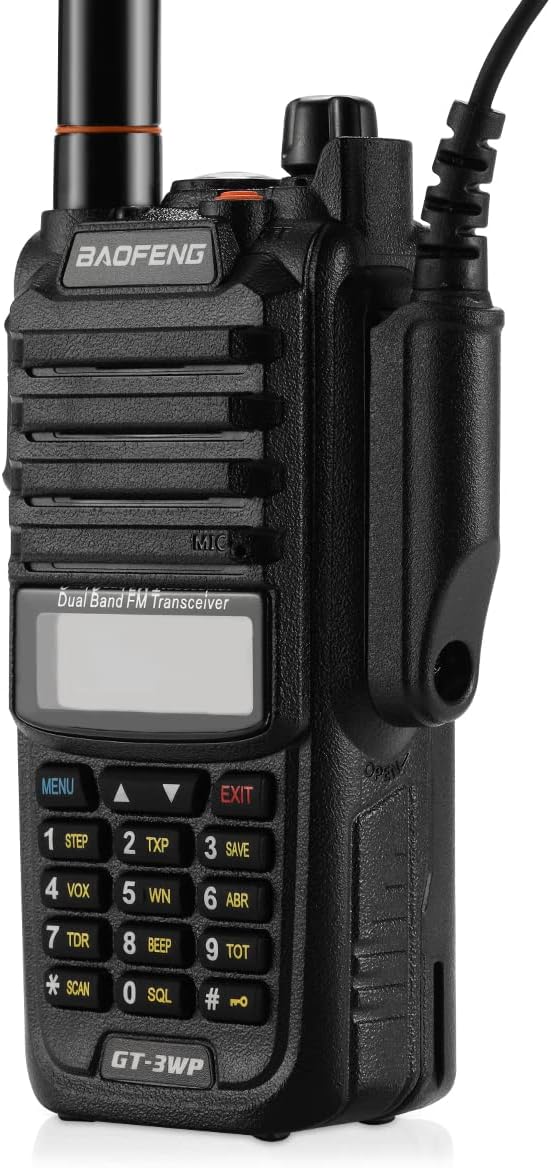
Image 2.1: All components included in the BAOFENG GT-3WP package, including the radio, battery, charger, antenna, earpiece, and wrist strap.
3. Product Overview
Familiarize yourself with the main components and controls of your GT-3WP radio.

Image 3.1: Front view of the BAOFENG GT-3WP with key components labeled, including the antenna, On/Off/Volume knob, Alarm key, PTT button, SK-side keys, Accessory jack, Microphone (MIC), and Keypad.
Key Components:
- Antenna: For transmitting and receiving radio signals.
- Knob (On/Off/Volume): Rotates to power the radio on or off and adjust the volume.
- Alarm Key: Activates the emergency alarm function.
- PTT (Push-To-Talk) Button: Press and hold to transmit, release to receive.
- SK-side key1/F: Programmable side key, often used for functions like FM radio or reverse frequency.
- SK-side key2/M: Programmable side key, often used for monitor function or switching between VFO/Memory modes.
- Accessory Jack: Connects external audio accessories like earpieces or programming cables.
- MIC: Built-in microphone for voice transmission.
- Keypad: Used for frequency input, menu navigation, and activating various functions.
4. Setup
4.1 Battery Installation
- Align the battery pack with the grooves on the back of the radio.
- Slide the battery pack upwards until it clicks into place.
- To remove, press the release latch at the bottom of the battery and slide it downwards.

Image 4.1: Rear view of the BAOFENG GT-3WP, showing the battery compartment and contacts for proper battery alignment.
4.2 Antenna Attachment
- Screw the antenna into the connector on the top of the radio by turning it clockwise until it is finger-tight. Do not overtighten.
4.3 Charging the Battery
- Connect the power adapter to the desktop charger.
- Plug the adapter into a standard AC outlet.
- Place the radio (with battery installed) or the battery alone into the charging cradle.
- The charger indicator light will typically show red during charging and green when fully charged.
5. Operating Instructions
5.1 Power On/Off and Volume Control
- To power on, rotate the On/Off/Volume knob clockwise until you hear a click.
- To power off, rotate the knob counter-clockwise until you hear a click.
- Adjust the volume by rotating the knob after the radio is powered on.
5.2 Selecting Frequencies/Channels
- The radio operates in two modes: Frequency Mode (VFO) for direct frequency input and Channel Mode (Memory) for pre-programmed channels.
- To switch between modes, press the VFO/MR button (often assigned to a side key or a keypad function).
- In Frequency Mode, use the keypad to enter the desired frequency (e.g., 145.000 MHz).
- In Channel Mode, use the UP/DOWN arrow keys or the keypad to select a stored channel.
5.3 Transmitting and Receiving
- To transmit, press and hold the PTT button on the left side of the radio. Speak clearly into the microphone.
- Release the PTT button to stop transmitting and return to receive mode.
- Ensure you are on an appropriate frequency or channel before transmitting.
5.4 Keypad Functions
- MENU: Enters the radio's menu system for advanced settings.
- EXIT: Exits the current menu or function.
- UP/DOWN Arrows: Navigate through menu options or adjust frequencies/channels.
- SQL (Squelch): Adjusts the squelch level to filter out background noise.
- SCAN: Initiates frequency or channel scanning.
- VOX (Voice Operated Transmit): Enables hands-free transmission when voice is detected.
- SAVE (Battery Save): Activates the battery saving function to extend battery life.
5.5 Frequency Range
The BAOFENG GT-3WP operates within the following frequency ranges:
- VHF: 144-148MHz
- UHF: 420-450MHz
Note: The radio will not transmit outside these specified frequency ranges.
6. Advanced Features
6.1 CTCSS & DCS Tones
CTCSS (Continuous Tone-Coded Squelch System) and DCS (Digitally Coded Squelch) tones are used to filter out unwanted communications on a shared frequency. When enabled, your radio will only open its squelch to receive signals that carry the same pre-set tone.
6.2 Crossband Reception and Transmission
The GT-3WP supports crossband reception and transmission, allowing the radio to receive on one band (e.g., VHF) and transmit on another (e.g., UHF), or vice-versa, depending on configuration.
6.3 DTMF Emergency Alarm
The DTMF (Dual-Tone Multi-Frequency) emergency alarm function can be activated to send an alert signal, typically used in emergency situations to notify other radios of distress.
7. Waterproof and Dustproof (IP67)
The BAOFENG GT-3WP is rated IP67, indicating it is dust-tight and protected against immersion in water up to 1 meter (3.3 feet) for up to 30 minutes. This ensures reliability in wet and dusty environments.

Image 7.1: The BAOFENG GT-3WP radio shown in water, illustrating its IP67 waterproof capability.
Important: Ensure all port covers and the battery compartment are securely sealed before exposing the radio to water or dust.
8. Maintenance
8.1 Cleaning the Radio
- Wipe the radio's surface with a soft, damp cloth.
- Do not use harsh chemicals, solvents, or abrasive cleaners.
- Ensure the radio is dry before charging or opening any compartments.
8.2 Battery Care
- Charge the battery fully before initial use.
- Avoid overcharging or completely draining the battery to prolong its lifespan.
- Store the battery in a cool, dry place when not in use.
- If the battery shows signs of damage or swelling, discontinue use and replace it.
9. Troubleshooting
| Problem | Possible Cause | Solution |
|---|---|---|
| Radio does not power on | Low or dead battery; improperly installed battery | Charge the battery; ensure battery is correctly installed. |
| Cannot transmit or receive | Incorrect frequency/channel; squelch too high; antenna not connected; out of range | Verify frequency/channel; adjust squelch; check antenna connection; move closer to other radios. |
| Poor audio quality | Low battery; weak signal; incorrect CTCSS/DCS tone | Charge battery; move to a location with better signal; verify CTCSS/DCS settings. |
| Radio stops working after water exposure | Seals compromised; prolonged immersion beyond IP67 rating | Ensure all seals are intact before water exposure. If water ingress occurs, power off immediately, remove battery, and allow to dry completely. Contact support if issues persist. |
10. Specifications
| Feature | Specification |
|---|---|
| Model Number | GT-3WP |
| Frequency Range | VHF: 144-148MHz, UHF: 420-450MHz |
| Number of Channels | 128 |
| Power Output | High/Mid/Low (5W, 3W, 1W selectable) |
| Water Resistance Level | IP67 (Waterproof and Dustproof) |
| Battery Type | 1 Lithium Ion battery (included) |
| Voltage | 7.4 Volts (DC) |
| Product Dimensions | 2.3"D x 1.3"W x 4.3"H (5.8 x 3.3 x 10.9 cm) |
| Item Weight | 1.12 pounds (0.51 kg) |
| Talking Range Maximum | 15 Miles (actual range varies by terrain and conditions) |
11. Important Notices
11.1 Programming Software
The BAOFENG GT-3WP can be programmed using software such as CHIRP. For official software and support, refer to the manufacturer's website or contact their customer service.
11.2 GMRS Version
If you are interested in a GMRS-specific version, consider the BAOFENG UV-9G Waterproof GMRS Radio. The GT-3WP is designed for amateur radio use within its specified frequency bands.
12. Warranty and Support
For warranty information, technical support, or service inquiries, please refer to the documentation provided with your purchase or visit the official BAOFENG website. Keep your purchase receipt as proof of purchase.