
1. Product Overview
The Chicco Next2Stars Projector is designed to create a soothing and relaxing environment for infants, aiding in relaxation and sleep. It features a star projection system, a selection of musical melodies, and a soft, detachable plush toy. This manual provides essential information for the safe and effective use of your projector.

Figure 1: The Chicco Next2Stars Projector, featuring a star projection dome and a detachable plush bear, designed to soothe infants.
2. Setup
2.1 Unpacking
Carefully remove all components from the product packaging. Ensure all parts are present and undamaged before proceeding.
2.2 Battery Installation
- Locate the battery compartment on the underside of the projector.
- Open the compartment cover using a suitable screwdriver (not included).
- Insert the required batteries (type and quantity specified in specifications) ensuring correct polarity (+/-).
- Close the battery compartment cover securely.
2.3 Placement
The projector offers versatile placement options:
- Flat Surface: Place the projector on a stable, flat surface near the infant's sleeping area.
- Crib Attachment: The projector is designed to attach to most cribs, including Next2me cribs, with tubular parts up to 38mm. Securely fasten the attachment mechanism to the crib rail, ensuring it is stable and out of the infant's reach.
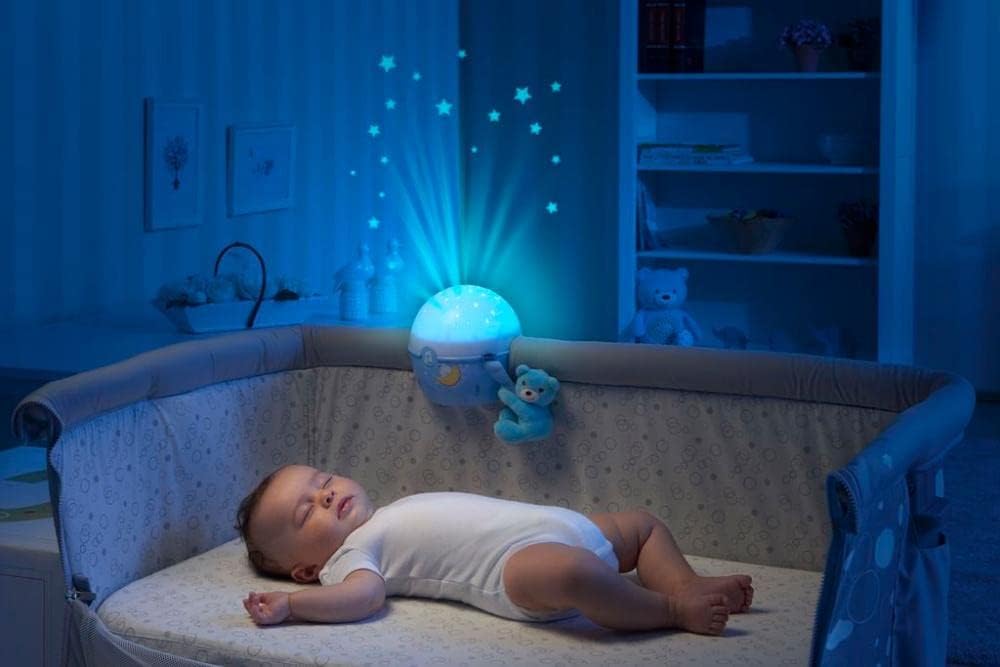
Figure 2: The projector creating a starry night sky ambiance, positioned on the side of a crib where a baby is sleeping peacefully.

Figure 3: Detail showing how the projector securely attaches to the side rail of a Next2me crib, suitable for tubular parts up to 38mm.
3. Operating Instructions
3.1 Power On/Off
Locate the power button on the projector. Press once to turn on, and press again to turn off.
3.2 Light Effects
The projector offers three distinct light effects to create a calming atmosphere:
- Nighttime Projection: Projects a starry sky onto the ceiling.
- Soft Projection: Provides a gentle, diffused light.
- Night Light: Offers a steady, comforting glow.
Use the dedicated button to cycle through the different light modes. The projector also features automatic color change for the projected stars.

Figure 4: The projector in action, illustrating its battery-powered operation and the three distinct light effects: nighttime projection, soft projection, and night light.
3.3 Music Playback
Select from a range of soothing melodies designed to help your infant relax. The music playback duration is approximately 30 minutes. Adjust the volume using the designated controls.
3.4 Built-In Sound Sensor
The projector is equipped with a sound sensor that detects when your baby cries. Upon detection, the projector will automatically activate the lights and music to help soothe the baby back to sleep.

Figure 5: This image highlights the projector's ability to detect baby cries and automatically activate lights and music, providing 30 minutes of melodies and changing light colors.
3.5 Detachable Plush Toy
The soft plush bear attached to the projector is detachable. It can be removed for separate play or for cleaning.

Figure 6: A visual guide demonstrating the plush bear's detachability, allowing for separate play or easy cleaning, and showing the projector's appearance with and without the toy.
4. Maintenance
4.1 Cleaning
- Projector Unit: Wipe the projector unit with a soft, dry cloth. Do not use abrasive cleaners or immerse the unit in water.
- Detachable Plush Toy: The plush bear is machine washable. Refer to the care label on the toy for specific washing instructions.
4.2 Battery Replacement
Replace batteries when the light projection or music playback becomes weak or inconsistent. Always use new batteries of the specified type and dispose of old batteries responsibly.
5. Troubleshooting
- No Power: Ensure batteries are correctly installed and are fresh. Check for any corrosion in the battery compartment.
- Lights Not Projecting: Verify that the projection dome is clean and free from obstructions. Ensure the light mode is selected.
- Sound Not Playing: Check that the music mode is activated and the volume is not set to minimum.
- Sound Sensor Not Activating: Ensure the sensor area is clear and not obstructed. The sensor works best in quiet environments and within close proximity to the infant.
- Intermittent Operation: This may indicate low battery power. Replace batteries.
6. Specifications
| Model Number | 7647200000 |
| Material Type | Plastic |
| Product Dimensions | 22 x 15 x 15 cm |
| Item Weight | 0.33 Kilograms |
| Batteries Required | Yes (not included) |
| Language (Manual) | English, French, German, Italian, Polish, Spanish |
| Color | Next2stars Blau (Blue) |
| Light Type | Light Emitting Diode |
| Key Features | Color change, 3 light effects, 30 minutes of music, built-in sound sensor, detachable plush toy. |

Figure 7: A diagram indicating the product dimensions: 220mm length, 150mm width, and 150mm height for the projector unit.
7. Warranty and Support
7.1 Warranty Information
The Chicco Next2Stars Projector comes with a standard 1-year manufacturer's guarantee. An additional 2-year extension is available upon successful product registration online. Please retain your proof of purchase for warranty claims.

Figure 8: Information regarding the Chicco 3-year guarantee, which includes a standard 1-year manufacturer's guarantee and a 2-year extension upon online product registration.
7.2 Customer Support
For further assistance, technical support, or to register your product, please visit the official Chicco website or contact their customer service department. Contact details can typically be found on the product packaging or the Chicco official website.